IMMOBILISER SYSTEM(w/o Smart Entry and Start System) Security Indicator Light Does not Blink
DESCRIPTION
-
The transponder key ECU assembly blinks the security indicator light (clock assembly) when the immobiliser is set (no key is in the ignition key cylinder).
-
The main body ECU (multiplex network body ECU) blinks the security indicator light (clock assembly) when the theft deterrent system is in the arming preparation state or alarm sounding state.
WIRING DIAGRAM
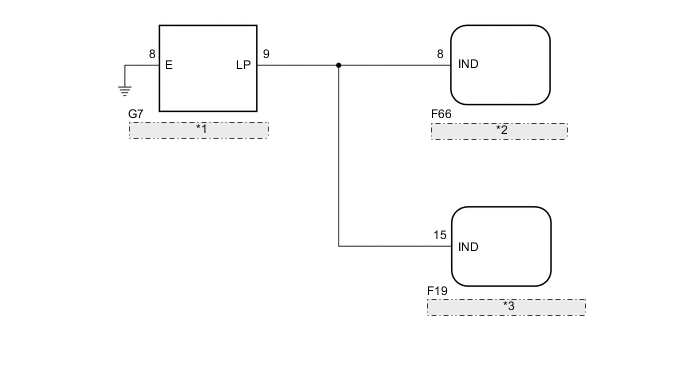
| *1 | Security Indicator Light (Clock Assembly) |
| *2 | Transponder Key ECU Assembly |
| *3 | Main Body ECU (Multiplex Network Body ECU) |
CAUTION / NOTICE / HINT
Note
If the transponder key ECU assembly is replaced, refer to Service Bulletin.
PROCEDURE
-
PERFORM ACTIVE TEST USING GTS (SECURITY INDICATOR)
-
Connect the GTS to the DLC3.
-
Turn the ignition switch to ON.
-
Turn the GTS on.
-
Enter the following menus: Body Electrical / Immobiliser or Main Body / Active Test.
-
Perform the Active Test according to the display on the GTS.
Body Electrical > Immobiliser > Active TestTester Display Measurement Item Control Range Diagnostic Note Security Indicator Security indicator light ON/OFF -
Body Electrical > Immobiliser > Active TestTester Display Security Indicator
Body Electrical > Main Body > Active TestTester Display Measurement Item Control Range Diagnostic Note Security Indicator Security indicator light ON/OFF -
Body Electrical > Main Body > Active TestTester Display Security Indicator Result Result Proceed to Security indicator light operation is normal when performing the "Main Body" and "Immobiliser" Active Test A
-
Security indicator light operation is not normal when performing the "Immobiliser" Active Test
-
Security indicator light operation is normal when performing the "Main Body" Active Test
B
-
Security indicator light operation is normal when performing the "Immobiliser" Active Test
-
Security indicator light operation is not normal when performing the "Main Body" Active Test
C Security indicator light operation is not normal when performing the "Main Body" and "Immobiliser" Active Test D -
B 
CHECK HARNESS AND CONNECTOR (SECURITY INDICATOR LIGHT (CLOCK ASSEMBLY) - TRANSPONDER KEY ECU ASSEMBLY) Click here
C
CHECK HARNESS AND CONNECTOR (SECURITY INDICATOR LIGHT (CLOCK ASSEMBLY) - MAIN BODY ECU (MULTIPLEX NETWORK BODY ECU)) Click here
D
INSPECT SECURITY INDICATOR LIGHT (CLOCK ASSEMBLY) Click here
A 
-
-
CHECK SECURITY INDICATOR LIGHT (CLOCK ASSEMBLY) OPERATION
-
When the immobiliser is set, check that the security indicator light blinks.*1
OK The security indicator light blinks normally. -
When the theft deterrent system is in the arming preparation state, check that the security indicator light is on.*2
OK The security indicator light is on. Result Result Proceed to Both *1 and *2 are OK A *1 is NG (*2 is OK) B *2 is NG (*1 is OK) C Both *1 and *2 are NG D
A 
USE SIMULATION METHOD TO CHECK Click here
B
REPLACE TRANSPONDER KEY ECU ASSEMBLY
C
REPLACE MAIN BODY ECU (MULTIPLEX NETWORK BODY ECU) Click here
D
REPLACE SECURITY INDICATOR LIGHT (CLOCK ASSEMBLY) Click here
-
-
CHECK HARNESS AND CONNECTOR (SECURITY INDICATOR LIGHT (CLOCK ASSEMBLY) - TRANSPONDER KEY ECU ASSEMBLY)
-
Disconnect the G7 security indicator light (clock assembly) connector.
-
Disconnect the F66 transponder key ECU assembly connector.
-
Measure the resistance according to the value(s) in the table below.
Standard Resistance Tester Connection Condition Specified Condition F66-8 (IND) - G7-9 (LP) Always Below 1 Ω F66-8 (IND) or G7-9 (LP) - Body ground Always 10 kΩ or higher Result Proceed to OK NG
OK
REPLACE TRANSPONDER KEY ECU ASSEMBLY
NG
REPAIR OR REPLACE HARNESS OR CONNECTOR
-
-
CHECK HARNESS AND CONNECTOR (SECURITY INDICATOR LIGHT (CLOCK ASSEMBLY) - MAIN BODY ECU (MULTIPLEX NETWORK BODY ECU))
-
Disconnect the G7 security indicator light (clock assembly) connector.
-
Disconnect the F19 main body ECU (multiplex network body ECU) connector.
-
Measure the resistance according to the value(s) in the table below.
Standard Resistance Tester Connection Condition Specified Condition F19-15 (IND) - G7-9 (LP) Always Below 1 Ω F19-15 (IND) or G7-9 (LP) - Body ground Always 10 kΩ or higher Result Proceed to OK NG
OK
REPLACE MAIN BODY ECU (MULTIPLEX NETWORK BODY ECU) Click here
NG
REPAIR OR REPLACE HARNESS OR CONNECTOR
-
-
INSPECT SECURITY INDICATOR LIGHT (CLOCK ASSEMBLY)
-
Remove the security indicator light (clock assembly).
-
Inspect the security indicator light (clock assembly).
Result Proceed to OK NG
NG
REPLACE SECURITY INDICATOR LIGHT (CLOCK ASSEMBLY) Click here
OK
-
-
CHECK HARNESS AND CONNECTOR (SECURITY INDICATOR LIGHT (CLOCK ASSEMBLY) - MAIN BODY ECU (MULTIPLEX NETWORK BODY ECU) - BODY GROUND)
-
Disconnect the G7 security indicator light (clock assembly) connector.
-
Disconnect F66 transponder key ECU assembly connector.
-
Disconnect the F19 main body ECU (multiplex network body ECU) connector.
-
Measure the resistance according to the value(s) in the table below.
Standard Resistance Tester Connection Condition Specified Condition F66-8 (IND) - G7-9 (LP) Always Below 1 Ω F19-15 (IND) - G7-9 (LP) Always Below 1 Ω G7-8 (E) - Body ground Always Below 1 Ω F66-8 (IND) or G7-9 (LP) - Body ground Always 10 kΩ or higher Result Proceed to OK NG
NG
REPAIR OR REPLACE HARNESS OR CONNECTOR
OK
-
-
REPLACE TRANSPONDER KEY ECU ASSEMBLY
-
Temporarily replace the transponder key ECU assembly with a new or known good one.
Note
Key ID code registration is necessary when replacing the transponder key ECU assembly, refer to Service Bulletin.
Tech Tips
Refer to Service Bulletin.
-
When the immobiliser is set or theft deterrent system is in the arming preparation state, check that the security indicator light blinks.
OK Security indicator light blinks. Result Proceed to OK NG
OK
END (TRANSPONDER KEY ECU ASSEMBLY WAS DEFECTIVE)
NG
REPLACE MAIN BODY ECU (MULTIPLEX NETWORK BODY ECU) Click here
-