PRE-CRASH SAFETY SYSTEM Pre-crash Safety System Circuit
WIRING DIAGRAM
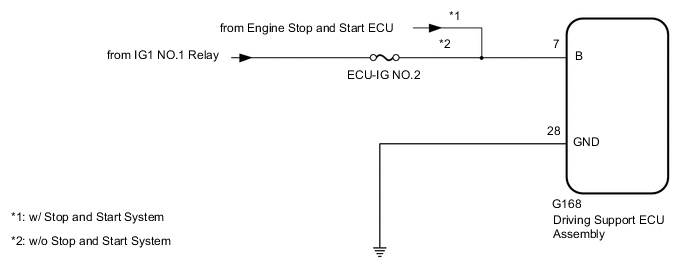
PROCEDURE
-
CUSTOMER PROBLEM ANALYSIS AND SYMPTOM CHECK
-
Check the customer problem analysis and symptom.
Result Proceed to NEXT
NEXT 
-
-
INSPECT BATTERY VOLTAGE
-
Measure the battery voltage.
Standard voltage 11 to 14 V -
Using the parts location and system diagram, check the system for blown-out fuses, open or short circuits in the wire harness(es) and connectors that are not properly connected by performing a visual check.
Tech Tips
If the voltage is 11 V or less, replace or recharge the auxiliary battery before proceeding to the next step.
Result Proceed to NEXT
NEXT
-
-
CHECK HARNESS AND CONNECTOR (DRIVING SUPPORT ECU ASSEMBLY - BATTERY AND BODY GROUND)
-
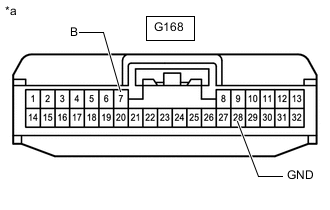
*a Front view of wire harness connector
(to Driving Support ECU Assembly)
Check driving support ECU assembly.
Note
As the connector may be damaged if a load of more than 10 kg (22 lb) is applied to it, do not apply any more load than necessary to the connector.
-
Disconnect the driving support ECU assembly connector.
-
Measure the voltage according to the value(s) in the table below.
Note
DTCs may be output when connectors are disconnected during inspection. Therefore, make sure to clear the DTCs using the GTS once the inspection has been completed.
Standard Voltage *1: w/o Stop and Start SystemTester Connection Switch Condition Specified Condition G168-7 (B) - Body ground Ignition switch ON 11 to 14 V*1
9.5 to 14 V*2
G168-7 (B) - Body ground Ignition switch off Below 1 V
*2: w/ Stop and Start System
-
Measure the resistance according to the value(s) in the table below.
Standard Resistance Tester Connection Condition Specified Condition G168-28 (GND) - Body ground Always Below 1 Ω
Result Proceed to OK NG -
NG 
REPAIR OR REPLACE HARNESS OR CONNECTOR
OK
-
-
CHECK CAN COMMUNICATION SYSTEM
-
Use the GTS to check if the CAN communication system is functioning normally.
OK CAN communication system DTCs are not output. Result Proceed to OK NG
NG
GO TO CAN COMMUNICATION SYSTEM for LHD: Click here
GO TO CAN COMMUNICATION SYSTEM for RHD: Click hereOK
-
-
CHECK FOR DTC
-
Check for DTCs and note any codes that are output.
Body Electrical > Pre-Crash 2 > Trouble Codes -
Clear the DTCs.
Body Electrical > Pre-Crash 2 > Clear DTCs -
Recheck for DTCs. Try to reproduce the DTCs by duplicating the conditions indicated by the DTCs.
Body Electrical > Pre-Crash 2 > Trouble CodesOK DTCs are not output. Result Proceed to OK NG
NG
GO TO DIAGNOSTIC TROUBLE CODE CHART Click here
OK
-
-
DATA LIST / ACTIVE TEST
-
Using the GTS, check the Data List.
-
Using the GTS, perform the Active Test.
Result Proceed to NEXT
NEXT
-
-
VEHICLE CONTROL HISTORY
-
Check whether the vehicle control history (PCS operation history) matches the customer analysis.
Result Result Proceed to Vehicle control history matches the customer analysis A Vehicle control history does not match customer analysis or there is no vehicle control history B
A
END (EXPLANATION)
B
USE SIMULATION METHOD TO CHECK Click here
-