IMMOBILISER SYSTEM(w/o Entry and Start System), Diagnostic DTC:B279A
| DTC Code | DTC Name |
|---|---|
| B279A | Theft Deterrent System Communication Line High Fixation |
DESCRIPTION
If the communication line (EFIO-IMI) to the transponder key ECU assembly is stuck high (e.g. shorted to +B), the ECM stores this DTC.
| DTC No. | Detection Item | DTC Detection Condition | Trouble Area | Note |
|---|---|---|---|---|
| B279A | Theft Deterrent System Communication Line High Fixation | Communication line (EFIO-IMI) between the ECM and transponder key ECU assembly is stuck high. |
|
DTC Output Confirmation Operation: |
| Vehicle Condition when Malfunction Detected | Fail-safe Operation when Malfunction Detected |
|---|---|
| Engine cannot be started (initial ignition occurs and engine cranks, then ignition stops) | Engine cannot be started |
| DTC No. | Data List and Active Test |
|---|---|
| B279A | - |
WIRING DIAGRAM
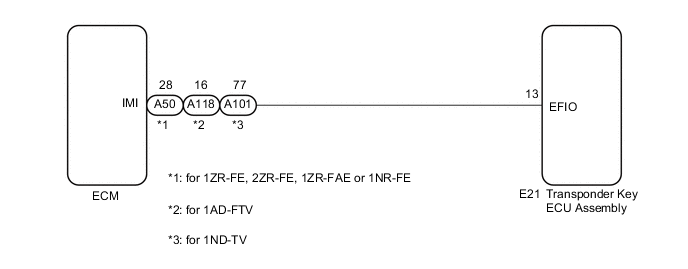
CAUTION / NOTICE / HINT
Note
-
If the transponder key ECU assembly or ECM is replaced, refer to Service Bulletin.
-
After repair, confirm that no DTCs are output by performing "DTC Output Confirmation Operation".
PROCEDURE
-
CLEAR DTC
-
Clear the DTCs.
Powertrain > Engine and ECT > Clear DTCs
Powertrain > Engine and ECT > Clear DTCsResult Proceed to NEXT
NEXT 
-
-
CHECK FOR DTC
-
Check for DTCs.
Powertrain > Engine and ECT > Trouble Codes
Powertrain > Engine and ECT > Trouble CodesTech Tips
Before checking for DTCs, perform the "DTC Output Confirmation Operation" procedure.
OK DTC B279A is not output. Result Result Proceed to B279A is not output A B279A is output B
A 
USE SIMULATION METHOD TO CHECK Click here
B
-
-
CHECK CONNECTION OF CONNECTOR
-
Check that the connectors are properly connected to the ECM and transponder key ECU assembly.
OK Connectors are properly connected. Result Proceed to OK NG
NG
CONNECT CONNECTORS PROPERLY
OK
-
-
CHECK HARNESS AND CONNECTOR (TRANSPONDER KEY ECU ASSEMBLY - ECM AND BODY GROUND)
-
for 1ZR-FE, 2ZR-FE, 1ZR-FAE or 1NR-FE
-
Disconnect the E21 transponder key ECU assembly connector.
-
Disconnect the A50 ECM connector.
-
Measure the resistance according to the value(s) in the table below.
Standard Resistance Tester Connection Condition Specified Condition E21-13 (EFIO) - A50-28 (IMI) Always Below 1 Ω E21-13 (EFIO) - Body ground Always 10 kΩ or higher A50-28 (IMI) - Body ground Always 10 kΩ or higher
-
-
for 1ND-TV
-
Disconnect the E21 transponder key ECU assembly connector.
-
Disconnect the A101 ECM connector.
-
Measure the resistance according to the value(s) in the table below.
Standard Resistance Tester Connection Condition Specified Condition E21-13 (EFIO) - A101-77 (IMI) Always Below 1 Ω E21-13 (EFIO) - Body ground Always 10 kΩ or higher A101-77 (IMI) - Body ground Always 10 kΩ or higher
-
-
for 1AD-FTV
-
Disconnect the E21 transponder key ECU assembly connector.
-
Disconnect the A118 ECM connector.
-
Measure the resistance according to the value(s) in the table below.
Standard Resistance Tester Connection Condition Specified Condition E21-13 (EFIO) - A118-16 (IMI) Always Below 1 Ω E21-13 (EFIO) - Body ground Always 10 kΩ or higher A118-16 (IMI) - Body ground Always 10 kΩ or higher
Result Proceed to OK NG -
NG
REPAIR OR REPLACE HARNESS OR CONNECTOR
OK
-
-
REPLACE TRANSPONDER KEY ECU ASSEMBLY
-
Replace the transponder key ECU assembly with a new one.
Result Proceed to NEXT
NEXT
-
-
CLEAR DTC
-
Clear the DTCs.
Powertrain > Engine and ECT > Clear DTCs
Powertrain > Engine and ECT > Clear DTCsResult Proceed to NEXT
NEXT
-
-
CHECK FOR DTC
-
Check for DTCs.
Tech Tips
Before checking for DTCs, perform the "DTC Output Confirmation Operation" procedure.
OK DTC B279A is not output. Result Result Proceed to B279A is not output A B279A is output (for 1AD-FTV) B B279A is output (for 1ND-TV) C B279A is output (for 1NR-FE) D B279A is output (for 1ZR-FAE) E B279A is output (for 1ZR-FE) F B279A is output (for 2ZR-FE) G
A
END (TRANSPONDER KEY ECU ASSEMBLY WAS DEFECTIVE)
B
REPLACE ECM Click here
C
REPLACE ECM Click here
D
REPLACE ECM Click here
E
REPLACE ECM Click here
F
REPLACE ECM Click here
G
REPLACE ECM Click here
-