MAYDAY BATTERY REMOVAL
PROCEDURE
-
REMOVE UPPER RADIATOR SUPPORT SEAL
-
DISCONNECT CABLE FROM NEGATIVE BATTERY TERMINAL
Note
When disconnecting the cable, some systems need to be initialized after the cable is reconnected Click here.
-
REMOVE REAR CONSOLE END PANEL SUB-ASSEMBLY
-
REMOVE NO. 1 TELEPHONE BRACKET WITH TELEMATICS TRANSCEIVER (w/ Telematics Transceiver for G-BOOK)
-
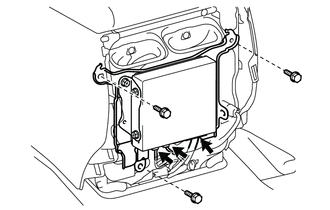
Disconnect the connectors.
-
Remove the 3 bolts and telephone bracket with telematics transceiver.
-
-
REMOVE TELEMATICS TRANSCEIVER (w/ Telematics Transceiver except G-BOOK)
-
REMOVE MAYDAY BATTERY (w/ Telematics Transceiver for G-BOOK)
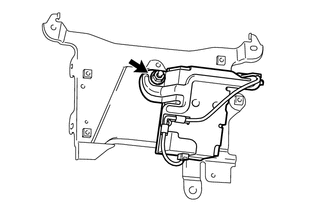
-
Remove the nut and No. 3 telephone bracket together with the mayday battery.
-
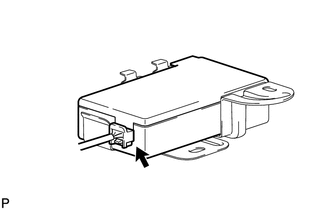
Disconnect the connector and remove the mayday battery.
-
-
REMOVE MOBILEPHONE BATTERY (w/ Telematics Transceiver except G-BOOK)
-
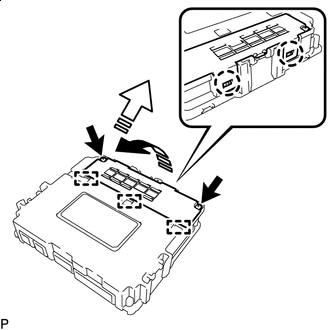

Remove in this Direction (1) 
Remove in this Direction (2) Remove the 2 screws.
Tech Tips
Remove the 2 screws together with the battery cover.
-
Detach the 2 claws and 3 guides and remove the battery cover as shown in the illustration.
-
Disconnect the connector and remove the mobilephone battery as shown in the illustration.
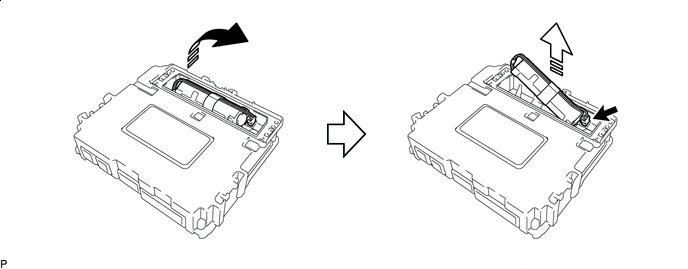
Remove in this Direction (1) Remove in this Direction (2)
-