REMOTE TOUCH REMOVAL
CAUTION / NOTICE / HINT
Tech Tips
-
Use the same procedure for RHD and LHD vehicles.
-
The procedure listed below is for LHD vehicles.
PROCEDURE
-
REMOVE LOWER CENTER INSTRUMENT CLUSTER FINISH PANEL SUB-ASSEMBLY
-
REMOVE INSTRUMENT PANEL FINISH PANEL END LH
-
REMOVE INSTRUMENT PANEL FINISH PANEL END RH
-
REMOVE SHIFT LEVER KNOB SUB-ASSEMBLY
-
REMOVE UPPER CONSOLE PANEL SUB-ASSEMBLY
-
REMOVE REMOTE TOUCH ASSEMBLY
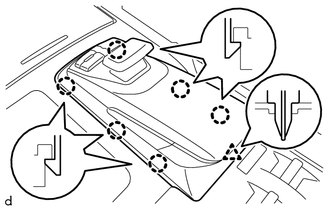
Detach the 6 claws, clip and remove the remote touch assembly.
-
REMOVE COVER ASSEMBLY LH
-
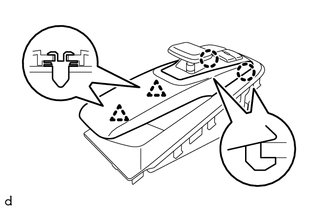
Detach the 2 clips and remove the cover.
-
-
REMOVE SWITCH KNOB
-
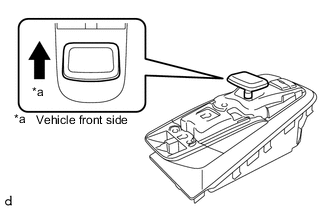
Remove the switch knob upward.
-
-
REMOVE REMOTE OPERATION BOARD
-
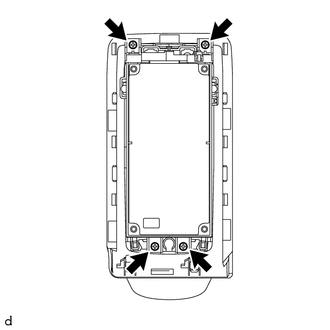
Remove the 4 screws.
-
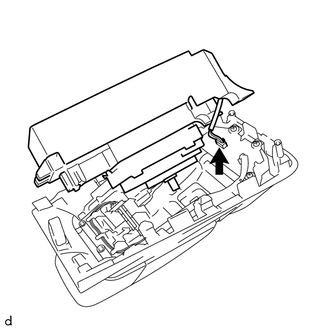
Move the remote operation board as shown in the illustration.
-
Disconnect the connector and remove the remote operation board.
-
-
REMOVE REMOTE OPERATION SWITCH