AIRBAG SYSTEM, Diagnostic DTC:B1660/43

| DTC Code | DTC Name |
|---|---|
| B1660/43 | Passenger Airbag ON/OFF Indicator Circuit Malfunction |
DESCRIPTION
The passenger airbag ON/OFF indicator circuit consists of the center airbag sensor assembly and passenger airbag ON/OFF indicator.
The passenger airbag ON/OFF indicator indicates the operation condition of the instrument panel passenger airbag, lower No. 2 instrument panel airbag assembly, front seat airbag RH*1 or LH*2 and front seat outer belt assembly RH*1 or LH*2.
DTC B1660/43 is stored when a malfunction is detected in the passenger airbag ON/OFF indicator circuit.
*1: for LHD
*2: for RHD
| DTC Code | Detection Condition | Trouble Area |
|---|---|---|
| B1660/43 | One of the following conditions is met:
|
|
WIRING DIAGRAM
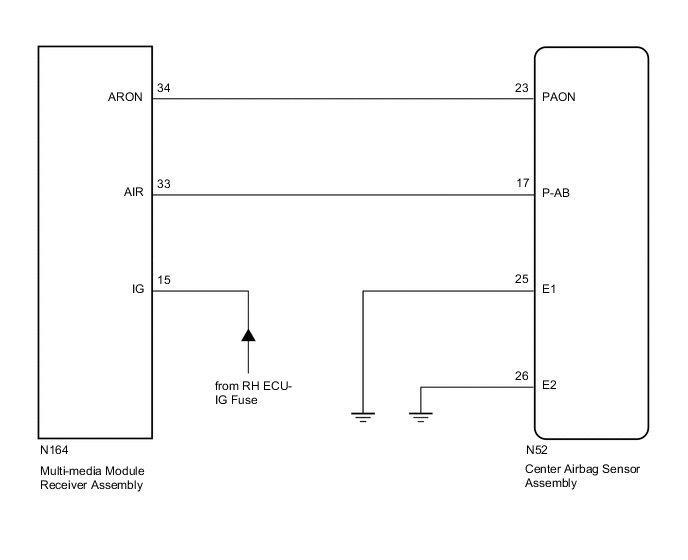
CAUTION / NOTICE / HINT
Note
-
After turning the power switch off, waiting time may be required before disconnecting the cable from the negative (-) auxiliary battery terminal. Therefore, make sure to read the disconnecting the cable from the negative (-) auxiliary battery terminal notices before proceeding with work Click here.
-
When disconnecting the cable from the negative (-) auxiliary battery terminal while performing repairs, some systems need to be initialized after the cable is reconnected Click here.
PROCEDURE
-
CHECK PASSENGER AIRBAG ON/OFF INDICATOR CONDITION
-
Turn the power switch on (IG).
-
Check the passenger airbag ON/OFF indicator operation.
Tech Tips
Refer to the normal condition of the passenger airbag ON/OFF indicator Click here.
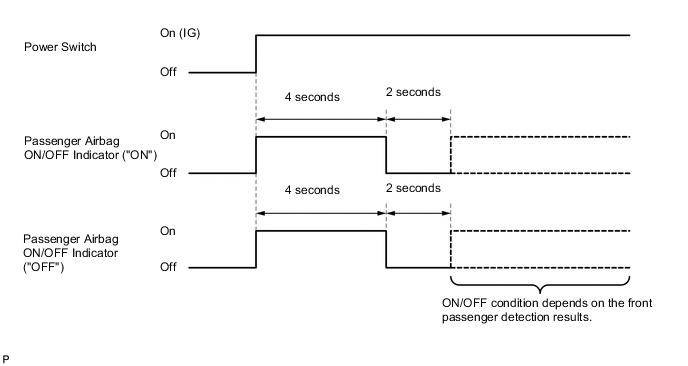
Result ON/OFF Indicator Illumination Proceed to One or both indicators are always on A Both indicators are always off B
B 
CHECK CONNECTION OF CONNECTORS Click here
A 
-
-
CHECK CONNECTION OF CONNECTORS
-
Turn the power switch off.
-
Disconnect the cable from the negative (-) auxiliary battery terminal, and wait for at least 90 seconds.
-
Check that the connectors are properly connected to the center airbag sensor assembly and multi-media module receiver assembly.
OK The connectors are properly connected.
NG 
CONNECT CONNECTORS PROPERLY
OK
-
-
CHECK CONNECTORS
-
Disconnect the connectors from the center airbag sensor assembly and multi-media module receiver assembly.
-
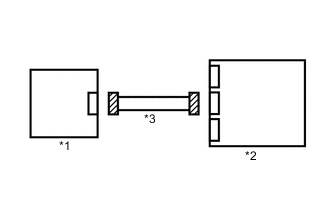
Text in Illustration *1 Multi-media Module Receiver Assembly *2 Center Airbag Sensor Assembly *3 Instrument Panel Wire Check that the connectors (on the center airbag sensor assembly side and multi-media module receiver assembly side) are not damaged.
OK The connectors are not deformed or damaged.
NG
REPLACE INSTRUMENT PANEL WIRE
OK
-
-
CHECK PASSENGER AIRBAG ON/OFF INDICATOR
-
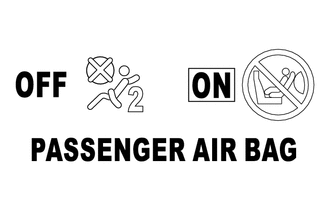
Connect the connector to the multi-media module receiver assembly.
-
Connect the cable to the negative (-) auxiliary battery terminal, and wait for at least 2 seconds.
-
Turn the power switch on (IG).
-
Check the passenger airbag ON/OFF indicator operation.
OK The passenger airbag ON/OFF indicator does not come on.
NG
CHECK INSTRUMENT PANEL WIRE Click here
OK
-
-
CHECK CENTER AIRBAG SENSOR ASSEMBLY
-
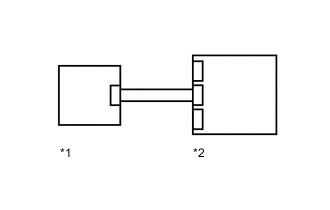
Text in Illustration *1 Multi-media Module Receiver Assembly *2 Center Airbag Sensor Assembly Connect the connector to the center airbag sensor assembly.
-
Connect the cable to the negative (-) auxiliary battery terminal, and wait for at least 2 seconds.
-
Turn the power switch on (IG), and wait for at least 60 seconds.
-
Clear the DTCs Click here.
-
Turn the power switch off.
-
Turn the power switch on (IG), and wait for at least 60 seconds.
-
Check for DTCs Click here.
OK DTC B1660/43 is not output. Tech Tips
Codes other than DTC B1660/43 may be output at this time, but they are not related to this check.
OK
USE SIMULATION METHOD TO CHECK Click here
NG
REPLACE CENTER AIRBAG SENSOR ASSEMBLY Click here
-
-
CHECK INSTRUMENT PANEL WIRE
-
Disconnect the connector from the multi-media module receiver assembly.
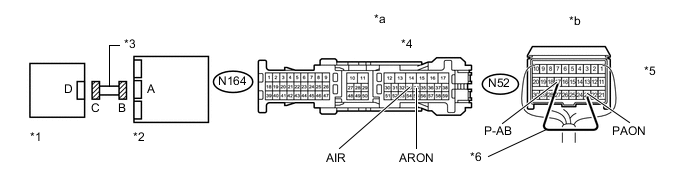
Text in Illustration *1 Multi-media Module Receiver Assembly *2 Center Airbag Sensor Assembly *3 Instrument Panel Wire *4 Connector C *5 Connector B *6 Service Wire *a Front view of wire harness connector
(to Multi-media Module Receiver Assembly)
*b Rear view of wire harness connector
(to Center Airbag Sensor Assembly)
-
Connect the cable to the negative (-) auxiliary battery terminal, and wait for at least 2 seconds.
-
Turn the power switch on (IG).
-
Measure the voltage according to the value(s) in the table below.
Standard Voltage Tester Connection Switch Condition Specified Condition N164-34 (ARON) - Body ground Power switch on (IG) Below 1 V N164-33 (AIR) - Body ground Power switch on (IG) Below 1 V -
Turn the power switch off.
-
Disconnect the cable from the negative (-) auxiliary battery terminal, and wait for at least 90 seconds.
-
Using a service wire, connect terminals 23 (PAON) and 17 (P-AB) of connector B.
Note
Do not forcibly insert the service wire into the terminals of the connector when connecting a service wire.
-
Measure the resistance according to the value(s) in the table below.
Standard Resistance Tester Connection Condition Specified Condition N164-34 (ARON) - N164-33 (AIR) Always Below 1 Ω -
Disconnect the service wire from connector B.
-
Measure the resistance according to the value(s) in the table below.
Standard Resistance Tester Connection Condition Specified Condition N164-34 (ARON) - N164-33 (AIR) Always 1 MΩ or higher N164-34 (ARON) - Body ground Always 1 MΩ or higher N164-33 (AIR) - Body ground Always 1 MΩ or higher
OK
REPLACE MULTI-MEDIA MODULE RECEIVER ASSEMBLY Click here
NG
REPLACE INSTRUMENT PANEL WIRE
-
-
CHECK CONNECTION OF CONNECTORS
-
Turn the power switch off.
-
Disconnect the cable from the negative (-) auxiliary battery terminal, and wait for at least 90 seconds.
-
Check that the connectors are properly connected to the center airbag sensor assembly and multi-media module receiver assembly.
OK The connectors are properly connected.
NG
CONNECT CONNECTORS PROPERLY
OK
-
-
CHECK CONNECTORS
-
Text in Illustration *1 Multi-media Module Receiver Assembly *2 Center Airbag Sensor Assembly *3 Instrument Panel Wire Disconnect the connectors from the center airbag sensor assembly and multi-media module receiver assembly.
-
Check that the connectors (on the center airbag sensor assembly side and multi-media module receiver assembly side) are not damaged.
OK The connectors are not deformed or damaged.
NG
REPLACE INSTRUMENT PANEL WIRE
OK
-
-
CHECK INSTRUMENT PANEL WIRE
-
Connect the cable to the negative (-) auxiliary battery terminal, and wait for at least 2 seconds.
Text in Illustration *1 Multi-media Module Receiver Assembly *2 Center Airbag Sensor Assembly *3 Instrument Panel Wire *4 Connector C *5 Connector B *6 Service Wire *a Front view of wire harness connector
(to Multi-media Module Receiver Assembly)
*b Rear view of wire harness connector
(to Center Airbag Sensor Assembly)
-
Turn the power switch on (IG).
-
Measure the voltage according to the value(s) in the table below.
Standard Voltage Tester Connection Switch Condition Specified Condition N164-34 (ARON) - Body ground Power switch on (IG) Below 1 V N164-33 (AIR) - Body ground Power switch on (IG) Below 1 V -
Turn the power switch off.
-
Disconnect the cable from the negative (-) auxiliary battery terminal, and wait for at least 90 seconds.
-
Using a service wire, connect terminals 23 (PAON) and 17 (P-AB) of connector B.
Note
Do not forcibly insert the service wire into the terminals of the connector when connecting a service wire.
-
Measure the resistance according to the value(s) in the table below.
Standard Resistance Tester Connection Condition Specified Condition N164-34 (ARON) - N164-33 (AIR) Always Below 1 Ω -
Disconnect the service wire from connector B.
-
Measure the resistance according to the value(s) in the table below.
Standard Resistance Tester Connection Condition Specified Condition N164-34 (ARON) - N164-33 (AIR) Always 1 MΩ or higher N164-34 (ARON) - Body ground Always 1 MΩ or higher N164-33 (AIR) - Body ground Always 1 MΩ or higher
NG
REPLACE INSTRUMENT PANEL WIRE
OK
-
-
CHECK PASSENGER AIRBAG ON/OFF INDICATOR (SOURCE VOLTAGE)
-
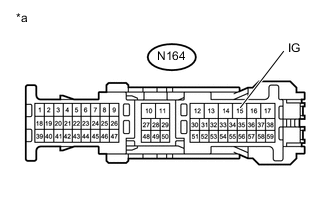
Text in Illustration *a Front view of wire harness connector
(to Multi-media Module Receiver Assembly)
Connect the connectors to the center airbag sensor assembly.
-
Connect the cable to the negative (-) auxiliary battery terminal, and wait for at least 2 seconds.
-
Turn the power switch on (IG).
-
Measure the voltage according to the value(s) in the table below.
Standard Voltage Tester Connection Switch Condition Specified Condition N164-15 (IG) - Body ground Power switch on (IG) 11 to 14 V
NG
REPAIR OR REPLACE HARNESS AND CONNECTOR
OK
-
-
CHECK PASSENGER AIRBAG ON/OFF INDICATOR
-
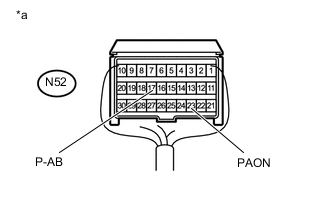
Text in Illustration *a Rear view of wire harness connector
(to Center Airbag Sensor Assembly)
Turn the power switch off.
-
Disconnect the cable from the negative (-) auxiliary battery terminal, and wait for at least 90 seconds.
-
Connect the connector to the multi-media module receiver assembly.
-
Disconnect the connectors from the center airbag sensor assembly.
-
Using a service wire, connect terminal 23 (PAON) and body ground.
-
Using a service wire, connect terminal 17 (P-AB) and body ground.
-
Connect the cable to the negative (-) auxiliary battery terminal, and wait for at least 2 seconds.
-
Turn the power switch on (IG).
-
Check the indicator according to the table below.
OK Tester Connection Switch Condition Passenger Airbag ON/OFF Indicator N52-23 (PAON) - Body ground Power switch on (IG) "ON" comes on N52-17 (P-AB) - Body ground Power switch on (IG) "OFF" comes on
NG
REPLACE MULTI-MEDIA MODULE RECEIVER ASSEMBLY Click here
OK
-
-
CHECK CENTER AIRBAG SENSOR ASSEMBLY
-
Text in Illustration *1 Multi-media Module Receiver Assembly *2 Center Airbag Sensor Assembly Turn the power switch off.
-
Disconnect the cable from the negative (-) auxiliary battery terminal, and wait for at least 90 seconds.
-
Connect the connectors to the center airbag sensor assembly.
-
Connect the cable to the negative (-) auxiliary battery terminal and wait for at least 2 seconds.
-
Turn the power switch on (IG), and wait for at least 60 seconds.
-
Clear the DTCs Click here.
-
Turn the power switch off.
-
Turn the power switch on (IG), and wait for at least 60 seconds.
-
Check for DTCs Click here.
OK DTC B1660/43 is not output. Tech Tips
Codes other than DTC B1660/43 may be output at this time, but they are not related to this check.
OK
USE SIMULATION METHOD TO CHECK Click here
NG
REPLACE CENTER AIRBAG SENSOR ASSEMBLY Click here
-