MULTI-DISPLAY INSTALLATION
CAUTION / NOTICE / HINT
Tech Tips
-
Use the same procedure for RHD and LHD vehicles.
-
The procedure listed below is for LHD vehicles.
PROCEDURE
-
INSTALL MULTI-DISPLAY (for 8 Inch)
-
Connect all the connectors.
-
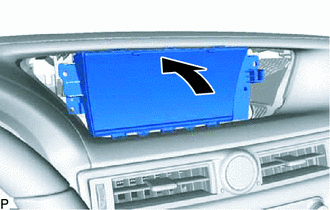
Move the multi-display in the direction of the arrow in the illustration to temporarily install it.
-
Install the multi-display with the 4 screws.
-
-
INSTALL ACCESSORY METER ASSEMBLY (for 12.3 Inch)
-
Connect all the connectors.
-
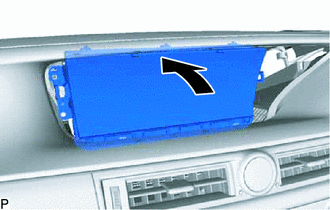
Move the accessory meter assembly in the direction of the arrow in the illustration to temporarily install it.
-
Install the accessory meter assembly with the 4 screws.
-
-
INSTALL UPPER INSTRUMENT CLUSTER FINISH PANEL
-
CONNECT CABLE TO NEGATIVE AUXILIARY BATTERY TERMINAL
Note
When disconnecting the cable, some systems need to be initialized after the cable is reconnected Click here.
-
INSTALL LUGGAGE COMPARTMENT TRIM COVER LH
-
INSTALL LUGGAGE COMPARTMENT FLOOR MAT