AUDIO AND VISUAL SYSTEM Switch Operation of Remote Touch not Accepted
PROCEDURE
-
START DIAGNOSTIC MODE
-
Activate diagnostic mode and check if the "Service Menu" screen can be displayed Click here.
OK Diagnostic mode can be activated.
NG 
REMOTE TOUCH SELF CHECK (SWITCH OPERATION CHECK) Click here
OK 
-
-
CHECK PANEL SWITCH (OPERATION CHECK)
-
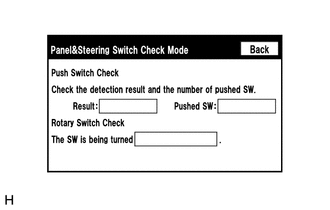
Enter the "Panel&Switch Check Mode" screen. Refer to Check Panel & Steering Switch in Operation Check Click here.
-
Operate the abnormal switch and check if the switch status is correctly displayed.
OK The switch status is correctly displayed as operated.
OK 
REPLACE MULTI-MEDIA MODULE RECEIVER ASSEMBLY Click here
NG
-
-
REMOTE TOUCH SELF CHECK (SWITCH OPERATION CHECK)
-
Activate self check mode Click here.
-
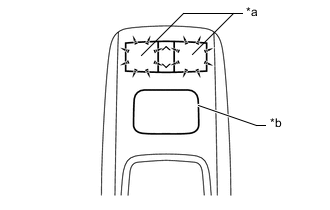
Text in Illustration *a Switch Illumination *b Switch Knob Check switch operation.
-
Move the remote touch switch knob to the lower left.
-
Check that the switch illumination when each switch on the remote touch is pressed.
Result Result Proceed to Self check mode cannot be activated. A Some switches do not turn on the switch illumination when they are pressed. A All switches turn on the switch illumination when they are pressed. B
-
B
REPLACE MULTI-MEDIA MODULE RECEIVER ASSEMBLY Click here
A
-
-
REPLACE REMOTE TOUCH (REMOTE OPERATION SWITCH)
-
Replace the remote operation switch Click here.
-
Check that each switch operation on the remote touch is accepted normally.
OK Each switch operation is accepted normally.
OK
END (REMOTE TOUCH [REMOTE OPERATION SWITCH] IS DEFECTIVE)
NG
REPLACE REMOTE TOUCH (REMOTE OPERATION BOARD) Click here
-