METER / GAUGE SYSTEM Tachometer Malfunction
DESCRIPTION
The combination meter receives engine speed signals from the ECM via the CAN line. The combination meter displays engine speed data that is calculated based on the data received from the ECM.
WIRING DIAGRAM
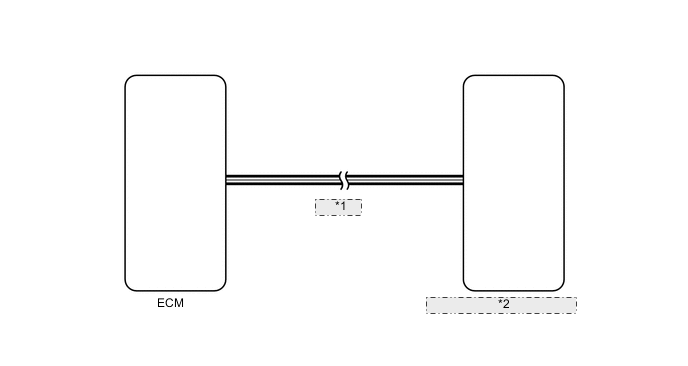
| *1 | CAN Line |
| *2 | Combination Meter Assembly |
PROCEDURE
-
CHECK CAN COMMUNICATION SYSTEM
-
Check for DTCs Click here.
Result Result Proceed to CAN communication system DTC is not output A CAN communication system (for LHD) DTC is output B CAN communication system (for RHD) DTC is output C
B 
Go to CAN COMMUNICATION SYSTEM Click here
C
Go to CAN COMMUNICATION SYSTEM Click here
A 
-
-
PERFORM ACTIVE TEST USING INTELLIGENT TESTER (TACHOMETER)
-
Operate the intelligent tester according to the display and select Active Test Click here.
Combination Meter Tester Display Test Part Control Range Diagnostic Note TachoMeter Operation Tachometer 0, 1000, 2000, 3000, 4000, 5000, 6000, 7000 Perform the test with the vehicle stopped and engine idling. Tech Tips
Make sure that the vehicle is stopped and the engine is idling.
OK Needle indication is normal. Result Result Proceed to OK A NG (w/ Multi-information Display) B NG (w/o Multi-information Display) C
B
REPLACE COMBINATION METER ASSEMBLY Click here
C
REPLACE COMBINATION METER ASSEMBLY Click here
A
-
-
READ VALUE USING INTELLIGENT TESTER (TACHOMETER)
-
Operate the intelligent tester according to the display and select Data List Click here.
Combination Meter Tester Display Measurement Item/Range Normal Condition Diagnostic Note Engine Rpm Engine speed/Min.: 0, Max.: 12750 Idling: 700 to 800 Unit: rpm OK Engine speed displayed on the intelligent tester is almost the same as actual engine speed. Result Result Proceed to NG A OK (w/ Multi-information Display) B OK (w/o Multi-information Display) C
B
REPLACE COMBINATION METER ASSEMBLY Click here
C
REPLACE COMBINATION METER ASSEMBLY Click here
A
-
-
READ VALUE USING INTELLIGENT TESTER (ENGINE SPEED)
-
Operate the intelligent tester according to the display and select Data List Click here.
Result Result Proceed to Engine speed displayed on the intelligent tester is almost same as actual engine speed A Engine speed displayed on the intelligent tester is not same as actual engine speed (for 1GR-FE) B Engine speed displayed on the intelligent tester is not same as actual engine speed (for 1UR-FE) C Engine speed displayed on the intelligent tester is not same as actual engine speed (for 3UR-FE) D Engine speed displayed on the intelligent tester is not same as actual engine speed (for 1VD-FTV) E OK Engine speed displayed on the intelligent tester is almost the same as actual engine speed.
B
REPLACE ECM Click here
C
REPLACE ECM Click here
D
REPLACE ECM Click here
E
REPLACE ECM Click here
A
-
-
CHECK COMBINATION METER ASSEMBLY
-
Check the combination meter type.
Result Result Proceed to w/ Multi-information Display A w/o Multi-information Display B
A
REPLACE COMBINATION METER ASSEMBLY Click here
B
REPLACE COMBINATION METER ASSEMBLY Click here
-