TELEMATICS TRANSCEIVER REMOVAL
PROCEDURE
-
PRECAUTION
CAUTION:
After turning the engine switch off, waiting time may be required before disconnecting the cable from the battery terminal. Therefore, make sure to read the disconnecting the cable from the battery terminal notice before proceeding with work Click here.
Note
-
When replacing the multi-media module receiver assembly or telematics transceiver, perform the vehicle contract setting (See page w/ Telematics Transceiver for G-BOOK , See page w/ Telematics Transceiver except G-BOOK Click here).
-
The safety connect device uses the telematics transceiver to provide access to the network service.
-
The telematics transceiver has a DCM ID (described on the label attached to the telematics transceiver.
-
-
REMOVE COWL TOP VENTILATOR LOUVER RH
-
DISCONNECT CABLE FROM NEGATIVE BATTERY TERMINAL
CAUTION:
Wait at least 90 seconds after disconnecting the cable from the negative (-) battery terminal to disable the SRS system.
Note
When disconnecting the cable, some systems need to be initialized after the cable is reconnected Click here.
-
REMOVE INSTRUMENT PANEL FINISH PANEL END RH
-
REMOVE INSTRUMENT SIDE PANEL RH
-
REMOVE NO. 2 INSTRUMENT PANEL UNDER COVER SUB-ASSEMBLY
-
REMOVE LOWER INSTRUMENT PANEL
-
REMOVE FRONT PASSENGER SIDE KNEE AIRBAG ASSEMBLY
-
REMOVE GLOVE COMPARTMENT DOOR ASSEMBLY
-
REMOVE TELEMATICS TRANSCEIVER
-
w/ Telematics Transceiver for G-BOOK
-
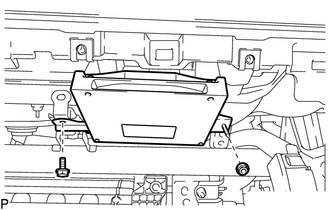
Remove the bolt and nut.
-
Disconnect each connector and remove the telematics transceiver.
-
-
w/ Telematics Transceiver except G-BOOK
-
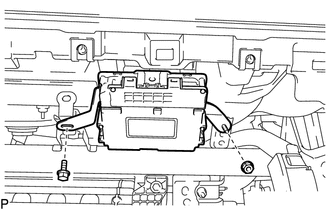
Remove the bolt and nut.
-
Disconnect each connector and remove the telematics transceiver.
-
-
-
REMOVE NO. 1 TELEPHONE BRACKET (w/ Telematics Transceiver for G-BOOK)
-
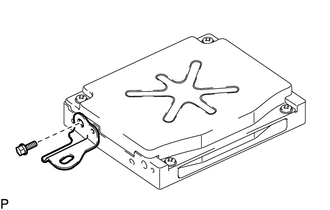
Remove the bolt and No. 1 telephone bracket.
-
-
REMOVE NO. 2 TELEPHONE BRACKET (w/ Telematics Transceiver for G-BOOK)
-
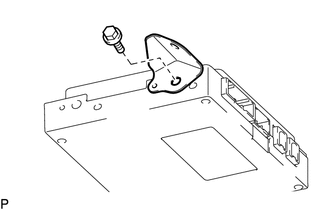
Remove the bolt and No. 2 telephone bracket.
-
-
REMOVE MOBILEPHONE BATTERY (w/ Telematics Transceiver except G-BOOK)