STEERING COLUMN ASSEMBLY(w/o VGRS) REMOVAL
CAUTION / NOTICE / HINT
CAUTION:
Some of these service operations affect the SRS airbag system. Read the precautionary notices concerning the SRS airbag system before servicing the steering column Click here.
Tech Tips
-
Use the same procedures for the RHD and LHD.
-
The procedures listed below are for the LHD.
PROCEDURE
-
PLACE FRONT WHEELS FACING STRAIGHT AHEAD
-
REMOVE COWL TOP VENTILATOR LOUVER
-
PRECAUTION
Note
After turning the engine switch off, waiting time may be required before disconnecting the cable from the negative (-) battery terminal. Therefore, make sure to read the disconnecting the cable from the negative (-) battery terminal notices before proceeding with work Click here.
-
DISCONNECT CABLE FROM NEGATIVE BATTERY TERMINAL
-
Disable the AUTO TILT AWAY function by changing the customize parameter Click here.
Note
Record the current customize parameter setting (whether the AUTO TILT AWAY function is enabled or disabled) in order to restore the current setting after finishing the operation.
Tech Tips
Performing the above operation causes the AUTO TILT AWAY function to be disabled when the engine switch is turned off.
-
Turn the engine switch on (IG). Operate the tilt and telescopic switch to fully extend and lower the steering column assembly.
-
Turn the engine switch off and disconnect the cable from the negative battery terminal.
CAUTION:
Wait at least 90 seconds after disconnecting the cable from the negative (-) battery terminal to disable the SRS system.
Note
When disconnecting the cable, some systems need to be initialized after the cable is reconnected Click here.
-
-
REMOVE STEERING WHEEL ASSEMBLY
-
REMOVE STEERING COLUMN COVER (w/o Driver Monitor Camera)
-
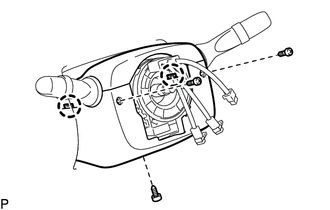
Remove the 3 screws.
-
Detach the 2 claws to remove the steering column cover lower.
Note
Do not damage the tilt and telescopic switch.
-
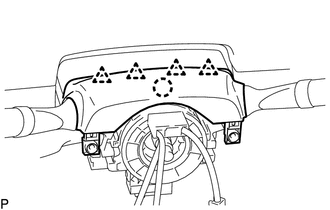
Detach the 4 clips.
-
Detach the claw to remove the steering column cover upper.
-
-
REMOVE STEERING COLUMN COVER (w/ Driver Monitor Camera)
-
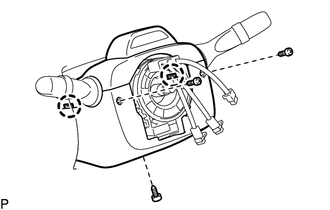
Remove the 3 screws.
-
Detach the 2 claws to remove the steering column cover lower.
Note
Do not damage the tilt and telescopic switch.
-
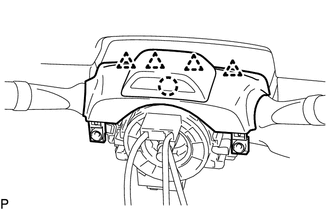
Detach the 4 clips.
-
Detach the claw to remove the steering column cover upper.
-
Disconnect the driver monitor connector.
-
-
REMOVE TURN SIGNAL SWITCH ASSEMBLY WITH SPIRAL CABLE SUB-ASSEMBLY
-
Disconnect the connectors from the turn signal switch with spiral cable.
-
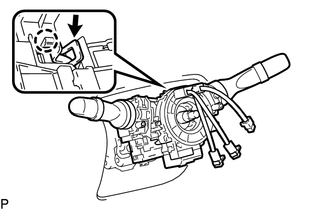
Using pliers, grip the claws of the clamp and remove the turn signal switch with spiral cable from the steering column.
-
-
REMOVE NO. 1 LOWER INSTRUMENT PANEL AIRBAG ASSEMBLY
-
REMOVE NO. 1 AIR DUCT SUB-ASSEMBLY
-
Detach the 2 claws and remove the wiring harness protector.
-
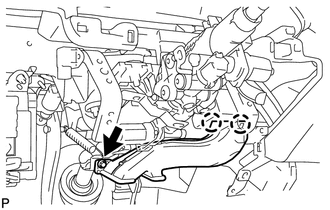
Detach the bolt, and remove the 2 claws and air duct.
-
-
REMOVE STEERING SLIDING WITH SHAFT YOKE SUB-ASSEMBLY
-
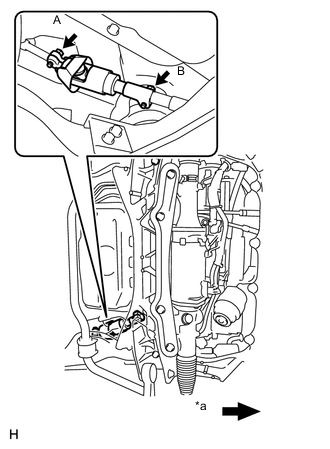
Text in Illustration *a Front of the Vehicle Loosen bolt A and remove bolt B, then slide the steering sliding with shaft yoke.
Note
-
Do not remove bolt A.
-
Do not separate the steering sliding with shaft yoke from the intermediate shaft.
-
-
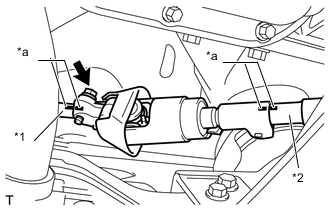
Text in Illustration *1 No. 2 steering intermediate shaft *2 Intermediate shaft *a Matchmark Put matchmarks on the steering sliding with shaft yoke, No. 2 steering intermediate shaft and intermediate shaft.
-
Remove the bolt and the steering sliding with shaft yoke from the steering intermediate shaft.
-
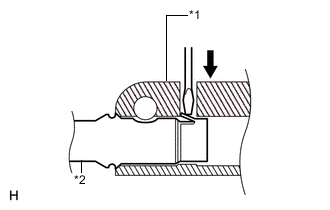
Text in Illustration *1 Steering sliding with shaft yoke *2 No. 2 steering intermediate shaft Separate the steering sliding with shaft yoke from the No. 2 steering intermediate shaft.
Tech Tips
Insert a screwdriver or equivalent into the yoke's hole. Hold down the intermediate shaft's claw and remove the intermediate shaft. If the claw is damaged, remove the claw. The intermediate shaft does not have to be replaced.
-
-
REMOVE STEERING INTERMEDIATE SHAFT
-
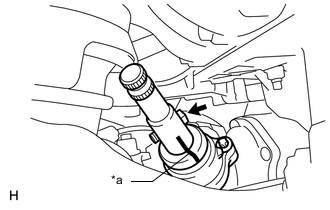
Text in Illustration *a Matchmark Put matchmarks on the steering intermediate shaft and power steering link.
-
Remove the bolt and steering intermediate shaft.
-
-
REMOVE NO. 2 STEERING INTERMEDIATE SHAFT ASSEMBLY
-
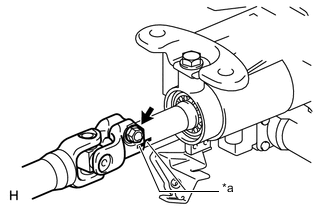
Text in Illustration *a Matchmark Put matchmarks on the No. 2 steering intermediate shaft and the steering column.
-
Remove the bolt.
-
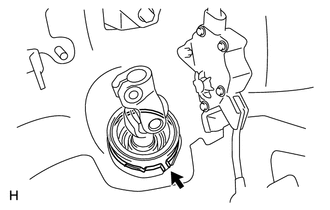
Remove the clamp and No. 2 steering intermediate shaft.
-
-
REMOVE STEERING COLUMN ASSEMBLY (TILT STEERING GEAR ASSEMBLY WITH MOTOR)
-
Disconnect the connectors and wire harness clamps from the steering column.
-
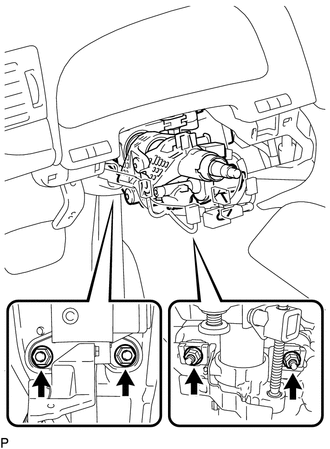
Remove the 4 nuts and steering column.
-