TRANSMISSION CONTROL CABLE REMOVAL
PROCEDURE
-
REMOVE RADIATOR SUPPORT OPENING COVER
-
REMOVE NO. 2 CYLINDER HEAD COVER
-
DISCONNECT CABLE FROM NEGATIVE BATTERY TERMINAL
Note
-
w/ Navigation System (for HDD):
After the ignition switch is turned off, the HDD navigation system requires approximately a minute to record various types of memory and settings. As a result, after turning the ignition switch off, wait a minute or more before disconnecting the cable from the negative (-) battery terminal.
-
When disconnecting the cable, some systems need to be initialized after the cable is reconnected Click here.
-
-
REMOVE BATTERY
-
REMOVE BATTERY CARRIER
-
REMOVE AIR CLEANER CAP AND HOSE
-
REMOVE AIR CLEANER CASE SUB-ASSEMBLY
-
REMOVE NO. 2 ENGINE UNDER COVER
-
DISCONNECT HEATED OXYGEN SENSOR CONNECTOR
-
REMOVE FRONT EXHAUST PIPE ASSEMBLY
-
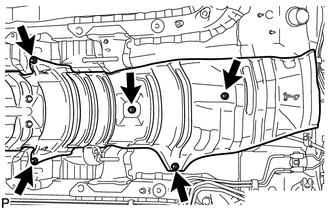
REMOVE FRONT FLOOR NO. 1 HEAT INSULATOR
-
Remove the 5 nuts and heat insulator.
-
-
REMOVE CONSOLE BOX ASSEMBLY
-
Remove the console box assembly Click here
-
-
REMOVE TRANSMISSION CONTROL CABLE ASSEMBLY
-
Move the shift lever to N.
-
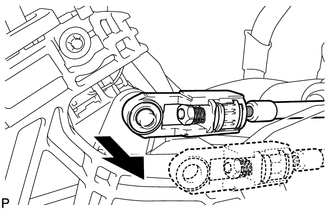
Disconnect the end of the transmission control cable from the shift lever.
-
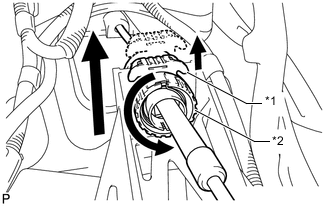
Using a screwdriver, pull out the stopper of the transmission control cable.
Note
Do not remove the stopper. If the stopper is removed, reinstall it to its original position.
-
Rotate the nut of the transmission control cable counterclockwise approximately 180° and, while holding the nut in that position, disconnect the transmission control cable from the shift lever retainer.
Text in Illustration *1 Stopper *2 Nut Note
Do not over-rotate the nut as it will come off the internal spring and the transmission control cable will not be reusable.
-
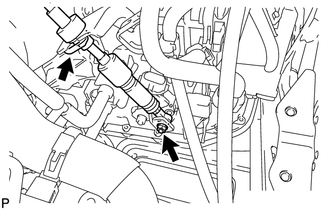
Remove the nut and disconnect the control cable assembly from the control shaft lever.
-
Remove the clip and disconnect the transmission control cable from the control cable bracket.
-
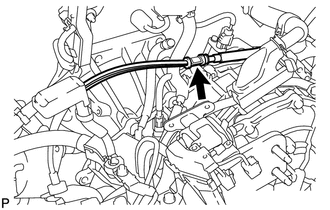
Disconnect the control cable from the control cable bracket.
-
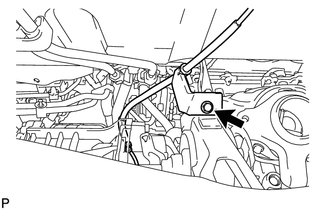
Remove the bolt and disconnect the transmission control cable support.
-
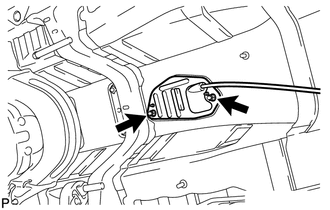
Remove the 2 nuts and disconnect the transmission control cable.
-
Pull out the transmission control cable.
-