INSPECTION PROCEDURE
PROCEDURE
- Click here
CHECK RADIO RECEIVER ASSEMBLY
-
Check the radio automatic station search function by activating it.
OK Automatic station search function stops on a station.
- OKClick here
- NGClick here
-
- Click here
CHECK OPTIONAL COMPONENTS
-
Check if any optional components that may decrease reception capacity, such as sunshade film or a telephone antenna, are installed.
OK Optional components are installed. Note:Do not remove optional components without permission of the customer.
- OKClick here
- NGClick here
-
- Click here
CHECK RADIO RECEIVER ASSEMBLY
-
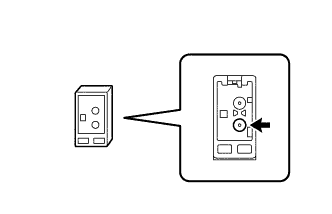
Remove the antenna connector from the radio receiver assembly.
-
Turn the ignition switch ACC with the radio receiver assembly connector connected.
-
Turn on the radio and turn into AM mode.
-
Place a screwdriver, thin wire or other metal object on the radio and display receiver assembly antenna jack and check that noise can be heard from the speakers.
OK Noise occurs.
- OKClick here
- NGClick here
-
- Click here
INSPECT QUARTER WINDOW ASSEMBLY (WINDOW GLASS ANTENNA WIRE)
-
Inspect the quarter window assembly (window glass antenna wire) (Click here).
- OKClick here
- NGClick here
-
- Click here
INSPECT RADIO RECEIVER ASSEMBLY
-
Disconnect the RA radio receiver assembly connector.
-
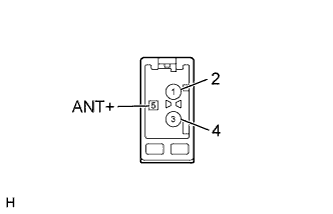
Measure the voltage according to the value(s) in the table below.
Standard Voltage Tester Connection Switch Condition Specified Condition 5 (ANT+) - Body ground Ignition switch ACC, radio switch on 11 to 14 V
- OKClick here
- NGClick here
-
- Click here
CHECK NO. 2 ANTENNA CORD SUB-ASSEMBLY
-
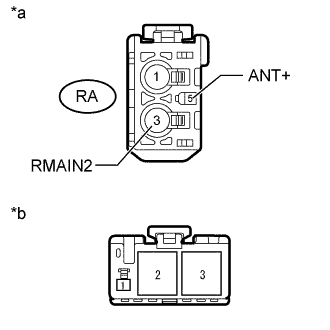
Disconnect the antenna connector from the radio receiver assembly.
-
Disconnect the antenna connector from the holder antenna assembly.
-
Measure the resistance according to the value(s) in the table below.
Standard Resistance Tester Connection Condition Specified Condition RA-3 (RMAIN2) - 3 Always Below 1 Ω RA-5 (ANT+) - 1 Always Below 1 Ω RA-3 (RMAIN2) - Body ground Always 10 kΩ or higher RA-5 (ANT+) - Body ground Always 10 kΩ or higher Table 1. Text in Illustration *a Front view of wire harness connector
(to Radio Receiver Assembly)
*b Front view of wire harness connector
(to Holder Antenna Assembly)
- OKClick here
- NGClick here
-
- Click here
CHECK HOLDER ANTENNA ASSEMBLY
-
Replace the holder antenna assembly with a known good one and check if radio broadcasts can be received normally (Click here).
OK Radio broadcasts can be received.
- OKClick here
- NGClick here
-
- Click here
USE SIMULATION METHOD TO CHECKClick here
- Click here
REMOVE OPTIONAL COMPONENTS AND CHECK AGAIN (SEE NOTICE ABOVE)
- Click here
REPLACE RADIO RECEIVER ASSEMBLYClick here
- Click here
REPAIR QUARTER WINDOW ASSEMBLYClick here
- Click here
REPLACE RADIO RECEIVER ASSEMBLYClick here
- Click here
REPLACE NO. 2 ANTENNA CORD SUB-ASSEMBLYClick here
- Click here
END (HOLDER ANTENNA ASSEMBLY IS DEFECTIVE)
- Click here
REPLACE RADIO RECEIVER ASSEMBLYClick here