AIR CONDITIONING PANEL INSTALLATION

-
INSTALL AIR CONDITIONING CONTROL ASSEMBLY
-
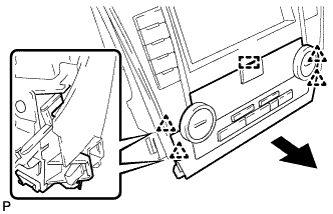
Engage the guide and 4 clips to install the air conditioning control assembly as shown in the illustration.
-
-
INSTALL NO. 1 RADIO BRACKET (for Radio and Display Type)
-
w/o Satellite Radio:
-
Install the No. 1 radio bracket with the 5 screws.
-
-
w/ Satellite Radio:
-
Install the No. 1 radio bracket with the 7 screws.
-
-
-
INSTALL NO. 2 RADIO BRACKET (for Radio and Display Type)
-
w/o Satellite Radio:
-
Install the No. 2 radio bracket with the 5 screws.
-
-
w/ Satellite Radio:
-
Install the No. 2 radio bracket with the 7 screws.
-
-
-
INSTALL NO. 1 RADIO BRACKET (for Navigation Receiver Type)
-
w/o Satellite Radio:
-
Install the No. 1 radio bracket with the 5 screws.
-
-
w/ Satellite Radio:
-
Install the No. 1 radio bracket with the 7 screws.
-
-
-
INSTALL NO. 2 RADIO BRACKET (for Navigation Receiver Type)
-
w/o Satellite Radio:
-
Install the No. 2 radio bracket with the 5 screws.
-
-
w/ Satellite Radio:
-
Install the No. 2 radio bracket with the 7 screws.
-
-
-
INSTALL RADIO RECEIVER ASSEMBLY WITH AIR CONDITIONING CONTROL ASSEMBLY (for Radio and Display Type)
-
Connect each connector.
-
Engage the 8 clips to the vehicle body to temporarily install the radio receiver assembly with air conditioning control assembly.
-
Install the radio receiver assembly with air conditioning control assembly with the 4 bolts.
-
-
INSTALL NAVIGATION RECEIVER ASSEMBLY WITH AIR CONDITIONING CONTROL ASSEMBLY (for Navigation Receiver Type)
-
Connect each connector.
-
Engage the 8 clips to the vehicle body to temporarily install the navigation receiver assembly with air conditioning control assembly.
-
Install the navigation receiver assembly with air conditioning control assembly with the 4 bolts.
-
-
INSTALL NO. 2 INSTRUMENT PANEL REGISTER ASSEMBLY
-
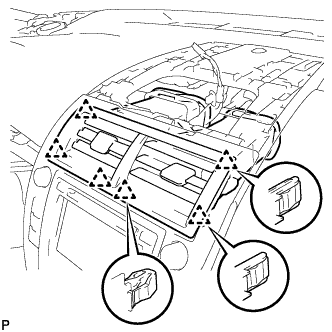
Engage the 6 clips to install the No. 2 instrument panel register assembly.
Note
When installing the No. 2 instrument panel register assembly, check that the wire harness is not caught between the No. 2 instrument panel register assembly and duct.
-
-
INSTALL CENTER INSTRUMENT CLUSTER FINISH PANEL ASSEMBLY
-
Connect the connector.
-
Engage the clamp.
-
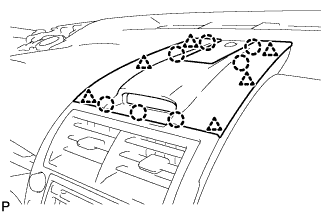
Engage the 6 clips and 7 claws to install the center instrument cluster finish panel assembly.
-
-
INSTALL UPPER CONSOLE PANEL SUB-ASSEMBLY
-
Connect each connector.
-
Engage the 4 clips and guide.
-
Install the upper console panel sub-assembly with the 2 screws <C> or <D>.
-
-
INSTALL BOX BOTTOM MAT
-
Install the box bottom mat.
-
-
INSTALL REAR CONSOLE BOX ASSEMBLY
-
CONNECT CABLE TO NEGATIVE BATTERY TERMINAL (for Radio and Display Type with Intuitive Parking Assist System)
Note
When disconnecting the cable, some systems need to be initialized after the cable is reconnected Click here.
-
CONNECT CABLE TO NEGATIVE BATTERY TERMINAL (for Navigation Receiver Type)
Note
When disconnecting the cable, some systems need to be initialized after the cable is reconnected Click here.