INSTRUMENT PANEL SPEAKER REMOVAL

-
PRECAUTION (for Center)
Note
After turning the ignition switch off, waiting time may be required before disconnecting the cable from the negative (-) battery terminal. Therefore, make sure to read the disconnecting the cable from the negative (-) battery terminal notices before proceeding with work Click here.
-
DISCONNECT CABLE FROM NEGATIVE BATTERY TERMINAL (for Center)
Note
When disconnecting the cable, some systems need to be initialized after the cable is reconnected Click here.
-
DISCONNECT FRONT DOOR OPENING TRIM WEATHERSTRIP (for Side)
-
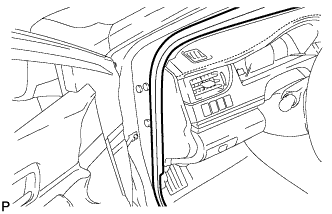
Disconnect the front door opening trim weatherstrip LH.
-
-
REMOVE FRONT PILLAR GARNISH (for Side)
-
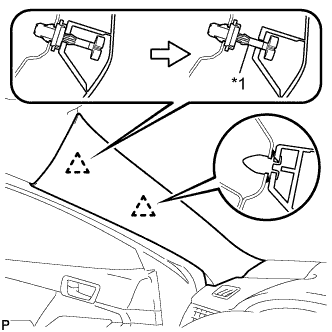
Text in Illustration *1 Front Pillar Garnish Clip Pull the upper part of the garnish toward the inside of the cabin and disengage the garnish from the base of the 2 clips.
Tech Tips
Make the front pillar garnish LH hang down from the front pillar garnish clip.
-
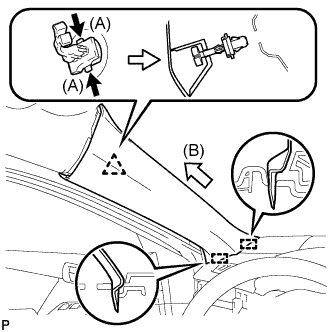
While pushing the tabs on the front pillar garnish clip in the direction indicated by the arrow (A) shown in the illustration, disengage the front pillar garnish clip.
-
Pull the garnish in the direction indicated by the arrow (B) shown in the illustration to disengage the 2 guides and remove the front pillar garnish LH.
-
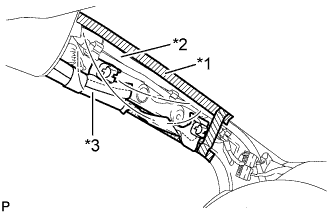
Text in Illustration *1 Adhesive Tape *2 Protective Cover *3 Curtain Shield Airbag Assembly Protect the curtain shield airbag assembly.
-
Cover the airbag with a piece of cloth or nylon and secure the edges of the cover with tape as shown in the illustration.
Note
Cover the curtain shield airbag with a protective cover as soon as the front pillar garnish is removed.
-
-
-
REMOVE INSTRUMENT PANEL SPEAKER PANEL SUB-ASSEMBLY (for Side)
-
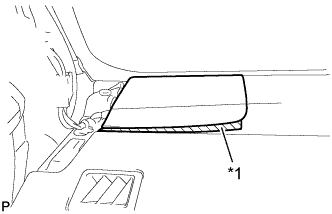
Text in Illustration *1 Protective Tape Apply protective tape to the area shown in the illustration.
-
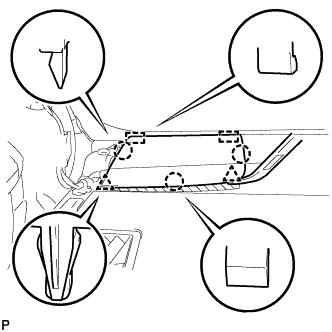
Using a moulding remover, disengage the 2 clips and 3 claws.
-
Disengage the 2 guides to remove the No.1 instrument panel speaker panel sub-assembly.
-
-
REMOVE FRONT NO. 2 SPEAKER ASSEMBLY (for Side)
-
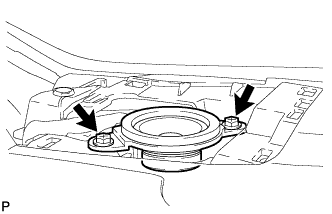
Remove the 2 screws.
-
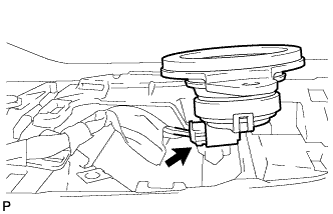
Lift the front No. 2 speaker assembly and disconnect the connector to remove the speaker.
Note
Do not touch the speaker cone.
-
-
REMOVE REAR CONSOLE BOX ASSEMBLY (for Center)
-
REMOVE BOX BOTTOM MAT (for Center)
-
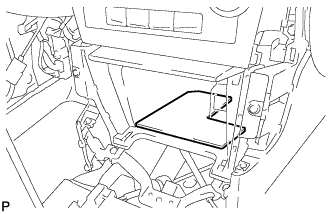
Remove the box bottom mat.
-
-
REMOVE UPPER CONSOLE PANEL SUB-ASSEMBLY (for Center)
-
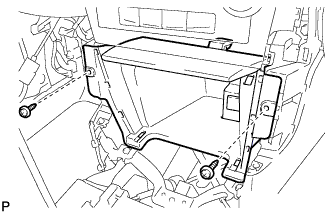
Remove the 2 screws <C> or <D>.
-
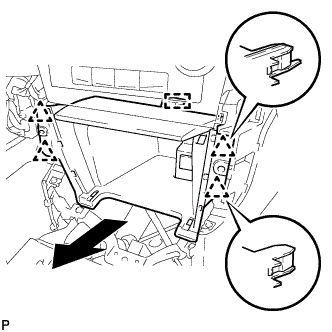
Disengage the 4 clips and guide as shown in the illustration.
-
Disconnect each connector to remove the upper console panel sub-assembly.
-
-
REMOVE CENTER INSTRUMENT CLUSTER FINISH PANEL ASSEMBLY (for Center)
-
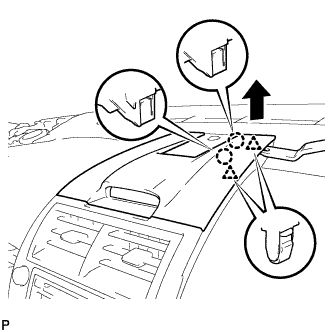
Using a moulding remover, disengage the 2 claws and 2 clips as shown in the illustration.
-
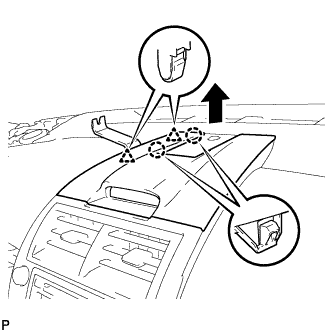
Using a moulding remover, disengage the 2 claws and 2 clips as shown in the illustration.
-
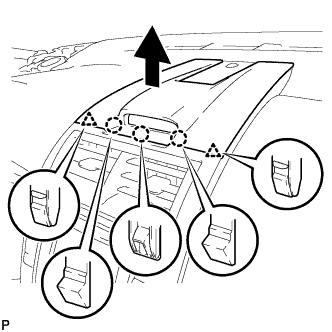
Disengage the 3 claws and 2 clips as shown in the illustration.
-
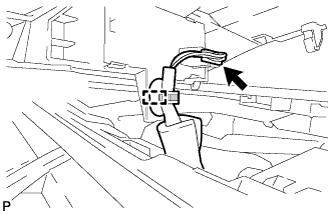
Disengage the clamp.
-
Disconnect the connector to remove the center instrument cluster finish panel assembly.
-
-
REMOVE NO. 2 INSTRUMENT PANEL REGISTER ASSEMBLY (for Center)
-
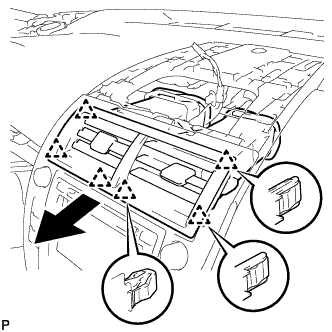
Pull the No. 2 instrument panel register assembly in the direction indicated by the arrow to disengage the 6 clips to remove the No. 2 instrument panel register assembly.
-
-
REMOVE RADIO RECEIVER ASSEMBLY WITH AIR CONDITIONING CONTROL ASSEMBLY (for Center)
w/ Intuitive Parking Assist System: Click here
-
REMOVE NAVIGATION RECEIVER ASSEMBLY WITH AIR CONDITIONING CONTROL ASSEMBLY (for Center)
w/o Intuitive Parking Assist System: Click here
-
REMOVE NO. 1 SPEAKER OPENING COVER ASSEMBLY (for Center)
-
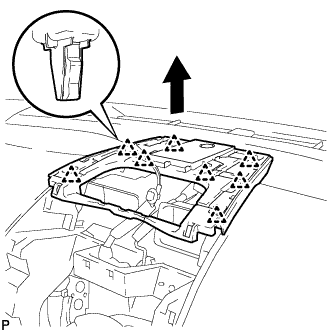
Disengage the 8 clips as shown in the illustration.
-
Disconnect the connector to remove the No. 1 speaker opening cover assembly.
-
-
REMOVE FRONT NO. 3 SPEAKER ASSEMBLY (for Center)
-
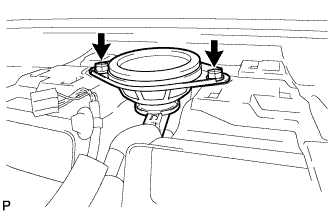
Remove the 2 screws.
-
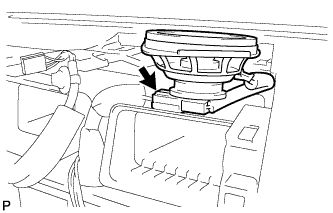
Lift the front No. 3 speaker assembly and disconnect the connector to remove the speaker.
Note
Do not touch the speaker cone.
-