ROOF HEADLINING INSTALLATION

-
INSTALL FRONT DOOR OPENING TRIM WEATHERSTRIP LH
-
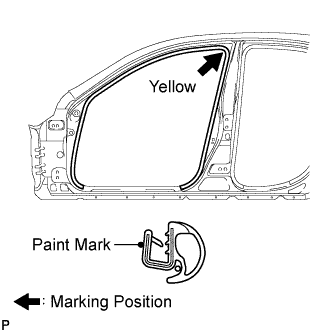
Install the front door opening trim weatherstrip LH as shown in the illustration.
-
-
INSTALL FRONT DOOR OPENING TRIM WEATHERSTRIP RH
-
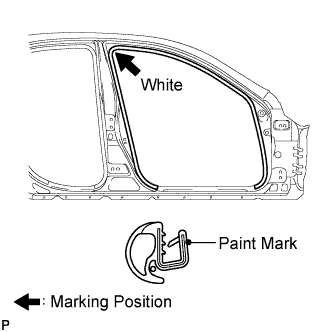
Install the front door opening trim weatherstrip RH as shown in the illustration.
-
-
INSTALL REAR DOOR OPENING TRIM WEATHERSTRIP LH
-
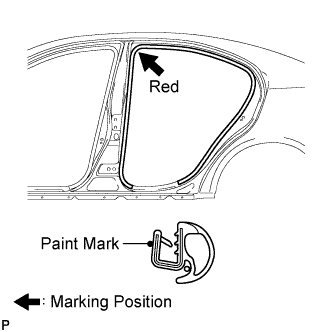
Install the rear door opening trim weatherstrip LH as shown in the illustration.
-
-
INSTALL REAR DOOR OPENING TRIM WEATHERSTRIP RH
-
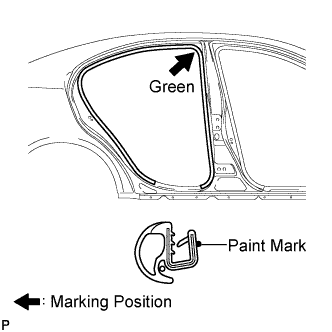
Install the rear door opening trim weatherstrip RH as shown in the illustration.
-
-
INSTALL NO. 1 ROOF WIRE (w/o Sliding Roof)
-
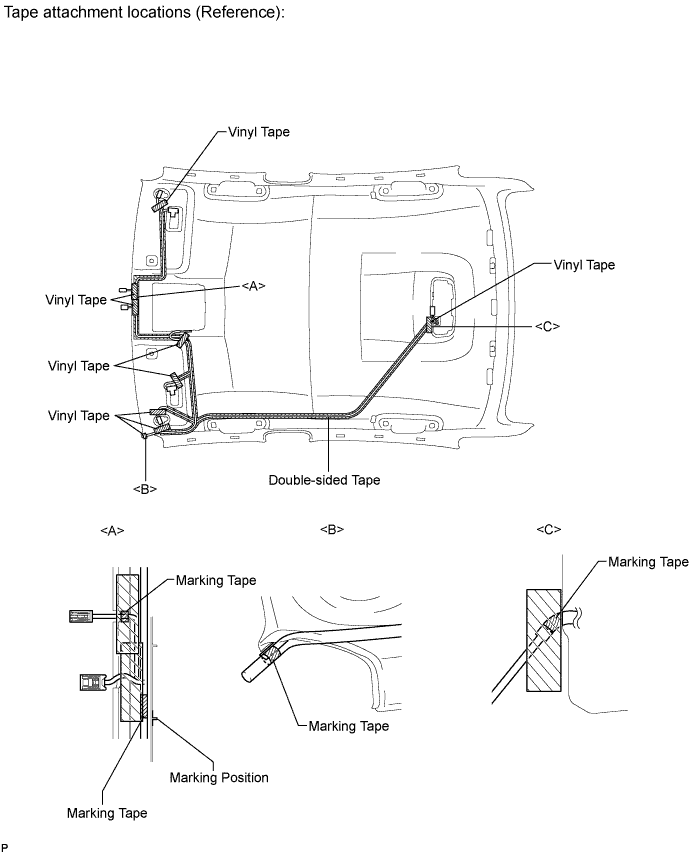
Install the roof wire.
-
Remove the peeling paper from one side of double-sided tape.
-
Attach double-sided tape to the marks on the roof headlining as shown in the illustration.
-
Remove the peeling paper from the other side of double-sided tape.
-
Align the wire harness to double-sided tape. Also, align the marking tape areas of the wire harness to the marks on the roof headlining. Temporarily attach the wire harness to the roof headlining. Secure the wire harness to the roof headlining with vinyl tape.
Note
Securely install the No. 1 roof wire. If the wire is not secured, noise will occur.
-
-
-
INSTALL NO. 1 ROOF WIRE (w/ Sliding Roof)
-
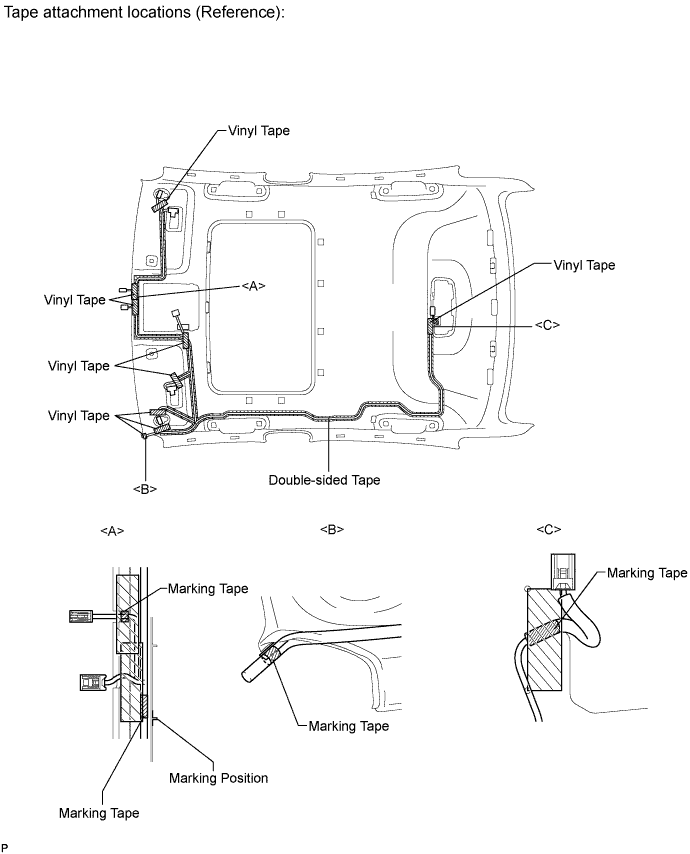
Install the roof wire.
-
Remove the peeling paper from one side of double-sided tape.
-
Attach double-sided tape to the marks on the roof headlining as shown in the illustration.
-
Remove the peeling paper from the other side of double-sided tape.
-
Align the wire harness to double-sided tape. Also, align the marking tape areas of the wire harness to the marks on the roof headlining. Temporarily attach the wire harness to the roof headlining. Secure the wire harness to the roof headlining with vinyl tape.
Note
Securely install the No. 1 roof wire. If the wire is not secured, noise will occur.
-
-
-
INSTALL VANITY LIGHT ASSEMBLY
-
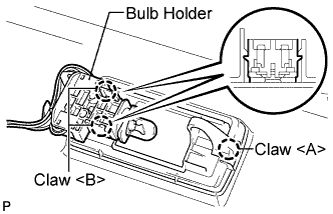
Engage the claw <A>, and then install the bulb holder with the 2 claws <B> to install the vanity light assembly.
Tech Tips
Use the same procedure to install the light on the other side.
-
-
INSTALL NO. 2 ROOF HEADLINING PAD
-
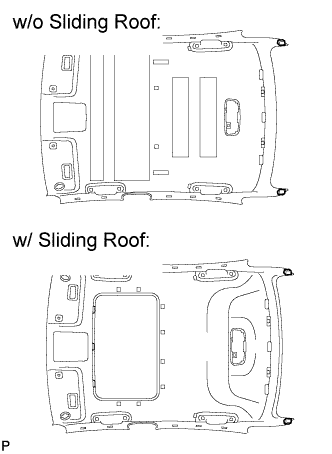
Install the 2 No. 2 roof headlining pads using double-sided tape.
-
-
INSTALL REAR NO. 2 SIDE RAIL SPACER LH (w/o Sliding Roof)
-
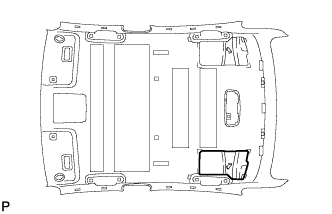
Align the markings on the roof headlining assembly with the rear No. 2 side rail spacer LH and install the spacer using double-sided tape as shown in the illustration.
-
-
INSTALL REAR NO. 2 SIDE RAIL SPACER RH (w/o Sliding Roof)
Tech Tips
Use the same procedure for the RH side and the LH side.
-
INSTALL REAR ROOF SILENCER PAD (w/o Sliding Roof)
-
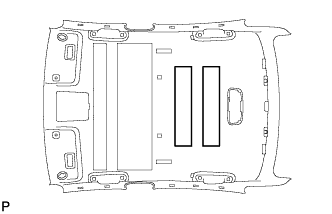
Align the markings on the roof headlining assembly with the roof silencer pads and install the pads using double-sided tape as shown in the illustration.
-
-
INSTALL ROOF HEADLINING PAD LH (w/o Sliding Roof)
-
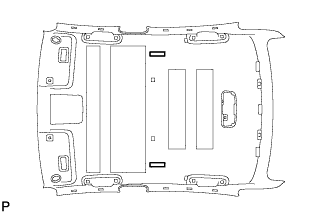
Align the markings on the roof headlining assembly with the roof headlining pad LH and install the pads using double-sided tape as shown in the illustration.
-
-
INSTALL CENTER ROOF SILENCER PAD (w/o Sliding Roof)
-
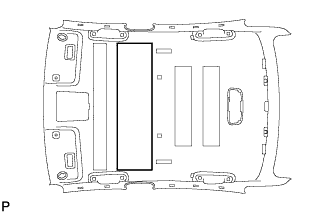
Align the markings on the roof headlining assembly with the center roof silencer pad and install the pad using double-sided tape as shown in the illustration.
-
-
INSTALL NO. 1 ROOF SILENCER PAD (w/o Sliding Roof)
-
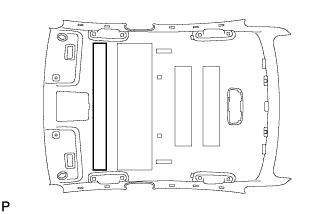
Align the markings on the roof headlining assembly with the No. 1 roof silencer pad and install the pad using double-sided tape as shown in the illustration.
-
-
INSTALL REAR SIDE RAIL SPACER LH (w/ Sliding Roof)
-
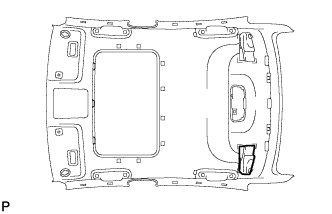
Align the markings on the roof headlining assembly with the rear side rail spacer LH and install the spacer using double-sided tape as shown in the illustration.
-
-
INSTALL REAR SIDE RAIL SPACER RH (w/ Sliding Roof)
Tech Tips
Use the same procedure for the RH side and the LH side.
-
INSTALL ROOF HEADLINING PAD
-
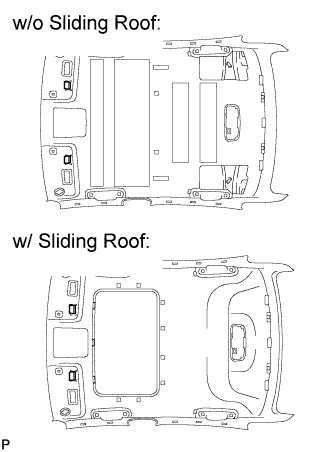
Align the markings on the roof headlining assembly with the roof headlining pads and install the pads using double-sided tape as shown in the illustration.
-
-
INSTALL ROOF HEADLINING ASSEMBLY (w/o Sliding Roof)
-
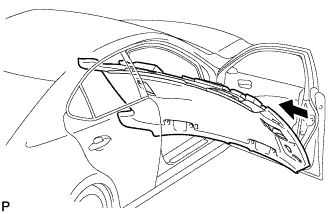
Place the roof headlining in the vehicle from the front right door.
-
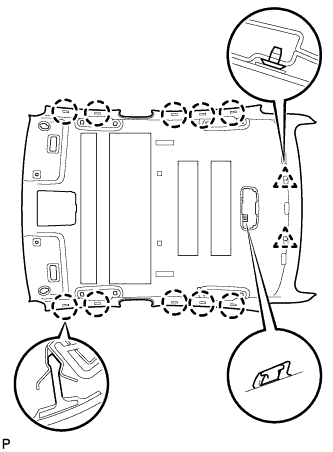
Engage the hook, 10 claws and 2 clips, and install the roof headlining assembly.
-
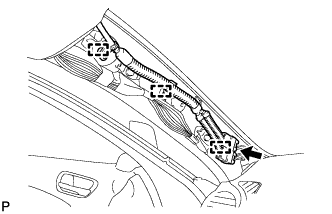
Connect the roof wire connector and engage each clamp.
-
Connect each connector to the map light assembly.
-
-
INSTALL ROOF HEADLINING ASSEMBLY (w/ Sliding Roof)
-
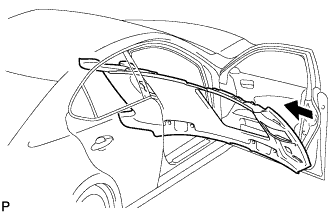
Place the roof headlining in the vehicle from the front right door.
-
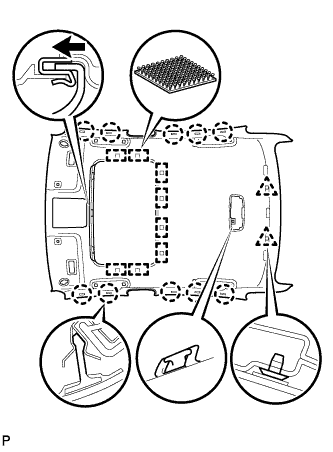
Engage the hook, 10 claws, 8 fasteners and 2 clips, and install the roof headlining assembly.
-
Connect the roof wire connector and engage each clamp.
-
Connect each connector to the map light assembly.
-
-
INSTALL VISOR HOLDER
-
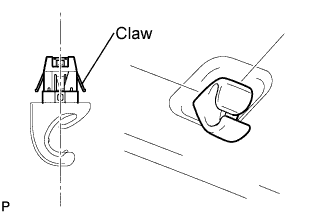
Set the claws of the visor holder as shown in the illustration
-
Engage the claws and install the visor holder.
Tech Tips
Use the same procedure to install the holder on the other side.
-
-
INSTALL VISOR ASSEMBLY LH
-
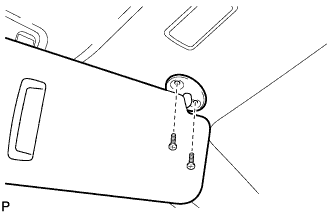
Install the visor assembly LH with the 2 screws.
-
-
INSTALL VISOR ASSEMBLY RH
Tech Tips
Use the same procedure for the RH side and the LH side.
-
INSTALL VISOR BRACKET COVER
-
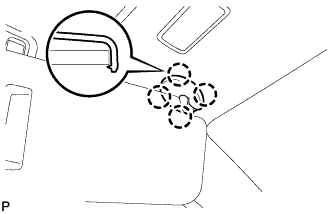
Engage the 4 claws and install the visor bracket cover.
Tech Tips
Use the same procedure to install the cover on the other side.
-
-
INSTALL ASSIST GRIP SUB-ASSEMBLY
-
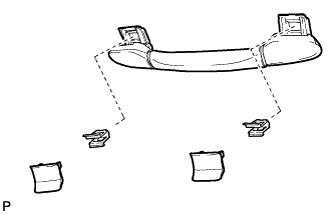
Put an assist grip sub-assembly together as shown in the illustration.
-
Install the assist grip sub-assembly.
Tech Tips
Use the same procedure for the other 3 assist grips.
-
-
INSTALL COAT HOOK
-
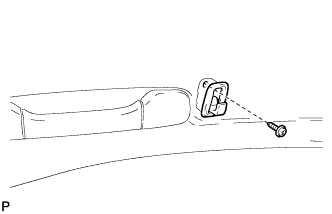
Install the coat hook with the screw.
Tech Tips
Use the same procedure to install the hook on the other side.
-
-
INSTALL SPOT LIGHT ASSEMBLY
-
Connect the connector.
-
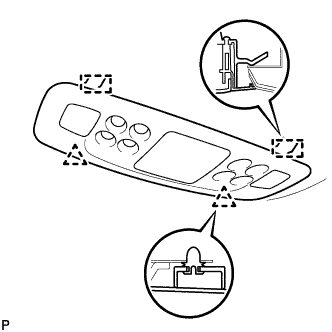
Engage the 2 guides.
-
Engage the 2 clips and install the spot light assembly.
-
-
INSTALL MAP LIGHT ASSEMBLY (w/o Sliding Roof)
-
Connect the connector.
-
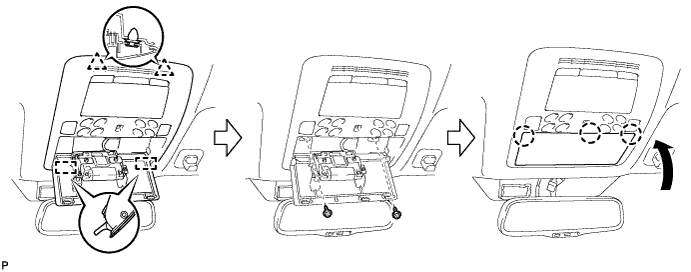
Engage the 2 guides.
-
Engage the 2 clips and install the map light assembly.
-
Install the 2 screws.
-
Engage the 3 claws and close the cover.
-
-
INSTALL MAP LIGHT ASSEMBLY (w/ Sliding Roof)
-
Connect the connector.
-
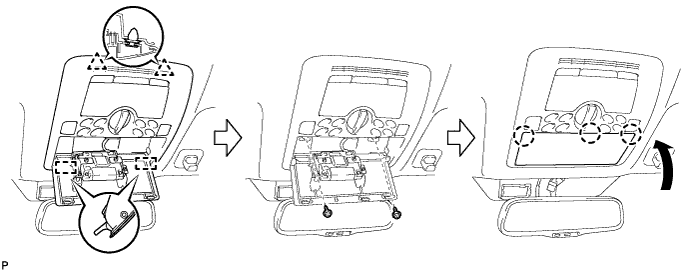
Engage the 2 guides.
-
Engage the 2 clips and install the map light assembly.
-
Install the 2 screws.
-
Engage the 3 claws and close the cover.
-
-
INSTALL RAIN SENSOR TAPE
-
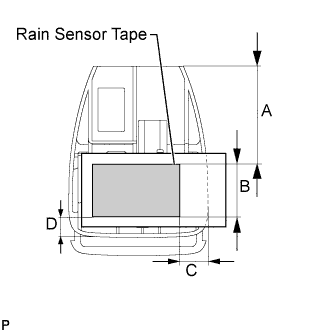
Peel off the releasing sheet (yellow side) and attach the rain sensor tape on the position indicated in the illustration (the sensor part of the rain sensor) while pushing out air bubbles with fingers.
-
Peel off the releasing sheet (white side).
Note
-
When reusing the rain sensor, clean up dirt on the sensor part with a piece of cloth, etc.
-
Do not touch the sensor tape surface directly with fingers.
Area Measurement A 45.5 mm (1.791 in.) B 24.7 mm (0.972 in.) C 10.0 mm (0.393 in.) D 9.8 mm (0.385 in.) -
-
-
INSTALL RAIN SENSOR
-
Connect the connector.
-
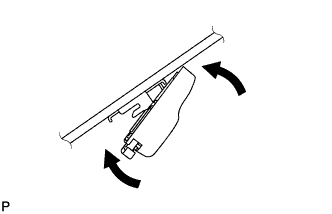
Engage the claw as shown in the illustration to set the position.
-
Gradually attach the rain sensor to the glass surface to prevent air bubbles from forming in between them.
-
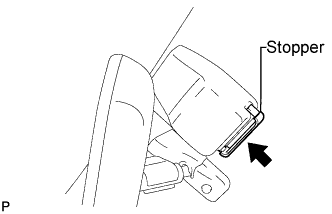
Push in the stopper.
Note
-
Do not touch the sensor tape surface and the glass surface directly with fingers.
-
Clean up dirt on the glass with a piece of cloth, etc.
-
After installing the rain sensor, there should be no air bubbles between the windshield glass and the rain sensor tape.
-
-
-
INSTALL INNER REAR VIEW MIRROR STAY HOLDER COVER
-
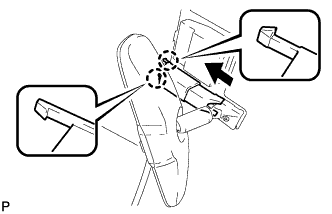
Engage the 2 claws and install the inner rear view mirror stay holder cover as shown in the illustration.
-
-
INSTALL ROOF SIDE INNER GARNISH LH
-
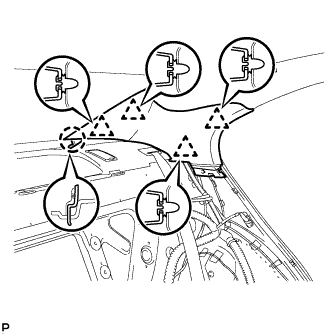
Engage the claw and 4 clips, and install the roof side garnish inner LH.
-
-
INSTALL ROOF SIDE INNER GARNISH RH
Tech Tips
Use the same procedure for the RH side and the LH side.
-
INSTALL REAR SEAT SIDE GARNISH LH
-
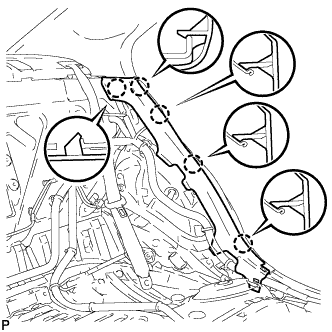
Engage the 5 claws and install the rear seat side garnish LH.
-
-
INSTALL REAR SEAT SIDE GARNISH RH
Tech Tips
Use the same procedure for the RH side and the LH side.
-
INSTALL CENTER PILLAR GARNISH LH
-
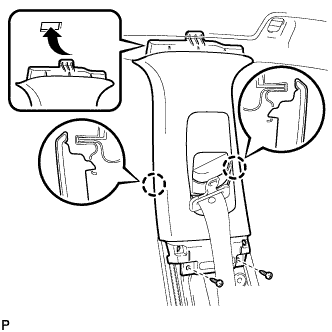
Engage the 2 claws and install the center pillar garnish LH.
-
Install the 2 screws.
-
-
INSTALL CENTER PILLAR GARNISH RH
Tech Tips
Use the same procedure for the RH side and the LH side.
-
INSTALL LOWER CENTER PILLAR GARNISH LH
-
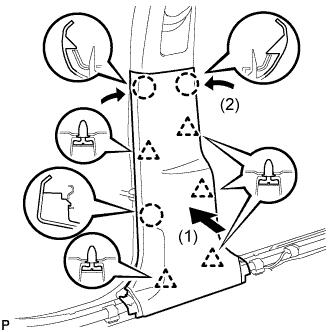
Engage the 5 clips and 3 claws, and install the lower center pillar garnish LH.
-
-
INSTALL LOWER CENTER PILLAR GARNISH RH
Tech Tips
Use the same procedure for the RH side and the LH side.
-
INSTALL FRONT SEAT OUTER BELT ASSEMBLY LH
-
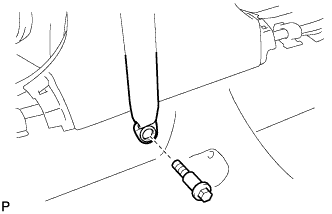
Install the front seat outer belt assembly LH with the bolt.
- Torque:
- 42 N*m { 428 kgf*cm, 31 ft.*lbf }
-
-
INSTALL FRONT SEAT OUTER BELT ASSEMBLY RH
Tech Tips
Use the same procedure for the RH side and the LH side.
-
INSTALL LAP BELT OUTER ANCHOR COVER
-
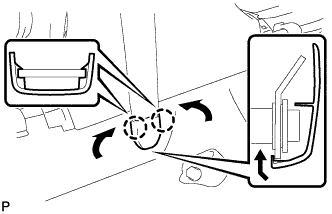
Engage the 2 claws and install the lap belt outer anchor cover as shown in the illustration.
Tech Tips
Use the same procedure to install the cover on the other side.
-
-
INSTALL REAR DOOR SCUFF PLATE LH
-
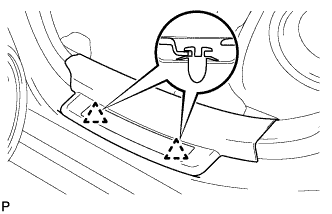
Engage the 2 clips.
-
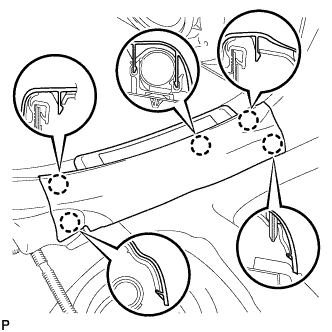
Engage the 5 claws and install the rear door scuff plate LH.
-
-
INSTALL REAR DOOR SCUFF PLATE RH
Tech Tips
Use the same procedure for the RH side and the LH side.
-
INSTALL TRANSMISSION FLOOR SHIFT ASSEMBLY
-
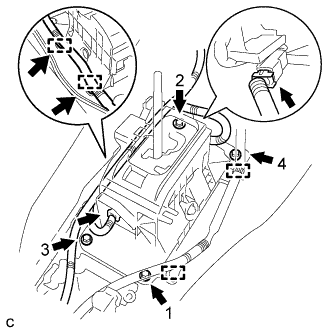
Install the floor shift assembly with the 4 bolts.
- Torque:
- 8.3 N*m { 85 kgf*cm, 73 in.*lbf }
-
Connect the 4 clamps to the floor shift assembly.
-
Connect the 2 connectors to the floor shift assembly.
-
-
CONNECT FLOOR SHIFT GEAR SHIFTING ROD SUB-ASSEMBLY
-
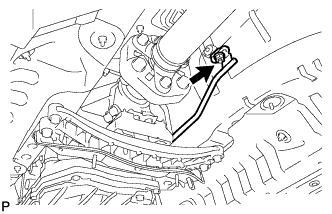
Temporarily tighten the floor shift gear shifting rod with the nut.
Tech Tips
The rod is tightened to a torque specification in the "ADJUST SHIFT LEVER POSITION" procedure.
-
-
ADJUST SHIFT LEVER POSITION
-
Remove the nut and disconnect the shifting rod.
-
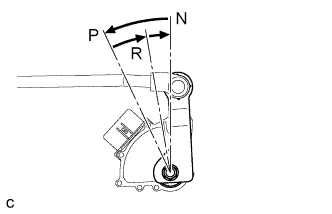
Turn the control shaft lever of the park/neutral position switch counterclockwise until it stops, and turn it clockwise 2 notches to set it to N.
-
Move the shift lever to N and tighten the nut while lightly pushing the lever toward R.
- Torque:
- 13 N*m { 130 kgf*cm, 9 ft.*lbf }
Note
Do not push the shift lever too hard.
-
Check that the shift lever moves smoothly and the shift lever and gear operate correctly Click here.
-
-
INSTALL FRONT NO. 1 FLOOR HEAT INSULATOR
-
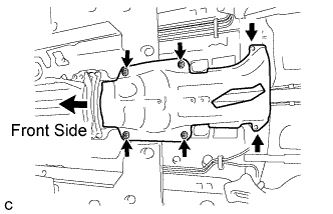
Install the front No. 1 floor heat insulator with the 4 nuts and 2 bolts.
- Torque:
- Nut
- 5.4 N*m { 55 kgf*cm, 48 in.*lbf }
- Bolt
- 19 N*m { 194 kgf*cm, 14 ft.*lbf }
-
-
INSTALL FRONT EXHAUST PIPE ASSEMBLY
-
Install 2 new gaskets to the exhaust manifold RH and exhaust manifold LH.
-
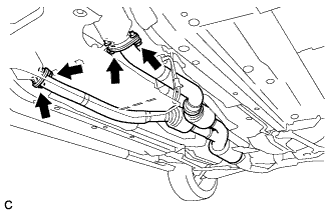
Install the front exhaust pipe assembly with 4 new bolts and 4 new nuts.
- Torque:
- 39 N*m { 398 kgf*cm, 29 ft.*lbf }
-
-
CONNECT HEATED OXYGEN SENSOR
-
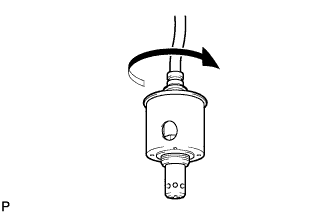
Rotate the heated oxygen sensors 4 times counterclockwise, and then install them to the front exhaust pipe assembly by hand.
-
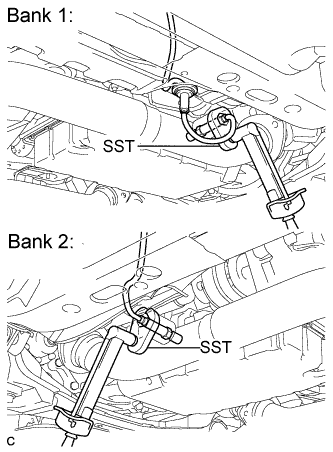
Using SST, tighten the 2 heated oxygen sensors.
- SST
- 09224-00010
- Torque:
- with SST
- 40 N*m { 408 kgf*cm, 30 ft.*lbf }
- without SST
- 44 N*m { 449 kgf*cm, 32 ft.*lbf }
Tech Tips
-
Use a torque wrench with a fulcrum length of 30 cm (11.8 in.). If the fulcrum length is not as specified, calculate the torque value based on the specification for when SST is not used Click here.
-
Make sure that SST and the wrench are connected in a straight line.
-
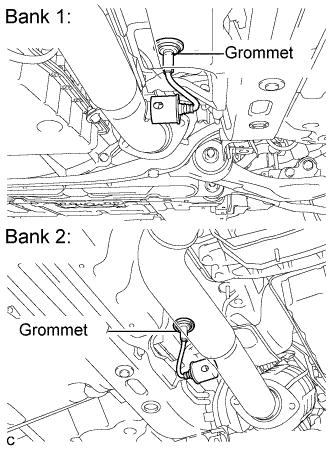
Connect the 2 grommets to the floor panel.
-
-
INSTALL FRONT CENTER FLOOR BRACE
-
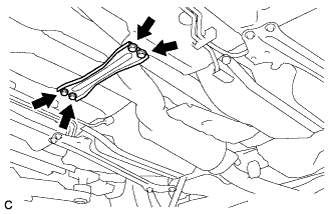
Install the front center floor brace with the 4 bolts.
- Torque:
- 7.4 N*m { 76 kgf*cm, 66 in.*lbf }
-
-
INSTALL REAR NO. 1 FLOOR PANEL BRACE
-
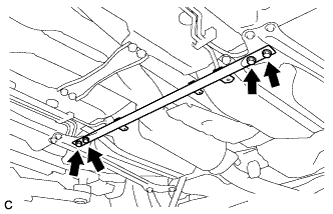
Install the rear No. 1 floor panel brace with the 4 bolts.
- Torque:
- 19 N*m { 194 kgf*cm, 14 ft.*lbf }
-
-
INSTALL TAIL EXHAUST PIPE ASSEMBLY
-
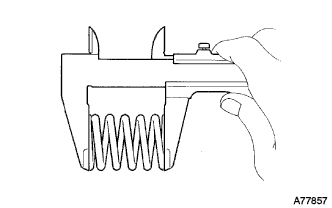
Using a vernier caliper, measure the free length of the compression springs.
Minimum length 41.5 mm (1.634 in.) If the free length is less than the minimum, replace the compression spring.
-
Fully insert a new gasket to the front exhaust pipe assembly.
-
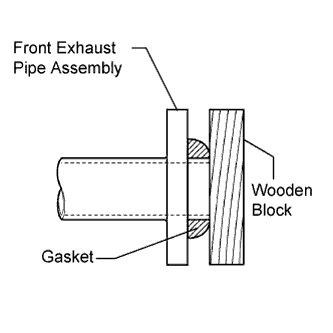
Using a plastic hammer and wooden block, tap in the new gasket until its surface is flush with the front exhaust pipe assembly.
Note
-
Be sure to install the gasket in the correct direction.
-
Do not reuse the gasket.
-
Do not damage the gasket.
-
Do not push in the gasket by using the exhaust pipe when connecting it.
-
-
Connect the tail exhaust pipe assembly to the 6 exhaust pipe supports.
-
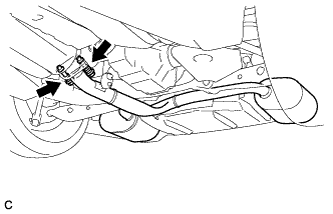
Install the tail exhaust pipe assembly with the 2 bolts and 2 compression springs.
- Torque:
- 43 N*m { 440 kgf*cm, 32 ft.*lbf }
-
-
INSTALL NO. 2 FLOOR UNDER COVER
-
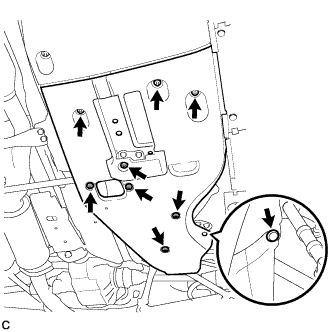
Install the No. 2 floor under cover with the 6 clips and 3 grommets.
-
-
INSTALL NO. 1 FLOOR UNDER COVER
-
Install the No. 1 floor under cover with the 5 clips and 3 grommets.
-
-
INSTALL INSTRUMENT PANEL STAY
-
Engage the claw to install the instrument panel stay.
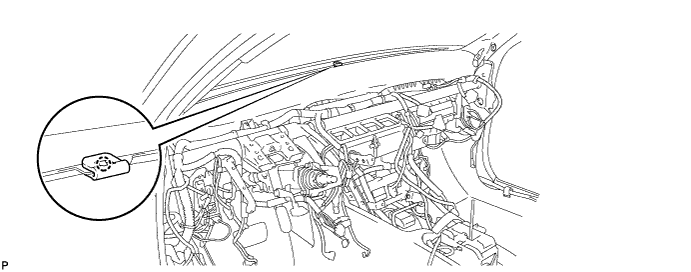
-
-
INSTALL INSTRUMENT PANEL CLIP
-
Engage the 4 claws to install the 4 instrument panel clips.
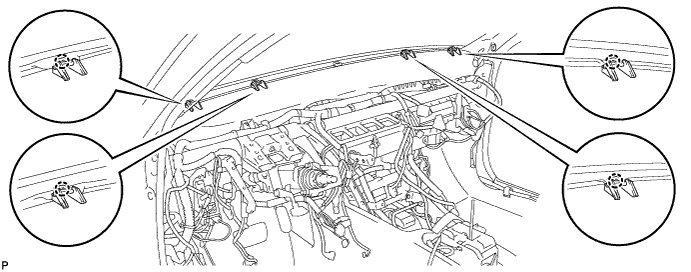
-
-
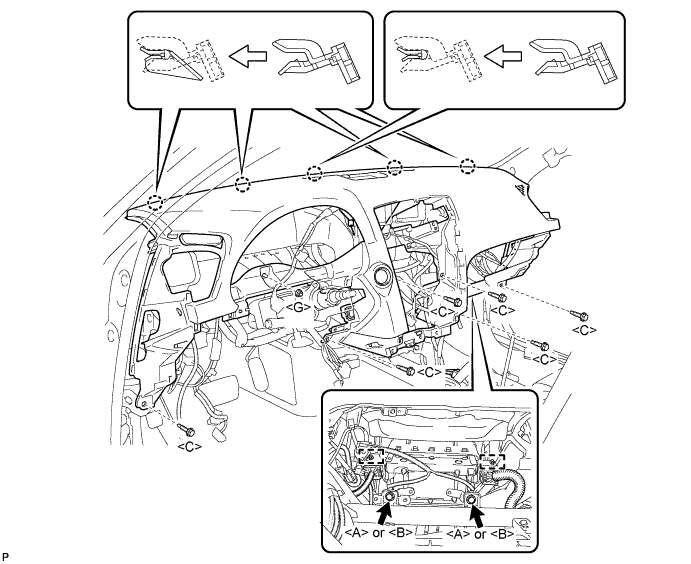
INSTALL INSTRUMENT PANEL SAFETY PAD ASSEMBLY
-
Engage the 5 claws.
Note
Do not allow the wire harness to get caught in the claws.
-
Engage the 2 clamps.
-
Install the 2 passenger airbag bolts <A> or <B>.
- Torque:
- 20 N*m { 204 kgf*cm, 15 ft.*lbf }
-
Install the 6 bolts <C> and nut <G>.
-
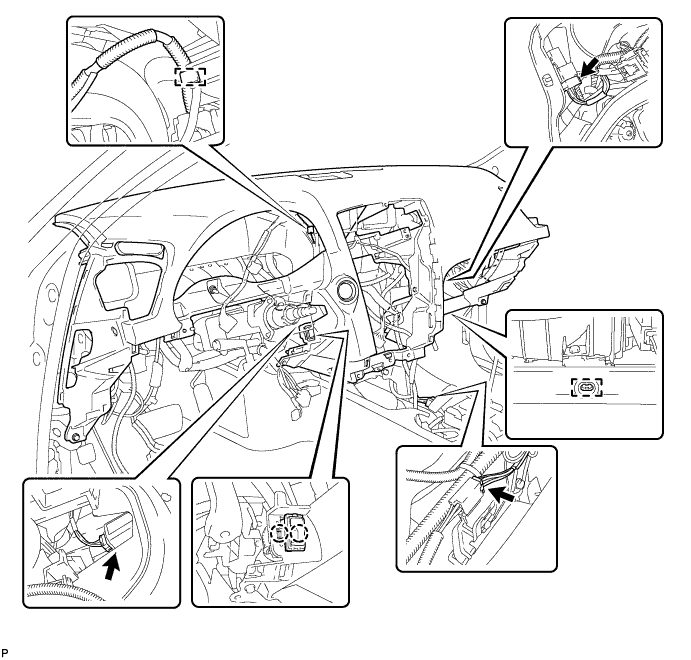
Engage the 2 claws and install the cooler thermistor.
-
Engage the clamps.
-
Connect the connectors and install the instrument panel safety pad assembly.
-
-
CONNECT NO. 2 INSTRUMENT PANEL WIRE
-
Check that the engine switch is off.
-
Check that the cable is disconnected from the negative (-) battery terminal.
CAUTION:
Wait at least 90 seconds after disconnecting the cable from the negative (-) battery terminal to disable the SRS system.
-
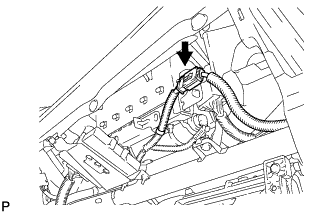
Connect the connector.
Note
When connecting the airbag connector, take care not to damage the airbag wire harness.
-
-
INSTALL NO. 1 CONSOLE BOX DUCT
-
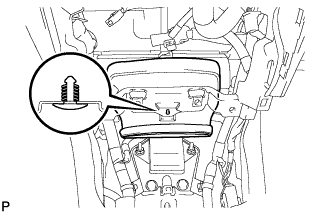
Install the No. 1 console box duct with the clip.
-
-
INSTALL NO. 2 CONSOLE BOX DUCT
-
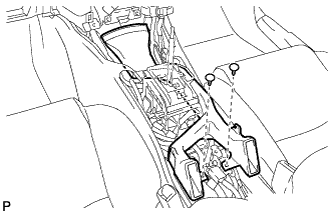
Install the No. 2 console box duct with the 2 clips.
-
-
INSTALL FRONT STEREO COMPONENT SPEAKER ASSEMBLY (w/ Front Center Speaker)
-
Connect the connector.
-
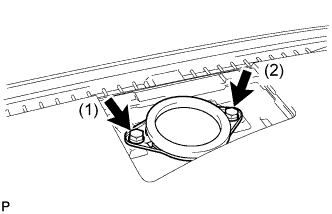
Install the front stereo component speaker assembly with the 2 bolts.
Tech Tips
Install the bolts in the order shown in the illustration.
-
-
INSTALL NO. 3 INSTRUMENT PANEL SPEAKER PANEL SUB-ASSEMBLY
-
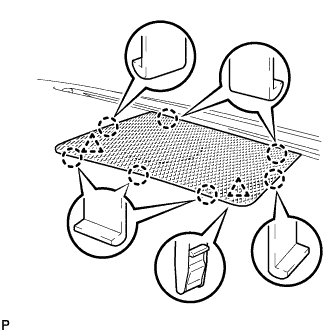
Engage the 7 claws and 2 clips to install the No. 3 instrument panel speaker panel sub-assembly.
-
-
INSTALL NO. 2 INSTRUMENT PANEL REGISTER ASSEMBLY
-
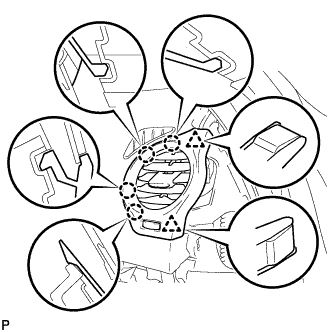
Connect the connector.
-
Engage the 4 claws and 2 clips to install the No. 2 instrument panel register assembly.
-
-
INSTALL NO. 1 INSTRUMENT PANEL REGISTER ASSEMBLY
-
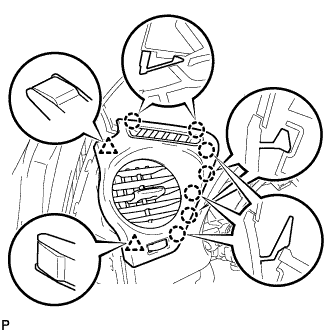
Connect the connector.
-
Engage the 7 claws and 2 clips to install the No. 1 instrument panel register assembly.
-
-
INSTALL GLOVE COMPARTMENT DOOR ASSEMBLY
-
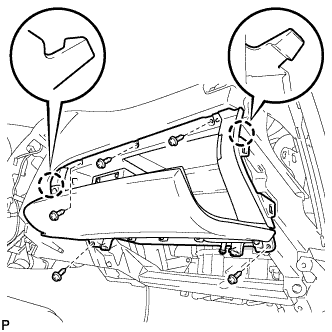
Connect the connectors.
-
Engage the 2 claws.
-
Install the glove compartment door assembly with the 5 screws <D>.
-
-
INSTALL FRONT PASSENGER SIDE KNEE AIRBAG ASSEMBLY
-
Check that the engine switch is off.
-
Check that the battery negative (-) cable is disconnected.
CAUTION:
Wait at least 90 seconds after disconnecting the cable from the negative (-) battery terminal to disable the SRS system.
-
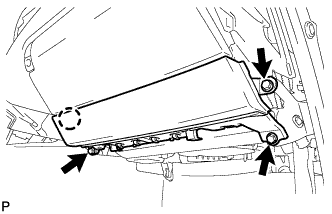
Connect the front passenger side knee airbag connector to the front passenger side knee airbag assembly.
Note
When connecting the airbag connector, take care not to damage the airbag wire harness.
-
Install the front passenger side knee airbag assembly with the 3 bolts and claw.
- Torque:
- 10 N*m { 102 kgf*cm, 7 ft.*lbf }
-
-
INSTALL NO. 2 INSTRUMENT PANEL UNDER COVER SUB-ASSEMBLY
-
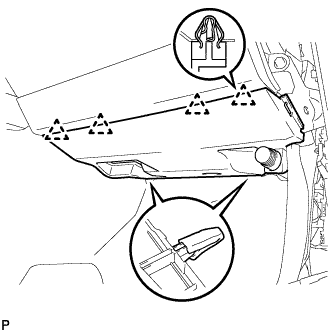
Engage the 4 clips to install the No. 2 instrument panel under cover sub-assembly.
-
-
INSTALL SIDE INSTRUMENT PANEL RH
-
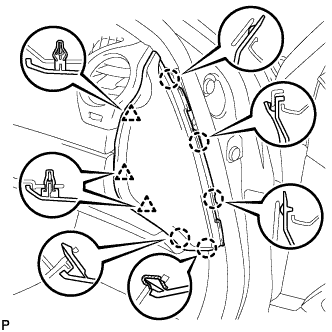
Engage the 5 claws and 3 clips to install the side instrument panel RH.
-
-
INSTALL COMBINATION METER ASSEMBLY
-
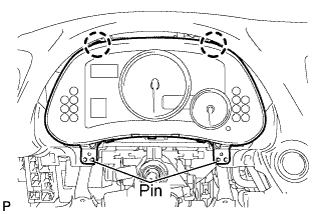
Connect the connectors.
-
Engage the 2 claws and install the combination meter assembly.
-
-
INSTALL INSTRUMENT CLUSTER FINISH PANEL SUB-ASSEMBLY
-
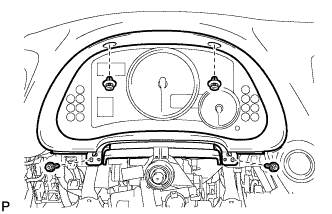
Install the instrument cluster finish panel sub-assembly with the 2 screws <F> and 2 clips.
-
-
INSTALL DRIVER SIDE KNEE AIRBAG ASSEMBLY
-
Check that the engine switch is off.
-
Check that the battery negative (-) cable is disconnected.
CAUTION:
Wait at least 90 seconds after disconnecting the cable from the negative (-) battery terminal to disable the SRS system.
-
Connect the driver side knee airbag connector to the driver side knee airbag assembly.
Note
When connecting the airbag connector, take care not to damage the airbag wire harness.
-
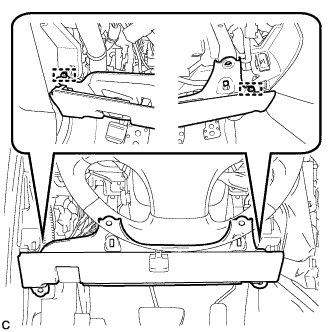
Temporarily install the driver side knee airbag assembly with the 2 pins.
-
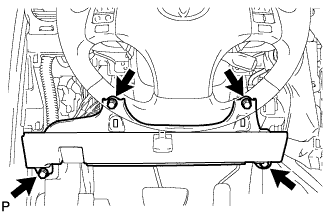
Install the driver side knee airbag assembly with the 4 bolts.
- Torque:
- 10 N*m { 102 kgf*cm, 7 ft.*lbf }
-
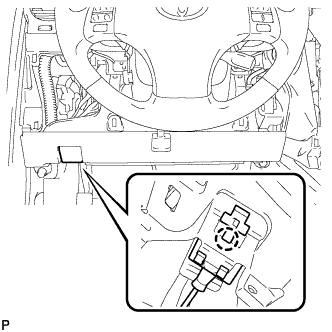
Install the hood lock control cable with the claw.
-
-
INSTALL LOWER INSTRUMENT PANEL FINISH PANEL SUB-ASSEMBLY
-
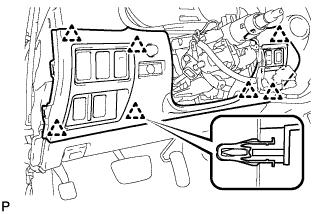
Connect the connectors.
-
Engage the 7 clips to install the lower instrument panel finish panel sub-assembly.
-
-
INSTALL NO. 1 INSTRUMENT PANEL UNDER COVER SUB-ASSEMBLY
-
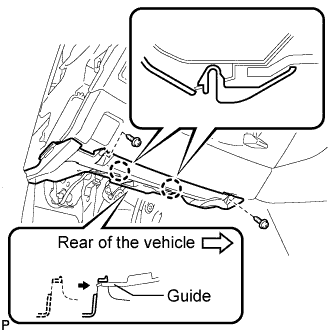
Connect the connectors.
-
Insert the No. 1 instrument panel under cover sub-assembly into the guide as shown in the illustration.
-
Engage the 2 claws.
-
Install the No. 1 instrument panel under cover sub-assembly with the 2 screws <D>.
-
-
INSTALL SIDE INSTRUMENT PANEL LH
-
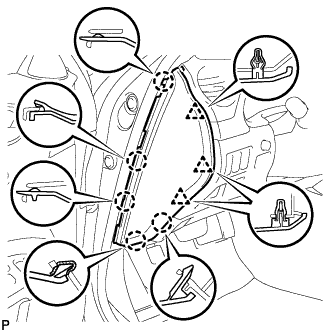
Engage the 5 claws and 3 clips to install the side instrument panel LH.
-
-
INSTALL FRONT PILLAR GARNISH LH
-
Remove the protective cover.
-
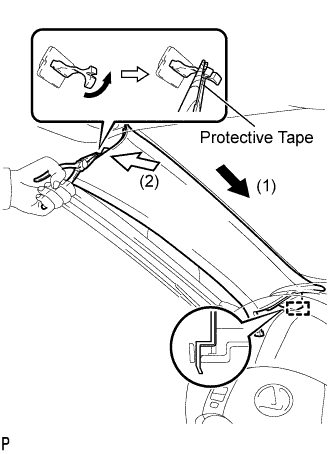
Make sure that the front pillar garnish clip is not damaged.
Note
-
If there is any damage, replace the garnish clip with a new one.
-
When a garnish clip is being replaced, make sure to install it in the direction shown in the illustration.
-
-
Engage the guide.
-
Turn the end of the front pillar garnish clip 90° with needle-nosed pliers and install it to the front pillar garnish LH.
Tech Tips
Tape the tips of the needle-nosed pliers before use.
-
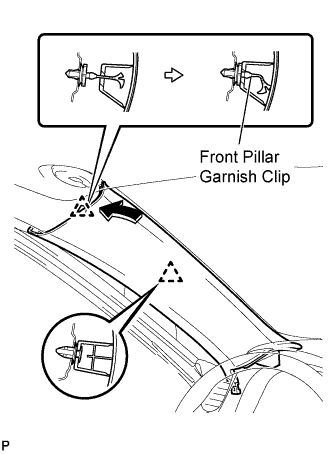
Engage the 2 clips to install the front pillar garnish LH.
-
-
INSTALL FRONT PILLAR GARNISH RH
Tech Tips
Use the same procedure for the RH side and the LH side.
-
INSTALL FRONT DOOR OPENING TRIM COVER LH
-
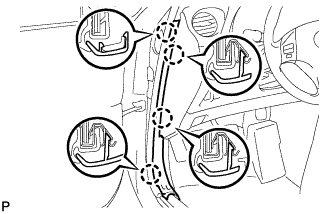
Engage the 4 claws and install the front door opening trim cover LH.
-
-
INSTALL FRONT DOOR OPENING TRIM COVER RH
Tech Tips
Use the same procedure for the RH side and the LH side.
-
INSTALL FRONT DOOR SCUFF PLATE LH
-
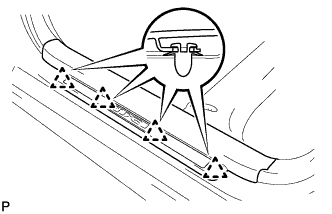
Engage the 4 clips.
-
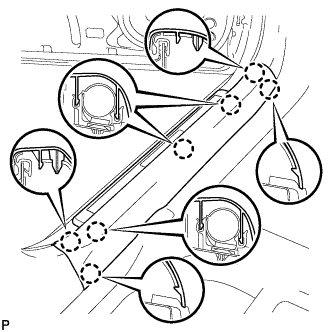
Engage the 7 claws and install the front door scuff plate LH.
-
-
INSTALL FRONT DOOR SCUFF PLATE RH
Tech Tips
Use the same procedure for the RH side and the LH side.
-
INSTALL TURN SIGNAL SWITCH ASSEMBLY WITH SPIRAL CABLE SUB-ASSEMBLY
-
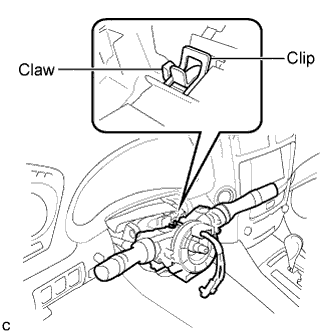
Install the turn signal switch assembly with spiral cable sub-assembly to the steering column assembly with the clamp.
-
Connect the connectors to the turn signal switch assembly with spiral cable sub-assembly.
-
-
INSTALL STEERING COLUMN COVER
-
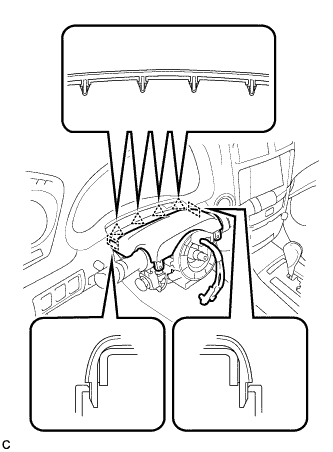
Engage the 4 clips and 2 guides to install the upper steering column cover onto the instrument panel cluster finish panel.
-
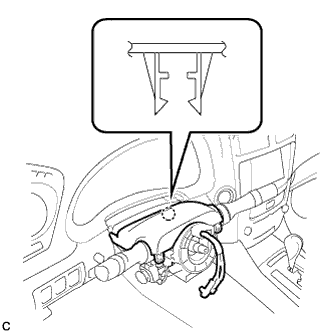
Engage the claw to install the upper steering column cover.
-
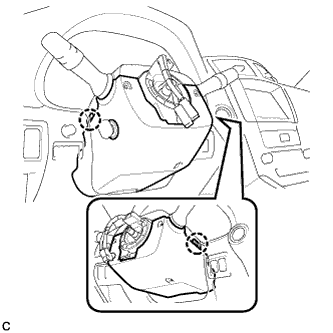
Engage the 2 claws to install the lower steering column cover.
Note
Do not damage the tilt and telescopic switch.
-
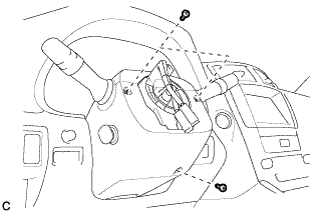
Install the 3 screws.
- Torque:
- 2.0 N*m { 20 kgf*cm, 18 in.*lbf }
-
-
ADJUST SPIRAL CABLE SUB-ASSEMBLY
-
Check that the engine switch is off.
-
Check that the battery negative (-) cable is disconnected.
CAUTION:
Wait at least 90 seconds after disconnecting the cable from the negative (-) battery terminal to disable the SRS system.
-
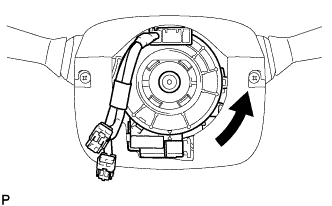
Rotate the spiral cable counterclockwise slowly by hand until it stops.
Note
Do not turn the spiral cable using the airbag wire harness.
-
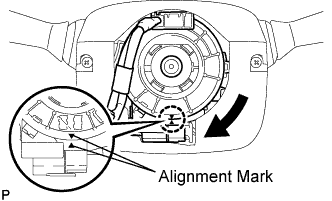
Rotate the spiral cable clockwise approximately 2.5 turns to align the marks.
Note
Do not turn the spiral cable using the airbag wire harness.
Tech Tips
The spiral cable will rotate approximately 2.5 turns to both the left and right from the center.
-
-
INSTALL STEERING WHEEL ASSEMBLY
-
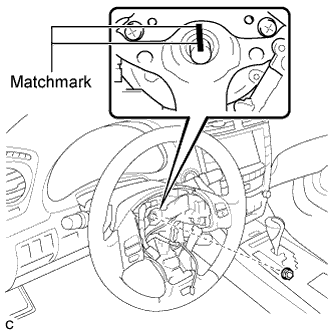
Align the matchmarks on the steering wheel assembly and steering main shaft.
-
Install the steering wheel assembly set nut.
- Torque:
- 50 N*m { 510 kgf*cm, 37 ft.*lbf }
-
Connect the connectors to the spiral cable sub-assembly.
-
-
INSTALL STEERING PAD
-
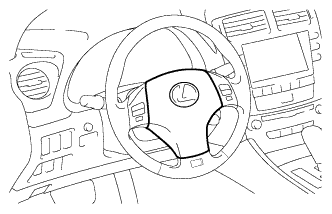
With the steering pad installed on the vehicle, perform a visual check. If there are any following defects, replace the steering pad with a new one:
-
Cuts, minute cracks or marked discoloration on the steering pad top surface or grooves.
-
-
Make sure that the horn sounds.
Tech Tips
If the horn does not sound, inspect the horn system Click here.
-
-
INSTALL LOWER NO. 3 STEERING WHEEL COVER
-
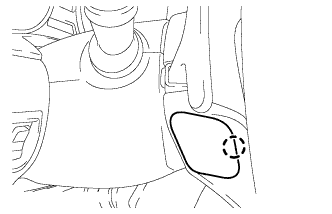
Install the lower No. 3 steering wheel cover with the claw.
-
-
INSTALL LOWER NO. 2 STEERING WHEEL COVER
-
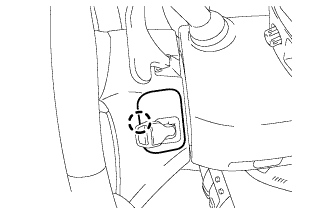
Install the lower No. 2 steering wheel cover with the claw.
-
-
INSTALL INTEGRATION CONTROL PANEL WITH RADIO RECEIVER ASSEMBLY (w/o Navigation System)
-
Connect each connector.
-
Install the integration control panel with radio receiver assembly with the 4 bolts.
-
-
INSTALL MULTI-MEDIA MODULE RECEIVER ASSEMBLY WITH DISPLAY (w/ Navigation System)
-
Connect each connector.
-
Install the the multi-media module receiver assembly with display with the 4 bolts.
-
-
INSTALL CENTER LOWER INSTRUMENT CLUSTER FINISH PANEL
-
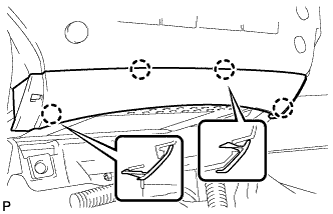
Engage the 4 claws to install the center lower instrument cluster finish panel.
-
-
INSTALL NO. 3 INSTRUMENT PANEL REGISTER ASSEMBLY
-
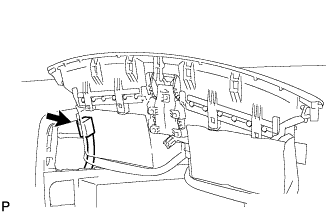
for LHD:
-
Connect the connector.
-
-
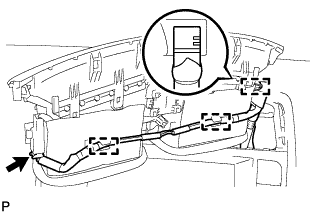
for RHD:
-
Connect the connector.
-
Engage the 3 clamps.
-
-
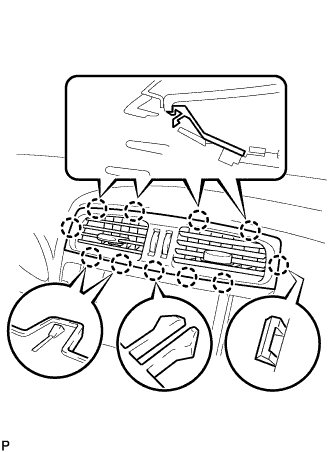
Engage the 11 claws to install the No. 3 instrument panel register assembly.
-
-
INSTALL CONSOLE BOX
-
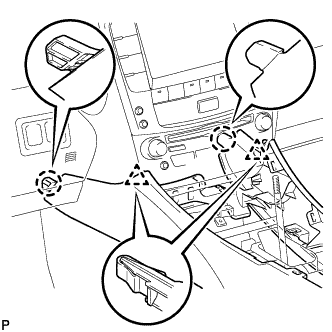
Engage the 2 claws and 2 clips.
-
Connect each connector.
-
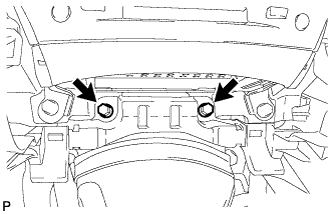
Install the 2 bolts.
-
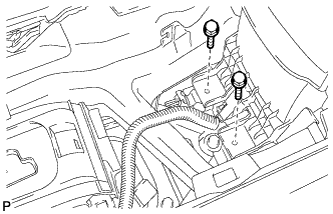
Install the 2 bolts.
-
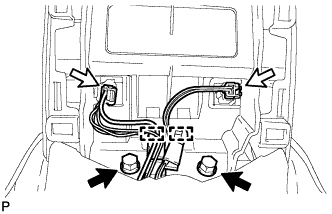
Connect the 2 connectors.
-
Engage the 2 clamps.
-
Install the 2 bolts.
-
-
INSTALL CONSOLE BOX REGISTER ASSEMBLY (w/ Ashtray)
-
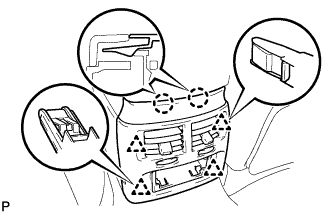
Engage the 2 claws and 4 clips to install the console box register assembly.
-
-
INSTALL CONSOLE BOX REGISTER ASSEMBLY (w/o Ashtray)
-
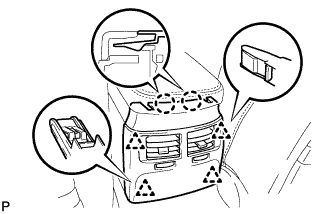
Engage the 2 claws and 4 clips to install the console box register assembly.
-
-
INSTALL REAR ASH RECEPTACLE ASSEMBLY (w/ Ashtray)
-
Install the rear ash receptacle assembly.
-
-
INSTALL FRONT ASH RECEPTACLE BOX SUB-ASSEMBLY (w/ Ashtray)
-
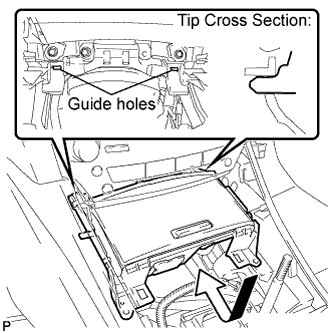
Connect the connectors.
-
Insert the protruding parts of the front ash receptacle box sub-assembly into the 2 guide holes as shown in the illustration.
-
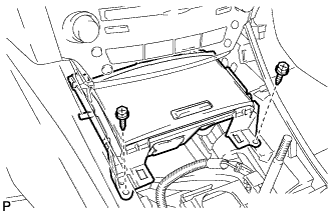
Install the front ash receptacle box sub-assembly with the 2 screws <E>.
-
-
INSTALL INSTRUMENT PANEL BOX ASSEMBLY (w/o Ashtray)
-
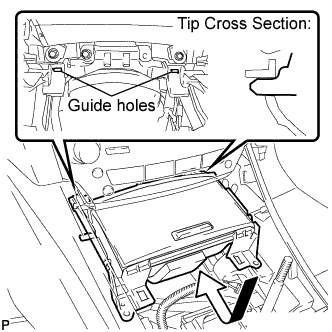
Connect the connectors.
-
Insert the protruding parts of the instrument panel box assembly into 2 guide holes as shown in the illustration.
-
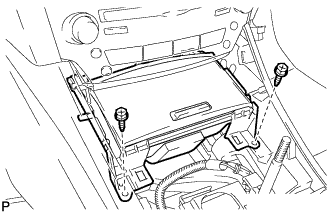
Install the instrument panel box assembly with the 2 screws <E>.
-
-
INSTALL CONSOLE PANEL SUB-ASSEMBLY
-
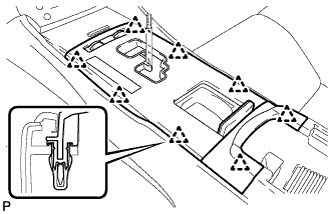
Connect the connectors.
-
Engage the 8 clips to install the console panel sub-assembly.
-
-
INSTALL UPPER NO. 2 CONSOLE PANEL GARNISH
-
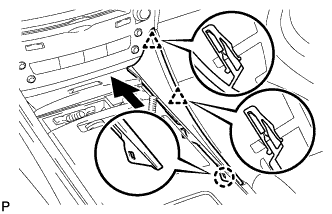
Engage the claw and 2 clips to install the upper No. 2 console panel garnish as shown in the illustration.
-
-
INSTALL UPPER NO. 1 CONSOLE PANEL GARNISH
-
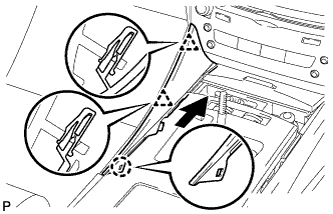
Engage the claw and 2 clips to install the upper No. 1 console panel garnish as shown in the illustration.
-
-
INSTALL SHIFT LEVER KNOB SUB-ASSEMBLY
-
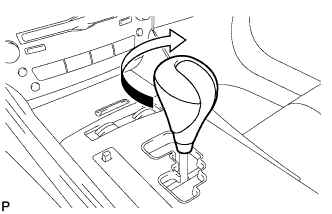
Turn the shift lever knob clockwise and install the shift lever knob sub-assembly.
-
-
INSTALL FRONT SEAT ASSEMBLY LH
-
Check the power seat operation.
-
Check the seat heater operation.
-
Turn the engine switch on (IG).
-
Turn the seat heater switch on.
-
Wait 5 minutes or more and confirm that the seat surface becomes warm.
-
-
-
INSTALL REAR INNER SEAT TRACK BRACKET COVER LH
-
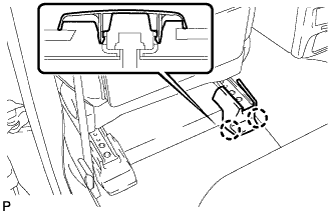
Engage the 2 claws and install the rear inner seat track bracket cover.
-
-
INSTALL REAR OUTER SEAT TRACK BRACKET COVER LH
-
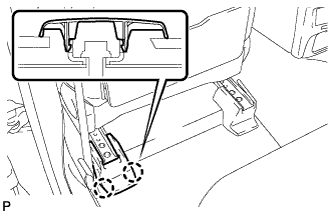
Engage the 2 claws and install the rear outer seat track bracket cover.
-
-
INSTALL FRONT INNER SEAT TRACK BRACKET COVER LH
-
Operate the power seat switch knob and move the seat to the rearmost position.
-
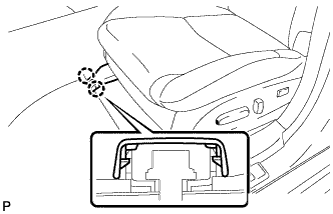
Engage the 2 claws and install the front inner seat track bracket cover.
-
-
INSTALL FRONT OUTER SEAT TRACK BRACKET COVER LH
-
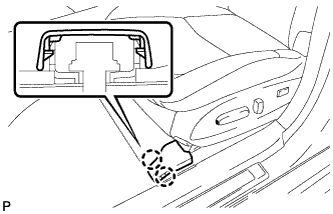
Engage the 2 claws and install the front outer seat track bracket cover.
-
-
INSTALL FRONT SEAT HEADREST ASSEMBLY
-
INSTALL FRONT SEAT ASSEMBLY RH
Tech Tips
Use the same procedure for the RH side and the LH side.
-
INSTALL REAR INNER SEAT TRACK BRACKET COVER RH
Tech Tips
Use the same procedure for the RH side and the LH side.
-
INSTALL REAR OUTER SEAT TRACK BRACKET COVER RH
Tech Tips
Use the same procedure for the RH side and the LH side.
-
INSTALL FRONT INNER SEAT TRACK BRACKET COVER RH
Tech Tips
Use the same procedure for the RH side and the LH side.
-
INSTALL FRONT OUTER SEAT TRACK BRACKET COVER RH
Tech Tips
Use the same procedure for the RH side and the LH side.
-
INSTALL FRONT SEAT HEADREST ASSEMBLY
-
INSTALL REAR SEATBACK ASSEMBLY
-
Place the seatback in the cabin.
Note
Be careful not to damage the vehicle body.
-
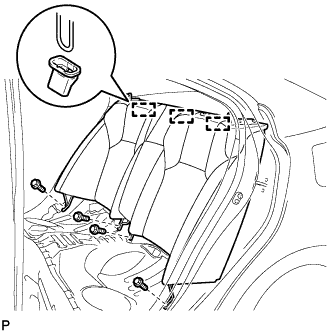
Engage the 3 hooks.
-
Install the rear seatback assembly with the 4 bolts.
- Torque:
- 18 N*m { 184 kgf*cm, 13 ft.*lbf }
-
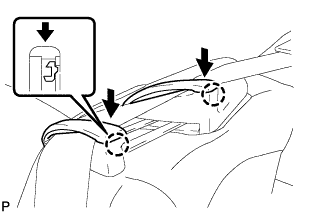
Pass the seat belt through the rear seat shoulder belt guide RH.
-
Engage the 2 claws and close the 2 caps of the rear seat shoulder belt guide RH.
-
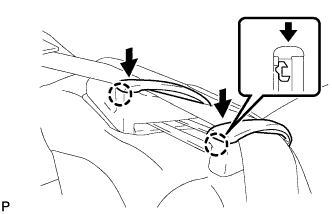
Pass the seat belt through the rear seat shoulder belt guide LH.
-
Engage the 2 claws and close the 2 caps of the rear seat shoulder belt guide LH.
-
-
INSTALL REAR SEAT HEADREST ASSEMBLY LH
-
INSTALL REAR SEAT HEADREST ASSEMBLY RH
-
INSTALL REAR SEAT CUSHION ASSEMBLY
-
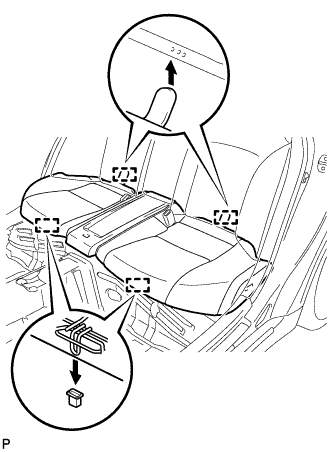
Engage the 2 rear hooks of the seat cushion to the child restraint seat anchor bracket.
-
Engage the 2 front hooks of the seat cushion to the vehicle body.
-
Confirm that the seat cushion is firmly installed.
Note
When installing the seat cushion, make sure the seat belt buckle is not under the seat cushion.
-
-
CONNECT CABLE TO NEGATIVE BATTERY TERMINAL
Note
When disconnecting the cable, some systems need to be initialized after the cable is reconnected Click here.
-
INSPECT STEERING PAD
-
With the steering pad installed on the vehicle, perform a visual check. If there are any following defects, replace the steering pad with a new one:
-
Cuts, minute cracks or marked discoloration on the steering pad top surface or grooves.
-
-
Make sure that the horn sounds.
Tech Tips
If the horn does not sound, inspect the horn system Click here.
-
-
INSPECT SRS WARNING LIGHT
-
INSPECT FRONT SEAT ASSEMBLY
-
Check the power seat operation.
-
Check the seat heater operation.
-
Turn the engine switch on (IG).
-
Turn the seat heater switch on.
-
Wait 5 minutes or more and confirm that the seat surface becomes warm.
-
-
-
INSPECT SHIFT LEVER POSITION
-
When shifting from P to R with the engine switch on (IG) and the brake pedal depressed, make sure that the shift lever moves smoothly and moves correctly into the position.
-
Check that the shift lever does not stop when moving the shift lever from R to P, and check that the shift lever does not stick when moving the shift lever from D to M.
-
Start the engine and make sure that the vehicle moves forward when shifting from N to D and moves rearward when shifting to R.
If an operation cannot be done as specified, inspect the park/neutral position switch assembly and check the shift lever assembly installation condition.
-
-
INSPECT FOR EXHAUST GAS LEAK
If exhaust gas is leaking, tighten the related parts to stop the leak. Replace damaged parts as necessary.