FRONT EVAPORATOR TEMPERATURE SENSOR REMOVAL

-
ALIGN FRONT WHEELS FACING STRAIGHT AHEAD
-
REMOVE COOL AIR INTAKE DUCT SEAL
-
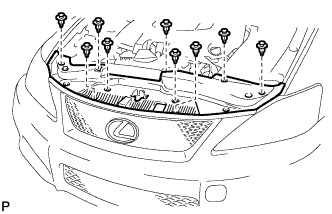
Using a clip remover, remove the 9 clips and cool air intake duct seal.
-
-
REMOVE ENGINE ROOM SIDE COVER LH (for LHD)
-
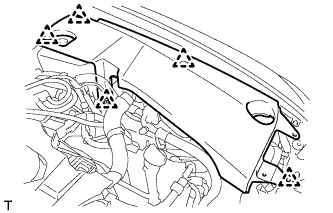
Remove the 5 clips and engine room side cover LH.
-
-
REMOVE ENGINE ROOM SIDE COVER LH (for RHD)
-
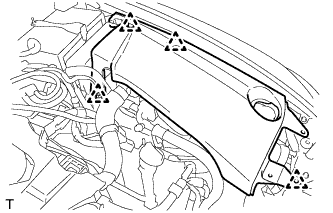
Remove the 4 clips and engine room side cover LH.
-
-
REMOVE ENGINE ROOM SIDE COVER RH (for LHD)
-
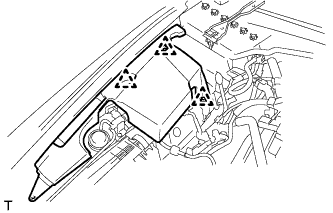
Remove the 3 clips and engine room side cover RH.
-
-
REMOVE ENGINE ROOM SIDE COVER RH (for RHD)
-
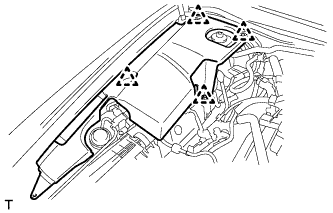
Remove the 4 clips and engine room side cover RH.
-
-
DISCHARGE REFRIGERANT FROM REFRIGERATION SYSTEM
-
Start up the engine.
-
Turn the A/C switch on.
-
Operate the cooler compressor at an engine speed of approximately 1000 rpm for 5 to 6 minutes to circulate the refrigerant and collect the compressor oil remaining in each component into the cooler compressor.
-
Stop the engine.
-
Recover the refrigerant from the A/C system using a refrigerant recovery unit.
-
-
DISCONNECT CABLE FROM NEGATIVE BATTERY TERMINAL
CAUTION:
Wait at least 90 seconds after disconnecting the cable from the negative (-) battery terminal to disable the SRS system Click here.
Note
When disconnecting the cable, some systems need to be initialized after the cable is reconnected Click here.
-
REMOVE FRONT UPPER FENDER PROTECTOR LH
-
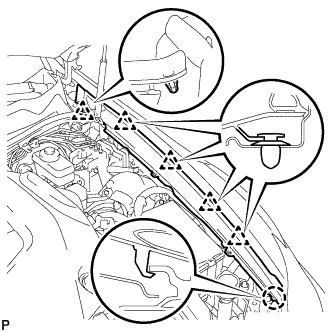
Separate the clip on the rubber portion of the cowl top ventilator louver sub-assembly from the front upper fender protector LH.
-
Disengage the 4 clips and the claw to remove the front upper fender protector LH.
-
-
REMOVE FRONT UPPER FENDER PROTECTOR RH
Tech Tips
Use the same procedure for the RH side and LH side Click here.
-
REMOVE ROOF DRIP SIDE FINISH MOULDING LH
-
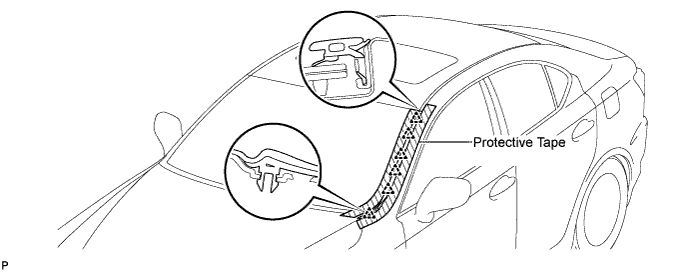
Put protective tape around the roof drip side finish moulding.
-
Using a moulding remover, disengage the 6 clips and remove the roof drip side finish moulding.
Note
-
Do not remove the clips.
-
If the clips are damaged or dropped off, replace them with new clips.
-
-
-
REMOVE ROOF DRIP SIDE FINISH MOULDING RH
Tech Tips
Use the same procedure for the RH side and LH side Click here.
-
REMOVE FRONT WIPER ARM HEAD CAP
-
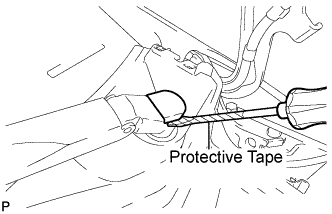
Using a screwdriver, remove the front wiper arm head cap.
Tech Tips
-
Use the same procedure for the RH side and LH side.
-
Tape the screwdriver tip before use.
-
-
-
REMOVE FRONT WIPER ARM AND BLADE ASSEMBLY LH
-
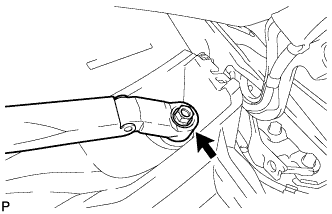
Remove the nut and the front wiper arm and blade assembly LH.
-
-
REMOVE FRONT WIPER ARM AND BLADE ASSEMBLY RH
-
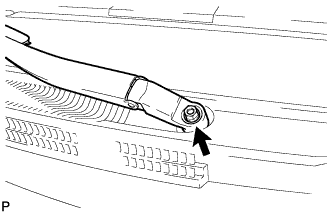
Remove the nut and the front wiper arm and blade assembly RH.
-
-
REMOVE COWL TOP VENTILATOR LOUVER SUB-ASSEMBLY
-
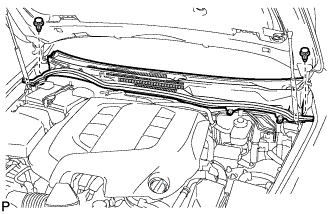
Remove the 2 clips.
-
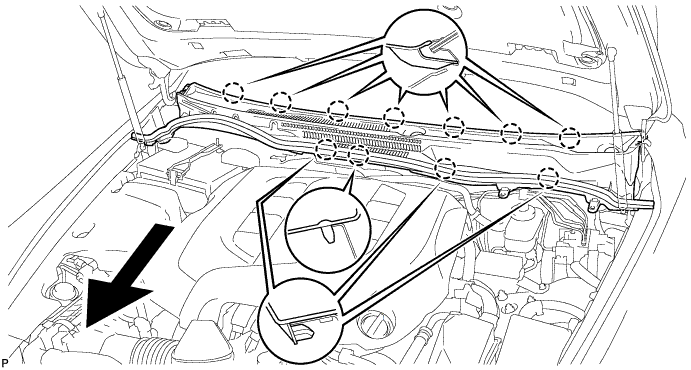
Disengage the 11 claws and pull out the cowl top ventilator louver sub-assembly.
-
-
REMOVE WINDSHIELD WIPER MOTOR AND LINK ASSEMBLY
-
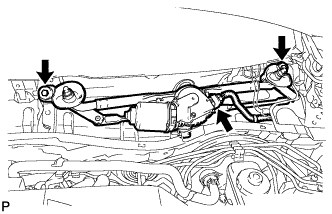
Disconnect the connector.
-
Remove the 2 bolts.
-
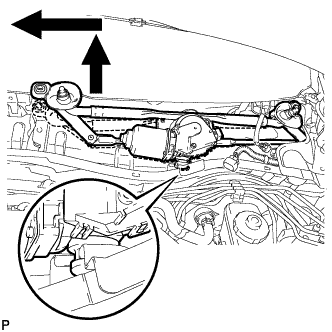
Disengage the rubber pin of the windshield wiper motor from the vehicle body as shown in the illustration.
-
Remove the windshield wiper motor and link assembly.
-
-
SEPARATE SUCTION PIPE SUB-ASSEMBLY
-
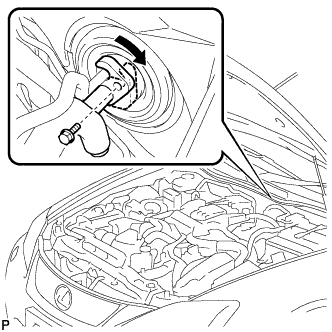
Remove the bolt, and slide the hook connector.
-
Disconnect the suction pipe sub-assembly.
-
Remove the O-ring from the suction pipe sub-assembly.
Note
Seal the openings of the disconnected parts using vinyl tape to prevent moisture and foreign matter from entering.
-
-
SEPARATE COOLER REFRIGERANT LIQUID PIPE A
-
Disconnect the cooler refrigerant liquid pipe A.
-
Remove the O-ring from the cooler refrigerant liquid pipe A.
Note
Seal the openings of the disconnected parts using vinyl tape to prevent moisture and foreign matter from entering.
-
-
REMOVE HEATER WATER OUTLET HOSE
-
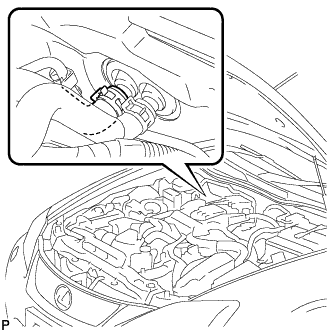
Using pliers, grip the claws of the clip and slide the clip to disconnect the heater water outlet hose.
-
-
REMOVE HEATER WATER INLET HOSE
Tech Tips
Use the same procedure for the heater water outlet hose.
-
REMOVE SHIFT LEVER KNOB SUB-ASSEMBLY
-
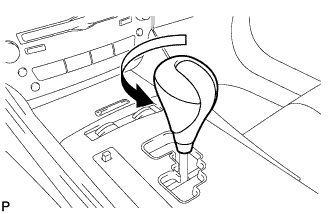
Turn the shift lever knob counterclockwise and remove the shift lever knob sub-assembly.
-
-
REMOVE UPPER NO. 1 CONSOLE PANEL GARNISH
-
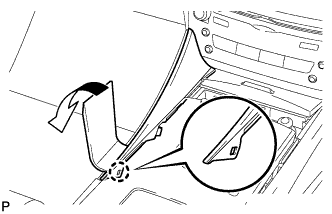
Using a moulding remover, disengage the claw.
-
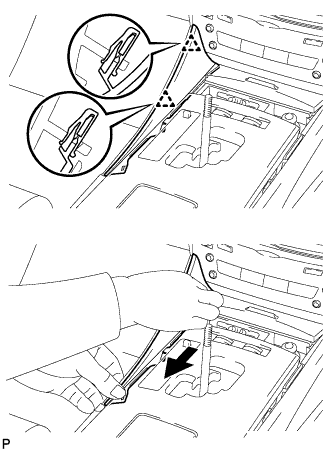
Pull the upper No. 1 console panel garnish in the direction indicated by the arrow to disengage the 2 clips and remove the upper No. 1 console panel garnish.
-
-
REMOVE UPPER NO. 2 CONSOLE PANEL GARNISH
-
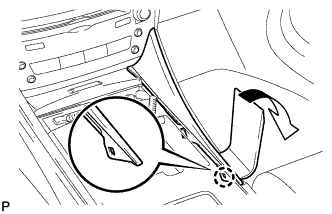
Using a moulding remover, disengage the claw.
-
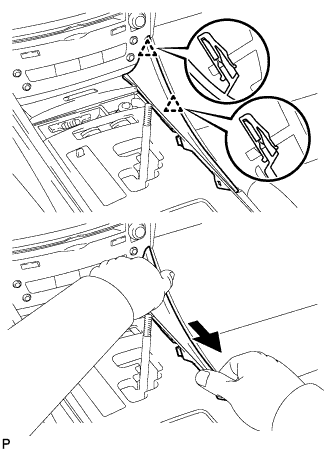
Pull the upper No. 2 console panel garnish in the direction indicated by the arrow to disengage the 2 clips and remove the upper No. 2 console panel garnish.
-
-
REMOVE CONSOLE PANEL SUB-ASSEMBLY
-
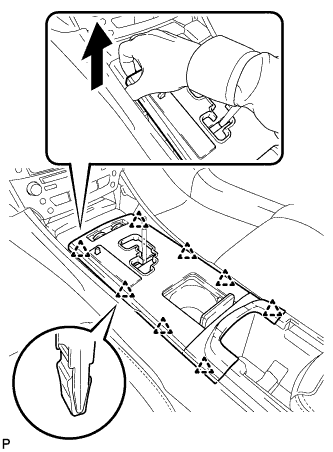
Hold the front of the console panel sub-assembly as shown in the illustration and disengage the 8 clips by pulling the console panel sub-assembly in the direction shown by the arrow.
Note
Do not use any tools to disengage the clips. The use of tools may result in damage to the console panel sub-assembly.
-
Disconnect the connectors and remove the console panel sub-assembly.
-
-
REMOVE FRONT ASH RECEPTACLE ASSEMBLY
-
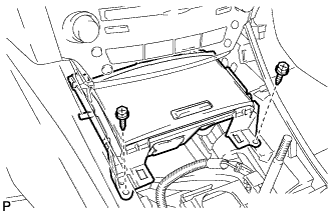
Remove the 2 screws <E>.
-
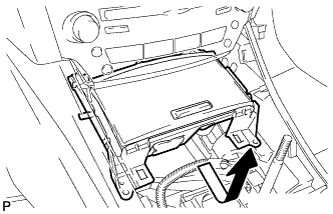
Pull the front ash receptacle assembly in the direction indicated by the arrow to disconnect the connectors and remove the front ash receptacle assembly.
-
-
REMOVE REAR ASH RECEPTACLE ASSEMBLY
-
Remove the rear ash receptacle assembly.
-
-
REMOVE CONSOLE BOX REGISTER ASSEMBLY
-
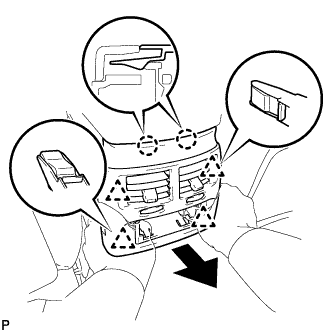
Disengage the 2 claws and 4 clips, and then remove the console box register assembly.
-
-
REMOVE CONSOLE BOX
-
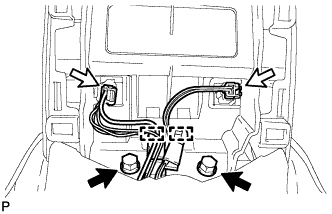
Remove the 2 bolts.
-
Disconnect the 2 connectors.
-
Disengage the 2 clamps.
-
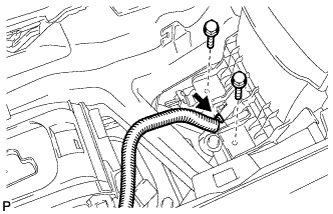
Remove the 2 bolts.
-
Disconnect the connector.
-
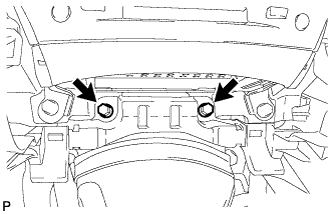
Remove the 2 bolts.
-
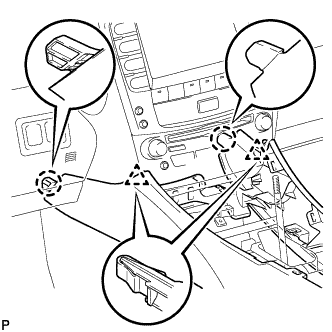
Disengage the 2 claws and 2 clips, and then remove the console box.
-
-
REMOVE NO. 3 INSTRUMENT PANEL REGISTER ASSEMBLY
-
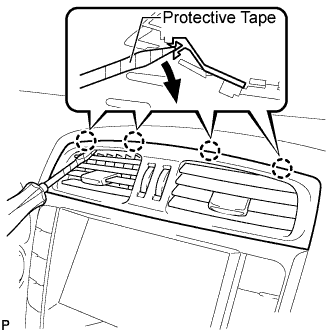
Using a screwdriver, disengage the 4 claws.
Tech Tips
Tape the screwdriver tip before use.
-
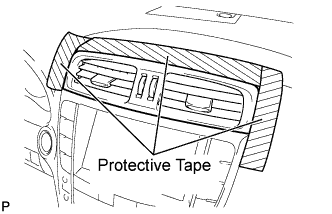
Apply protective tape to the areas shown in the illustration.
-
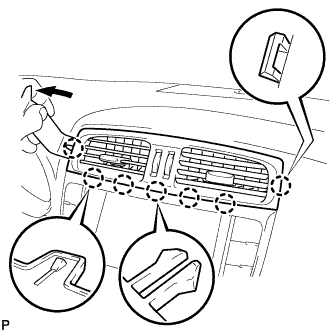
Using a moulding remover, disengage the 4 claws starting from the left of the No. 3 instrument panel register assembly. Disengage the remaining 3 claws by pulling the No. 3 instrument panel register assembly by hand.
Note
Do not pry the lower part of the No. 3 instrument panel register assembly. Doing so may damage the assembly.
-
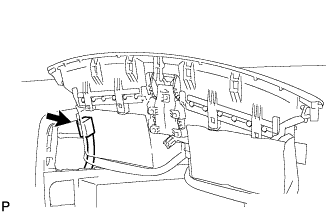
for LHD:
-
Disconnect the connector and remove the No. 3 instrument panel register assembly.
-
-
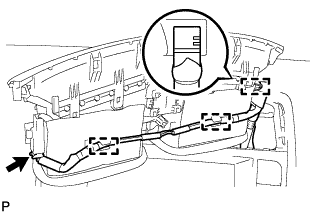
for RHD:
-
Disengage the 3 clamps.
-
Disconnect the connector and remove the No. 3 instrument panel register assembly.
-
-
-
REMOVE CENTER LOWER INSTRUMENT CLUSTER FINISH PANEL
-
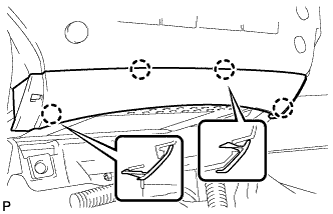
Disengage the 4 claws to remove the center lower instrument cluster finish panel.
-
-
REMOVE MULTI-DISPLAY WITH RADIO RECEIVER ASSEMBLY (w/ Navigation System)
-
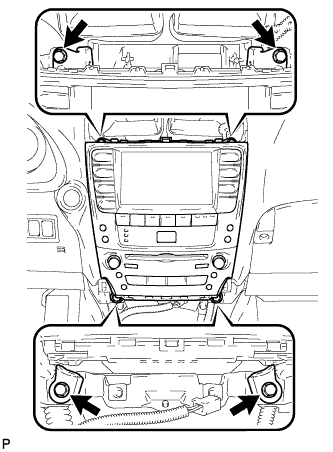
Remove the 4 bolts.
-
Pull the multi-display with radio receiver assembly toward the rear of the vehicle.
-
Disconnect each connector and remove the multi-display.
-
-
REMOVE INTEGRATION CONTROL PANEL WITH RADIO RECEIVER ASSEMBLY (w/o Navigation System)
-
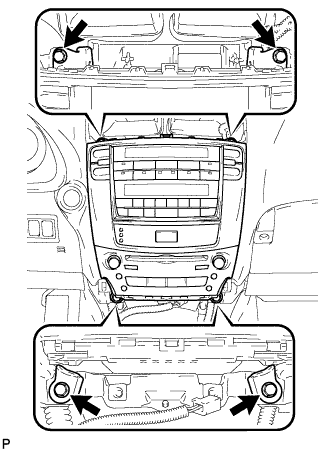
Remove the 4 bolts.
-
Pull the integration control panel with radio receiver assembly toward the rear of the vehicle.
-
Disconnect each connector and remove the panel.
-
-
REMOVE LOWER NO. 2 STEERING WHEEL COVER
-
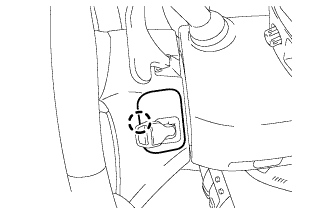
Disengage the claw and remove the lower No. 2 steering wheel cover.
-
-
REMOVE LOWER NO. 3 STEERING WHEEL COVER
-
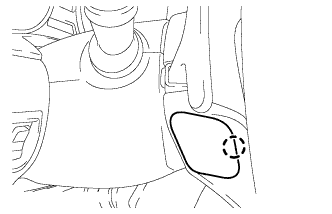
Disengage the claw and remove the lower No. 3 steering wheel cover.
-
-
REMOVE STEERING PAD
-
Check that the engine switch is off.
-
Check that the cable is disconnected from the negative (-) battery terminal.
CAUTION:
Wait at least 90 seconds after disconnecting the cable from the negative (-) battery terminal to disable the SRS system.
-
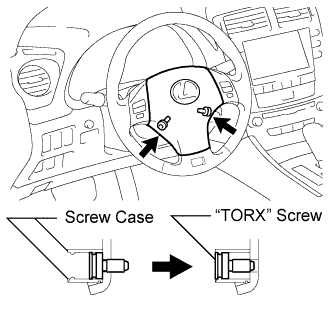
Using a T30 "TORX" socket wrench, loosen the 2 "TORX" screws until the groove along the screw circumference catches on the screw case.
-
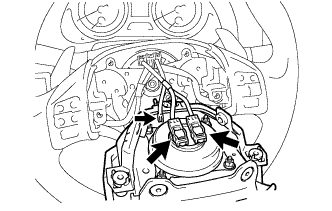
Pull out the steering pad from the steering wheel assembly.
Note
When removing the steering pad, do not pull the airbag wire harness.
-
Disconnect the horn connector from the steering pad.
-
Disconnect the 2 airbag connectors and remove the steering pad.
Note
When disconnecting the airbag connector, take care not to damage the airbag wire harness.
-
-
REMOVE STEERING WHEEL ASSEMBLY
-
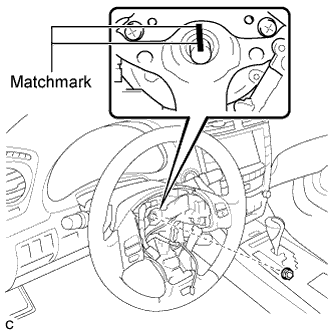
Remove the steering wheel assembly set nut.
-
Put matchmarks on the steering wheel assembly and the steering main shaft.
-
Disconnect the connectors from the spiral cable.
-

Install SST to the steering wheel assembly as shown in the illustration.
- SST
- 09950-50013 ( 09951-05010, 09952-05010, 09953-05020, 09954-05021 )
Note
Apply a small amount of grease to the threads and tip of SST (09953-05020) before use.
-
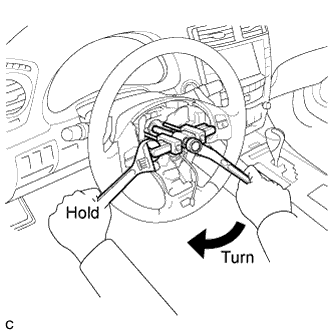
Using SST, remove the steering wheel assembly.
-
-
REMOVE STEERING COLUMN COVER
-
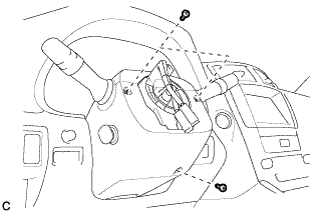
Remove the 3 screws.
-
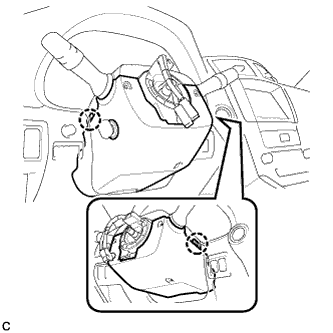
Disengage the 2 claws to remove the lower steering column cover.
Note
Do not damage the tilt and telescopic switch.
-
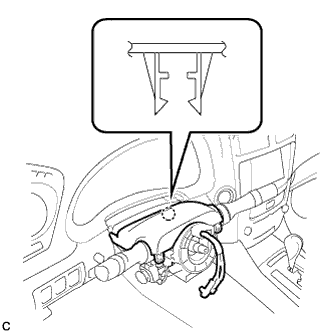
Disengage the claw.
-
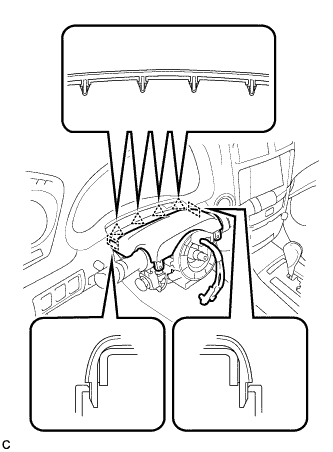
Disengage the 4 clips and 2 guides to separate the upper steering column cover.
-
-
REMOVE TURN SIGNAL SWITCH ASSEMBLY WITH SPIRAL CABLE SUB-ASSEMBLY
-
Disconnect the connectors from the turn signal switch assembly with spiral cable sub-assembly.
-
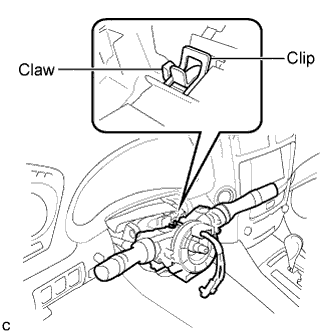
Using pliers, grip the claws of the clip and remove the turn signal switch assembly with spiral cable sub-assembly from the steering column assembly.
-
-
REMOVE FRONT DOOR SCUFF PLATE LH
-
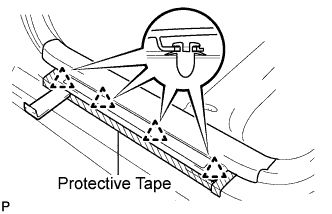
Put protective tape around the front door scuff plate.
-
Using a moulding remover, disengage the 4 clips.
-
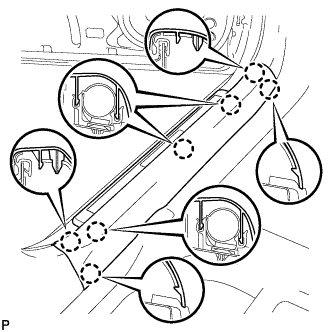
Disengage the 7 claws and remove the front door scuff plate LH.
-
-
REMOVE FRONT DOOR OPENING TRIM COVER LH
-
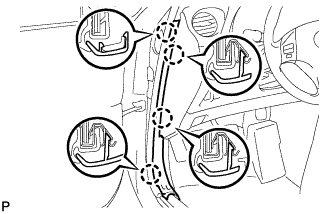
Disengage the 4 claws and remove the front door opening trim cover LH.
-
-
REMOVE SIDE INSTRUMENT PANEL LH
-
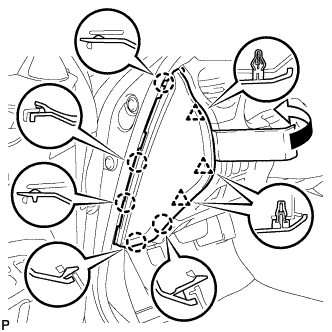
Using a moulding remover, disengage the 5 claws and 3 clips to remove the side instrument panel LH.
-
-
REMOVE NO. 1 INSTRUMENT PANEL UNDER COVER SUB-ASSEMBLY
-
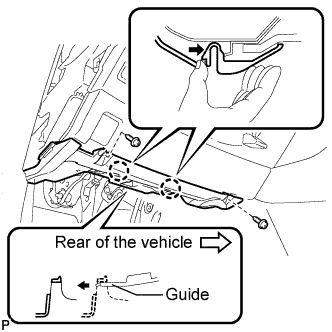
Remove the 2 screws <D>.
-
Push the 2 claws in the direction indicated by the arrow to disengage them.
-
Remove the No. 1 instrument panel under cover sub-assembly from the guide as shown in the illustration and pull the cover toward the rear of the vehicle.
-
Disconnect the connectors and remove the No. 1 instrument panel under cover sub-assembly.
-
-
REMOVE LOWER INSTRUMENT PANEL FINISH PANEL SUB-ASSEMBLY
-
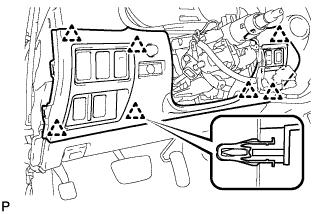
Disengage the 7 clips.
-
Disconnect the connectors and remove the lower instrument panel finish panel sub-assembly.
-
-
REMOVE DRIVER SIDE KNEE AIRBAG ASSEMBLY
-
Check that the engine switch is off.
-
Check that the cable is disconnected from the negative (-) battery terminal.
CAUTION:
Wait at least 90 seconds after disconnecting the cable from the negative (-) battery terminal to disable the SRS system.
-
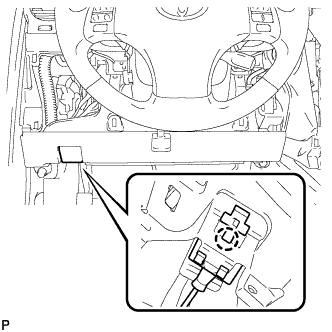
Disengage the claw and separate the hood lock control cable.
-
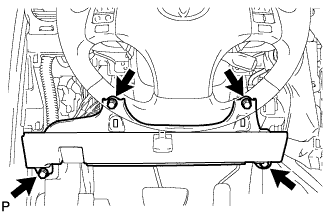
Remove the 4 bolts.
-
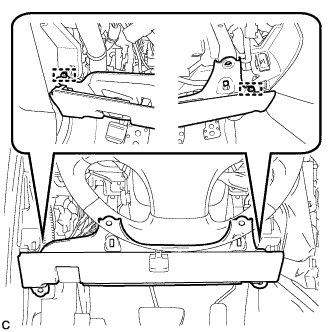
Disengage the 2 pins and separate the driver side knee airbag assembly.
-
Disconnect the connector and remove the driver side knee airbag assembly.
Note
When disconnecting the airbag connector, take care not to damage the airbag wire harness.
-
-
REMOVE INSTRUMENT CLUSTER FINISH PANEL SUB-ASSEMBLY
-
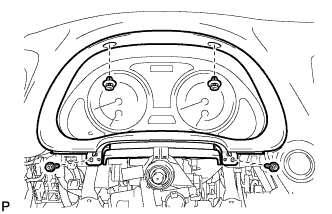
Remove the 2 screws <F> and 2 clips, and then remove the instrument cluster finish panel sub-assembly.
-
-
REMOVE COMBINATION METER ASSEMBLY
-
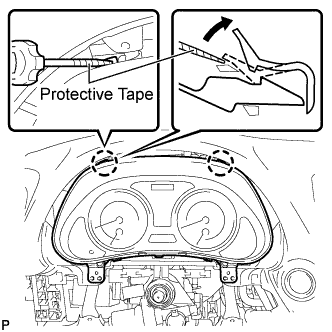
Using a screwdriver, disengage the 2 claws.
Tech Tips
Tape the screwdriver tip before use.
-
Disconnect the connectors and remove the combination meter assembly.
-
-
REMOVE FRONT DOOR SCUFF PLATE RH
Tech Tips
Use the same procedure for the RH side and LH side Click here.
-
REMOVE FRONT DOOR OPENING TRIM COVER RH
Tech Tips
Use the same procedure for the RH side and LH side Click here.
-
REMOVE SIDE INSTRUMENT PANEL RH
-
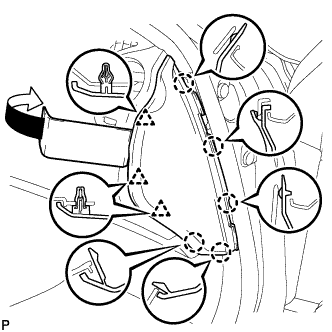
Using a moulding remover, disengage the 5 claws and 3 clips to remove the side instrument panel RH.
-
-
REMOVE NO. 2 INSTRUMENT PANEL UNDER COVER SUB-ASSEMBLY
-
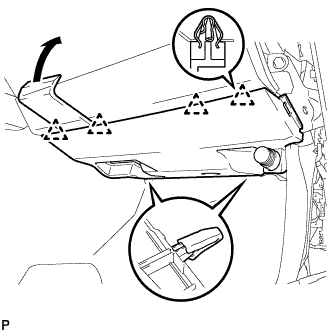
Using a moulding remover, disengage the 4 clips and remove the No. 2 instrument panel under cover sub-assembly.
-
-
REMOVE FRONT PASSENGER SIDE KNEE AIRBAG ASSEMBLY
-
Check that the engine switch is off.
-
Check that the cable is disconnected from the negative (-) battery terminal.
CAUTION:
Wait at least 90 seconds after disconnecting the cable from the negative (-) battery terminal to disable the SRS system.
-
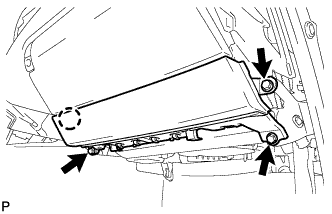
Remove the 3 bolts.
-
Disengage the claw and separate the front passenger side knee airbag assembly.
-
Disconnect the connector and remove the front passenger side knee airbag assembly.
Note
When disconnecting the airbag connector, take care not to damage the airbag wire harness.
-
-
REMOVE GLOVE COMPARTMENT DOOR ASSEMBLY
-
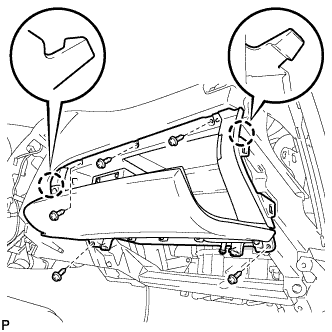
Remove the 5 screws <D>.
-
Disengage the 2 claws.
-
Disconnect the connectors and remove the glove compartment door assembly.
-
-
REMOVE FRONT PILLAR GARNISH LH
-
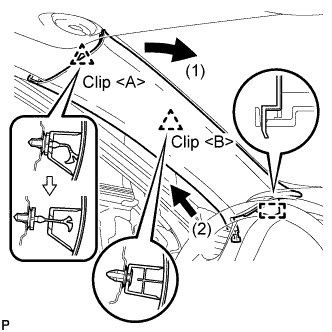
Disengage the 2 clips from the vehicle body.
-
Cut off the clip <A>.
-
Disengage the guide and remove the front pillar garnish LH.
-
Remove the clip <A> from the vehicle body.
-
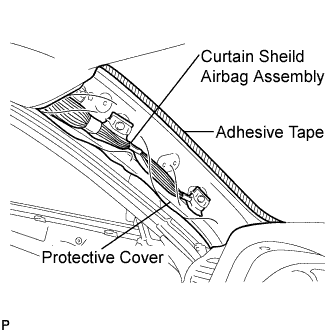
Protect the curtain shield airbag assembly.
-
Thoroughly cover the airbag with a cloth or nylon sheet and fix the ends of the cover with adhesive tape, as shown in the illustration.
Note
Cover the curtain shield airbag with a protective cover as soon as the front pillar garnish is removed.
-
-
-
REMOVE FRONT PILLAR GARNISH RH
Tech Tips
Use the same procedure for the RH side and LH side Click here.
-
REMOVE NO. 1 INSTRUMENT PANEL REGISTER ASSEMBLY
-
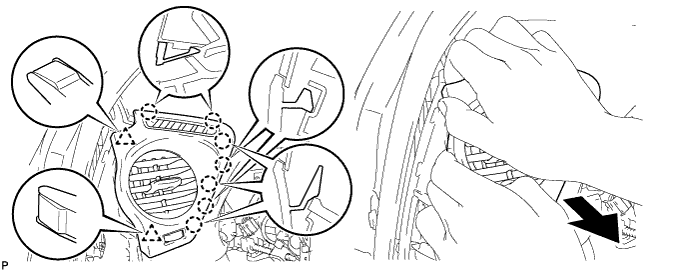
Pull the No. 1 instrument panel register assembly in the direction indicated by the arrow to disengage the 7 claws and 2 clips, and then disconnect the connector and remove the No. 1 instrument panel register assembly.
-
-
REMOVE NO. 2 INSTRUMENT PANEL REGISTER ASSEMBLY
-
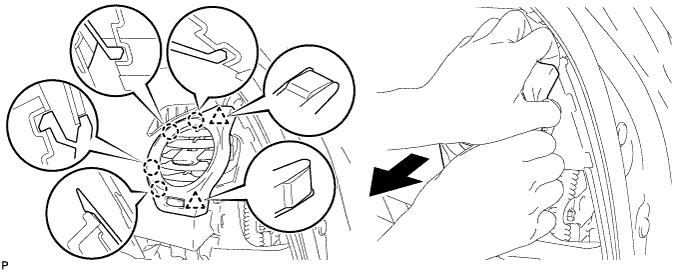
Pull the No. 2 instrument panel register assembly in the direction indicated by the arrow to disengage the 4 claws and 2 clips, and then disconnect the connector and remove the No. 2 instrument panel register assembly.
-
-
REMOVE NO. 3 INSTRUMENT PANEL SPEAKER PANEL SUB-ASSEMBLY
-
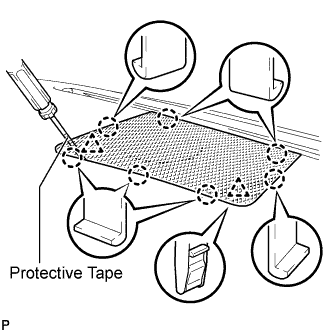
Using a screwdriver, disengage the 7 claws and 2 clips, and remove the No. 3 instrument panel speaker panel sub-assembly.
Tech Tips
Tape the screwdriver tip before use.
-
-
REMOVE FRONT STEREO COMPONENT SPEAKER ASSEMBLY (w/ Front Center Speaker)
-
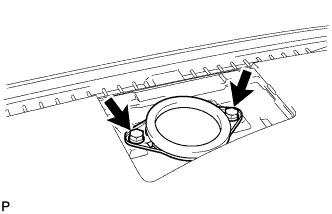
Remove the 2 bolts.
-
Lift the front stereo component speaker assembly and disconnect the connector to remove the speaker assembly.
Note
Do not touch the cone part of the speaker.
-
-
REMOVE NO. 2 CONSOLE BOX DUCT
-
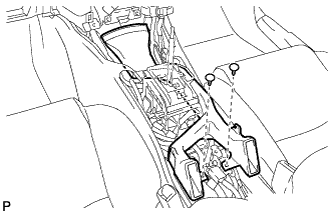
Remove the 2 clips and No. 2 console box duct.
-
-
REMOVE NO. 1 CONSOLE BOX DUCT
-
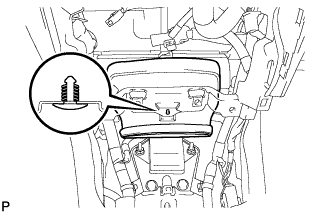
Remove the clip and No. 1 console box duct.
-
-
DISCONNECT INSTRUMENT PANEL WIRE ASSEMBLY
-
Check that the engine switch is off.
-
Check that the cable is disconnected from the negative (-) battery terminal.
CAUTION:
Wait at least 90 seconds after disconnecting the cable from the negative (-) battery terminal to disable the SRS system.
-
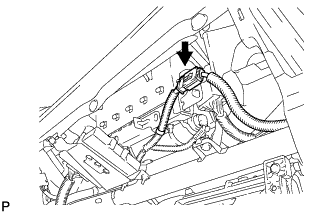
Disconnect the connector.
Note
When disconnecting the airbag connector, take care not to damage the airbag wire harness.
-
-
REMOVE INSTRUMENT PANEL SAFETY PAD ASSEMBLY
-
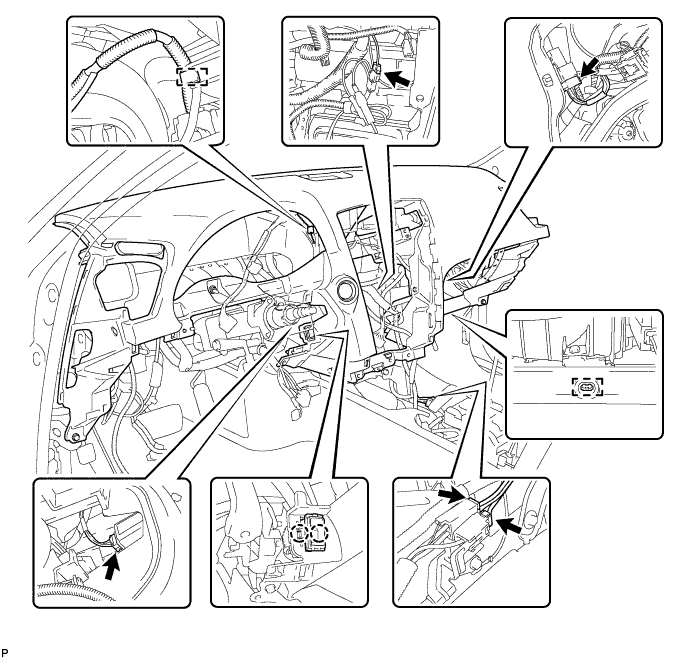
Disengage the clamps.
-
Disconnect the connectors.
-
Disengage the 2 claws and separate the cooler thermistor.
-
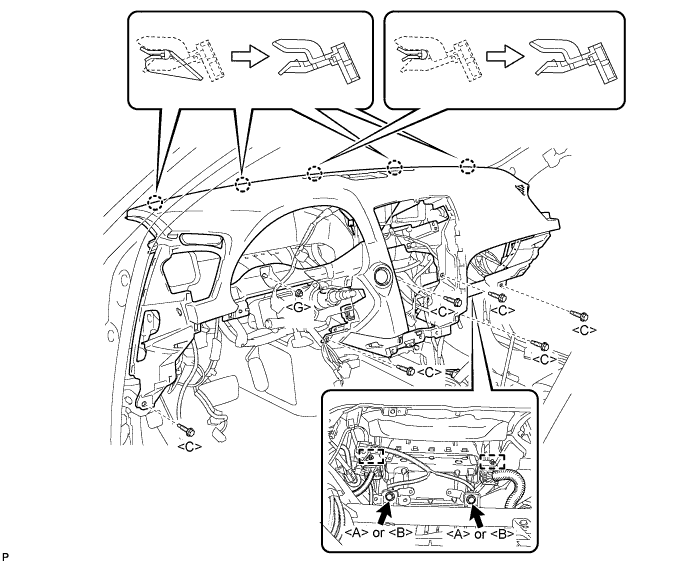
Remove the 6 bolts <C> and nut <G>.
-
Remove the 2 passenger airbag bolts <A> or <B>.
-
Disengage the 2 clamps.
-
Disengage the 5 claws and remove the instrument panel safety pad assembly.
-
-
REMOVE INSTRUMENT PANEL CLIP
-
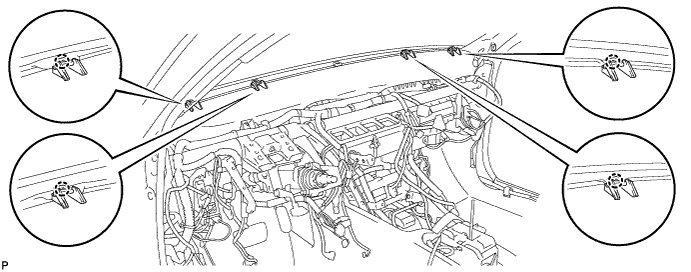
Disengage the 4 claws to remove the 4 instrument panel clips.
-
-
REMOVE INSTRUMENT PANEL STAY
-
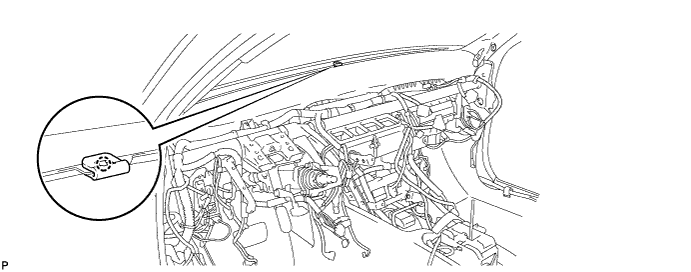
Disengage the claw to remove the instrument panel stay.
-
-
REMOVE NO. 1 AIR DUCT
-
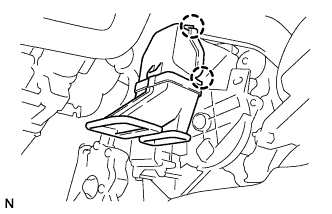
Disengage the 2 claws and remove the No. 1 air duct.
-
-
REMOVE BRAKE PEDAL RETURN SPRING
-
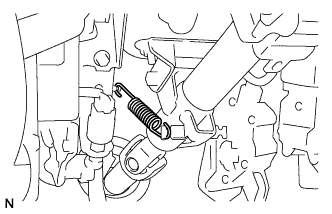
Remove the brake pedal return spring.
-
-
SEPARATE STEERING SLIDING YOKE SUB-ASSEMBLY
-
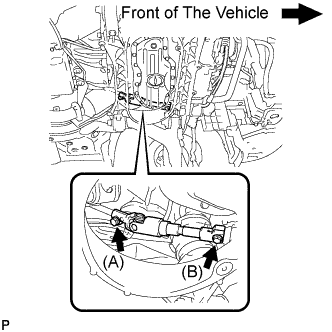
Loosen the bolt (A) and remove the bolt (B), then slide the steering sliding yoke sub-assembly.
Note
-
Do not remove the bolt (A).
-
Do not separate the steering sliding yoke sub-assembly from the power steering gear assembly.
-
-
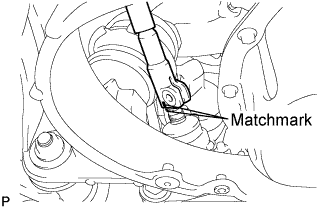
Put matchmarks on the steering sliding yoke sub-assembly and the power steering link assembly.
-
Separate the steering sliding yoke sub-assembly from the power steering link assembly.
-
-
REMOVE STEERING COLUMN ASSEMBLY
-
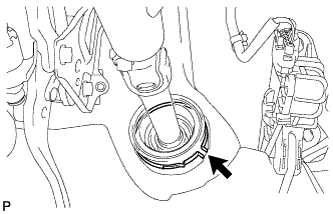
Remove the clamp from the steering column hole shield.
-
Disconnect the connectors and wire harness clamps from the steering column assembly.
-
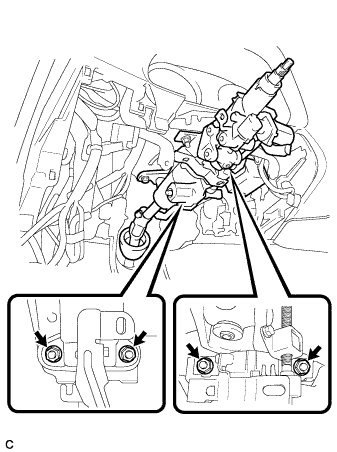
Remove the 4 nuts and steering column assembly.
-
-
REMOVE SKID CONTROL ECU
-
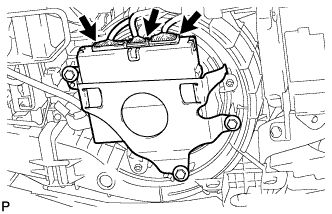
Disconnect the 3 connectors from the skid control ECU.
-
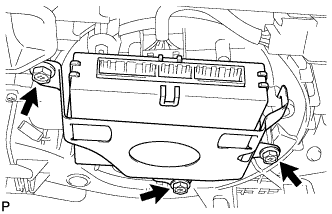
Remove the 3 screws and skid control ECU.
-
-
REMOVE DEFROSTER NOZZLE LOWER ASSEMBLY
-
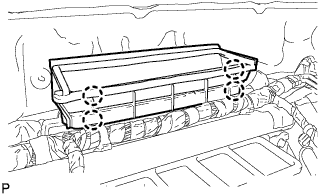
Release the 4 claws and remove the defroster nozzle lower assembly.
-
-
REMOVE INSTRUMENT PANEL REINFORCEMENT ASSEMBLY
-
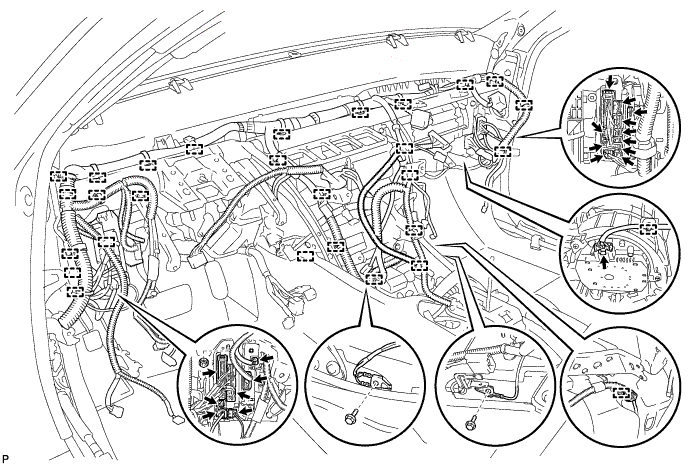
Remove the 27 clamps and 19 connectors, and then disconnect the wire harness.
-
Remove the nut, 2 bolts and 2 junction blocks.
-
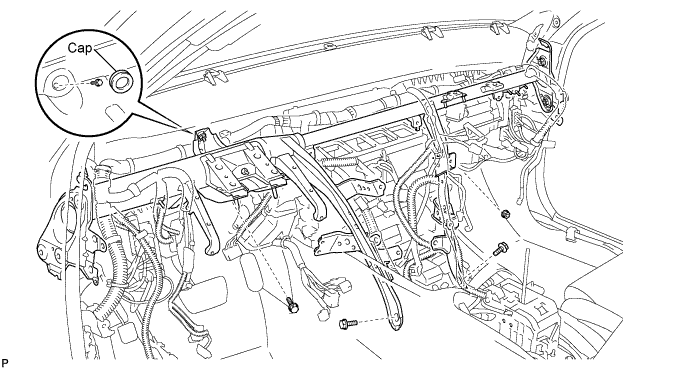
Remove the cap and bolt.
-
Remove the 3 bolts and nut.
-
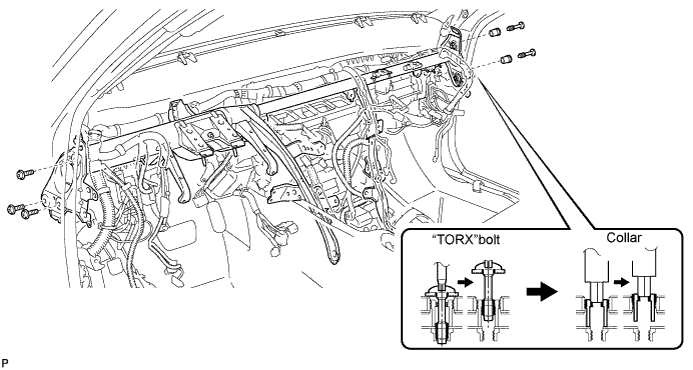
Using a T40 "TORX" socket, remove the 5 "TORX" bolts.
Note
The "TORX" bolts on the passenger side can be removed with the collar for adjustment.
-
Using a 12 mm hexagon wrench, remove the 2 collars and instrument panel reinforcement.
-
-
REMOVE AIR CONDITIONER UNIT ASSEMBLY
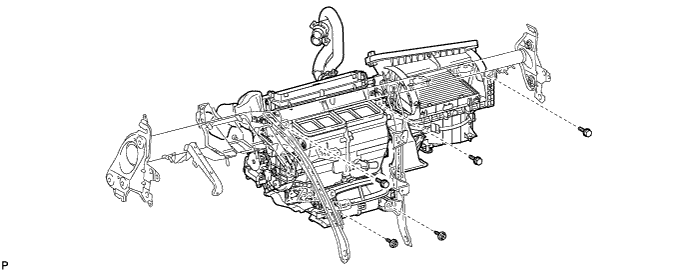
-
Remove the 2 screws, 3 bolts, and air conditioner unit assembly.
-
-
REMOVE NO. 2 AIR DUCT
-
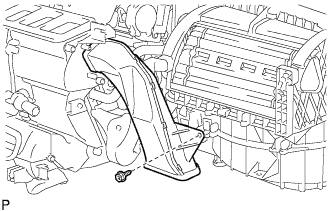
Remove the screw and No. 2 air duct.
-
-
REMOVE AIR CONDITIONING AMPLIFIER ASSEMBLY
-

Disconnect the connector.
-
Remove the screw and air conditioning amplifier assembly.
-
-
REMOVE BLOWER ASSEMBLY
-
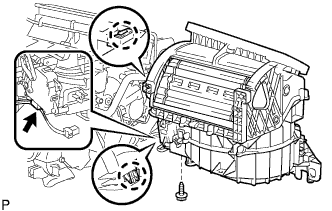
Disconnect the connector.
-
Remove the screw.
-
Release the claw and remove the blower assembly.
-
-
REMOVE COOL AIR BY-PASS CONTROL SERVO MOTOR
-
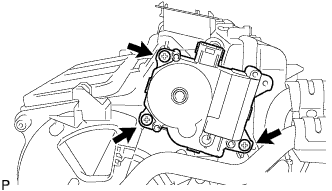
Disconnect the connector.
-
Remove the 3 screws and cool air by-pass control servo motor.
-
-
REMOVE AIR MIX CONTROL SERVO MOTOR
-
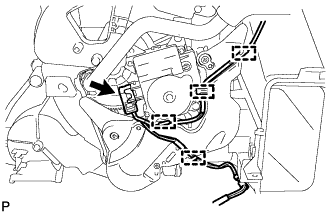
Remove the 4 clamps and connector, and disconnect the wire harness.
-
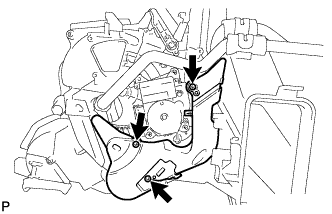
Remove the 3 screws and heater piping cover.
-
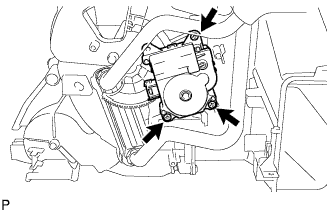
Remove the 3 screws and air mix control servo motor.
-
-
REMOVE COOLER EXPANSION VALVE
-
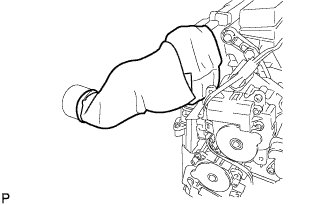
Remove the packing from the air conditioning tube assembly.
-
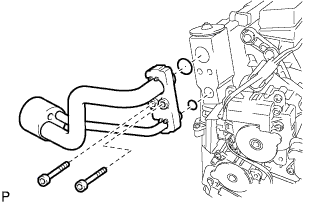
Using a 4 mm hexagon wrench, remove the 2 hexagon bolts and air conditioning tube assembly.
-
Remove the 2 O-rings from the air conditioning tube assembly.
-
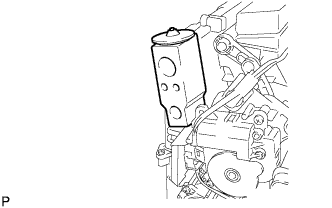
Remove the cooler expansion valve from the No. 1 cooler evaporator sub-assembly.
-
-
REMOVE AIR CONDITIONING HARNESS ASSEMBLY
-
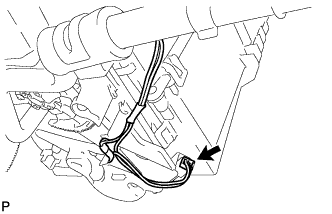
Disconnect the connector.
-
Remove the air conditioning harness assembly.
-
-
REMOVE AIR OUTLET CONTROL SERVO MOTOR
-
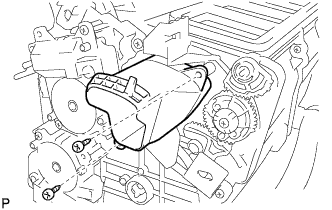
Remove the 2 screws and air duct.
-
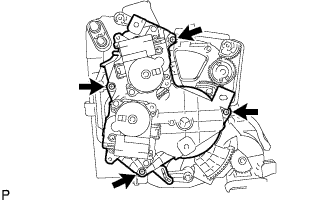
Remove the 4 screws and servo motor plate.
-
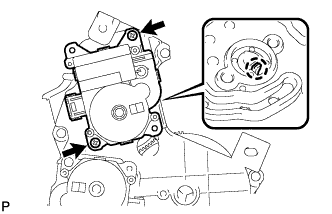
Remove the 2 screws.
-
Release the claw and remove the air outlet control servo motor from the servo motor plate.
-
-
REMOVE AIR MIX CONTROL SERVO MOTOR
-
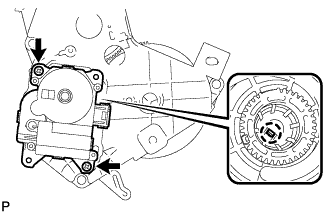
Remove the 2 screws.
-
Release the claw and remove the air mix control servo motor from the servo motor plate.
-
-
REMOVE HEATER RADIATOR UNIT SUB-ASSEMBLY
-
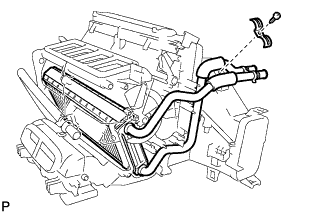
Remove the screw and clamp.
-
Remove the heater radiator unit sub-assembly.
-
-
REMOVE NO. 1 COOLER EVAPORATOR SUB-ASSEMBLY
-
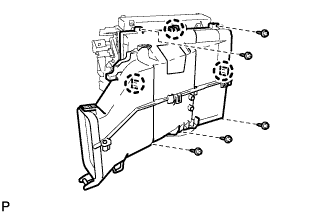
Remove the 5 screws.
-
Release the 3 claws and remove the air duct.
-
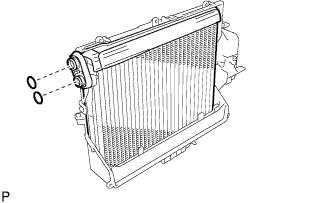
Remove the No. 1 cooler evaporator sub-assembly from the air duct.
-
Remove the 2 O-rings from the No. 1 cooler evaporator sub-assembly.
-
-
REMOVE NO. 1 COOLER THERMISTOR
-
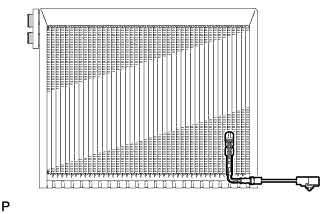
Remove the No. 1 cooler thermistor.
-