TELEVISION CAMERA ECU INSTALLATION

-
INSTALL TELEVISION CAMERA CONTROLLER (for LHD)
-
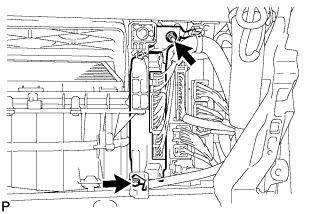
Install the television camera controller with the nut and bolt.
-
Connect each connector.
-
-
INSTALL TELEVISION CAMERA CONTROLLER (for RHD)
-
Install the television camera controller with the 2 nuts.
-
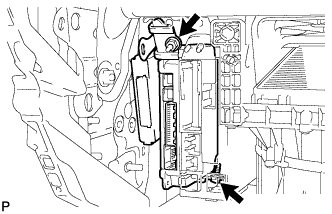
Install the television camera controller with power source control ECU with the nut and bolt.
-
Connect each connector.
-
-
INSTALL GLOVE COMPARTMENT DOOR ASSEMBLY
-
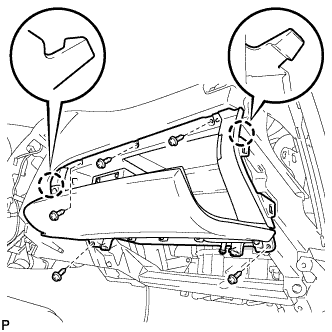
Connect the connectors.
-
Engage the 2 claws.
-
Install the glove compartment door assembly with the 5 screws <D>.
-
-
INSTALL FRONT PASSENGER SIDE KNEE AIRBAG ASSEMBLY
-
Check that the engine switch is off.
-
Check that the battery negative (-) cable is disconnected.
CAUTION:
Wait at least 90 seconds after disconnecting the cable from the negative (-) battery terminal to disable the SRS system.
-
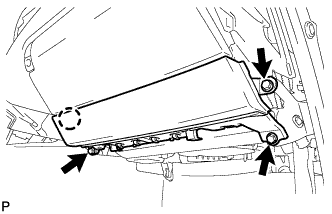
Connect the front passenger side knee airbag connector to the front passenger side knee airbag assembly.
Note
When connecting the airbag connector, take care not to damage the airbag wire harness.
-
Install the front passenger side knee airbag assembly with the 3 bolts and claw.
- Torque:
- 10 N*m { 102 kgf*cm, 7 ft.*lbf }
-
-
INSTALL NO. 2 INSTRUMENT PANEL UNDER COVER SUB-ASSEMBLY
-
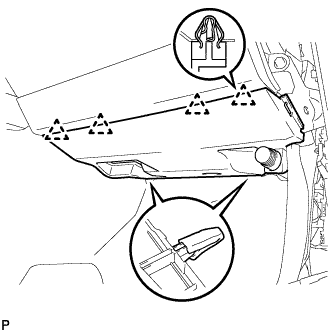
Engage the 4 clips to install the No. 2 instrument panel under cover sub-assembly.
-
-
INSTALL SIDE INSTRUMENT PANEL
-
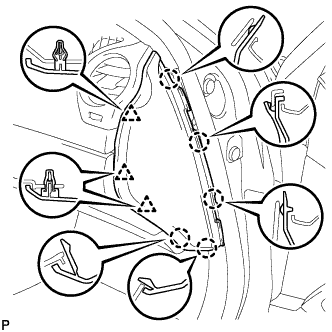
Engage the 5 claws and 3 clips to install the side instrument panel RH.
-
-
INSTALL FRONT DOOR OPENING TRIM COVER
Tech Tips
Use the same procedure for the RH side and the LH side Click here.
-
INSTALL FRONT DOOR SCUFF PLATE
Tech Tips
Use the same procedure for the RH side and the LH side Click here.
-
CONNECT CABLE TO NEGATIVE BATTERY TERMINAL
Note
When disconnecting the cable, some systems need to be initialized after the cable is reconnected Click here.
-
INSPECT SRS WARNING LIGHT
-
ADJUST TELEVISION CAMERA