ECM REMOVAL

-
DISCONNECT CABLE FROM NEGATIVE BATTERY TERMINAL
CAUTION:
Wait at least 90 seconds after disconnecting the cable from the negative (-) battery terminal to disable the SRS system.
Note
When disconnecting the cable, some systems need to be initialized after the cable is reconnected Click here.
-
REMOVE COOL AIR INTAKE DUCT SEAL
-
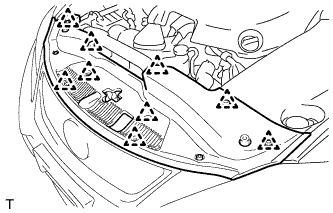
Remove the 9 clips and cool air intake duct seal.
-
-
REMOVE ENGINE ROOM SIDE COVER LH (for LHD)
-
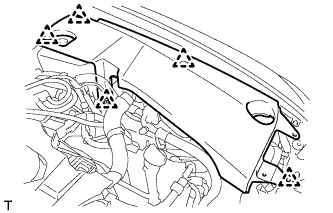
Remove the 5 clips and engine room side cover LH.
-
-
REMOVE ENGINE ROOM SIDE COVER LH (for RHD)
-
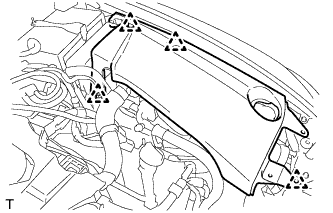
Remove the 4 clips and engine room side cover LH.
-
-
REMOVE V-BANK COVER SUB-ASSEMBLY
-
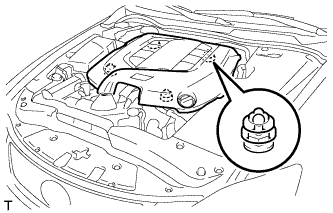
Hold the front of the V-bank cover sub-assembly and raise it to disengage the 2 clips on the front of the cover. Continue to raise the cover to disengage the 2 clips on the rear of the cover and remove the V-bank cover sub-assembly.
Note
Attempting to disengage both front and rear clips at the same time may cause the cover to break.
-
-
REMOVE ENGINE ROOM ECU COVER
-
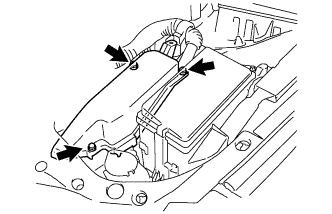
Remove the 3 bolts and the engine room ECU cover.
Note
-
Remove all water from on and around the engine room ECU cover.
-
Perform the inspection indoors to avoid rain.
-
Be sure to prevent water intrusion to the ECM (connectors and screw holes).
-
-
-
REMOVE ECM
-
Disconnect the ECM connectors.
-
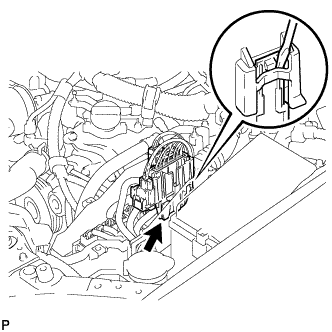
Using a screwdriver, disconnect the connector holder.
-
Disconnect the 6 ECM connectors.
-
-
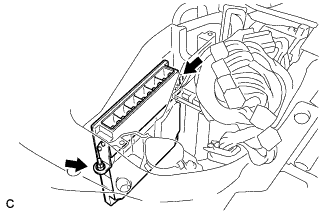
Remove the 2 nuts and ECM from the engine room ECU box.
-