RADIO ANTENNA CORD INSTALLATION

-
INSTALL ANTENNA CORD SUB-ASSEMBLY (w/o DVD Player)
-
Install the antenna cord sub-assembly with the 2 bolts.
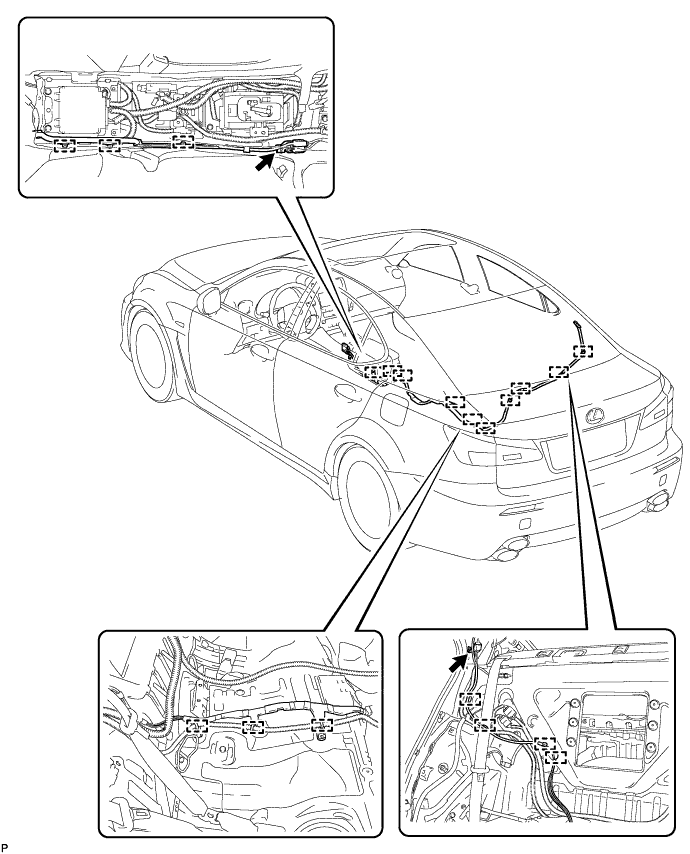
- Torque:
- 7.0 N*m { 71 kgf*cm, 62 in.*lbf }
-
Engage the 10 clamps.
-
Connect the connectors.
-
-
INSTALL ANTENNA CORD SUB-ASSEMBLY (w/ DVD Player)
-
Install the antenna cord sub-assembly with the 2 bolts.
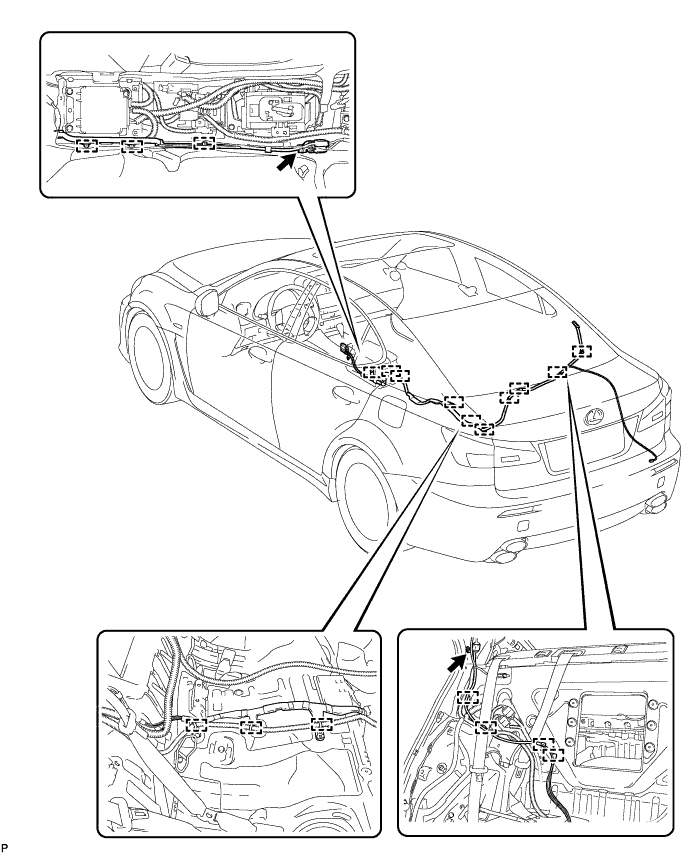
- Torque:
- 7.0 N*m { 71 kgf*cm, 62 in.*lbf }
-
Engage the 10 clamps.
-
Connect the connectors.
-
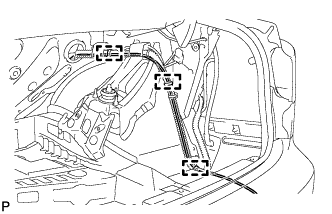
Engage the 3 clamps.
-
Connect the connector.
-
-
INSTALL SIDE LUGGAGE COMPARTMENT TRIM COVER (w/ DVD Player)
-
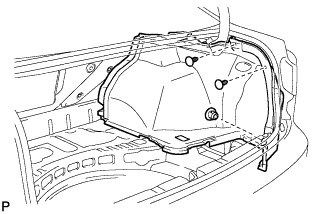
Install the side luggage compartment trim cover with the 3 clips.
-
-
INSTALL NO. 1 LUGGAGE COMPARTMENT TRIM HOOK (w/ DVD Player)
-
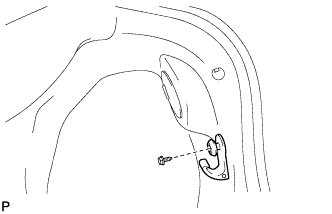
Install the No. 1 luggage compartment trim hook with the screw.
-
-
INSTALL FRONT LUGGAGE COMPARTMENT TRIM COVER (w/ DVD Player)
-
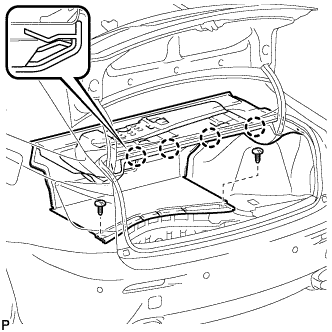
Engage the 4 claws.
-
Install the front luggage compartment trim cover with the 2 clips.
-
-
INSTALL NO. 2 LUGGAGE COMPARTMENT TRIM HOOK (w/ DVD Player)
-
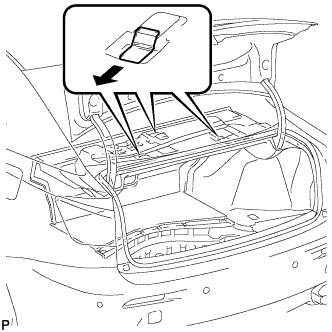
Install the 3 No. 2 luggage compartment trim hooks as shown in the illustration.
-
-
INSTALL ROPE HOOK (w/ DVD Player)
-
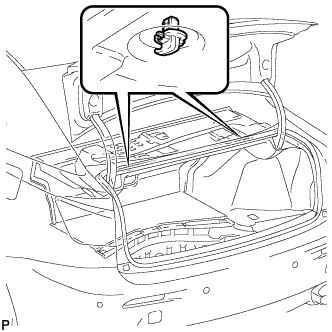
Install the 2 rope hooks.
-
-
INSTALL NO. 2 ROOM LIGHT ASSEMBLY (w/ DVD Player)
-
Connect the connector.
-
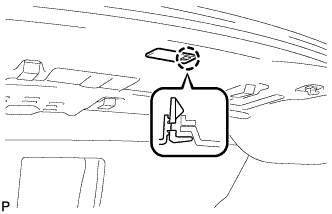
Engage the claw and install the No. 2 room light assembly.
-
-
INSTALL REAR LUGGAGE COMPARTMENT TRIM COVER (w/ DVD Player)
-
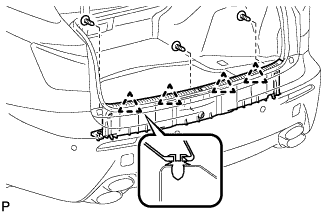
Engage the 4 clips.
-
Install the rear luggage compartment trim cover with the 3 clips.
-
-
INSTALL ROPE HOOK ASSEMBLY (w/ DVD Player)
-
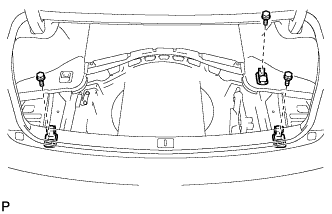
Install the 3 rope hook assemblies with the 3 bolts.
-
-
INSTALL DECK SIDE TRIM BOX LH (w/ DVD Player)
-
INSTALL DECK SIDE TRIM BOX RH (w/ DVD Player)
-
INSTALL LUGGAGE COMPARTMENT TRIM COVER (w/ DVD Player)
-
INSTALL ROOF SIDE INNER GARNISH
Tech Tips
Use the same procedure for the RH side and the LH side Click here.
-
INSTALL REAR SEAT SIDE GARNISH
Tech Tips
Use the same procedure for the RH side and the LH side Click here.
-
INSTALL REAR DOOR SCUFF PLATE
Tech Tips
Use the same procedure for the RH side and the LH side Click here.
-
INSTALL REAR SEATBACK ASSEMBLY
-
Place the seatback in the cabin.
Note
Be careful not to damage the vehicle body.
-
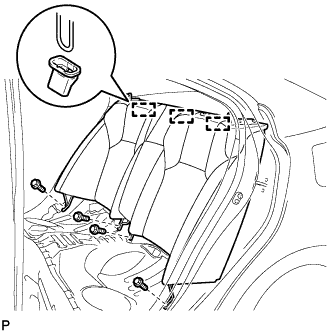
Engage the 3 hooks.
-
Install the rear seatback assembly with the 4 bolts.
- Torque:
- 18 N*m { 184 kgf*cm, 13 ft.*lbf }
-
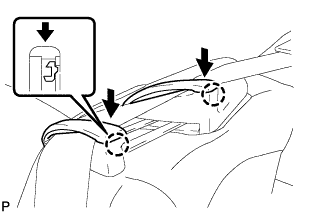
Pass the seat belt through the rear seat shoulder belt guide RH.
-
Engage the 2 claws and close the 2 caps of the rear seat shoulder belt guide RH.
-
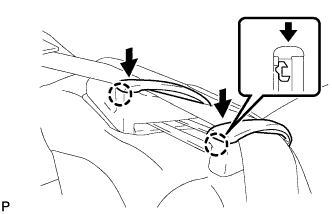
Pass the seat belt through the rear seat shoulder belt guide LH.
-
Engage the 2 claws and close the 2 caps of the rear seat shoulder belt guide LH.
-
-
INSTALL REAR SEAT HEADREST ASSEMBLY
-
INSTALL REAR SEAT CUSHION ASSEMBLY
-
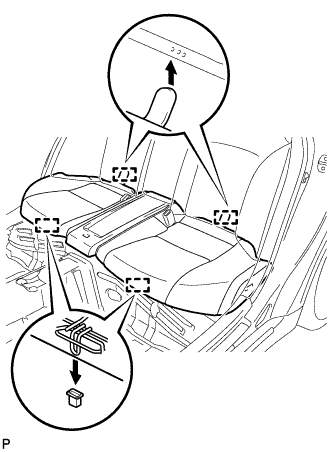
Engage the 2 rear hooks of the seat cushion to the child restraint seat anchor bracket.
-
Engage the 2 front hooks of the seat cushion to the vehicle body.
-
Confirm that the seat cushion is firmly installed.
Note
When installing the seat cushion, make sure the seat belt buckle is not under the seat cushion.
-
-
INSTALL NO. 2 ANTENNA CORD SUB-ASSEMBLY
-
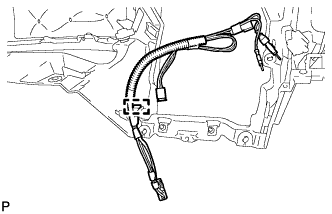
Engage the clamp and install the No. 2 antenna cord sub-assembly.
-
-
INSTALL INSTRUMENT PANEL SAFETY PAD ASSEMBLY
-
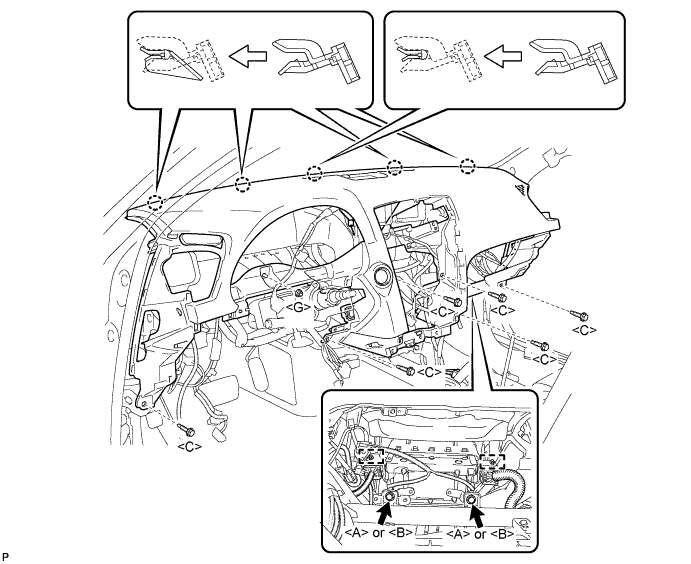
Engage the 5 claws.
Note
Do not allow the wire harness to get caught in the claws.
-
Engage the 2 clamps.
-
Install the 2 passenger airbag bolts <A> or <B>.
- Torque:
- 20 N*m { 204 kgf*cm, 15 ft.*lbf }
-
Install the 6 bolts <C> and nut <G>.
-
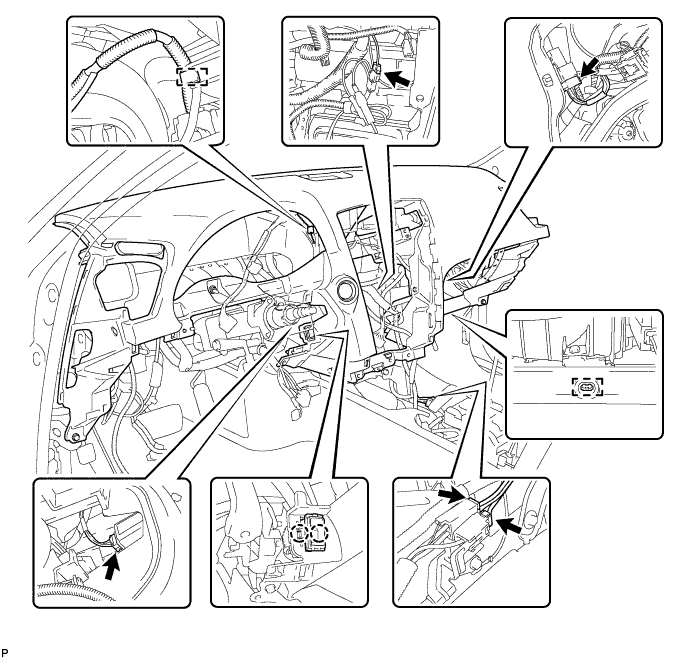
Engage the 2 claws and install the cooler thermistor.
-
Engage the clamps.
-
Connect the connectors and install the instrument panel safety pad assembly.
-
-
CONNECT INSTRUMENT PANEL WIRE ASSEMBLY
-
Check that the engine switch is off.
-
Check that the cable is disconnected from the negative (-) battery terminal.
CAUTION:
Wait at least 90 seconds after disconnecting the cable from the negative (-) battery terminal to disable the SRS system.
-
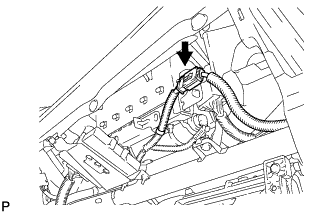
Connect the connector.
Note
When connecting the airbag connector, take care not to damage the airbag wire harness.
-
-
INSTALL NO. 1 CONSOLE BOX DUCT
-
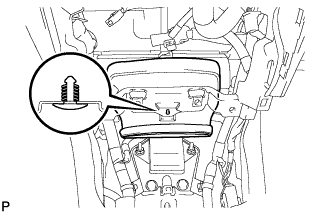
Install the No. 1 console box duct with the clip.
-
-
INSTALL NO. 2 CONSOLE BOX DUCT
-
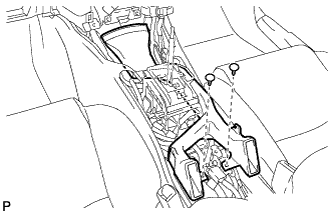
Install the No. 2 console box duct with the 2 clips.
-
-
INSTALL FRONT STEREO COMPONENT SPEAKER ASSEMBLY (w/ Front Center Speaker)
-
Connect the connector.
-
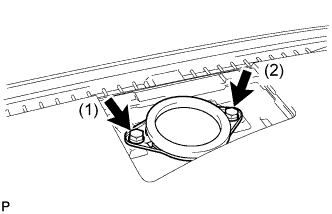
Install the front stereo component speaker assembly with the 2 bolts.
Tech Tips
Install the bolts in the order shown in the illustration.
-
-
INSTALL NO. 3 INSTRUMENT PANEL SPEAKER PANEL SUB-ASSEMBLY
-
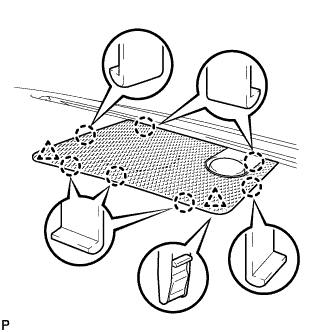
Engage the 7 claws and 2 clips, and install the No. 3 instrument panel speaker panel sub-assembly.
-
-
INSTALL NO. 2 INSTRUMENT PANEL REGISTER ASSEMBLY
-
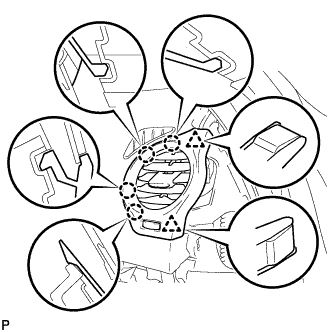
Connect the connector.
-
Engage the 4 claws and 2 clips, and install the No. 2 instrument panel register assembly.
-
-
INSTALL NO. 1 INSTRUMENT PANEL REGISTER ASSEMBLY
-
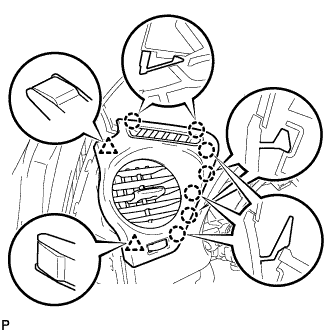
Connect the connector.
-
Engage the 7 claws and 2 clips, and install the No. 1 instrument panel register assembly.
-
-
INSTALL FRONT PILLAR GARNISH LH
-
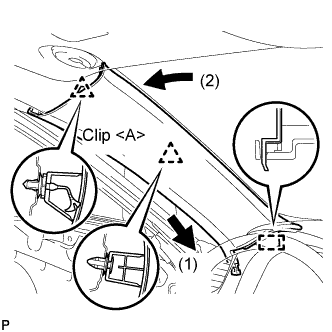
Install a new clip <A> on the front pillar garnish LH.
-
Engage the claw and 2 clips, and install the front pillar garnish LH.
-
-
INSTALL FRONT PILLAR GARNISH RH
Tech Tips
Use the same procedure for the RH side and the LH side.
-
INSTALL GLOVE COMPARTMENT DOOR ASSEMBLY
-
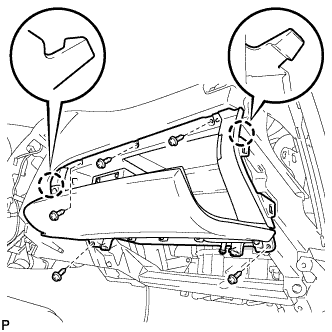
Connect the connectors.
-
Engage the 2 claws.
-
Install the glove compartment door assembly with the 5 screws <D>.
-
-
INSTALL FRONT PASSENGER SIDE KNEE AIRBAG ASSEMBLY
-
Check that the engine switch is off.
-
Check that the battery negative (-) cable is disconnected.
CAUTION:
Wait at least 90 seconds after disconnecting the cable from the negative (-) battery terminal to disable the SRS system.
-
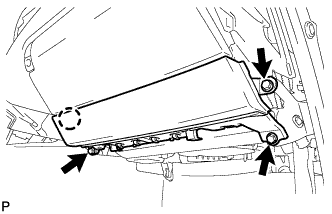
Connect the front passenger side knee airbag connector to the front passenger side knee airbag assembly.
Note
When connecting the airbag connector, take care not to damage the airbag wire harness.
-
Install the front passenger side knee airbag assembly with the 3 bolts and claw.
- Torque:
- 10 N*m { 102 kgf*cm, 7 ft.*lbf }
-
-
INSTALL NO. 2 INSTRUMENT PANEL UNDER COVER SUB-ASSEMBLY
-
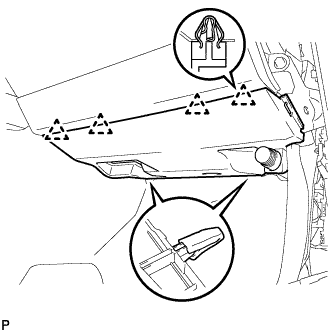
Engage the 4 clips and install the No. 2 instrument panel under cover sub-assembly.
-
-
INSTALL SIDE INSTRUMENT PANEL RH
-
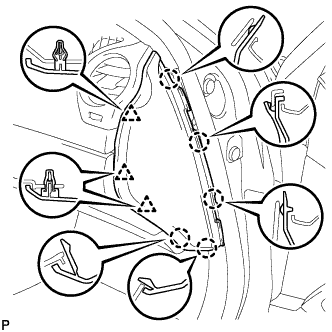
Engage the 5 claws and 3 clips, and then install the side instrument panel RH.
-
-
INSTALL FRONT DOOR OPENING TRIM COVER RH
Tech Tips
Use the same procedure for the RH side and LH side Click here.
-
INSTALL FRONT DOOR SCUFF PLATE RH
Tech Tips
Use the same procedure for the RH side and the LH side.
-
INSTALL COMBINATION METER ASSEMBLY
-
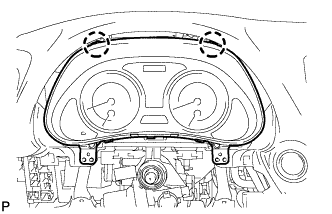
Connect the connectors.
-
Engage the 2 claws and install the combination meter assembly.
-
-
INSTALL INSTRUMENT CLUSTER FINISH PANEL SUB-ASSEMBLY
-
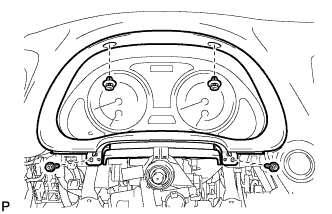
Install the instrument cluster finish panel sub-assembly with the 2 screws <F> and 2 clips.
-
-
INSTALL DRIVER SIDE KNEE AIRBAG ASSEMBLY
-
Check that the engine switch is off.
-
Check that the battery negative (-) cable is disconnected.
CAUTION:
Wait at least 90 seconds after disconnecting the cable from the negative (-) battery terminal to disable the SRS system.
-
Connect the driver side knee airbag connector to the driver side knee airbag assembly.
Note
When connecting the airbag connector, take care not to damage the airbag wire harness.
-
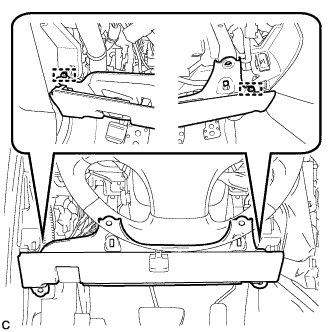
Temporarily install the driver side knee airbag assembly with the 2 pins.
-
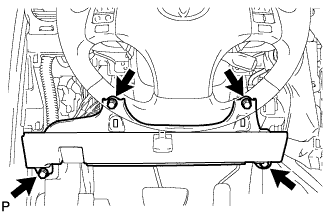
Install the driver side knee airbag assembly with the 4 bolts.
- Torque:
- 10 N*m { 102 kgf*cm, 7 ft.*lbf }
-
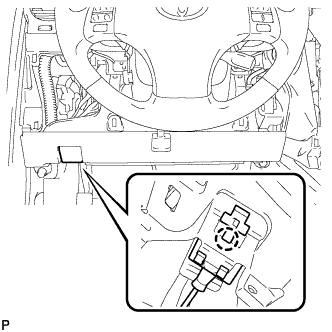
Install the hood lock control cable with the claw.
-
-
INSTALL LOWER INSTRUMENT PANEL FINISH PANEL SUB-ASSEMBLY
-
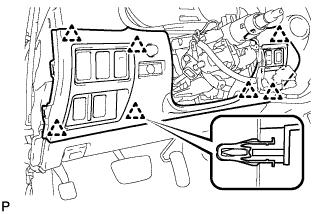
Connect the connectors.
-
Engage the 7 clips and install the lower instrument panel finish panel sub-assembly.
-
-
INSTALL NO. 1 INSTRUMENT PANEL UNDER COVER SUB-ASSEMBLY
-
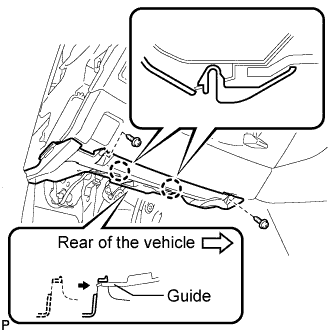
Connect the connectors.
-
Insert the No. 1 instrument panel under cover sub-assembly into the guide as shown in the illustration.
-
Engage the 2 claws.
-
Install the No. 1 instrument panel under cover sub-assembly with the 2 screws <D>.
-
-
INSTALL SIDE INSTRUMENT PANEL LH
-
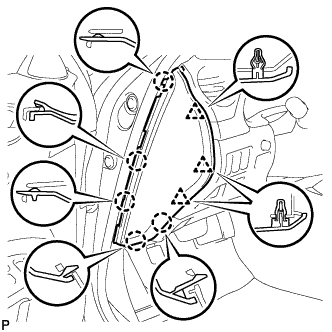
Engage the 5 claws and 3 clips, and then install the side instrument panel LH.
-
-
INSTALL FRONT DOOR OPENING TRIM COVER LH
-
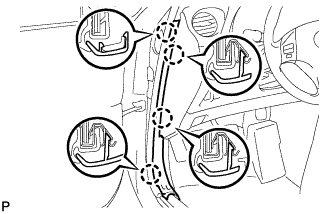
Engage the 4 claws and install the front door opening trim cover LH.
-
-
INSTALL FRONT DOOR SCUFF PLATE LH
-
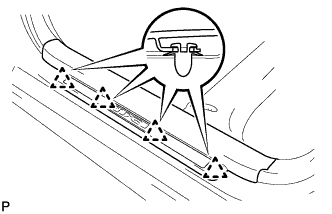
Engage the 4 clips.
-
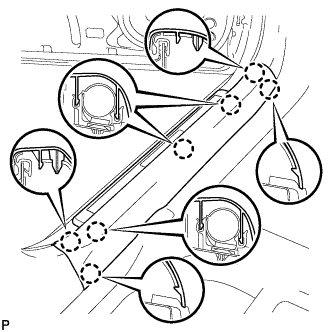
Engage the 7 claws and install the front door scuff plate LH.
-
-
INSTALL TURN SIGNAL SWITCH ASSEMBLY WITH SPIRAL CABLE SUB-ASSEMBLY
-
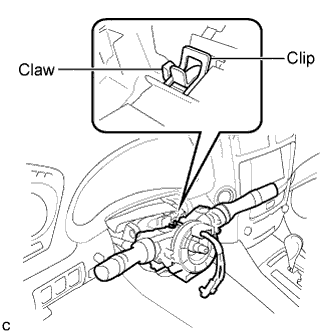
Install the turn signal switch assembly with spiral cable sub-assembly to the steering column assembly with the clamp.
-
Connect the connectors to the turn signal switch assembly with spiral cable sub-assembly.
-
-
INSTALL STEERING COLUMN COVER
-
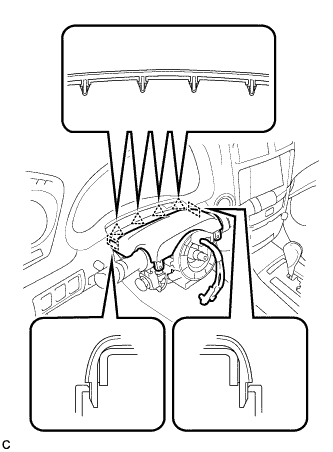
Engage the 4 clips and 2 guides to install the upper steering column cover onto the instrument panel cluster finish panel.
-
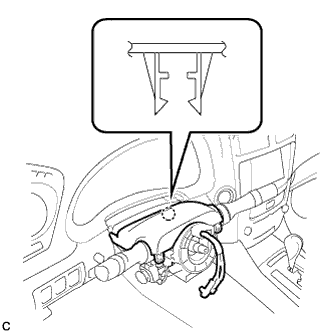
Engage the claw to install the upper steering column cover.
-
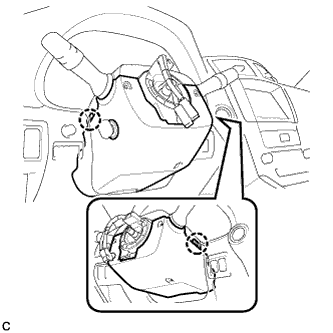
Engage the 2 claws to install the lower steering column cover.
Note
Do not damage the tilt and telescopic switch.
-
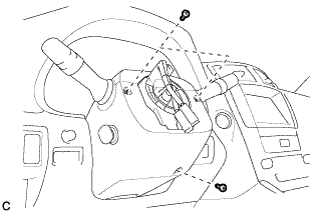
Install the 3 screws.
- Torque:
- 2.0 N*m { 20 kgf*cm, 18 in.*lbf }
-
-
ADJUST SPIRAL CABLE SUB-ASSEMBLY
-
Check that the engine switch is off.
-
Check that the battery negative (-) cable is disconnected.
CAUTION:
Wait at least 90 seconds after disconnecting the cable from the negative (-) battery terminal to disable the SRS system.
-
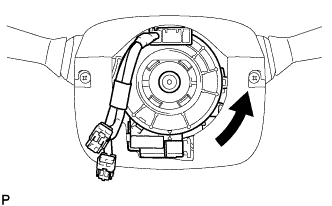
Rotate the spiral cable counterclockwise slowly by hand until it stops.
Note
Do not turn the spiral cable using the airbag wire harness.
-
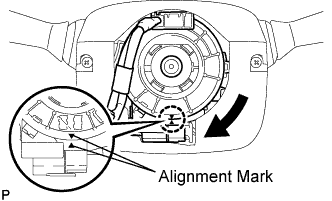
Rotate the spiral cable clockwise approximately 2.5 turns to align the marks.
Note
Do not turn the spiral cable using the airbag wire harness.
Tech Tips
The spiral cable will rotate approximately 2.5 turns to both the left and right from the center.
-
-
INSTALL STEERING WHEEL ASSEMBLY
-
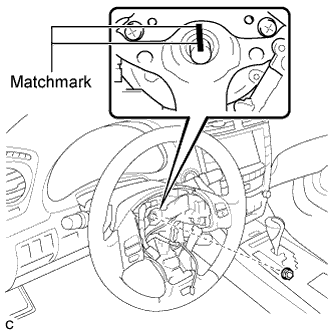
Align the matchmarks on the steering wheel assembly and steering main shaft.
-
Install the steering wheel assembly set nut.
- Torque:
- 50 N*m { 510 kgf*cm, 37 ft.*lbf }
-
Connect the connectors to the spiral cable sub-assembly.
-
-
INSTALL STEERING PAD
-
Check that the engine switch is off.
-
Check that the cable is disconnected from the negative (-) battery terminal.
CAUTION:
Wait at least 90 seconds after disconnecting the cable from the negative (-) battery terminal to disable the SRS system.
-
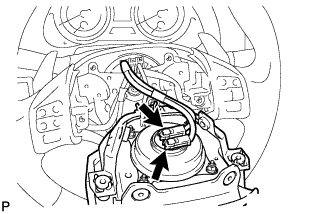
Connect the 2 airbag connectors to the steering pad.
Note
When connecting the airbag connector, take care not to damage the airbag wire harness.
-
Connect the horn connector to the steering pad.
-
Confirm that the circumference groove of the "TORX" screw fits in the screw case, and place the steering pad onto the steering wheel assembly.
-
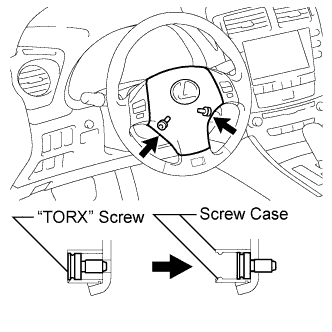
Using a "TORX" socket wrench (T30), tighten the 2 "TORX" screws.
- Torque:
- 8.8 N*m { 90 kgf*cm, 78 in.*lbf }
-
-
INSTALL LOWER NO. 3 STEERING WHEEL COVER
-
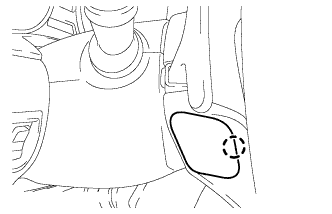
Install the lower No. 3 steering wheel cover with the claw.
-
-
INSTALL LOWER NO. 2 STEERING WHEEL COVER
-
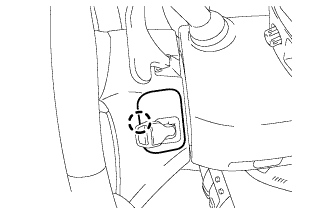
Install the lower No. 2 steering wheel cover with the claw.
-
-
INSTALL INTEGRATION CONTROL PANEL WITH RADIO RECEIVER ASSEMBLY (w/o Navigation System)
-
Connect each connector.
-
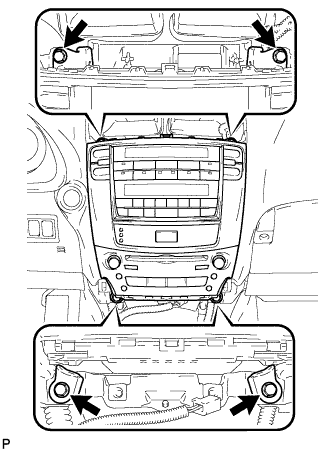
Install the integration control panel with radio receiver assembly with the 4 bolts.
-
-
INSTALL MULTI-DISPLAY WITH RADIO RECEIVER ASSEMBLY (w/ Navigation System)
-
Connect each connector.
-
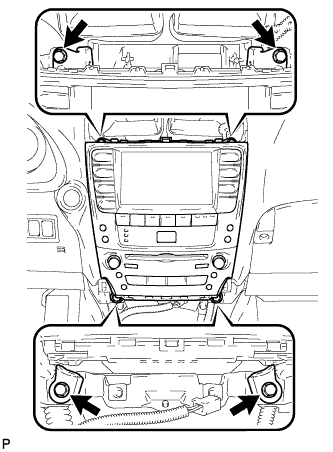
Install the the multi-display with radio receiver assembly with the 4 bolts.
-
-
INSTALL CENTER LOWER INSTRUMENT CLUSTER FINISH PANEL
-
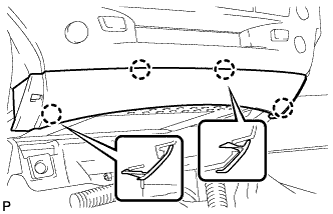
Engage the 4 claws and install the center lower instrument cluster finish panel.
-
-
INSTALL NO. 3 INSTRUMENT PANEL REGISTER ASSEMBLY
-
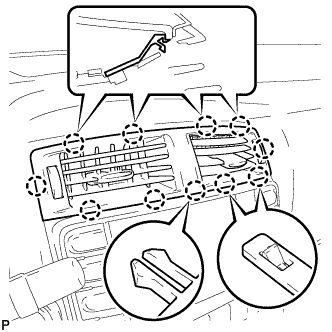
Connect the connectors.
-
Engage the 11 claws and install the No. 3 instrument panel register assembly.
-
-
INSTALL CONSOLE BOX
-
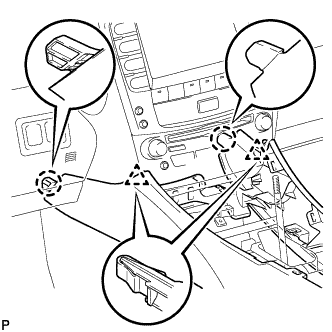
Engage the 2 claws and 2 clips.
-
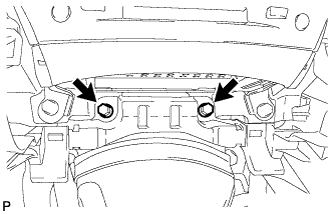
Install the 2 bolts.
-
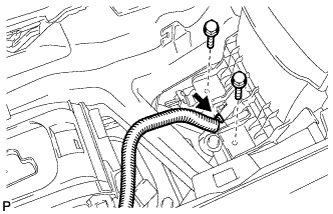
Install the 2 bolts.
-
Connect the connector.
-
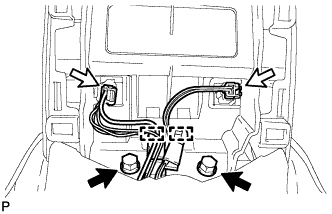
Connect the 2 connectors.
-
Engage the 2 clamps.
-
Install the 2 bolts.
-
-
INSTALL CONSOLE BOX REGISTER ASSEMBLY
-
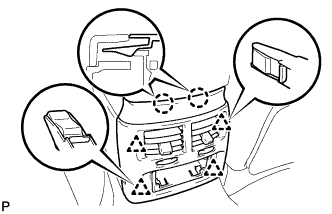
Engage the 2 claws and 4 clips, and then install the console box register assembly.
-
-
INSTALL REAR ASH RECEPTACLE ASSEMBLY
-
Install the rear ash receptacle assembly.
-
-
INSTALL FRONT ASH RECEPTACLE ASSEMBLY
-
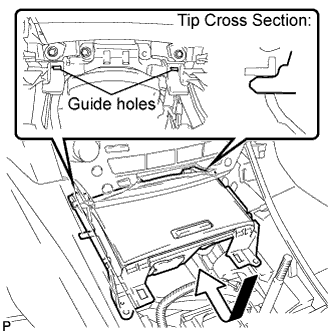
Connect the connectors.
-
Insert the protruding parts of the front ash receptacle assembly into the 2 guide holes as shown in the illustration.
-
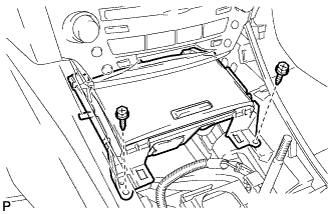
Install the front ash receptacle assembly with the 2 screws <E>.
-
-
INSTALL CONSOLE PANEL SUB-ASSEMBLY
-
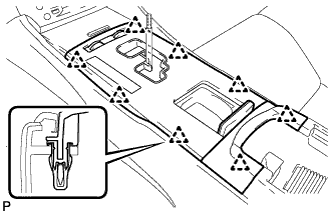
Connect the connectors.
-
Engage the 8 clips and install the console panel sub-assembly.
-
-
INSTALL UPPER NO. 2 CONSOLE PANEL GARNISH
-
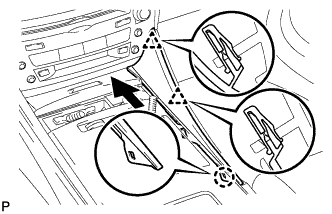
Engage the claw and 2 clips, and then install the upper No. 2 console panel garnish.
-
-
INSTALL UPPER NO. 1 CONSOLE PANEL GARNISH
-
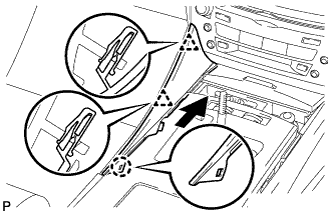
Engage the claw and 2 clips, and then install the upper No. 1 console panel garnish.
-
-
INSTALL SHIFT LEVER KNOB SUB-ASSEMBLY
-
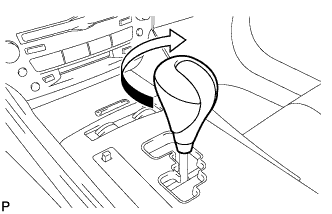
Turn the shift lever knob clockwise and install the shift lever knob sub-assembly.
-
-
CONNECT CABLE TO NEGATIVE BATTERY TERMINAL
Note
When disconnecting the cable, some systems need to be initialized after the cable is reconnected Click here.
-
INSPECT STEERING PAD
-
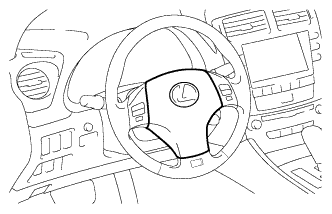
With the steering pad installed on the vehicle, perform a visual check. If there are any following defects, replace the steering pad with a new one:
-
Cuts, minute cracks or marked discoloration on the steering pad top surface or grooves.
-
-
Make sure that the horn sounds.
Tech Tips
If the horn does not sound, inspect the horn system Click here.
-
-
INSPECT SRS WARNING LIGHT