| DTC Code | DTC Name |
|---|---|
| Automatic High Beam System does not Operate or Operation Indicator does not Illuminate |
DESCRIPTION
The main body ECU (multiplex network body ECU) controls the automatic high beam system based on signals received from the forward recognition camera.
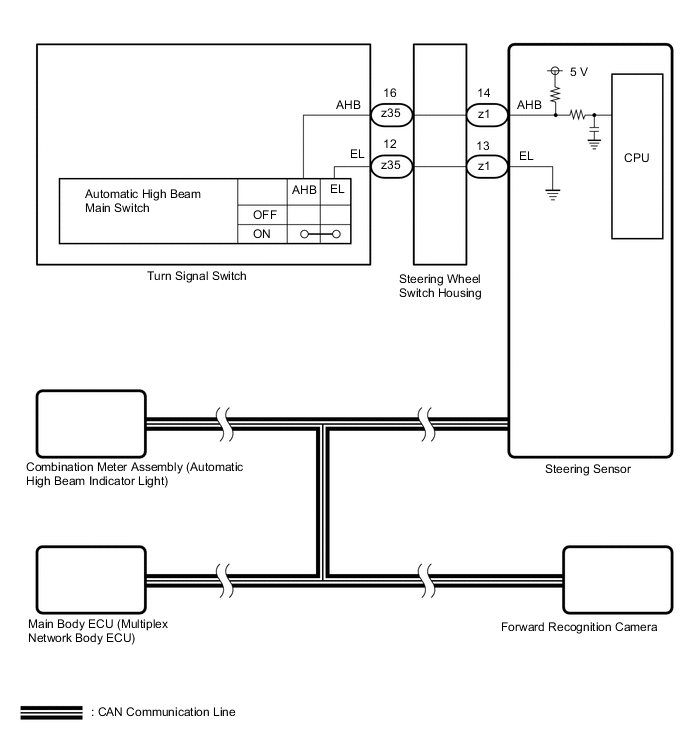
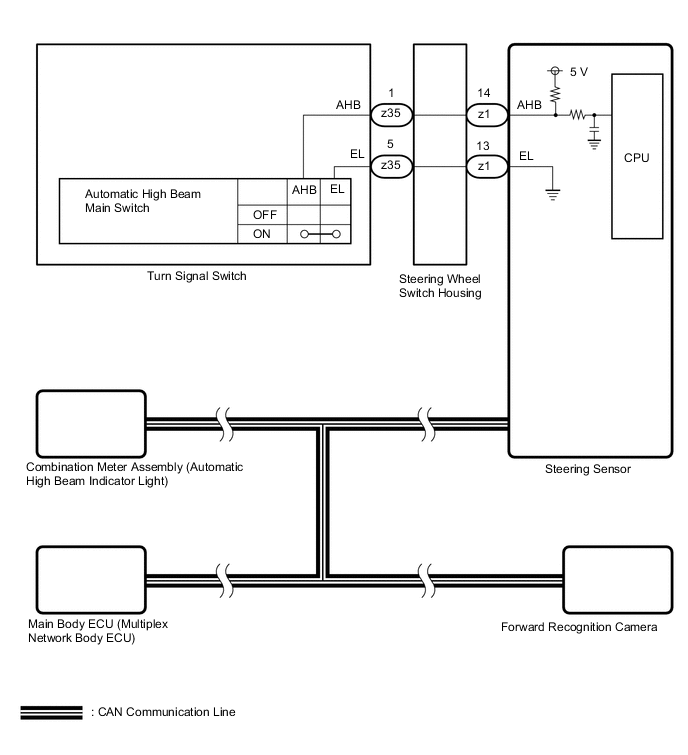
CAUTION / NOTICE / HINT
-
Before replacing the main body ECU (multiplex network body ECU), refer to Service Bulletin.
-
When replacing the combination meter assembly, always replace it with a new one. If a combination meter assembly which was installed to another vehicle is used, the information stored in it will not match the information from the vehicle and a DTC may be stored.
-
When replacing the forward recognition camera, always replace it with a new one. If a forward recognition camera which was installed to another vehicle is used, the information stored in the forward recognition camera will not match the information from the vehicle. As a result, a DTC may be stored.
-
If the forward recognition camera has been replaced with a new one, be sure to perform Forward Recognition Camera Learning.
PROCEDURE
- Click here
CHECK AUTOMATIC HIGH BEAM INDICATOR LIGHT
-
Check the operation of the automatic high beam indicator light.
-
Turn the power switch on (IG).
-
Turn the light control switch to the AUTO or head position.
-
Turn the headlight dimmer switch to the high position.
-
Turn the automatic high beam main switch on.
OK Automatic high beam indicator light illuminate. Result Proceed to OK NG -
- OKClick here
- NGClick here
-
- Click here
READ VALUE USING GTS
-
Using the GTS, read the Data List.
-
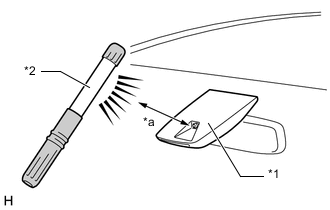
*1 Forward Recognition Camera (Automatic High Beam Sensor) *2 Work Light or Equivalent *a 100 mm (3.94 in.) or less Shine a light on the automatic high beam sensor*.
Tip:*: If troubleshooting is being performed in a bright area, such as outside on a sunny day, it will not be necessary to perform this step.
- Body Electrical > Main Body > Data List
Tester Display Measurement Item Range Normal Condition Diagnostic Note Auto H Beam STS0 Automatic high beam sensor state past 0 Undetec, CAM NA, No sens, Hlight, Taillgt, Speed, Daytime, Village, Malfunc, Delay, Aim Lmt, SAE Mod, Undefin, LIN Err Condition can be displayed - -
-
- Body Electrical > Main Body > Data List
Tester Display Auto H Beam STS0 -
-
-
-
OK The Data List value displays ""Daytime". - Body Electrical > Main Body > Data List
Result Proceed to OK NG -
- OKClick here
- NG
REPLACE FORWARD RECOGNITION CAMERAClick here
-
- Click here
READ VALUE USING GTS
-
Using the GTS, read the Data List.
-
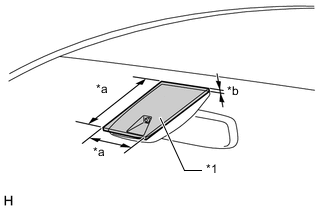
*1 Cardboard or Equivalent Object *a 150 mm (5.91 in.) or higher *b 3 mm (0.118 in.) or higher Cover the automatic high beam sensor with an opaque object, such as cardboard.
Note:
-
Make sure that there is no clearance between the cardboard or equivalent object and the area of the windshield glass in front of the automatic high beam sensor.
-
If there is any clearance, light may shine on the automatic high beam sensor and the value of the Data List will not change.
- Body Electrical > Main Body > Data List
Tester Display Measurement Item Range Normal Condition Diagnostic Note Auto H Beam STS0 Automatic high beam sensor state past 0 Undetec, CAM NA, No sens, Hlight, Taillgt, Speed, Daytime, Village, Malfunc, Delay, Aim Lmt, SAE Mod, Undefin, LIN Err Condition can be displayed - -
-
- Body Electrical > Main Body > Data List
Tester Display Auto H Beam STS0 -
-
-
-
OK The Data List value displays ""Speed". -
Result Proceed to OK NG -
- OK
USE SIMULATION METHOD TO CHECKClick here
- NG
REPLACE FORWARD RECOGNITION CAMERAClick here
-
- Click here
READ VALUE USING GTS
-
Using the GTS, read the Data List.
- Chassis > Steering Angle Sensor > Data List
Tester Display Measurement Item Range Normal Condition Diagnostic Note Auto High Beam Main Switch Automatic high beam main switch signal OFF or ON OFF: Automatic high beam main switch off
ON: Automatic high beam main switch on
- -
-
- Chassis > Steering Angle Sensor > Data List
Tester Display Auto High Beam Main Switch -
-
-
-
OK Normal condition listed above is displayed. Result Proceed to OK NG - Chassis > Steering Angle Sensor > Data List
- OKClick here
- NGClick here
-
- Click here
READ VALUE USING GTS
-
Using the GTS, read the Data List.
- Body Electrical > Main Body > Data List
Tester Display Measurement Item Range Normal Condition Diagnostic Note Auto H Beam STS0 Automatic high beam sensor state past 0 Undetec, CAM NA, No sens, Hlight, Taillgt, Speed, Daytime, Village, Malfunc, Delay, Aim Lmt, SAE Mod, Undefin, LIN Err Condition can be displayed - -
-
- Body Electrical > Main Body > Data List
Tester Display Auto H Beam STS0 -
-
-
-
OK The Data List value displays "Daytime" or "Speed". Result Proceed to OK NG - Body Electrical > Main Body > Data List
- OKClick here
- NG
REPLACE FORWARD RECOGNITION CAMERAClick here
-
- Click here
PERFORM ACTIVE TEST USING GTS
-
Perform the Active Test according to the display on the GTS.
- Body Electrical > Combination Meter > Active Test
Tester Display Measurement Item Control Range Diagnostic Note Automatic High Beam Indicator (Green) Automatic high beam indicator light OFF or ON - -
-
- Body Electrical > Combination Meter > Active Test
Tester Display Automatic High Beam Indicator (Green) -
-
-
-
OK Automatic high beam indicator light illuminate. Result Proceed to OK NG - Body Electrical > Combination Meter > Active Test
- OK
REPLACE MAIN BODY ECU (MULTIPLEX NETWORK BODY ECU)Click here
- NG
REPLACE COMBINATION METER ASSEMBLYClick here
-
- Click here
INSPECT TURN SIGNAL SWITCH
-
Remove the turn signal switch.
-
Inspect the turn signal switch.
Result Proceed to OK NG
- OKClick here
- NG
REPLACE TURN SIGNAL SWITCHClick here
-
- Click here
INSPECT STEERING WHEEL SWITCH HOUSING
-
Remove the steering wheel switch housing.
-
Inspect the steering wheel switch housing.
Result Proceed to OK NG
- OK
REPLACE STEERING SENSORClick here
- NG
REPLACE STEERING WHEEL SWITCH HOUSINGClick here
-