CAN COMMUNICATION SYSTEM TERMINALS OF ECU
Note
-
After turning the power switch off, waiting time may be required before disconnecting the cable from the negative (-) auxiliary battery terminal. Therefore, make sure to read the disconnecting the cable from the negative (-) auxiliary battery terminal notices before proceeding with work.
-
Before measuring the resistance of the CAN bus, turn the power switch off and leave the vehicle for 1 minute or more without operating the key or any switches, or opening or closing the doors. After that, disconnect the cable from the negative (-) auxiliary battery terminal and leave the vehicle for 1 minute or more before measuring the resistance.
-
This section describes the standard values for all CAN related components.
Tech Tips
-
The systems (ECUs and sensors) that use CAN communication vary depending on the vehicle and optional equipment. Check which systems (ECUs and sensors) are installed to the vehicle.
-
Operating the power switch, any other switches or a door triggers related ECU and sensor communication on the CAN. This communication will cause the resistance value to change.
-
Even after DTCs are cleared, if a DTC is stored again after driving the vehicle for a while, the malfunction may be occurring due to vibration of the vehicle. In such a case, wiggling the ECUs or wire harness while performing the inspection below may help determine the cause of the malfunction.
-
NO. 1 CAN JUNCTION CONNECTOR
-
Check the No. 1 CAN junction connector.
-
Connection diagram
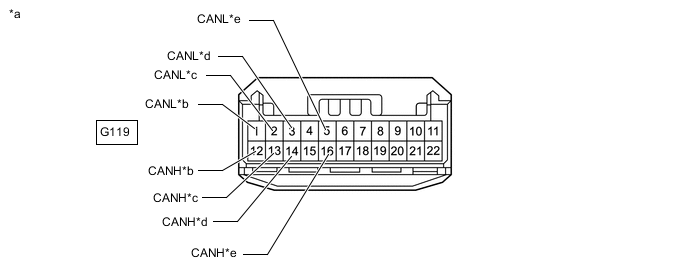
*a Front view of wire harness connector
(to No. 1 CAN Junction Connector)
*b for Radio Receiver Assembly *c for Central Gateway ECU (Network Gateway ECU) *d for No. 21 CAN Junction Connector *e for Telematics Transceiver (w/ Telematics Transceiver) - - -
Check the connection diagram of the components which are connected to the No. 1 CAN junction connector.
Terminal No. Wiring Color Connected to G119-12 (CANH) R Radio receiver assembly G119-1 (CANL) W G119-13 (CANH) L Central gateway ECU (network gateway ECU) G119-2 (CANL) W G119-14 (CANH) P No. 21 CAN junction connector G119-3 (CANL) W G119-16 (CANH) G Telematics transceiver* G119-5 (CANL) W *: w/ Telematics Transceiver
-
-
-
NO. 2 CAN JUNCTION CONNECTOR
-
Check the No. 2 CAN junction connector.
-
Connection diagram
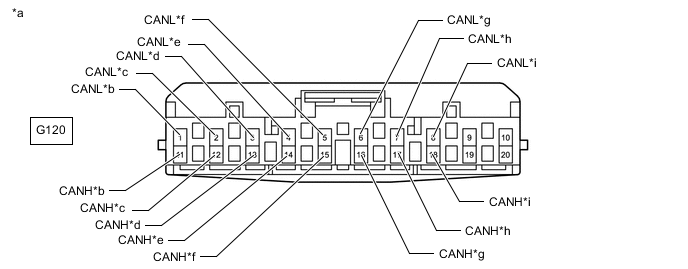
*a Front view of wire harness connector
(to No. 2 CAN Junction Connector)
*b for Combination Meter Assembly *c for Meter Mirror Sub-assembly (w/ Headup Display System) *d for Certification ECU (Smart Key ECU Assembly) *e for Air Conditioning Amplifier Assembly *f for Main Body ECU (Multiplex Network Body ECU) *g for Multiplex Tilt and Telescopic ECU *h for No. 11 CAN Junction Connector *i for Headlight ECU Sub-assembly LH - - -
Check the connection diagram of the components which are connected to the No. 2 CAN junction connector.
Terminal No. (Symbol) Wiring Color Connected to G120-11 (CANH) Y Combination meter assembly G120-1 (CANL) W G120-12 (CANH) BE Meter mirror sub-assembly* G120-2 (CANL) W G120-13 (CANH) G Certification ECU (smart key ECU assembly) G120-3 (CANL) W G120-14 (CANH) L Air conditioning amplifier assembly G120-4 (CANL) W G120-15 (CANH) BE Main body ECU (multiplex network body ECU) G120-5 (CANL) W G120-16 (CANH) P Multiplex tilt and telescopic ECU G120-6 (CANL) W G120-17 (CANH) BR No. 11 CAN junction connector G120-7 (CANL) W G120-18 (CANH) V Headlight ECU sub-assembly LH G120-8 (CANL) W *: w/ Headup Display System
-
-
-
NO. 4 CAN JUNCTION CONNECTOR
-
Check the No. 4 CAN junction connector.
-
Connection diagram
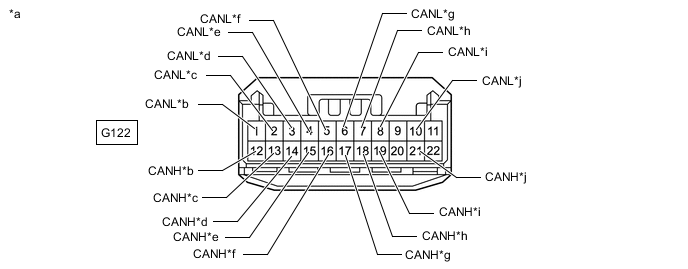
*a Front view of wire harness connector
(to No. 4 CAN Junction Connector)
*b for No. 12 CAN Junction Connector *c for Central Gateway ECU (Network Gateway ECU) *d for Steering Sensor *e for No. 14 CAN Junction Connector *f for Airbag ECU Assembly *g for Yaw Rate Sensor *h for Pedestrian Detection ECU Assembly *i for Front Steering Control ECU (w/ Variable Gear Ratio Steering System) *j for Hybrid Vehicle Control ECU Assembly -
Check the connection diagram of the components which are connected to the No. 4 CAN junction connector.
Terminal No. (Symbol) Wiring Color Connected to G122-12 (CANH) BR No. 12 CAN junction connector G122-1 (CANL) W G122-13 (CANH) Y Central gateway ECU (network gateway ECU) G122-2 (CANL) W G122-14 (CANH) G Steering sensor G122-3 (CANL) W G122-15 (CANH) LG No. 14 CAN junction connector G122-4 (CANL) W G122-16 (CANH) Y Airbag ECU assembly G122-5 (CANL) W G122-17 (CANH) V Yaw rate sensor G122-6 (CANL) W G122-18 (CANH) P Pedestrian detection ECU assembly G122-7 (CANL) W G122-19 (CANH) BE Front steering control ECU* G122-8 (CANL) W G122-21 (CANH) SB Hybrid vehicle control ECU assembly G122-10 (CANL) W *: w/ Variable Gear Ratio Steering System
-
-
-
NO. 5 CAN JUNCTION CONNECTOR
-
Check the No. 5 CAN junction connector.
-
Connection diagram
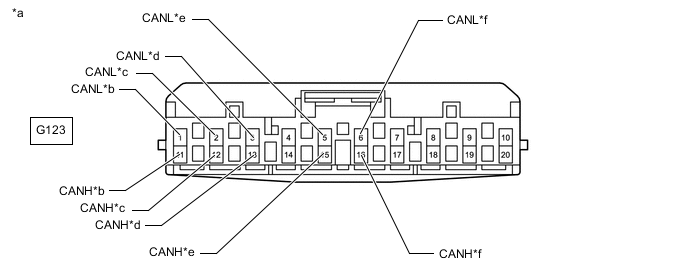
*a Front view of wire harness connector
(to No. 5 CAN Junction Connector)
*b for No. 15 CAN Junction Connector *c for Rack and Pinion Power Steering Gear Assembly *d for Driving Support ECU Assembly (w/ Pre-collision System) *e for Skid Control ECU Assembly *f for Front Steering Control ECU (w/ Variable Gear Ratio Steering System) -
Check the connection diagram of the components which are connected to the No. 5 CAN junction connector.
Terminal No. (Symbol) Wiring Color Connected to G123-11 (CANH) B No. 15 CAN junction connector G123-1 (CANL) W G23-12 (CANH) G Rack and pinion power steering gear assembly G123-2 (CANL) W G123-13 (CANH) Y Driving support ECU assembly*1 G123-3 (CANL) W G123-15 (CANH) L Skid control ECU assembly G123-5 (CANL) W G123-16 (CANH) P Front steering control ECU*2 G123-6 (CANL) W *1: w/ Pre-collision System
*2: w/ Variable Gear Ratio Steering System
-
-
-
NO. 6 CAN JUNCTION CONNECTOR
-
Check the No. 6 CAN junction connector.
-
Connection diagram
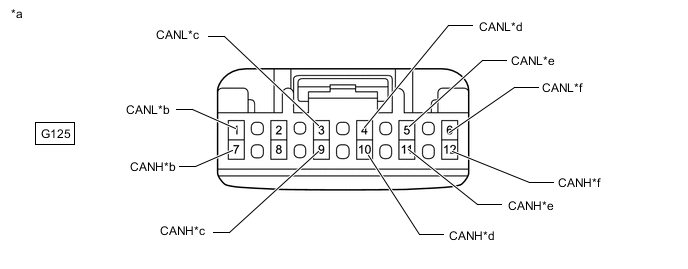
*a Front view of wire harness connector
(to No. 6 CAN Junction Connector)
*b for No. 16 CAN Junction Connector *c for Millimeter Wave Radar Sensor Assembly (w/ Pre-collision System) *d for No. 7 CAN Junction Connector *e for Driving Support ECU Assembly (w/ Pre-collision System) *f for Parking Assist ECU (w/ Panoramic View Monitor System) -
Check the connection diagram of the components which are connected to the No. 8 CAN junction connector.
Terminal No. (Symbol) Wiring Color Connected to G125-7 (CANH) B No. 16 CAN junction connector G125-2 (CANL) W G125-9 (CANH) V Millimeter wave radar sensor assembly*1 G125-3 (CANL) W G125-10 (CANH) G No. 7 CAN junction connector G125-4 (CANL) W G125-11 (CANH) R Driving support ECU assembly*1 G125-5 (CANL) W G125-12 (CANH) L Parking assist ECU*2 G125-6 (CANL) W *1: w/ Pre-collision System
*2: w/ Panoramic View Monitor System
-
-
-
NO. 7 CAN JUNCTION CONNECTOR
-
Check the No. 7 CAN junction connector.
-
Connection diagram
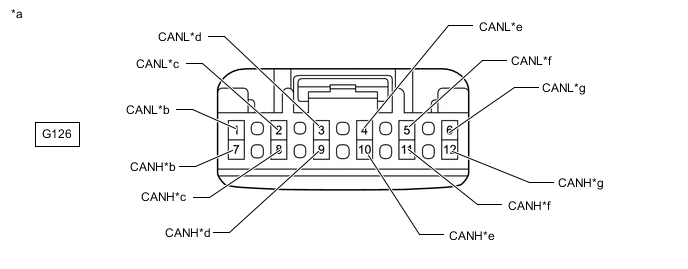
*a Front view of wire harness connector
(to No. 7 CAN Junction Connector)
*b for Central Gateway ECU (Network Gateway ECU) *c for No. 9 CAN Junction Terminal *d
-
for Forward Recognition Camera (w/ Pre-collision System [for Mono Camera Type])
-
for Object Recognition Camera (w/ Pre-collision System [for Stereo Camera Type])
*e for Swing Grille Actuator Assembly (w/ Grille Shutter System) *f for Front Side Radar Sensor RH (w/ Pre-collision System [for Stereo Camera Type]) *g for No. 6 CAN Junction Connector - - -
-
Check the connection diagram of the components which are connected to the No. 7 CAN junction connector.
Terminal No. (Symbol) Wiring Color Connected to G126-7 (CANH) BE Central gateway ECU (network gateway ECU) G126-1 (CANL) W G126-8 (CANH) Y No. 9 CAN junction terminal G126-2 (CANL) W G126-9 (CANH) V
-
Forward recognition camera*1
-
Object recognition camera*2
G126-3 (CANL) W G126-10 (CANH) L Swing grille actuator assembly*3 G126-4 (CANL) W G126-11 (CANH) R Front side radar sensor RH*2 G126-5 (CANL) W G126-12 (CANH) G No. 6 CAN junction connector G126-6 (CANL) W *1: w/ Pre-collision System (for Mono Camera Type)
*2: w/ Pre-collision System (for Stereo Camera Type)
*3: w/ Grille Shutter System
-
-
-
-
NO. 9 CAN JUNCTION CONNECTOR
-
Check the No. 9 CAN junction connector.
-
Connection diagram
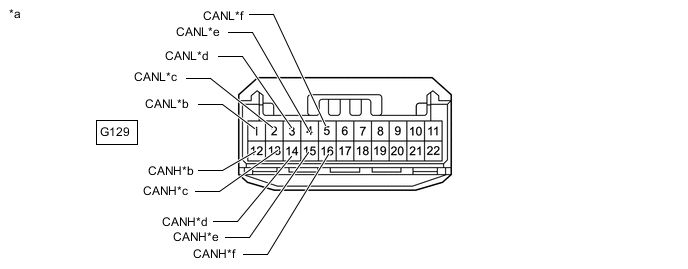
*a Front view of wire harness connector
(to No. 9 CAN Junction Connector)
*b for Central Gateway ECU (Network Gateway ECU) *c for Hybrid Vehicle Control ECU Assembly *d for Shift Control ECU *e for Inverter with Converter Assembly *f for No. 13 CAN Junction Connector -
Check the connection diagram of the components which are connected to the No. 9 CAN junction connector.
Terminal No. (Symbol) Wiring Color Connected to G129-12 (CANH) R Central gateway ECU (network gateway ECU) G129-1 (CANL) W G129-13 (CANH) L Hybrid vehicle control ECU assembly G129-2 (CANL) W G129-14 (CANH) Y Shift control ECU G129-3 (CANL) W G129-15 (CANH) G Inverter with converter assembly G129-4 (CANL) W G129-16 (CANH) BR No. 13 CAN junction connector G129-5 (CANL) W
-
-
-
NO. 10 CAN JUNCTION CONNECTOR
-
Check the No. 10 CAN junction connector.
-
Connection diagram
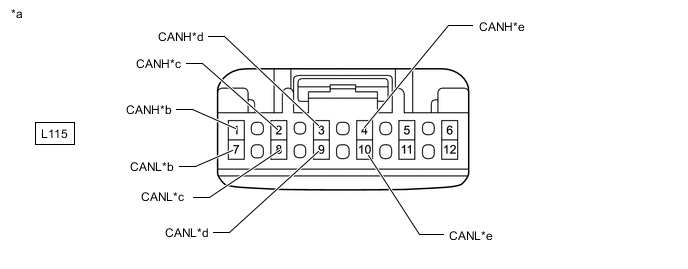
*a Front view of wire harness connector
(to No. 10 CAN Junction Connector)
*b for Front Multiplex Network Door ECU RH *c
-
for No. 2 Position Control ECU Assembly (for LHD)
-
for Position Control ECU Assembly (for RHD)
*d for Central Gateway ECU (Network Gateway ECU) *e for No. 11 CAN Junction Connector - - -
-
Check the connection diagram of the components which are connected to the No. 10 CAN junction connector.
Terminal No. (Symbol) Wiring Color Connected to L115-1 (CANH) GR Front multiplex network door ECU RH L115-7 (CANL) W L115-2 (CANH) SB
-
for No. 2 Position Control ECU Assembly*1
-
for Position Control ECU Assembly*2
L115-8 (CANL) W L115-3 (CANH) Y Central gateway ECU (network gateway ECU) L115-9 (CANL) W L115-4 (CANH) R No. 11 CAN junction connector L115-10 (CANL) W *1: for LHD
*2: for RHD
-
-
-
-
NO. 11 CAN JUNCTION CONNECTOR
-
Check the No. 11 CAN junction connector.
-
Connection diagram
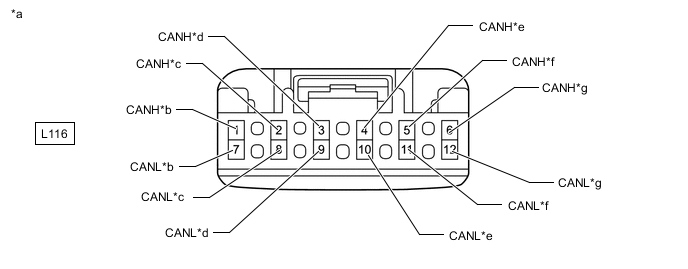
*a Front view of wire harness connector
(to No. 11 CAN Junction Connector)
*b for No. 2 CAN Junction Connector *c for Front Multiplex Network Door ECU LH *d for No. 10 CAN Junction Connector *e
-
for Position Control ECU Assembly (for LHD)
-
for No. 2 Position Control ECU Assembly (for RHD)
*f for Rear Power Seat Switch (Rear Multi Operation Panel System) (w/ Rear Multi Operation Panel System) *g for Headlight ECU Sub-assembly RH - - -
-
Check the connection diagram of the components which are connected to the No. 11 CAN junction connector.
Terminal No. (Symbol) Wiring Color Connected to L116-1 (CANH) BR No. 2 CAN junction connector L116-7 (CANL) W L116-2 (CANH) GR Front multiplex network door ECU LH L116-8 (CANL) W L116-3 (CANH) R No. 10 CAN junction connector L116-9 (CANL) W L116-4 (CANH) Y
-
for Position Control ECU Assembly*1
-
for No. 2 Position Control ECU Assembly*2
L116-10 (CANL) W L116-5 (CANH) P Rear power seat switch (rear multi operation panel system)*3 L116-11 (CANL) W L116-6 (CANH) B Headlight ECU sub-assembly RH L116-12 (CANL) W *1: for LHD
*2: for RHD
*3: w/ Rear Multi Operation Panel System
-
-
-
-
NO. 12 CAN JUNCTION CONNECTOR
-
Check the No. 12 CAN junction connector.
-
Connection diagram
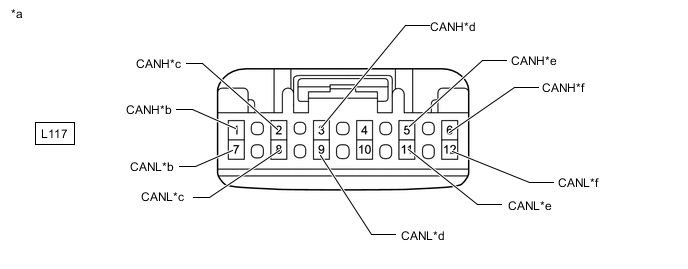
*a Front view of wire harness connector
(to No. 12 CAN Junction Connector)
*b for Skid Control ECU Assembly *c for No. 4 CAN Junction Connector *d for No. 2 CAN Junction Terminal *e for Rack and Pinion Power Steering Gear Assembly *f for ECM -
Check the connection diagram of the components which are connected to the No. 12 CAN junction connector.
Terminal No. (Symbol) Wiring Color Connected to L117-1 (CANH) GR Skid control ECU assembly L117-7 (CANL) W L117-2 (CANH) BR No. 4 CAN junction connector L117-8 (CANL) W L117-3 (CANH) B No. 2 CAN junction terminal L117-9 (CANL) W L117-5 (CANH) P Rack and pinion power steering gear assembly L117-11 (CANL) W L117-6 (CANH) L ECM L117-12 (CANL) W
-
-
-
NO. 13 CAN JUNCTION CONNECTOR
-
Check the No. 13 CAN junction connector.
-
Connection diagram
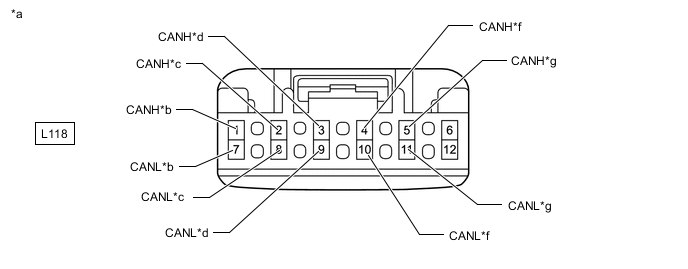
*a Front view of wire harness connector
(to No. 13 CAN Junction Connector)
*b for ECM *c for Skid Control ECU Assembly *d for No. 9 CAN Junction Connector *e for Sub-battery with Control Assembly *f for Battery ECU Assembly -
Check the connection diagram of the components which are connected to the No. 13 CAN junction connector.
Terminal No. (Symbol) Wiring Color Connected to L118-1 (CANH) GR ECM L118-7 (CANL) W L118-2 (CANH) BE Skid control ECU assembly L118-8 (CANL) W L118-3 (CANH) BR No. 9 CAN junction connector L118-9 (CANL) W L118-4 (CANH) LG Sub-battery with control assembly L118-10 (CANL) W L118-5 (CANH) B Battery ECU assembly L118-11 (CANL) W
-
-
-
NO. 14 CAN JUNCTION CONNECTOR
-
Check the No. 14 CAN junction connector.
-
Connection diagram
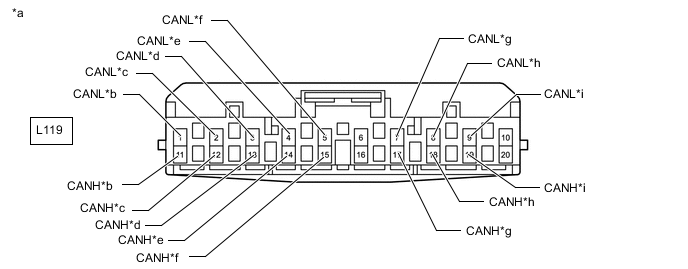
*a Front view of wire harness connector
(to No. 14 CAN Junction Connector)
*b for No. 1 CAN Junction Terminal *c for No. 4 CAN Junction Connector *d for Parking Brake ECU Assembly *e for Absorber Control ECU *f for Tire Pressure Warning ECU and Receiver *g for Suspension Control ECU (w/ Air Suspension System) *h for Rear Steering Control ECU (w/ Dynamic Rear Steering System) *i for Occupant Detection ECU (w/ Occupant Classification System) - - -
Check the connection diagram of the components which are connected to the No. 14 CAN junction connector.
Terminal No. (Symbol) Wiring Color Connected to L119-1 (CANH) B No. 1 CAN junction terminal L119-11 (CANL) W L119-2 (CANH) LG No. 4 CAN Junction Connector L119-12 (CANL) W L119-3 (CANH) L Parking brake ECU assembly L119-13 (CANL) W L119-4 (CANH) SB Absorber control ECU L119-14 (CANL) W L119-5 (CANH) Y Tire pressure warning ECU and receiver L119-15 (CANL) W L119-7 (CANH) G Suspension control ECU*1 L119-17 (CANL) W L119-8 (CANH) V Rear steering control ECU*2 L119-18 (CANL) W L119-9 (CANH) BE Occupant detection ECU*3 L119-19 (CANL) W *1: w/ Air Suspension System
*2: w/ Dynamic Rear Steering System
*3: w/ Occupant Classification System
-
-
-
NO. 15 CAN JUNCTION CONNECTOR
-
Check the No. 15 CAN junction connector.
-
Connection diagram
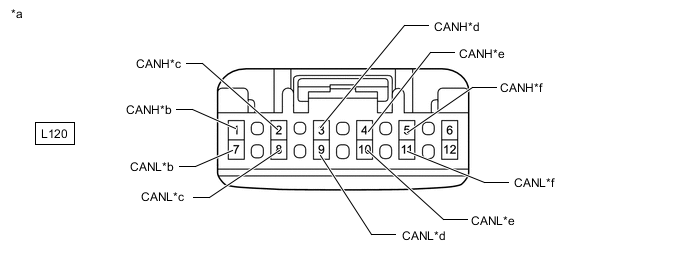
*a Front view of wire harness connector
(to No. 15 CAN Junction Connector)
*b for Suspension Control ECU (w/ Air Suspension System) *c for Absorber Control ECU *d for No. 8 CAN Junction Terminal *e for No. 5 CAN Junction Connector *f for Rear Steering Control ECU (w/ Dynamic Rear Steering System) -
Check the connection diagram of the components which are connected to the No. 15 CAN junction connector.
Terminal No. (Symbol) Wiring Color Connected to L120-1 (CANH) V Suspension control ECU*1 L120-7 (CANL) W L120-2 (CANH) R Absorber control ECU L120-8 (CANL) W L120-3 (CANH) B No. 8 CAN junction terminal L120-9 (CANL) W L120-4 (CANH) B No. 5 CAN junction connector L120-10 (CANL) W L120-5 (CANH) Y Rear steering control ECU*2 L120-11 (CANL) W *1: w/ Air Suspension System
*2: w/ Dynamic Rear Steering System
-
-
-
NO. 16 CAN JUNCTION CONNECTOR
-
Check the No. 16 CAN junction connector.
-
Connection diagram
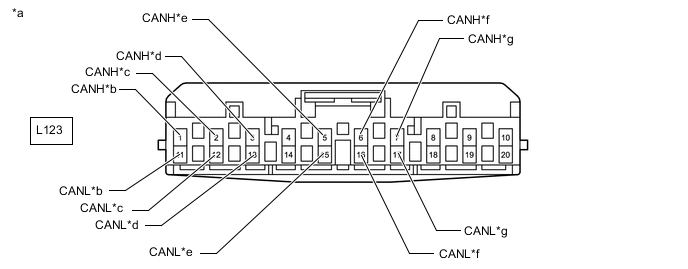
*a Front view of wire harness connector
(to No. 16 CAN Junction Connector)
*b for No. 6 CAN Junction Connector *c for No. 3 CAN Junction Terminal *d for Clearance Warning ECU Assembly *e for Rear Television Camera Assembly *f for Blind Spot Monitor Sensor RH (w/ Blind Spot Monitor System) *g for Seat Belt Control ECU (w/ Pre-collision System [for Stereo Camera Type]) - - -
Check the connection diagram of the components which are connected to the No. 16 CAN junction connector.
Terminal No. (Symbol) Wiring Color Connected to L123-1 (CANH) B No. 6 CAN junction connector L123-11 (CANL) W L123-2 (CANH) Y No. 3 CAN junction terminal L123-12 (CANL) W L123-3 (CANH) BE Clearance warning ECU assembly L23-13 (CANL) W L123-5 (CANH) P Rear television camera assembly L123-15 (CANL) W L123-6 (CANH) LG Blind spot monitor sensor RH*1 L123-16 (CANL) W L123-7 (CANH) L Seat belt control ECU*2 L123-17 (CANL) W *1: w/ Blind Spot Monitor System
*2: w/ Pre-collision System (for Stereo Camera Type)
-
-
-
NO. 21 CAN JUNCTION CONNECTOR
-
Check the No. 21 CAN junction connector.
-
Connection diagram
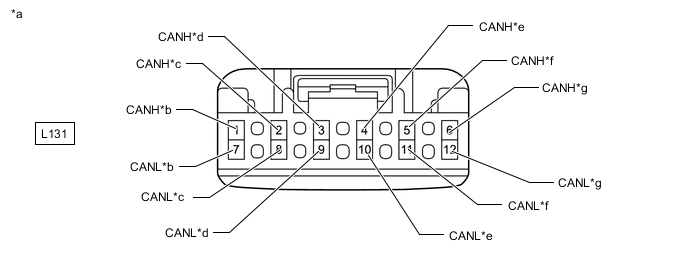
*a Front view of wire harness connector
(to No. 21 CAN Junction Connector)
*b for No. 1 CAN Junction Connector *c for Luggage Closer Motor Assembly *d for Rear Multiplex Network Door ECU LH *e for Stereo Component Equalizer Assembly *f for No. 7 CAN Junction Terminal *g for Rear Multiplex Network Door ECU RH - - -
Check the connection diagram of the components which are connected to the No. 21 CAN junction connector.
Terminal No. (Symbol) Wiring Color Connected to L131-1 (CANH) P No. 1 CAN junction connector L131-7 (CANL) W L131-2 (CANH) R Luggage closer motor assembly L131-8 (CANL) W L131-3 (CANH) BE Rear multiplex network door ECU LH L131-9 (CANL) W L131-4 (CANH) G Stereo component equalizer assembly L131-10 (CANL) W L131-5 (CANH) B No. 7 CAN junction terminal L131-11 (CANL) W L131-6 (CANH) V Rear multiplex network door ECU RH L131-12 (CANL) W
-
-
-
NO. 1 CAN JUNCTION TERMINAL
-
Check the No. 1 CAN junction terminal.
-
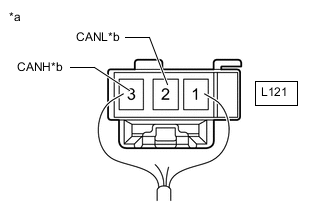
*a Rear view of wire harness connector
(to No. 1 CAN Junction Terminal)
*b for No. 14 CAN Junction Connector Connection diagram
-
Check the connection diagram of the components which are connected to the No. 1 CAN junction terminal.
Terminal No. (Symbol) Wiring Color Connected to L121-3 (CANH) B No. 14 CAN junction connector L121-2 (CANL) W
-
-
-
NO. 2 CAN JUNCTION TERMINAL
-
Check the No. 2 CAN junction terminal.
-
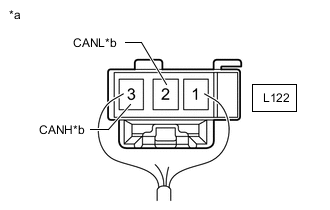
*a Rear view of wire harness connector
(to No. 2 CAN Junction Terminal)
*b for No. 12 CAN Junction Connector Connection diagram
-
Check the connection diagram of the components which are connected to the No. 2 CAN junction terminal.
Terminal No. (Symbol) Wiring Color Connected to L122-3 (CANH) B No. 12 CAN junction connector L122-2 (CANL) W
-
-
-
NO. 3 CAN JUNCTION TERMINAL
-
Check the No. 3 CAN junction terminal.
-
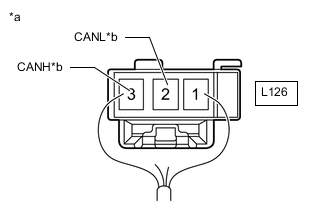
*a Rear view of wire harness connector
(to No. 3 CAN Junction Terminal)
*b for No. 16 CAN Junction Connector Connection diagram
-
Check the connection diagram of the components which are connected to the No. 3 CAN junction terminal.
Terminal No. (Symbol) Wiring Color Connected to L126-3 (CANH) Y No. 16 CAN junction connector L126-2 (CANL) W
-
-
-
NO. 7 CAN JUNCTION TERMINAL
-
Check the No. 7 CAN junction terminal.
-
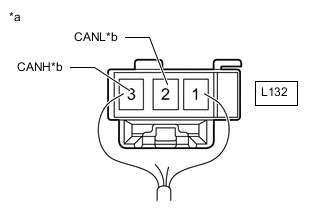
*a Rear view of wire harness connector
(to No. 7 CAN Junction Terminal)
*b for No. 21 CAN Junction Connector Connection diagram
-
Check the connection diagram of the components which are connected to the No. 7 CAN junction terminal.
Terminal No. (Symbol) Wiring Color Connected to L132-3 (CANH) B No. 21 CAN junction connector L132-2 (CANL) W
-
-
-
NO. 8 CAN JUNCTION TERMINAL
-
Check the No. 8 CAN junction terminal.
-
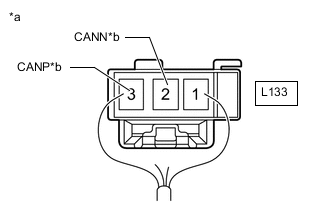
*a Rear view of wire harness connector
(to No. 8 CAN Junction Terminal)
*b for No. 15 CAN Junction Connector Connection diagram
-
Check the connection diagram of the components which are connected to the No. 8 CAN junction terminal.
Terminal No. (Symbol) Wiring Color Connected to L133-3 (CANP) B No. 15 CAN junction connector L133-2 (CANN) W
-
-
-
NO. 9 CAN JUNCTION TERMINAL
-
Check the No. 9 CAN junction terminal.
-
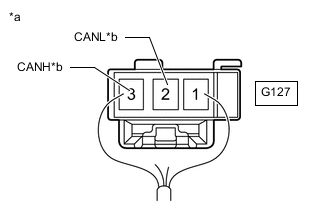
*a Rear view of wire harness connector
(to No. 9 CAN Junction Terminal)
*b for No. 7 CAN Junction Connector Connection diagram
-
Check the connection diagram of the components which are connected to the No. 9 CAN junction terminal.
Terminal No. (Symbol) Wiring Color Connected to G127-3 (CANH) Y No. 7 CAN junction connector G127-2 (CANL) W
-
-
-
DLC3
-
Disconnect the cable from the negative (-) auxiliary battery terminal.
-
Measure the resistance according to the value(s) in the table below.
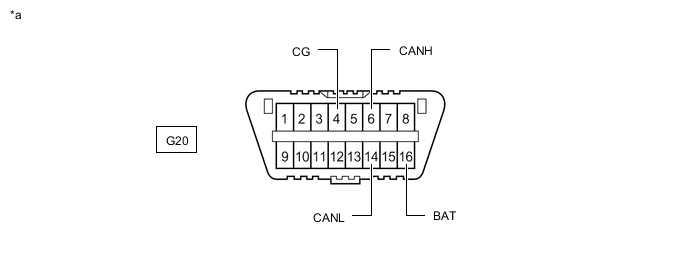
*a Front view of DLC3 - -
-
-
CENTRAL GATEWAY ECU (NETWORK GATEWAY ECU)
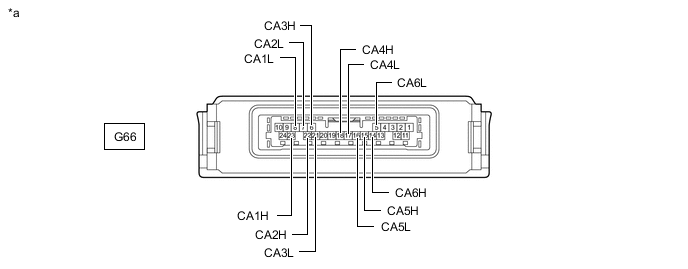
*a Component without harness connected
(Central Gateway ECU [Network Gateway ECU])
- -
-
Disconnect the cable from the negative (-) auxiliary battery terminal.
-
Disconnect the central gateway ECU (network gateway ECU) connector.
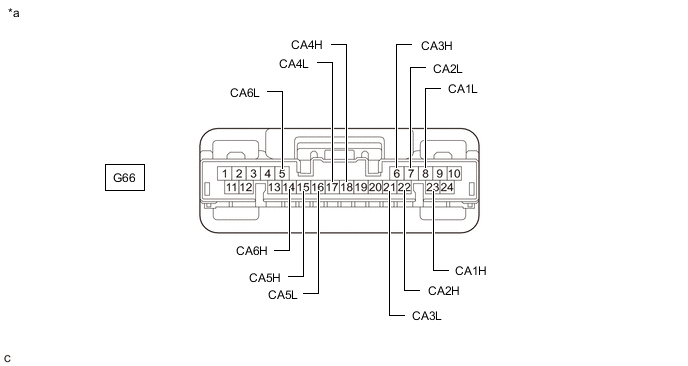
*a Front view of wire harness connector
(to Central Gateway ECU [Network Gateway ECU])
- - -
Measure the resistance according to the value(s) in the table below.
-
-
ECM
Refer to Terminals of ECU.
w/o Canister Pump Module: Click here
w/ Canister Pump Module: Click here
-
Disconnect the cable from the negative (-) auxiliary battery terminal.
-
Disconnect the ECM connectors.
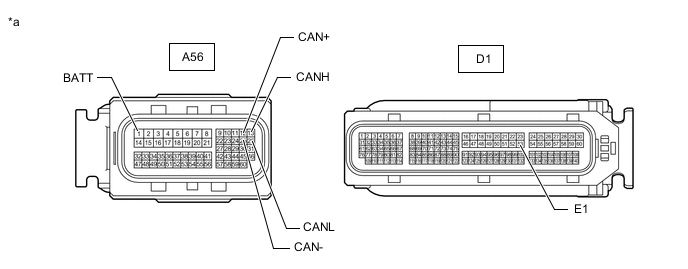
*a Front view of wire harness connector
(to ECM)
- - -
Measure the resistance according to the value(s) in the table below.
-
-
HYBRID VEHICLE CONTROL ECU ASSEMBLY
Refer to Terminals of ECU.
-
Disconnect the cable from the negative (-) auxiliary battery terminal.
-
Disconnect the hybrid vehicle control ECU assembly connectors.
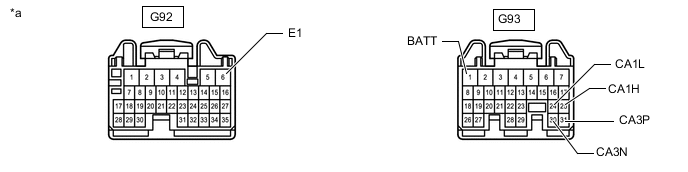
*a Front view of wire harness connector
(to Hybrid Vehicle Control ECU Assembly)
- - -
Measure the resistance according to the value(s) in the table below.
-
-
SHIFT CONTROL ECU
Refer to Terminals of ECU.
for 2WD: Click here
for AWD: Click here
-
Disconnect the cable from the negative (-) auxiliary battery terminal.
-
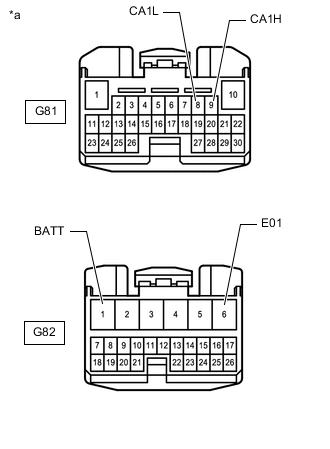
*a Front view of wire harness connector
(to Shift Control ECU)
Disconnect the shift control ECU connectors.
-
Measure the resistance according to the value(s) in the table below.
-
-
INVERTER WITH CONVERTER ASSEMBLY
Refer to Terminals of ECU.
-
Disconnect the cable from the negative (-) auxiliary battery terminal.
-
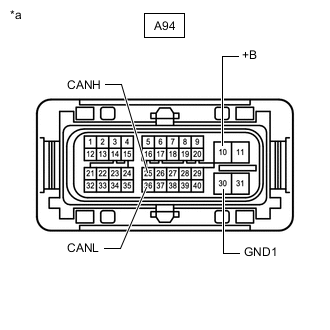
*a Front view of wire harness connector
(to Inverter with Converter Assembly)
Disconnect the inverter with converter assembly connector.
-
Measure the resistance according to the value(s) in the table below.
-
-
BATTERY ECU ASSEMBLY
Refer to Terminals of ECU.
-
Disconnect the cable from the negative (-) auxiliary battery terminal.
-
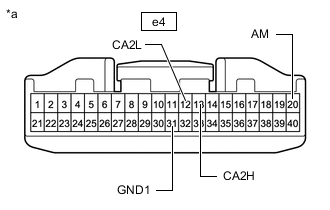
*a Front view of wire harness connector
(to Battery ECU Assembly)
Disconnect the battery ECU assembly connector.
-
Measure the resistance according to the value(s) in the table below.
-
-
SKID CONTROL ECU ASSEMBLY
Refer to Terminals of ECU.
-
Disconnect the cable from the negative (-) auxiliary battery terminal.
-
Disconnect the skid control ECU assembly connectors.
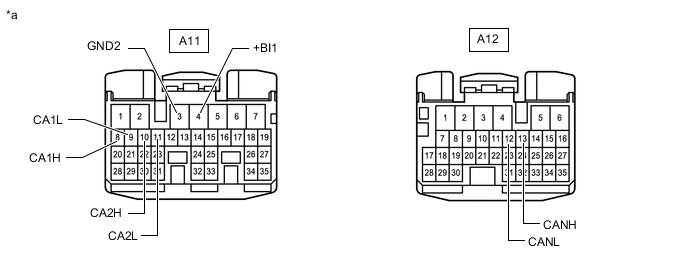
*a Front view of wire harness connector
(to Skid Control ECU Assembly)
- - -
Measure the resistance according to the value(s) in the table below.
-
-
RACK AND PINION POWER STEERING GEAR ASSEMBLY
Refer to Terminals of ECU.
-
Disconnect the cable from the negative (-) auxiliary battery terminal.
-
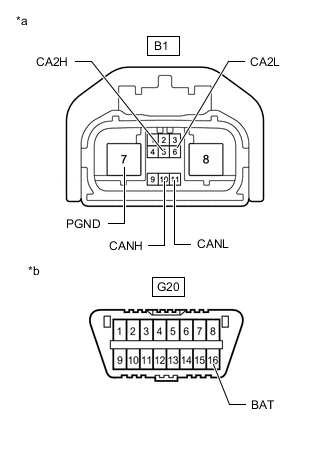
*a Front view of wire harness connector
(to Rack and Pinion Power Steering Gear Assembly)
*b Front view of DLC3 Disconnect the rack and pinion power steering gear assembly connector.
-
Measure the resistance according to the value(s) in the table below.
-
-
FRONT STEERING CONTROL ECU (w/ Variable Gear Ratio Steering System)
Refer to Terminals of ECU.
-
Disconnect the cable from the negative (-) auxiliary battery terminal.
-
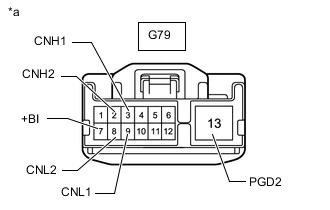
*a Front view of wire harness connector
(to Front Steering Control ECU)
Disconnect the front steering control ECU connector.
-
Measure the resistance according to the value(s) in the table below.
-
-
REAR STEERING CONTROL ECU (w/ Dynamic Rear Steering System)
Refer to Terminals of ECU.
-
Disconnect the cable from the negative (-) auxiliary battery terminal.
-
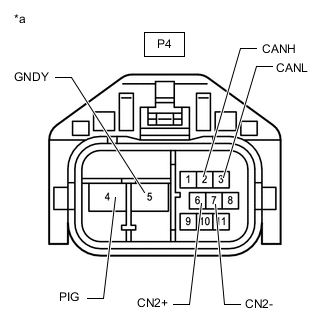
*a Front view of wire harness connector
(to Rear Steering Control ECU)
Disconnect the rear steering control ECU connector.
-
Measure the resistance according to the value(s) in the table below.
-
-
ABSORBER CONTROL ECU
Refer to Terminals of ECU.
-
Disconnect the cable from the negative (-) auxiliary battery terminal.
-
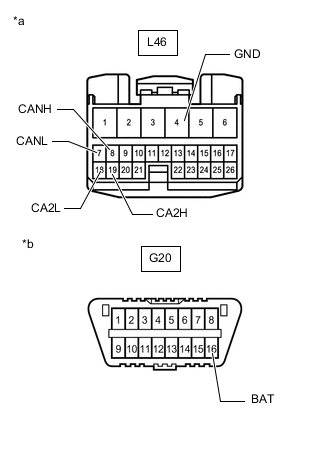
*a Front view of wire harness connector
(to Absorber Control ECU)
*b Front view of DLC3 Disconnect the absorber control ECU connector.
-
Measure the resistance according to the value(s) in the table below.
-
-
SUSPENTION CONTROL ECU (w/ Air Suspension System)
Refer to Terminals of ECU.
-
Disconnect the cable from the negative (-) auxiliary battery terminal.
-
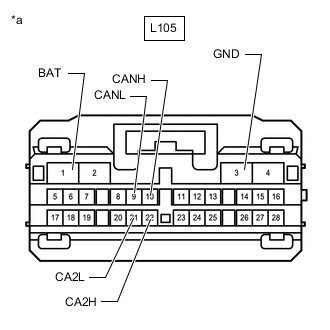
*a Front view of wire harness connector
(to Suspension Control ECU)
Disconnect the suspension control ECU connector.
-
Measure the resistance according to the value(s) in the table below.
-
-
PARKING BRAKE ECU ASSEMBLY
Refer to Terminals of ECU.
-
Disconnect the cable from the negative (-) auxiliary battery terminal.
-
Disconnect the parking brake ECU assembly connectors.
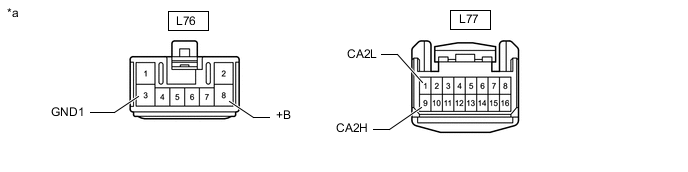
*a Front view of wire harness connector
(to Parking Brake ECU Assembly)
- - -
Measure the resistance according to the value(s) in the table below.
-
-
MULTIPLEX TILT AND TELESCOPIC ECU
Refer to Terminals of ECU.
-
Disconnect the cable from the negative (-) auxiliary battery terminal.
-
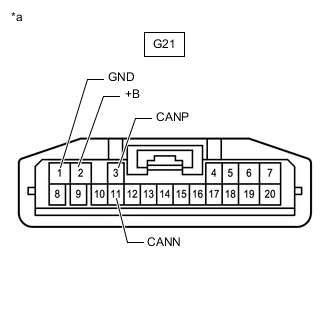
*a Front view of wire harness connector
(to Multiplex Tilt and Telescopic ECU)
Disconnect the multiplex tilt and telescopic ECU connector.
-
Measure the resistance according to the value(s) in the table below.
-
-
STEERING SENSOR (w/ Variable Gear Ratio Steering System)
-
Disconnect the cable from the negative (-) auxiliary battery terminal.
-
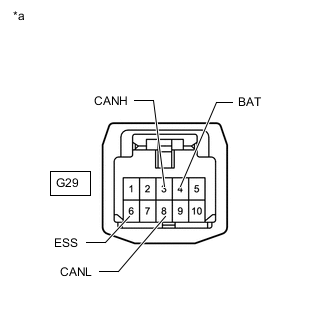
*a Front view of wire harness connector
(to Steering Sensor)
Disconnect the steering sensor connector.
-
Measure the resistance according to the value(s) in the table below.
-
-
STEERING SENSOR (w/o Variable Gear Ratio Steering System)
-
Disconnect the cable from the negative (-) auxiliary battery terminal.
-
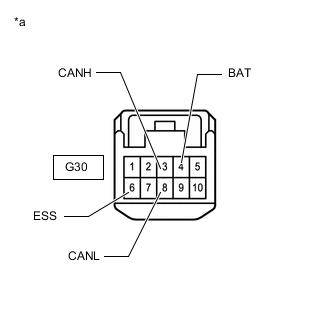
*a Front view of wire harness connector
(to Steering Sensor)
Disconnect the steering sensor connector.
-
Measure the resistance according to the value(s) in the table below.
-
-
DRIVING SUPPORT ECU ASSEMBLY (w/ Pre-collision System [for Mono Camera Type])
Refer to Terminals of ECU.
-
Disconnect the cable from the negative (-) auxiliary battery terminal.
-
Disconnect the driving support ECU assembly connector.
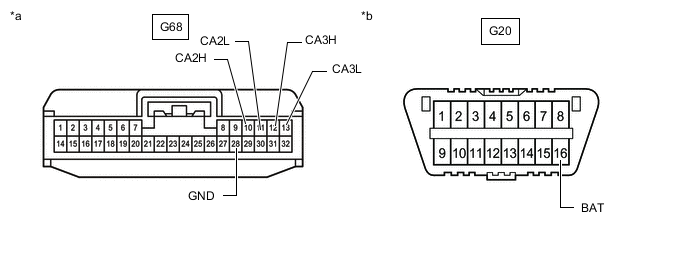
*a Front view of wire harness connector
(to Driving Support ECU Assembly)
*b Front view of DLC3 -
Measure the resistance according to the value(s) in the table below.
-
-
DRIVING SUPPORT ECU ASSEMBLY (w/ Pre-collision System [for Stereo Camera Type])
Refer to Terminals of ECU.
-
Disconnect the cable from the negative (-) auxiliary battery terminal.
-
Disconnect the driving support ECU assembly connector.
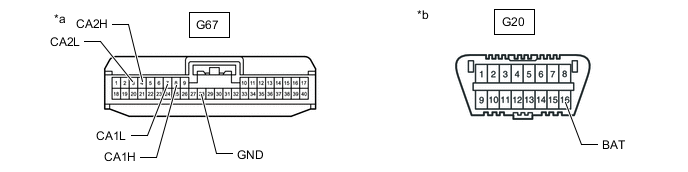
*a Front view of wire harness connector
(to Driving Support ECU Assembly)
*b Front view of DLC3 -
Measure the resistance according to the value(s) in the table below.
-
-
FORWARD RECOGNITION CAMERA (w/ Pre-collision System [for Mono Camera Type])
Refer to Terminals of ECU.
-
Disconnect the cable from the negative (-) auxiliary battery terminal.
-
Disconnect the forward recognition camera connector.
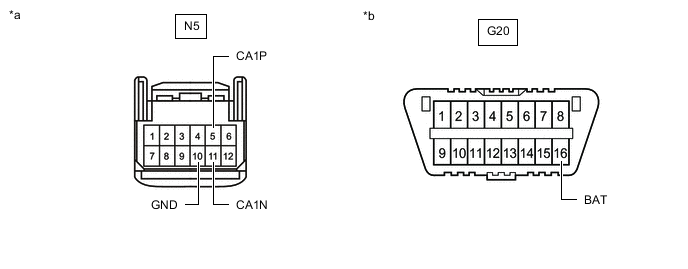
*a Front view of wire harness connector
(to Forward Recognition Camera)
*b Front view of DLC3 -
Measure the resistance according to the value(s) in the table below.
-
-
OBJECT RECOGNITION CAMERA (w/ Pre-collision System [for Stereo Camera Type])
Refer to Terminals of ECU.
-
Disconnect the cable from the negative (-) auxiliary battery terminal.
-
Disconnect the object recognition camera connector.
*a Front view of wire harness connector
(to Object Recognition Camera)
*b Front view of DLC3 -
Measure the resistance according to the value(s) in the table below.
-
-
MILLIMETER WAVE RADAR SENSOR ASSEMBLY
Refer to Terminals of ECU.
w/ Pre-collision System (for Mono Camera Type): Click here
w/ Pre-collision System (for Stereo Camera Type): Click here
-
Disconnect the cable from the negative (-) auxiliary battery terminal.
-
Disconnect the millimeter wave radar sensor assembly connector.
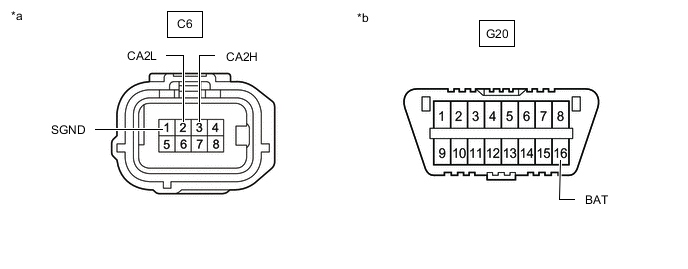
*a Front view of wire harness connector
(to Millimeter Wave Radar Sensor Assembly)
*b Front view of DLC3 -
Measure the resistance according to the value(s) in the table below.
-
-
AIRBAG ECU ASSEMBLY
Refer to Terminals of ECU.
-
Disconnect the cable from the negative (-) auxiliary battery terminal, and wait for at least 90 seconds.
-
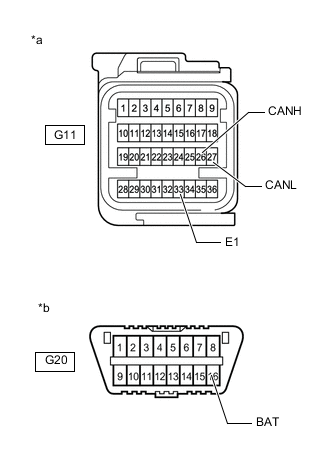
*a Front view of wire harness connector
(to Airbag ECU Assembly)
*b Front view of DLC3 Disconnect the airbag ECU assembly connector.
-
Measure the resistance according to the value(s) in the table below.
-
-
YAW RATE SENSOR
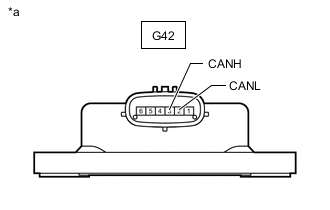
*a Component without harness connected
(Yaw Rate Sensor)
-
Disconnect the cable from the negative (-) auxiliary battery terminal.
-
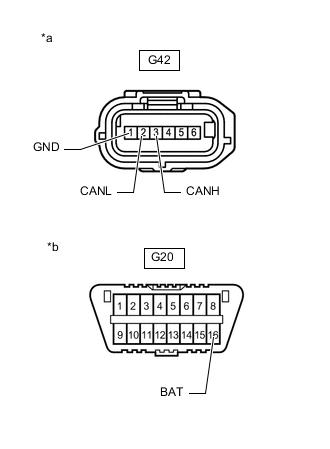
*a Front view of wire harness connector
(to Yaw Rate Sensor)
*b Front view of DLC3 Disconnect the yaw rate sensor connector.
-
Measure the resistance according to the value(s) in the table below.
-
-
PEDESTRIAN DETECTION ECU ASSEMBLY
Refer to Terminals of ECU.
-
Disconnect the cable from the negative (-) auxiliary battery terminal, and wait for at least 90 seconds.
-
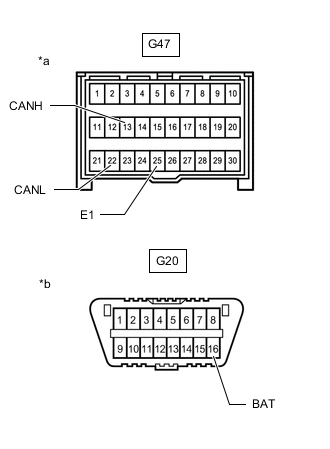
*a Front view of wire harness connector
(to Pedestrian Detection ECU Assembly)
*b Front view of DLC3 Disconnect the pedestrian detection ECU assembly connector.
-
Measure the resistance according to the value(s) in the table below.
-
-
COMBINATION METER ASSEMBLY
Refer to Terminals of ECU.
-
Disconnect the cable from the negative (-) auxiliary battery terminal.
-
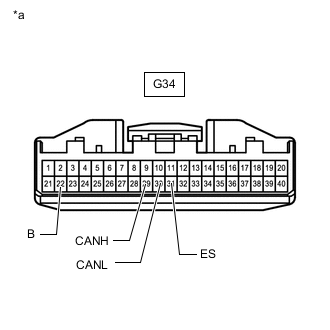
*a Front view of wire harness connector
(to Combination Meter Assembly)
Disconnect the combination meter assembly connector.
-
Measure the resistance according to the value(s) in the table below.
-
-
METER MIRROR SUB-ASSEMBLY (w/ Headup Display System)
Refer to Terminals of ECU.
-
Disconnect the cable from the negative (-) auxiliary battery terminal.
-
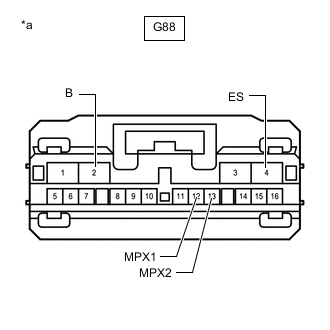
*a Front view of wire harness connector
(to Meter Mirror Sub-assembly)
Disconnect the meter mirror sub-assembly connector.
-
Measure the resistance according to the value(s) in the table below.
-
-
MAIN BODY ECU (MULTIPLEX NETWORK BODY ECU)
Refer to Terminals of ECU.
-
Disconnect the cable from the negative (-) auxiliary battery terminal.
-
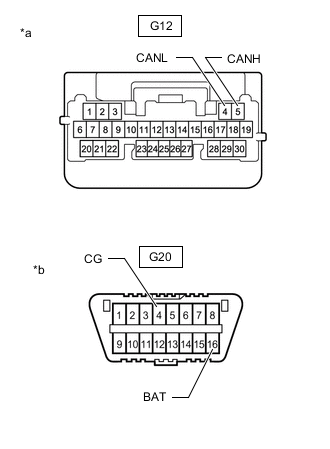
*a Front view of wire harness connector
(to Main Body ECU [Multiplex Network Body ECU])
*b Front view of DLC3 Disconnect the main body ECU (multiplex network body ECU) connector.
-
Measure the resistance according to the value(s) in the table below.
-
-
RADIO RECEIVER ASSEMBLY
Refer to Terminals of ECU.
-
Disconnect the cable from the negative (-) auxiliary battery terminal.
-
Disconnect the radio receiver assembly connectors.
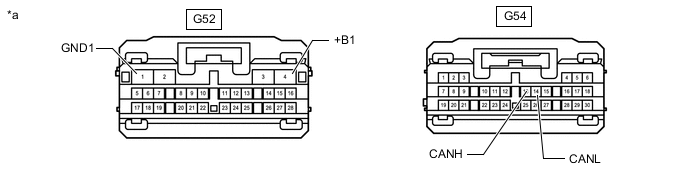
*a Front view of wire harness connector
(to Radio Receiver Assembly)
- - -
Measure the resistance according to the value(s) in the table below.
-
-
STEREO COMPONENT EQUALIZER ASSEMBLY
Refer to Terminals of ECU.
-
Disconnect the cable from the negative (-) auxiliary battery terminal.
-
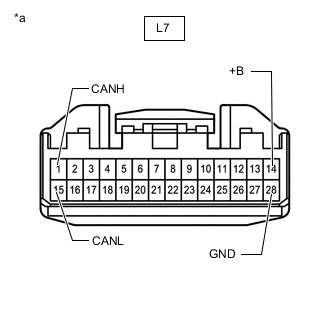
*a Front view of wire harness connector
(to Stereo Component Equalizer Assembly)
Disconnect the stereo component equalizer assembly connector.
-
Measure the resistance according to the value(s) in the table below.
-
-
AIR CONDITIONING AMPLIFIER ASSEMBLY
Refer to Terminals of ECU.
-
Disconnect the cable from the negative (-) auxiliary battery terminal.
-
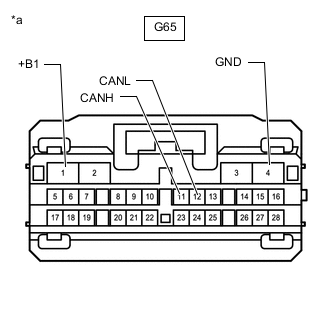
*a Front view of wire harness connector
(to Air Conditioning Amplifier Assembly)
Disconnect the air conditioning amplifier assembly connector.
-
Measure the resistance according to the value(s) in the table below.
-
-
REAR TELEVISION CAMERA ASSEMBLY (w/ Panoramic View Monitor System)
Refer to Terminals of ECU.
-
Disconnect the cable from the negative (-) auxiliary battery terminal.
-
Disconnect the rear television camera assembly connector.
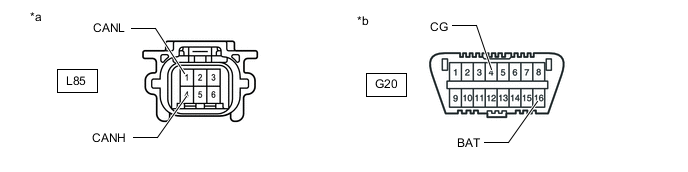
*a Front view of wire harness connector
(to Rear Television Camera Assembly)
*b Front view of DLC3 -
Measure the resistance according to the value(s) in the table below.
-
-
REAR TELEVISION CAMERA ASSEMBLY (w/ Parking Assist Monitor System)
Refer to Terminals of ECU.
-
Disconnect the cable from the negative (-) auxiliary battery terminal.
-
Disconnect the rear television camera assembly connector.
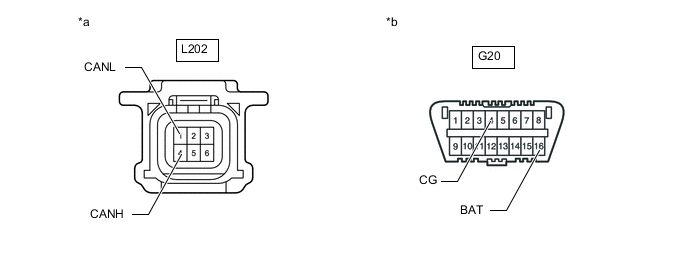
*a Front view of wire harness connector
(to Rear Television Camera Assembly)
*b Front view of DLC3 -
Measure the resistance according to the value(s) in the table below.
-
-
CLEARANCE WARNING ECU ASSEMBLY
Refer to Terminals of ECU.
-
Disconnect the cable from the negative (-) auxiliary battery terminal.
-
Disconnect the clearance warning ECU assembly connector.
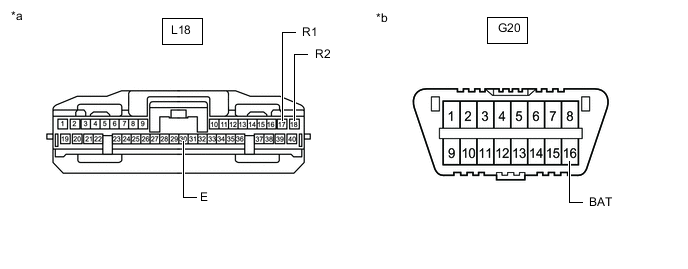
*a Front view of wire harness connector
(to Clearance Warning ECU Assembly)
*b Front view of DLC3 -
Measure the resistance according to the value(s) in the table below.
-
-
BLIND SPOT MONITOR SENSOR RH (w/ Blind Spot Monitor System)
Refer to Terminals of ECU.
-
Disconnect the cable from the negative (-) auxiliary battery terminal.
-
Disconnect the blind spot monitor sensor RH connector.
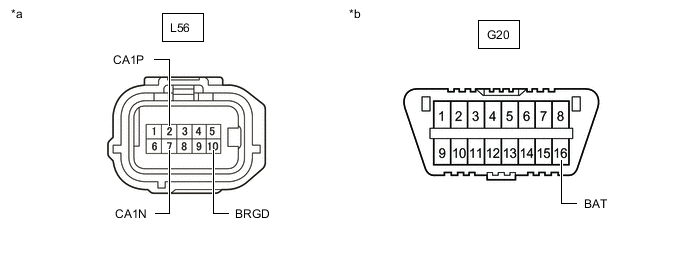
*a Front view of wire harness connector
(to Blind Spot Monitor Sensor RH)
*b Front view of DLC3 -
Measure the resistance according to the value(s) in the table below.
-
-
CERTIFICATION ECU (SMART KEY ECU ASSEMBLY)
Refer to Terminals of ECU.
-
Disconnect the cable from the negative (-) auxiliary battery terminal.
-
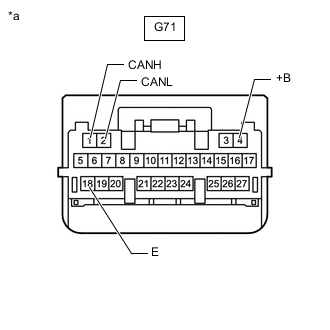
*a Front view of wire harness connector
(to Certification ECU [Smart Key ECU Assembly])
Disconnect the certification ECU (smart key ECU assembly) connector.
-
Measure the resistance according to the value(s) in the table below.
-
-
SUB-BATTERY WITH CONTROL ASSEMBLY
Refer to Terminals of ECU.
-
Disconnect the cable from the negative (-) auxiliary battery terminal.
-
Disconnect the sub-battery with control assembly connector.
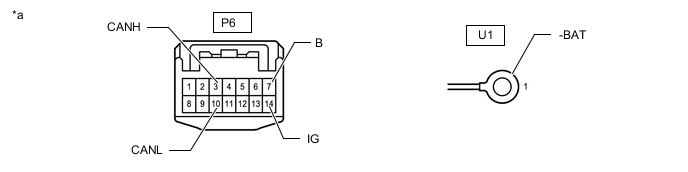
*a Front view of wire harness connector
(to Sub-battery with Control Assembly)
- - -
Measure the resistance according to the value(s) in the table below.
-
-
HEADLIGHT ECU SUB-ASSEMBLY LH
Refer to Terminals of ECU.
-
Disconnect the cable from the negative (-) auxiliary battery terminal.
-
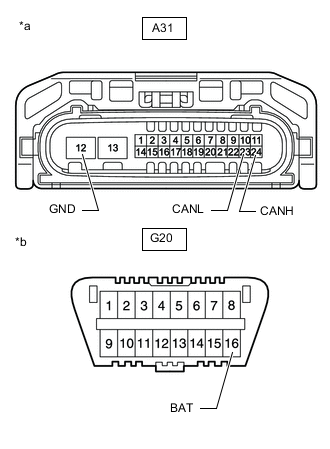
*a Front view of wire harness connector
(to Headlight ECU Sub-assembly LH)
*b Front view of DLC3 Disconnect the headlight ECU sub-assembly LH connector.
-
Measure the resistance according to the value(s) in the table below.
-
-
HEADLIGHT ECU SUB-ASSEMBLY RH
Refer to Terminals of ECU.
-
Disconnect the cable from the negative (-) auxiliary battery terminal.
-
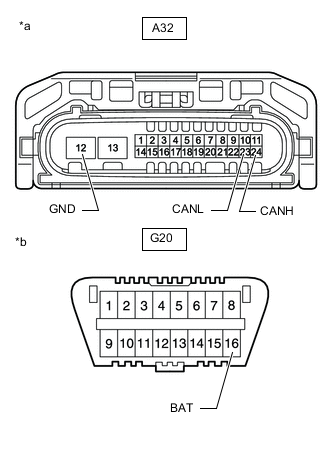
*a Front view of wire harness connector
(to Headlight ECU Sub-assembly RH)
*b Front view of DLC3 Disconnect the headlight ECU sub-assembly RH connector.
-
Measure the resistance according to the value(s) in the table below.
-
-
FRONT MULTIPLEX NETWORK DOOR ECU RH
Refer to Terminals of ECU.
-
Disconnect the cable from the negative (-) auxiliary battery terminal.
-
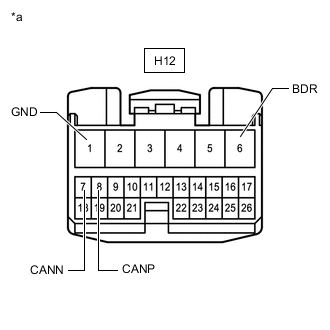
*a Front view of wire harness connector
(to Front Multiplex Network Door ECU RH)
Disconnect the front multiplex network door ECU RH connector.
-
Measure the resistance according to the value(s) in the table below.
-
-
FRONT MULTIPLEX NETWORK DOOR ECU LH
Refer to Terminals of ECU.
-
Disconnect the cable from the negative (-) auxiliary battery terminal.
-
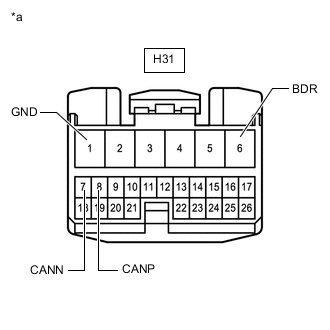
*a Front view of wire harness connector
(to Front Multiplex Network Door ECU LH)
Disconnect the front multiplex network door ECU LH connector.
-
Measure the resistance according to the value(s) in the table below.
-
-
POSITION CONTROL ECU ASSEMBLY (for LHD)
Refer to Terminals of ECU.
-
Disconnect the cable from the negative (-) auxiliary battery terminal.
-
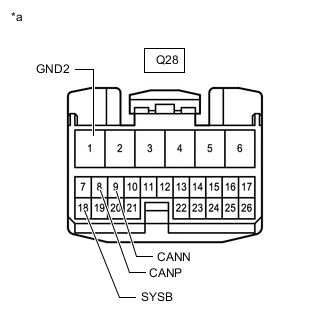
*a Front view of wire harness connector
(to Position Control ECU Assembly)
Disconnect the position control ECU assembly connectors.
-
Measure the resistance according to the value(s) in the table below.
-
-
NO. 2 POSITION CONTROL ECU ASSEMBLY (for RHD)
Refer to Terminals of ECU.
-
Disconnect the cable from the negative (-) auxiliary battery terminal.
-
*a Front view of wire harness connector
(to No. 2 Position Control ECU Assembly)
Disconnect the No. 2 position control ECU assembly connectors.
-
Measure the resistance according to the value(s) in the table below.
-
-
NO. 2 POSITION CONTROL ECU ASSEMBLY (for LHD)
Refer to Terminals of ECU.
-
Disconnect the cable from the negative (-) auxiliary battery terminal.
-
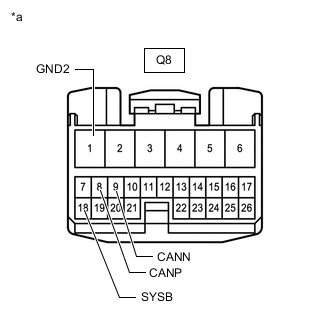
*a Front view of wire harness connector
(to No. 2 Position Control ECU Assembly)
Disconnect the No. 2 position control ECU assembly connector.
-
Measure the resistance according to the value(s) in the table below.
-
-
POSITION CONTROL ECU ASSEMBLY (for RHD)
Refer to Terminals of ECU.
-
Disconnect the cable from the negative (-) auxiliary battery terminal.
-
*a Front view of wire harness connector
(to No. 2 Position Control ECU Assembly)
Disconnect the position control ECU assembly connector.
-
Measure the resistance according to the value(s) in the table below.
-
-
TIRE PRESSURE WARNING ECU AND RECEIVER
Refer to Terminals of ECU.
-
Disconnect the cable from the negative (-) auxiliary battery terminal.
-
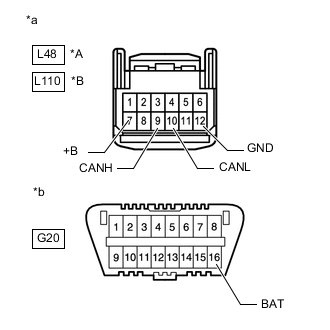
*A for RHD with Light Auto Turn-off System (w/ Delay Function) *B for LHD, w/o Light Auto Turn-off System (w/ Delay Function) *a Front view of wire harness connector
(to Tire Pressure Warning ECU and Receiver)
*b Front view of DLC3 Disconnect the tire pressure warning ECU and receiver connector.
-
Measure the resistance according to the value(s) in the table below.
-
-
LUGGAGE CLOSER MOTOR ASSEMBLY
Refer to Terminals of ECU.
-
Disconnect the cable from the negative (-) auxiliary battery terminal.
-
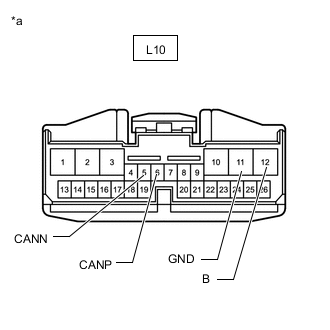
*a Front view of wire harness connector
(to Luggage Closer Motor Assembly)
Disconnect the luggage closer motor assembly connector.
-
Measure the resistance according to the value(s) in the table below.
-
-
SEAT BELT CONTROL ECU (w/ Pre-collision System [for Stereo Camera Type])
Refer to Terminals of ECU.
-
Disconnect the cable from the negative (-) auxiliary battery terminal.
-
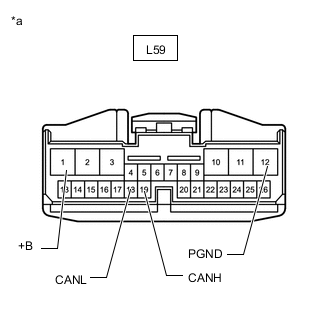
*a Front view of wire harness connector
(to Seat Belt Control ECU)
Disconnect the seat belt control ECU connector.
-
Measure the resistance according to the value(s) in the table below.
-
-
REAR MULTIPLEX NETWORK DOOR ECU RH
Refer to Terminals of ECU.
-
Disconnect the cable from the negative (-) auxiliary battery terminal.
-
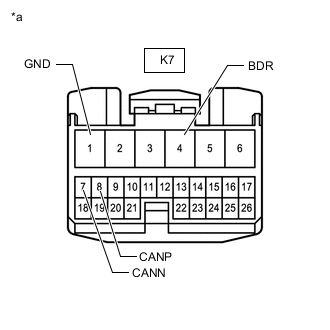
*a Front view of wire harness connector
(to Rear Multiplex Network Door ECU RH)
Disconnect the rear multiplex network door ECU RH connector.
-
Measure the resistance according to the value(s) in the table below.
-
-
REAR MULTIPLEX NETWORK DOOR ECU LH
Refer to Terminals of ECU.
-
Disconnect the cable from the negative (-) auxiliary battery terminal.
-
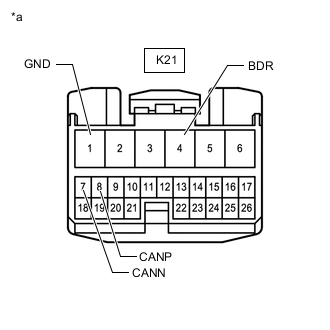
*a Front view of wire harness connector
(to Rear Multiplex Network Door ECU LH)
Disconnect the rear multiplex network door ECU LH connector.
-
Measure the resistance according to the value(s) in the table below.
-
-
FRONT SIDE RADAR SENSOR RH (w/ Pre-collision System [for Stereo Camera Type])
Refer to Terminals of ECU.
-
Disconnect the cable from the negative (-) auxiliary battery terminal.
-
Disconnect the front side radar sensor RH connector.
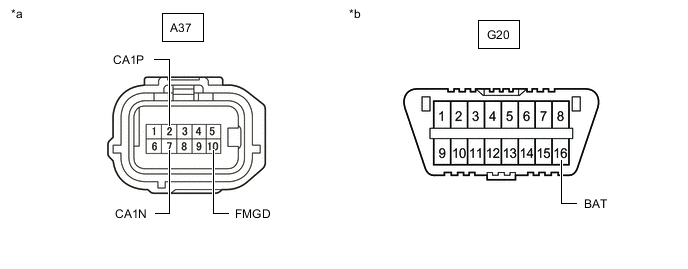
*a Front view of wire harness connector
(to Front Side Radar Sensor RH)
*b Front view of DLC3 -
Measure the resistance according to the value(s) in the table below.
-
-
PARKING ASSIST ECU (w/ Panoramic View Monitor System)
Refer to Terminals of ECU.
-
Disconnect the cable from the negative (-) auxiliary battery terminal.
-
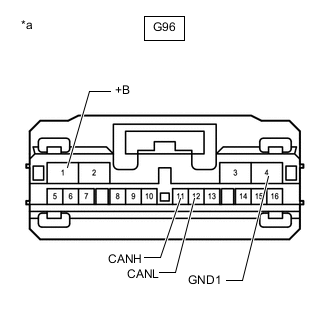
*a Front view of wire harness connector
(to Parking Assist ECU)
Disconnect the parking assist ECU connector.
-
Measure the resistance according to the value(s) in the table below.
-
-
REAR POWER SEAT SWITCH (REAR MULTI OPERATION PANEL SYSTEM) (w/ Rear Multi Operation Panel System)
Refer to Terminals of ECU.
-
Disconnect the cable from the negative (-) auxiliary battery terminal.
-
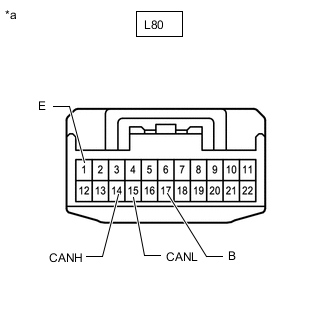
*a Front view of wire harness connector
(to Rear Power Seat Switch [Rear Multi Operation Panel System])
Disconnect the rear power seat switch (rear multi operation panel system) connector.
-
Measure the resistance according to the value(s) in the table below.
-
-
OCCUPANT DETECTION ECU (w/ Occupant Classification System)
Refer to Terminals of ECU.
-
Disconnect the cable from the negative (-) auxiliary battery terminal.
-
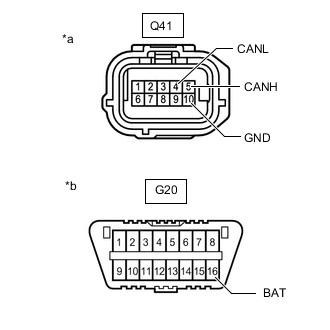
*a Front view of wire harness connector
(to Occupant Detection ECU)
*b Front view of DLC3 Disconnect the occupant detection ECU connector.
-
Measure the resistance according to the value(s) in the table below.
-
-
TELEMATICS TRANSCEIVER (w/ Telematics Transceiver)
Refer to Terminals of ECU.
-
Disconnect the cable from the negative (-) auxiliary battery terminal.
-
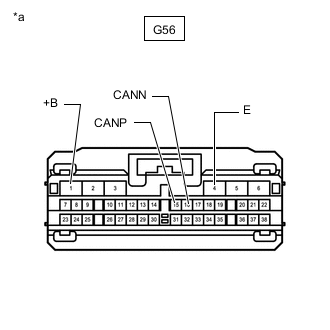
*a Front view of wire harness connector
(to Telematics Transceiver)
Disconnect the telematics transceiver connector.
-
Measure the resistance according to the value(s) in the table below.
-