| DTC Code | DTC Name |
|---|---|
| B2352 | Lost Communication with Power Integration No.1 ECU |
| B2353 | Lost Communication with Power Integration No.2 ECU |
| B2354 | Lost Communication with Power Integration No.3 ECU |
DESCRIPTION
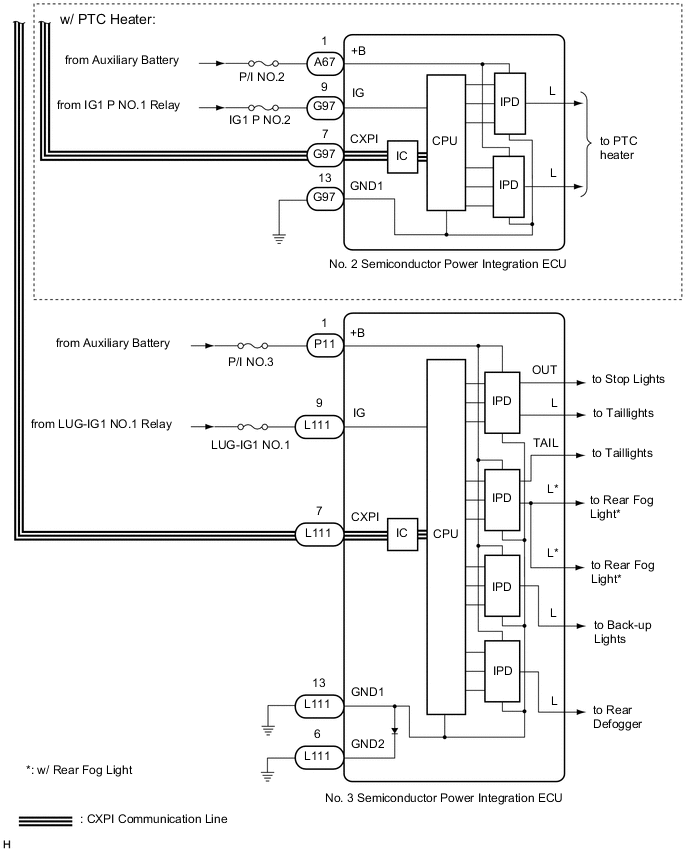
This DTC is stored when CXPI communication between the semiconductor power integration ECU and main body ECU (multiplex network body ECU) stops for 10 seconds or more.
| DTC No. | Detection Item | DTC Detection Condition | Trouble Area |
|---|---|---|---|
| B2352 | Lost Communication with Power Integration No.1 ECU | No communication between No. 1 semiconductor power integration ECU and main body ECU (multiplex network body ECU) for 10 seconds or more |
|
| B2353 | Lost Communication with Power Integration No.2 ECU | No communication between No. 2 semiconductor power integration ECU and main body ECU (multiplex network body ECU) for 10 seconds or more |
|
| B2354 | Lost Communication with Power Integration No.3 ECU | No communication between No. 3 semiconductor power integration ECU and main body ECU (multiplex network body ECU) for 10 seconds or more |
|
CAUTION / NOTICE / HINT
-
When using the GTS with the power switch off to troubleshoot:
Connect the GTS to the vehicle and turn a courtesy light switch on and off at 1.5 second intervals until communication between the GTS and vehicle begins.
-
Inspect the fuses for circuits related to this system before performing the following inspection procedure.
-
Recognition code registration is necessary when replacing the main body ECU (multiplex network body ECU).
-
If the main body ECU (multiplex network body ECU) is replaced, refer to the Service Bulletin.
-
After turning the power switch off, waiting time may be required before disconnecting the cable from the negative (-) auxiliary battery terminal. Therefore, make sure to read the disconnecting the cable from the negative (-) auxiliary battery terminal notices before proceeding with work.
-
When disconnecting the cable from the negative (-) auxiliary battery terminal while performing repairs, some systems need to be initialized after the cable is reconnected.
PROCEDURE
- Click here
CLEAR DTC
-
Clear the DTCs.
- Body Electrical > Main Body > Clear DTCs
-
-
Result Result NEXT
- NEXTClick here
-
- Click here
CHECK FOR DTC
-
Check for DTCs.
- Body Electrical > Main Body > Trouble Codes
-
-
Result Result Proceed to All DTCs are output A DTC B2352 is output B DTC B2353 is output (w/ PTC Heater) C DTC B2354 is output D
-
- Click here
CHECK NO. 1 SEMICONDUCTOR POWER INTEGRATION ECU
-
Turn the power switch off.
-
Disconnect the cable from the negative (-) auxiliary battery terminal.
-
Disconnect the A61 No. 1 semiconductor power integration ECU connector.
-
Connect the cable to the negative (-) auxiliary battery terminal.
-
Clear the DTCs.
- Body Electrical > Main Body > Clear DTCs
-
-
-
Check for DTCs.
- Body Electrical > Main Body > Trouble Codes
-
-
Result Result Proceed to All DTCs are output (w/ PTC Heater) A All DTCs are output (w/o PTC Heater) B DTC B2352 is output C
- AClick here
- BClick here
GO TO STEP 5
- C
REPLACE NO. 1 SEMICONDUCTOR POWER INTEGRATION ECUClick here
-
- Click here
CHECK NO. 2 SEMICONDUCTOR POWER INTEGRATION ECU
-
Turn the power switch off.
-
Disconnect the cable from the negative (-) auxiliary battery terminal.
-
Disconnect the G97 No. 2 semiconductor power integration ECU connector.
-
Connect the cable to the negative (-) auxiliary battery terminal.
-
Clear the DTCs.
- Body Electrical > Main Body > Clear DTCs
-
-
-
Check for DTCs.
- Body Electrical > Main Body > Trouble Codes
-
-
Result Result Proceed to All DTCs are output A DTC B2353 is output B
- AClick here
- B
REPLACE NO. 2 SEMICONDUCTOR POWER INTEGRATION ECUClick here
-
- Click here
CHECK NO. 3 SEMICONDUCTOR POWER INTEGRATION ECU
-
Turn the power switch off.
-
Disconnect the cable from the negative (-) auxiliary battery terminal.
-
Disconnect the L111 No. 3 semiconductor power integration ECU connector.
-
Connect the cable to the negative (-) auxiliary battery terminal.
-
Clear the DTCs.
- Body Electrical > Main Body > Clear DTCs
-
-
-
Check for DTCs.
- Body Electrical > Main Body > Trouble Codes
-
-
Result Result Proceed to All DTCs are output A DTC B2354 is output B
- AClick here
- B
REPLACE NO. 3 SEMICONDUCTOR POWER INTEGRATION ECUClick here
-
- Click here
CHECK HARNESS AND CONNECTOR (CXPI CIRCUIT)
-
Turn the power switch off.
-
Disconnect the cable from the negative (-) auxiliary battery terminal.
-
Disconnect the G17 main body ECU (multiplex network body ECU) connector.
-
Disconnect the G61 No. 1 semiconductor power integration ECU connector.
-
Disconnect the G97 No. 2 semiconductor power integration ECU connector. *
-
*:w/ PTC Heater
-
-
Disconnect the L111 No. 3 semiconductor power integration ECU connector.
-
Measure the resistance according to the value(s) in the table below.
Standard Resistance Tester Connection Condition Specified Condition G17-5 (CXP1) - Body ground Always 10 kΩ or higher Result Proceed to OK NG
- OKClick here
- NGClick here
-
- Click here
CHECK HARNESS AND CONNECTOR (MAIN BODY ECU [MULTIPLEX NETWORK BODY ECU] - NO. 1 SEMICONDUCTOR POWER INTEGRATION ECU)
-
Turn the power switch off.
-
Disconnect the cable from the negative (-) auxiliary battery terminal.
-
Disconnect the G17 main body ECU (multiplex network body ECU) connector.
-
Disconnect the A61 No. 1 semiconductor power integration ECU connector.
-
Measure the resistance according to the value(s) in the table below.
Standard Resistance Tester Connection Condition Specified Condition G17-5 (CXP1) - A61-7 (CXPI) Always Below 1 Ω Result Proceed to OK NG
- OK
REPLACE MAIN BODY ECU (MULTIPLEX NETWORK BODY ECU)Click here
- NGClick here
-
- Click here
CHECK HARNESS AND CONNECTOR (MAIN BODY ECU [MULTIPLEX NETWORK BODY ECU] - INSTRUMENT PANEL JUNCTION BLOCK ASSEMBLY)
-
Disconnect the G17 main body ECU (multiplex network body ECU) connector.
-
Disconnect the 5A instrument panel junction block assembly connector.
-
Measure the resistance according to the value(s) in the table below.
Standard Resistance Table 1. for LHD Tester Connection Condition Specified Condition G17-5 (CXP1) - 5A-29 Always Below 1 Ω Table 2. for RHD Tester Connection Condition Specified Condition G17-5 (CXP1) - 5A-30 Always Below 1 Ω Result Proceed to OK NG
- OK
REPLACE INSTRUMENT PANEL JUNCTION BLOCK ASSEMBLYClick here
- NG
REPAIR OR REPLACE HARNESS OR CONNECTOR
-
- Click here
CHECK HARNESS AND CONNECTOR (CXPI CIRCUIT)
-
Turn the power switch off.
-
Disconnect the cable from the negative (-) auxiliary battery terminal.
-
Disconnect the G17 main body ECU (multiplex network body ECU) connector.
-
Disconnect the G61 No. 1 semiconductor power integration ECU connector.
-
Disconnect the G97 No. 2 semiconductor power integration ECU connector. *
-
*:w/ PTC Heater
-
-
Disconnect the L111 No. 3 semiconductor power integration ECU connector.
-
Disconnect the 5A, 5F and 5H instrument panel junction block assembly connectors.
-
Measure the resistance according to the value(s) in the table below.
Standard Resistance Table 3. for LHD Tester Connection Condition Specified Condition 5A-29 - Body ground Always 10 kΩ or higher 5F-20 - Body ground Always 10 kΩ or higher 5A-51 - Body ground Always 10 kΩ or higher 5H-23 - Body ground Always 10 kΩ or higher Table 4. for RHD Tester Connection Condition Specified Condition 5A-30 - Body ground Always 10 kΩ or higher 5F-27 - Body ground Always 10 kΩ or higher 5A-52 - Body ground Always 10 kΩ or higher 5H-32 - Body ground Always 10 kΩ or higher Result Proceed to OK NG
- OK
REPLACE INSTRUMENT PANEL JUNCTION BLOCK ASSEMBLYClick here
- NG
REPAIR OR REPLACE HARNESS OR CONNECTOR
-
- Click here
CHECK HARNESS AND CONNECTOR (NO. 1 SEMICONDUCTOR POWER INTEGRATION ECU - BATTERY AND BODY GROUND)
-
Turn the power switch off.
-
Disconnect the cable from the negative (-) auxiliary battery terminal.
-
Disconnect the A61 and A66 No. 1 semiconductor power integration ECU connectors.
-
Measure the resistance according to the value(s) in the table below.
Standard Resistance Tester Connection Condition Specified Condition A61-6 (GND2) - Body ground Always Below 1 Ω A61-13 (GND1) - Body ground Always Below 1 Ω -
Connect the cable to the negative (-) auxiliary battery terminal.
-
Measure the voltage according to the value(s) in the table below.
Standard Voltage Tester Connection Switch Condition Specified Condition A66-1 (+B) - Body ground Power switch off 8 to 14 V A61-9 (IG) - Body ground Power switch on (IG) 8 to 14 V Result Proceed to OK NG
- OKClick here
- NG
REPAIR OR REPLACE HARNESS OR CONNECTOR
-
- Click here
CHECK HARNESS AND CONNECTOR (MAIN BODY ECU [MULTIPLEX NETWORK BODY ECU] - NO. 1 SEMICONDUCTOR POWER INTEGRATION ECU)
-
Turn the power switch off.
-
Disconnect the cable from the negative (-) auxiliary battery terminal.
-
Disconnect the G17 main body ECU (multiplex network body ECU) connector.
-
Disconnect the A61 No. 1 semiconductor power integration ECU connector.
-
Measure the resistance according to the value(s) in the table below.
Standard Resistance Tester Connection Condition Specified Condition A61-7 (CXPI) - G17-5 (CXP1) Always Below 1 Ω Result Proceed to OK NG
- OK
REPLACE NO. 1 SEMICONDUCTOR POWER INTEGRATION ECUClick here
- NGClick here
-
- Click here
CHECK HARNESS AND CONNECTOR (INSTRUMENT PANEL JUNCTION BLOCK ASSEMBLY - NO. 1 SEMICONDUCTOR POWER INTEGRATION ECU)
-
Turn the power switch off.
-
Disconnect the cable from the negative (-) auxiliary battery terminal.
-
Disconnect the A61 No. 1 semiconductor power integration ECU connector.
-
Disconnect the 5F instrument panel junction block assembly connector.
-
Measure the resistance according to the value(s) in the table below.
Standard Resistance Table 5. for LHD Tester Connection Condition Specified Condition A61-7 (CXPI) - 5F-20 Always Below 1 Ω Table 6. for RHD Tester Connection Condition Specified Condition A61-7 (CXPI) - 5F-27 Always Below 1 Ω Result Proceed to OK NG
- OK
REPLACE INSTRUMENT PANEL JUNCTION BLOCK ASSEMBLYClick here
- NG
REPAIR OR REPLACE HARNESS OR CONNECTOR
-
- Click here
CHECK HARNESS AND CONNECTOR (NO. 2 SEMICONDUCTOR POWER INTEGRATION ECU - BATTERY AND BODY GROUND)
-
Turn the power switch off.
-
Disconnect the cable from the negative (-) auxiliary battery terminal.
-
Disconnect the A67 and G97 No. 2 semiconductor power integration ECU connectors.
-
Measure the resistance according to the value(s) in the table below.
Standard Resistance Tester Connection Condition Specified Condition G97-13 (GND1) - Body ground Always Below 1 Ω -
Connect the cable to the negative (-) auxiliary battery terminal.
-
Measure the voltage according to the value(s) in the table below.
Standard Voltage Tester Connection Switch Condition Specified Condition A67-1 (+B) - Body ground Power switch off 8 to 14 V G97-9 (IG) - Body ground Power switch on (IG) 8 to 14 V Result Proceed to OK NG
- OKClick here
- NG
REPAIR OR REPLACE HARNESS OR CONNECTOR
-
- Click here
CHECK HARNESS AND CONNECTOR (MAIN BODY ECU [MULTIPLEX NETWORK BODY ECU] - NO. 2 SEMICONDUCTOR POWER INTEGRATION ECU)
-
Turn the power switch off.
-
Disconnect the cable from the negative (-) auxiliary battery terminal.
-
Disconnect the G17 main body ECU (multiplex network body ECU) connector.
-
Disconnect the G97 No. 2 semiconductor power integration ECU connector.
-
Measure the resistance according to the value(s) in the table below.
Standard Resistance Tester Connection Condition Specified Condition G97-7 (CXPI) - G17-5 (CXP1) Always Below 1 Ω Result Proceed to OK NG
- OK
REPLACE NO. 2 SEMICONDUCTOR POWER INTEGRATION ECUClick here
- NGClick here
-
- Click here
CHECK HARNESS AND CONNECTOR (INSTRUMENT PANEL JUNCTION BLOCK ASSEMBLY - NO. 2 SEMICONDUCTOR POWER INTEGRATION ECU)
-
Turn the power switch off.
-
Disconnect the cable from the negative (-) auxiliary battery terminal.
-
Disconnect the G97 No. 2 semiconductor power integration ECU connector.
-
Disconnect the 5A instrument panel junction block assembly connector.
-
Measure the resistance according to the value(s) in the table below.
Standard Resistance Table 7. for LHD Tester Connection Condition Specified Condition G97-7 (CXPI) - 5A-51 Always Below 1 Ω Table 8. for RHD Tester Connection Condition Specified Condition G97-7 (CXPI) - 5A-52 Always Below 1 Ω Result Proceed to OK NG
- OK
REPLACE INSTRUMENT PANEL JUNCTION BLOCK ASSEMBLYClick here
- NG
REPAIR OR REPLACE HARNESS OR CONNECTOR
-
- Click here
CHECK HARNESS AND CONNECTOR (NO. 3 SEMICONDUCTOR POWER INTEGRATION ECU - BATTERY AND BODY GROUND)
-
Turn the power switch off.
-
Disconnect the cable from the negative (-) auxiliary battery terminal.
-
Disconnect the P11 and L111 No. 3 semiconductor power integration ECU connectors.
-
Measure the resistance according to the value(s) in the table below.
Standard Resistance Tester Connection Condition Specified Condition L111-6 (GND2) - Body ground Always Below 1 Ω L111-13 (GND1) - Body ground Always Below 1 Ω -
Connect the cable to the negative (-) auxiliary battery terminal.
-
Measure the voltage according to the value(s) in the table below.
Standard Voltage Tester Connection Switch Condition Specified Condition P11-1 (+B) - Body ground Power switch off 8 to 14 V L111-9 (IG) - Body ground Power switch on (IG) 8 to 14 V Result Proceed to OK NG
- OKClick here
- NG
REPAIR OR REPLACE HARNESS OR CONNECTOR
-
- Click here
CHECK HARNESS AND CONNECTOR (MAIN BODY ECU [MULTIPLEX NETWORK BODY ECU] - NO. 3 SEMICONDUCTOR POWER INTEGRATION ECU)
-
Turn the power switch off.
-
Disconnect the cable from the negative (-) auxiliary battery terminal.
-
Disconnect the G17 main body ECU (multiplex network body ECU) connector.
-
Disconnect the L111 No. 3 semiconductor power integration ECU connector.
-
Measure the resistance according to the value(s) in the table below.
Standard Resistance Tester Connection Condition Specified Condition L111-7 (CXPI) - G17-5 (CXP1) Always Below 1 Ω Result Proceed to OK NG
- OK
REPLACE NO. 3 SEMICONDUCTOR POWER INTEGRATION ECUClick here
- NGClick here
-
- Click here
CHECK HARNESS AND CONNECTOR (INSTRUMENT PANEL JUNCTION BLOCK ASSEMBLY - NO. 3 SEMICONDUCTOR POWER INTEGRATION ECU)
-
Turn the power switch off.
-
Disconnect the cable from the negative (-) auxiliary battery terminal.
-
Disconnect the L111 No. 3 semiconductor power integration ECU connector.
-
Disconnect the 5H instrument panel junction block assembly connector.
-
Measure the resistance according to the value(s) in the table below.
Standard Resistance Table 9. for LHD Tester Connection Condition Specified Condition L111-7 (CXPI) - 5H-23 Always Below 1 Ω Table 10. for RHD Tester Connection Condition Specified Condition L111-7 (CXPI) - 5H-32 Always Below 1 Ω Result Proceed to OK NG
- OK
REPLACE INSTRUMENT PANEL JUNCTION BLOCK ASSEMBLYClick here
- NG
REPAIR OR REPLACE HARNESS OR CONNECTOR
-