When any of the following parts have been replaced, perform adjustment shown in the following table. If not, the parking support brake system may not operate correctly.
Click here
-
PRECAUTION (PROCEDURE 1)
-
The necessary procedures (adjustment, calibration, initialization or registration) that must be performed after parts are removed and installed, or replaced during parking support brake system removal/installation are shown below.
For the installation location of the ultrasonic sensors, refer to Parts Location.
Part Name Operation Adjustment Item Proceed to Steering sensor
-
Removal and installation of the steering sensor
-
Removal and installation of the connector of the steering sensor
-
Replacement
Steering angle neutral point (Initialize parking support brake system)* Procedure 4 Suspension, tires, etc. The vehicle height changes because of suspension or tire replacement Ultrasonic sensor detection angle Procedure 2, 3 Ultrasonic sensor detection angle registration Procedure 4 Front bumper assembly
-
Replacement
-
Installation position of the front bumper assembly changes because of the removal and installation of the front bumper assembly
Ultrasonic sensor detection angle Procedure 2, 3 Ultrasonic sensor detection angle registration Procedure 4 Rear bumper assembly
-
Replacement
-
Installation position of the rear bumper assembly changes because of the removal and installation of the rear bumper assembly
Ultrasonic sensor detection angle Procedure 2, 3 Ultrasonic sensor detection angle registration Procedure 4 Clearance warning ECU assembly Replacement Ultrasonic sensor detection angle Procedure 2, 3 Steering angle neutral point Procedure 4 Bumper type registration Ultrasonic sensor detection angle registration Ultrasonic sensor
-
Removal and installation
-
Replacement
Ultrasonic sensor detection angle Procedure 2, 3 Ultrasonic sensor detection angle registration Procedure 4 An ultrasonic sensor becomes misaligned Ultrasonic sensor detection angle Procedure 2, 3 Ultrasonic sensor detection angle registration Procedure 4 An ultrasonic sensor is subjected to impact Ultrasonic sensor detection angle Procedure 2, 3 Ultrasonic sensor detection angle registration Procedure 4 Auxiliary battery Cable is disconnected from the negative (-) auxiliary battery terminal Steering angle neutral point* Procedure 4 Blind spot monitor sensor Replacement Blind spot monitor beam axis confirmation Rear telebvision camera assembly
-
Replacement
-
Installation angle of the rear television camera changes because of the removal and installation of the rear television camera, etc.
-
Rear television camera view adjustment
-
Rear television camera assembly optical axis (Back camera position setting)
-
*: The steering sensor zero point can also be calibrated by driving the vehicle.
-
-
Refer to Pre-collision System (for Stereo Camera Type):
-
Refer to Pre-collision System (for Mono Camera Type):
-
-
-
-
PREPARATION (PROCEDURE 2)
-
Preparation
-
Digital angle gauge
-
Digital angle gauge attachment
-
Masking tape (To prevent damage)
-
A level
09989-00020 -
-
Confirm levelness of floor surface.
-
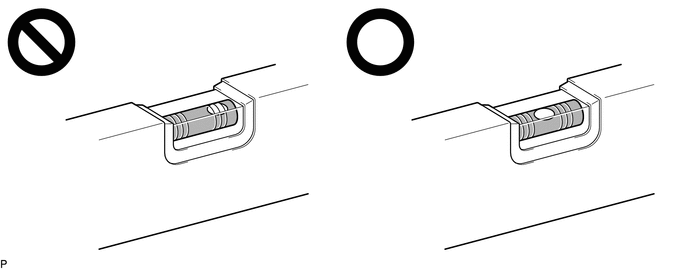
Place a bubble level on a level surface and confirm that the bubble is centered.
Note:Make sure that there is no gravel, sand, etc., and that the surface is not undulating.
Tip:By adjusting the direction of the bubble level, it is possible to find a position where the bubble is centered.
-
Turn on the digital angle gauge.
-
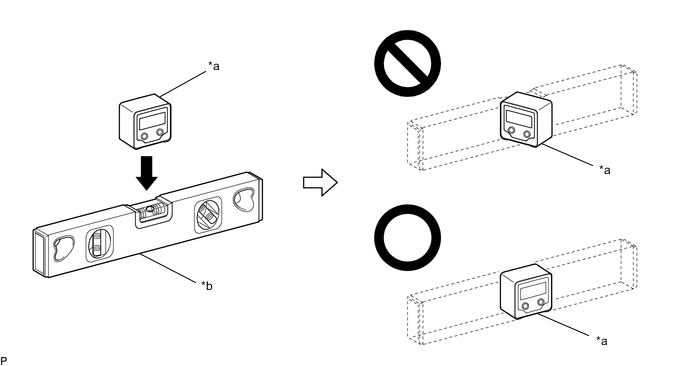
*a Digital Angle Gauge *b Level Place the digital angle gauge in the same location and direction as that of the bubble level where the levelness of the surface was confirmed.
Note:Confirm that the location and direction of the digital angle gauge is exactly the same as that of the bubble level.
-
Press the "ZERO" switch to memorize the zero point (perfectly level).
Note:Make sure that the digital angle gauge does not move when pressing the switch. If the digital angle gauge moves when the switch is pressed, an incorrect zero point may be memorized and it will not be possible to accurately check for levelness.
-
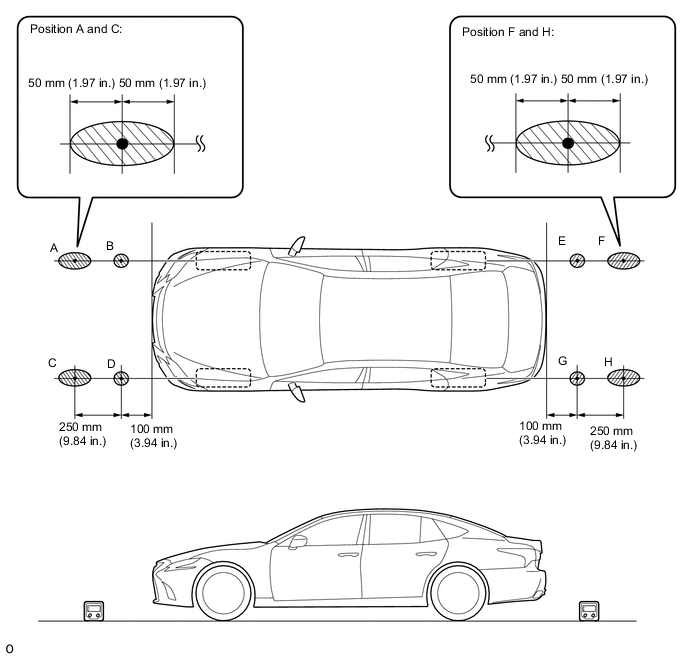

Confirmation Area - - Using the digital angle gauge in which the zero point (perfectly level) has been memorized, measure the angle of the floor surface at the 4 positions at the front of the vehicle and the 4 positions at the rear of the vehicle as shown in the illustration.
Note:
-
Always position the digital angle gauge in the direction shown in the illustration.
-
Make sure that there is no gravel, sand, etc., and that the floor surface is not undulating.
-
When measuring the angle of the floor surface, avoid uneven areas such as joints between tiles.
Tip:If necessary, the digital angle gauge can be placed anywhere within the specified area when measuring the angle of the floor surface for positions A, C, F and H.
-
-
Figure 1. Worksheet:
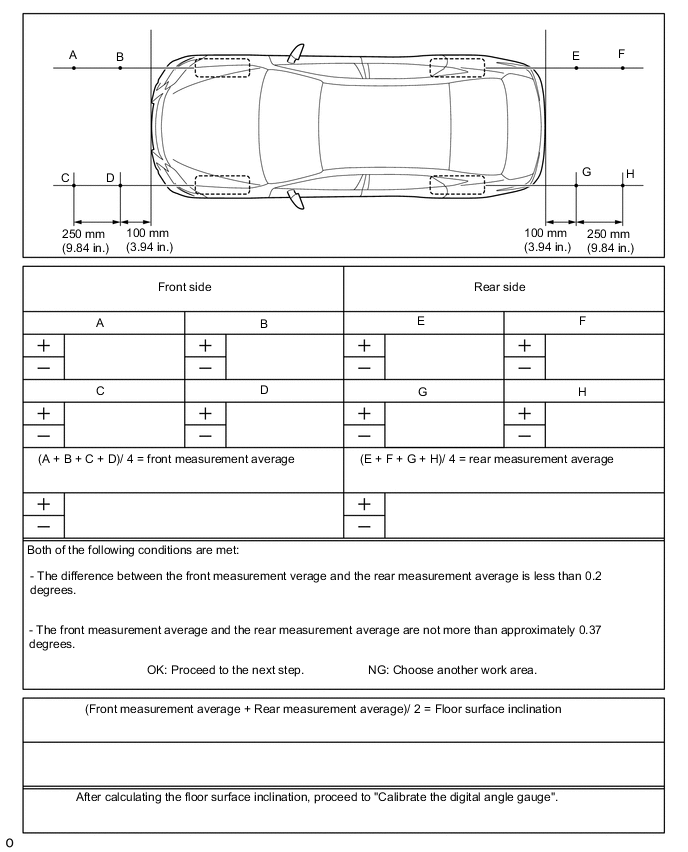
Using the following worksheet, calculate the average of the measurements taken at the 4 positions in front of the vehicle, and calculate the average of the measurements taken at the 4 positions behind the vehicle. Confirm that the front measurement average and the rear measurement average are not more than approximately 0.37 degrees. Also, confirm that the front measurement average and the rear measurement average is less than 0.2 degrees.
Note:If the front measurement average and the rear measurement average are more than approximately 0.37 degrees or the difference between the front measurement average and the rear measurement average is 0.2 degrees or more, choose another work area as it is not possible to accurately check the installation angle of the sensors.
-
Average the front measurement average and the rear measurement average, then round the answer to 1 decimal place (E.g. 0.0927 degrees is rounded to 0.1 degrees) to obtain the floor surface inclination value.
-
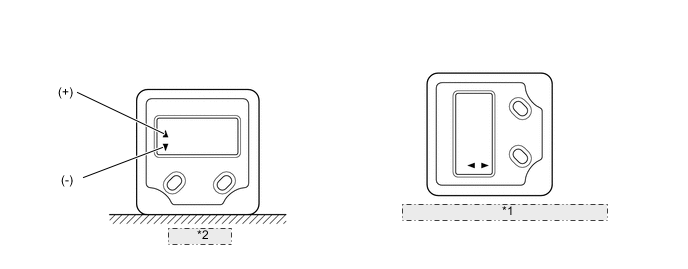
Table 1. *1 After calibrating, displays 90° when turned on its side *2 Calibrating Calibrate the digital angle gauge
Adjust the angle of the digital angle gauge until it reads the same value of the floor surface inclination, then press the "ZERO" switch to memorize the zero point (level with floor surface).
Note:Before pressing the "ZERO" switch, confirm that the digital angle gauge reading is positive if the floor angle inclination is positive, and negative if the floor angle inclination is negative.
-
-
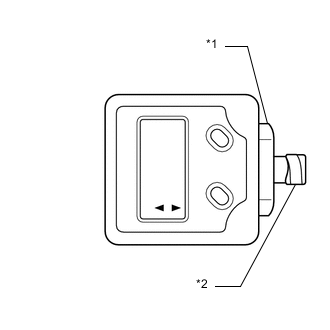
Table 2. *1 Digital angle gauge attachment *2 Masking tape Prepare the digital angle gauge
-
Attach the digital angle gauge attachment to the digital angle gauge.
09989-00020 -
Attach masking tape to the digital angle gauge attachment.
-
-
Remove all luggage from the vehicle.
-
Adjust the tire inflation pressure to the specified pressure.
-
Check the height of the vehicle.
-
for 2WDClick here
-
for AWDClick here
-
-
-
SENSOR HEIGHT AND ALIGNMENT INSPECTION (PROCEDURE 3)
Tip:Check if the installation angle of each ultrasonic sensor is appropriate.
-
Preparation
-
Visually check that the bumper, grill and ultrasonic sensors are installed properly and are not damaged.
Note:If the bumper, grill or any ultrasonic sensor is not installed correctly, the calibration may not be able to be completed.
-
Check the tire pressures and adjust them if necessary.
Note:
-
Ensure that the vehicle is level in an area with no wind.
-
Do not lean on the vehicle.
-
Do not do anything that may affect the level of the vehicle during the calibration, such as getting in or out of the vehicle, or adding or removing luggage.
-
-
-
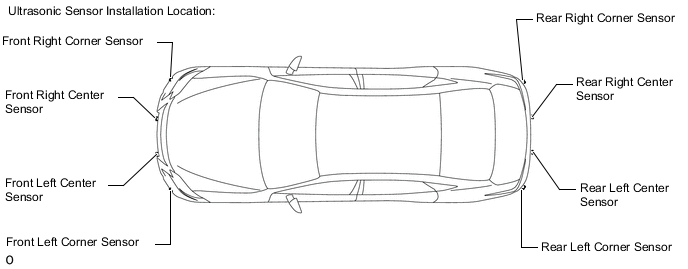
Sensor height and alignment inspection
-
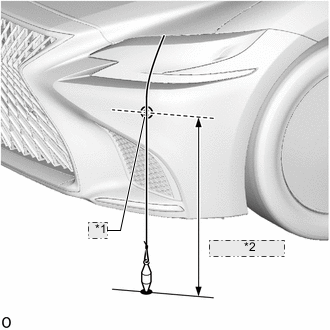
Table 3. *1 Corner of Sensor *2 Sensor Height Measure the installation height of the sensors.
Table 4. Standard Height (except Sport Package) (Front Bumper): Sensor Location Sensor Height Front Center Ultrasonic Sensor 430.0 to 497.7 mm (16.9 to 19.6 in.) Front Corner Ultrasonic Sensor 550 to 617.9 mm (21.7 to 24.3 in.) Table 5. Standard Height (for Sport Package) (Front Bumper): Sensor Location Sensor Height Front Center Ultrasonic Sensor 443.2 to 501.0 mm (17.4 to 19.7 in.) Front Corner Ultrasonic Sensor 550.0 to 617.9 mm (21.7 to 24.3 in.) Table 6. Standard Height (Rear Bumper): Sensor Location Sensor Height Rear Center Ultrasonic Sensor 519.3 to 593.8 mm (20.4 to 23.4 in.) Rear Corner Ultrasonic Sensor 519.3 to 593.7 mm (20.4 to 23.4 in.) Note:If the installation height of a sensor is not as specified, it may not be possible to measure the sensor angles correctly. If so, unload the vehicle and measure the installation height of the sensors again.
Tip:Use the center of the sensor as the measuring point.
-
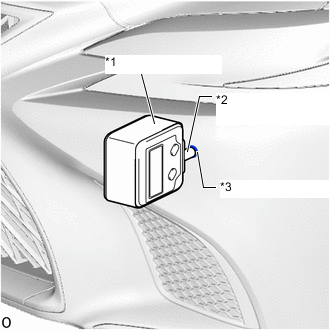
Table 7. *1 Digital angle gauge *2 Digital angle gauge attachment *3 Ultrasonic Sensor Using the digital angle gauge, measure the angle of each sensor.
-
Measure the angle of the front sensors as shown in the illustration.
Note:Ensure that the digital angle gauge is flush with the face of the sensor.
-
Measure the angle of the rear sensors.
Note:Ensure that the digital angle gauge is flush with the face of the sensor.
-
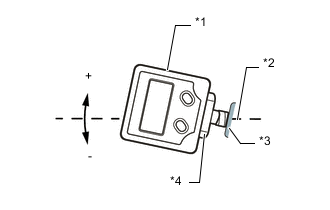
Table 9. For example *1 Digital angle gauge *2 Horizontal line *3 Ultrasonic Sensor *4 Digital angle gauge attachment Confirm that the angles of the sensors are as specified.
Note:The sensor angle is the measured sensor angle subtracted from 90°.
Tip:
-
The digital angle gauge should indicate 90° when turned on its side.
-
If the face of the sensor is tilted upwards, the sensor angle will be positive.
Table 8. Standard Height (Front Bumper): Sensor Location Installation Angle Front Center Ultrasonic Sensor 0.02 to 6.89° Front Corner Ultrasonic Sensor 3.32 to 10.19° Table 10. Standard Height (Rear Bumper): Sensor Location Installation Angle Rear Center Ultrasonic Sensor -1.16 to 5.71° Rear Corner Ultrasonic Sensor -0.72 to 6.15° -
-
If the angle or height of the sensors is not as specified, confirm that the installation is correct and then perform the inspection again.
-
-
-
REGISTRATION (PROCEDURE 4)
-
Preparation
-
Confirm that the following DTCs are not output.
System Proceed to Parking Support Alert System Parking Support Brake System Note:If DTC C1AEC, C1AED, C1AF0, C1AF3, C1AF4, C1AEA or C168D are output at this point, it is not a malfunction. Proceed with the calibration.
-
-
Connect the GTS to the DLC3.
-
Turn the power switch on (IG).
-
Turn the GTS on.
-
Enter the following menus: Body Electrical / IPA/ICS/Clearance Sonar / Utility.
- Body Electrical > IPA/ICS/Clearance Sonar > Utility
Tester Display Clearance Sonar Detection/Steering Adjustment -
-
-
-
- Body Electrical > IPA/ICS/Clearance Sonar > Utility
-
According to the display on the GTS, perform calibration.
Tip:If "Battery or Steering Sensor" is selected, further calibration is not required. (Bumper type registration is not required.)
-
Enter the bumper type using the GTS.
Bumper Type Value except Sport Package 1 for Sport Package Tip:If the clearance warning ECU assembly is replaced or removed and installed, it is necessary to perform bumper type registration.
-
Using the GTS, enter the measured sensor values.
Note:The sensor angle is the measured sensor angle subtracted from 90°.
Tip:The digital angle gauge should indicate 90° when turned on its side.
-
Disconnect the GTS from the DLC3.
-