Click here
CAUTION / NOTICE / HINT
Tip:
-
Use the same procedure for RHD and LHD vehicles.
-
The procedure listed below is for LHD vehicles.
Click here
PROCEDURE
- Click here
INSTALL MULTI-DISPLAY ASSEMBLY
-
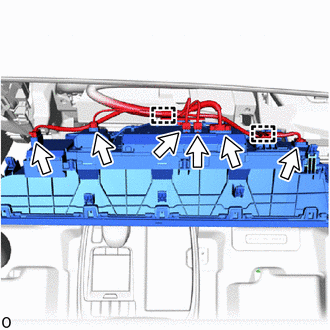
Connect each connectors and attach the clamp.
-
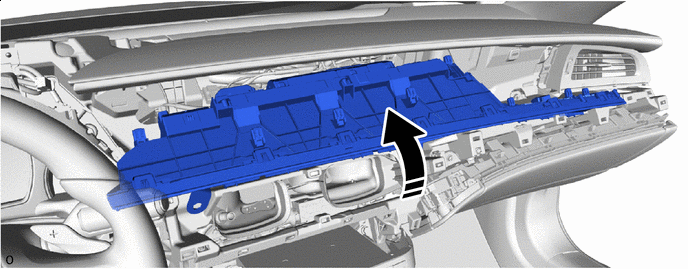

Install in this Direction - - Move the multi-display assembly as shown in the illustration
-
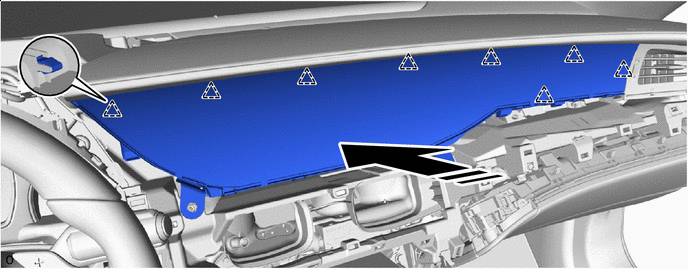
Install in this Direction - - Attach the clip to install the multi-display assembly.
Note:Do not subject the multi-display assembly to excessive force or damage it.
-
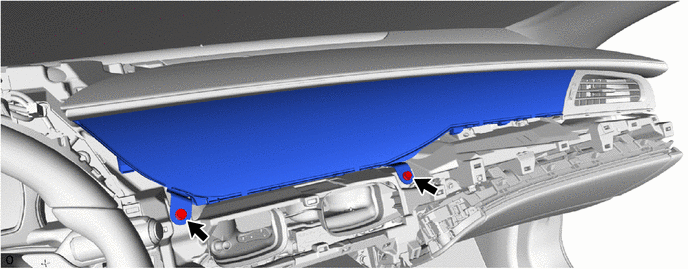
Install the 2 bolts.
-
- Click here
INSTALL INSTRUMENT CLUSTER FINISH PANEL GARNISH ASSEMBLY
- Click here
INSTALL INSTRUMENT PANEL SAFETY PAD INSERT SUB-ASSEMBLY
- Click here
INSTALL NO. 2 INSTRUMENT PANEL SAFETY PAD SUB-ASSEMBLY
- Click here
INSTALL LOWER INSTRUMENT PANEL FINISH PANEL ASSEMBLY
- Click here
INSTALL LOWER NO. 1 INSTRUMENT PANEL PAD SUB-ASSEMBLY
- Click here
INSTALL INSTRUMENT SIDE PANEL RH
- Click here
INSTALL INSTRUMENT SIDE PANEL LH