NAVIGATION SYSTEM, Diagnostic DTC:B15C8
| DTC Code | DTC Name |
|---|---|
| B15C8 | Digital TV Antenna 1 Disconnected |
DESCRIPTION
This DTC is stored when a malfunction occurs in the digital TV antenna which is connected to the radio receiver assembly.
| DTC No. | Detection Item | DTC Detection Condition | Trouble Area |
|---|---|---|---|
| B15C8 | Digital TV Antenna 1 Disconnected | Television antenna assembly is not connected. |
|
WIRING DIAGRAM
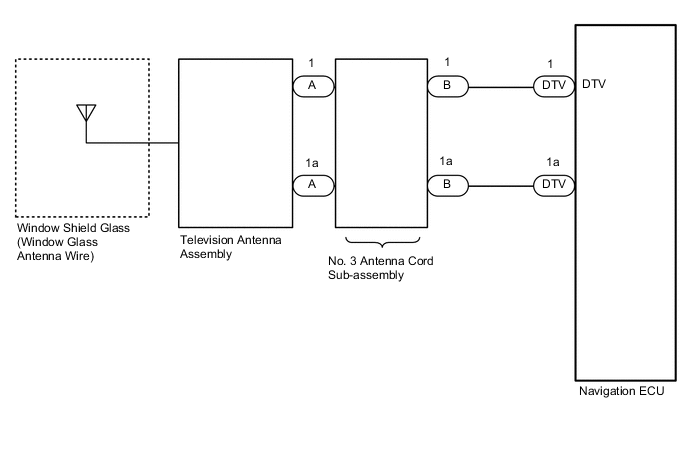
CAUTION / NOTICE / HINT
Note
When replacing the radio receiver assembly or navigation ECU, always replace it with a new one.
-
A communication malfunction DTC may be stored.
-
The radio receiver assembly or navigation ECU may not operate normally.
Tech Tips
Depending on the parts that are replaced during vehicle inspection or maintenance, performing initialization, registration or calibration may be needed. Refer to Precaution for Navigation System.
PROCEDURE
-
CLEAR DTC
-
Clear the DTCs.
Body Electrical > Navigation System > Clear DTCsResult Proceed to NEXT
NEXT 
-
-
CHECK DTC
-
Recheck for DTCs and check if the same DTC is output again.
Body Electrical > Navigation System > Trouble CodesOK No DTCs are output. Result Proceed to OK NG
OK 
USE SIMULATION METHOD TO CHECK Click here
NG
-
-
CHECK WINDOW SHIELD GLASS (WINDOW GLASS ANTENNA WIRE)
-
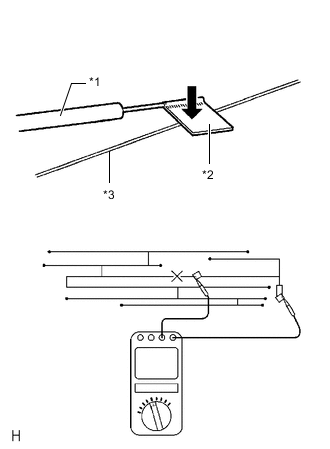
*1 Tester Probe *2 Tin Foil *3 Antenna Wire Check for continuity in the antenna.
Tech Tips
Check for continuity at the center of each antenna wire as shown in the illustration.
Note
When cleaning the glass, wipe it in the direction of the wire with a soft dry cloth. Take care not to damage the wire. Do not use detergents or glass cleaners with abrasive ingredients. When measuring resistance, wrap a piece of tin foil around the tip of each probe and press the foil against the wire with your finger as shown in the illustration.
OK There is continuity in the antenna wire. Result Proceed to OK NG
NG
REPAIR WINDOW SHIELD GLASS (WINDOW GLASS ANTENNA WIRE)
OK
-
-
CHECK NO. 3 ANTENNA CORD SUB-ASSEMBLY
-
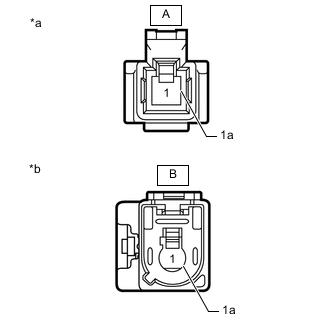
*a Front view of wire harness connector
(to Television Antenna Assembly)
*b Front view of wire harness connector
(to Wire Harness)
Remove the antenna connector from the television antenna assembly.
-
Disconnect the antenna connector from the wire harness.
-
Measure the resistance according to the value(s) in the table below.
Standard Resistance Tester Connection Condition Specified Condition A-1 - B-1 Always Below 1 Ω A-1a - B-1a Always Below 1 Ω A-1 - Body ground Always 10 kΩ or higher A-1a - Body ground Always 10 kΩ or higher Result Proceed to OK NG
NG
REPLACE NO. 3 ANTENNA CORD SUB-ASSEMBLY Click here
OK
-
-
CHECK HARNESS AND CONNECTOR (NO. 3 ANTENNA CORD SUB-ASSEMBLY - NAVIGATION ECU)
-
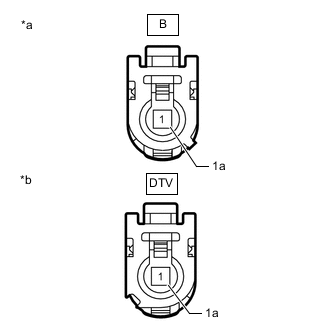
*a Front view of wire harness connector
(to No. 3 Antenna Cord Sub-assembly)
*b Front view of wire harness connector
(to Navigation ECU)
Disconnect the antenna cord sub-assembly connector.
-
Disconnect the navigation ECU connector.
-
Measure the resistance according to the value(s) in the table below.
Standard Resistance Tester Connection Condition Specified Condition B-1 - DTV-1 (DTV) Always Below 1 Ω B-1a - DTV-1a Always Below 1 Ω B-1 - Body ground Always 10 kΩ or higher B-1a - Body ground Always 10 kΩ or higher Result Proceed to OK NG
NG
REPAIR OR REPLACE HARNESS OR CONNECTOR
OK
-
-
CHECK TELEVISION ANTENNA ASSEMBLY
-
Replace the television antenna assembly.
-
Clear the DTCs.
Body Electrical > Navigation System > Clear DTCs -
Recheck for DTCs and check if the same DTC is output again.
Body Electrical > Navigation System > Trouble CodesOK No DTCs are output. Result Proceed to OK NG
OK
END (TELEVISION ANTENNA ASSEMBLY IS DEFECTIVE)
NG
-
-
CHECK NAVIGATION ECU
-
Replace the navigation ECU.
-
Clear the DTCs.
Body Electrical > Navigation System > Clear DTCs -
Recheck for DTCs and check if the same DTC is output again.
Body Electrical > Navigation System > Trouble CodesResult Proceed to OK NG
OK
END (NAVIGATION ECU IS DEFECTIVE)
NG
REPLACE RADIO RECEIVER ASSEMBLY Click here
-