KICK SENSOR INSTALLATION
PROCEDURE
-
INSTALL KICK DOOR CONTROL SENSOR
-
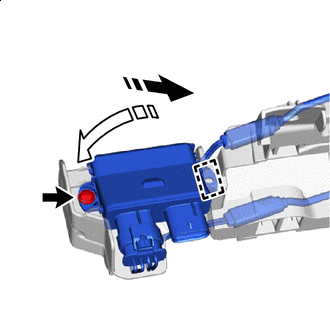

Install in this Direction (1) 
Install in this Direction (2) Attach the guide in the direction indicated by the arrow shown in the illustration to install the kick door control sensor with the screw.
Note
-
Do not subject the kick door control sensor to strong impacts or force, and do not drop it.
-
Do not reuse a kick door control sensor which has been subjected to an impact or dropped.
-
-
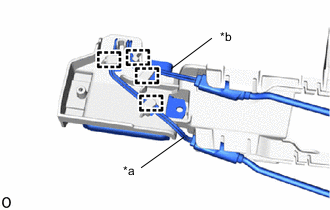
*a Red Wire *b Black Wire Connect the red wire and black wire to the kick door control bracket and attach the clamp.
Note
-
Do not pull strongly on the wire.
-
Do not twist the wire.
-
Do not cross the red and black wires.
-
-
Attach the guide and claws in the order shown in the illustration and connect the antenna cable.
Note
Securely insert the antenna into the bracket until it reaches the bottom.
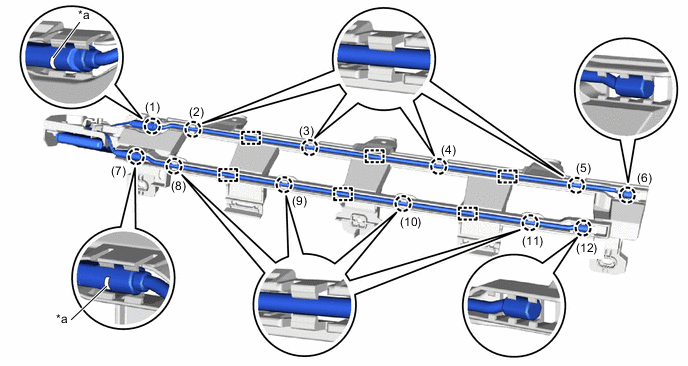
*a Paint Mark - - Tech Tips
Install so that the paint mark is facing the top of the vehicle.
-
-
INSTALL KICK DOOR CONTROL BRACKET
-
Attach the claw to install the kick door control bracket together with the kick door control sensor as shown in the illustration.
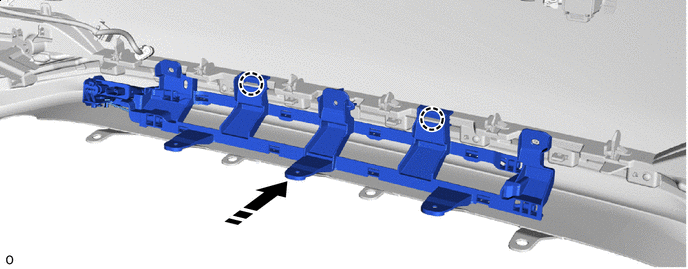
Install in this Direction - - -
Install the 3 clips.
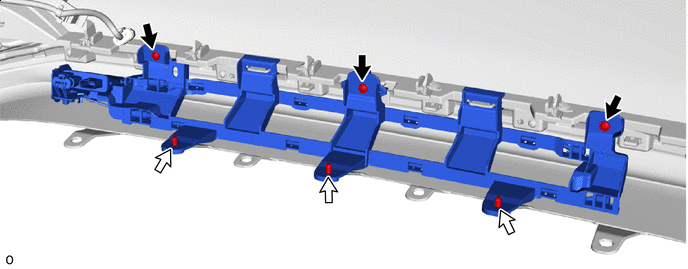

Screw 
Clip -
Install the 3 screws.
-
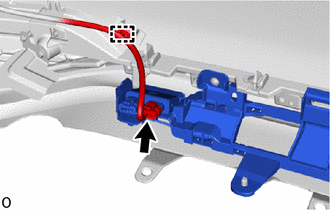
Attach the wire harness clamp and connect the connector.
Note
Do not touch the terminal of the kick door control sensor connector.
-
-
INSTALL REAR BUMPER COVER
-
CONNECT CABLE TO NEGATIVE AUXILIARY BATTERY TERMINAL
Note
When disconnecting the cable, some systems need to be initialized after the cable is reconnected.
-
INSTALL LUGGAGE COMPARTMENT MAT SUB-ASSEMBLY
-
CHECK KICK DOOR CONTROL SENSOR
-
PERFORM CALIBRATION