FRONT CAMERA SYSTEM(for Stereo Camera Type), Diagnostic DTC:C1AAE00
| DTC Code | DTC Name |
|---|---|
| C1AAE00 | Front Recognition Camera Heater Malfunction |
DESCRIPTION
The object recognition camera controls the flow of current to the internal heater.
If the object recognition camera detects a malfunction in the internal heater circuit, it will store this DTC.
| DTC No. | Detection Item | DTC Detection Condition | Trouble Area |
|---|---|---|---|
| C1AAE00 | Front Recognition Camera Heater Malfunction |
Either of the following conditions is met after 3 seconds have elapsed since the power switch was turned on (IG): |
|
WIRING DIAGRAM
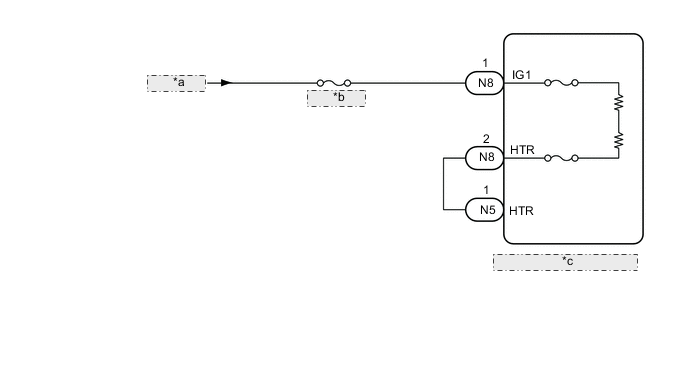
| *a | IG Circuit |
| *b | IG1 D NO.2 |
| *c | Object Recognition Camera |
CAUTION / NOTICE / HINT
Note
-
Inspect the fuses for circuits related to this system before performing the following procedure.
-
When replacing the object recognition camera, always replace it with a new one. If a object recognition camera which was installed to another vehicle is used, the information stored in the object recognition camera will not match the information from the vehicle. As a result, a DTC may be stored.
-
If the object recognition camera has been replaced with a new one, be sure to perform Object Recognition Camera Learning.
PROCEDURE
-
CHECK FOR DTCs (FRONT RECOGNITION CAMERA)
-
Clear the DTCs.
Chassis > Front Recognition Camera > Clear DTCs -
Make sure that the DTC detection conditions are met.
Tech Tips
If the conditions are not met, the system cannot detect the malfunction.
-
Check for DTCs.
Chassis > Front Recognition Camera > Trouble CodesResult Result Proceed to DTC C1AAE00 is not output A DTC C1AAE00 is output B
A 
USE SIMULATION METHOD TO CHECK Click here
B 
-
-
INSPECT OBJECT RECOGNITION CAMERA
-
Turn the power switch off.
-
Disconnect the N8 object recognition camera connector.
-
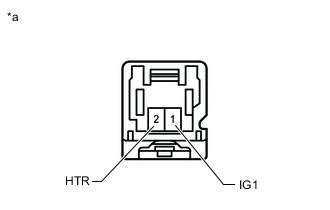
*a Component without harness connected
(Object Recognition Camera)
Measure the resistance according to the value(s) in the table below.
Standard Resistance Tester Connection Condition Specified Condition 1 (IG1) - 2 (HTR) Always 16.72 to 18.48 Ω -
Connect the N8 object recognition camera connector.
Result Proceed to OK NG
NG
REPLACE OBJECT RECOGNITION CAMERA Click here
OK
-
-
CHECK HARNESS AND CONNECTOR (HEATER POWER SOURCE CIRCUIT)
-
Turn the power switch off.
-
Disconnect the N5 and N8 object recognition camera connector.
-
Measure the voltage according to the value(s) in the table below.
Standard Voltage Tester Connection Condition Specified Condition N8-1 (IG1) - Body ground Power switch on (IG) 11 to 14 V Power switch off Below 1 V -
Measure the resistance according to the value(s) in the table below.
Standard Resistance Tester Connection Condition Specified Condition N8-2 (HTR) - N5-1 (HTR) Always Below 1 Ω N8-2 (HTR) or N5-1 (HTR) - Body ground Always 10 kΩ or higher -
Connect the N5 and N8 object recognition camera connector.
Result Proceed to OK NG
OK
REPLACE OBJECT RECOGNITION CAMERA Click here
NG
REPAIR OR REPLACE HARNESS OR CONNECTOR
-