CAUTION / NOTICE / HINT
The necessary procedures (adjustment, calibration, initialization, or registration) that must be performed after parts are removed and installed, or replaced when charging the HV battery are shown below.
| Replacement Part or Procedure | Necessary Procedure | Effect/Inoperative when not Performed | Link |
|---|---|---|---|
| Disconnect cable from negative auxiliary battery terminal | Memorize steering angle neutral point | LKA/LDA system (for Mono camera type) | for Stereo Camera type:Click here for Mono Camera type:Click here |
| Lane control system (for Stereo camera type) | |||
| Parking support brake system* | |||
| Pre-collision system (for Mono camera type) | |||
| Pre-collision system (for Stereo camera type) | |||
| Adaptive high beam system | |||
|
|||
| Variable gear ratio steering system | |||
| Parking assist monitor system | |||
| Panoramic view monitor system | |||
| Initialize rear door sunshade system | Rear door sunshade system | ||
| Initialize power trunk lid system | Power trunk lid system | ||
|
Initialize position control ECU | Rear power seat control system |
-
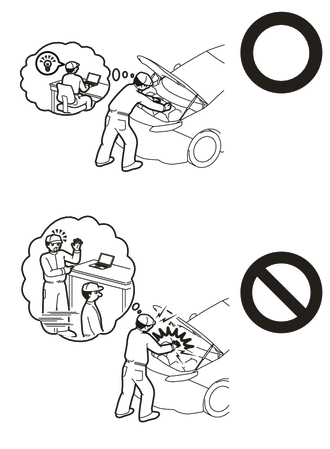
Orange wire harnesses and connectors indicate high-voltage circuits. To prevent electric shock, always follow the procedure described in the repair manual.
-
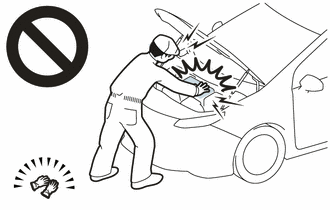
To prevent electric shock, wear insulated gloves when working on wire harnesses and components of the high voltage system.
PROCEDURE
- Click here
PRECAUTION
Note:After turning the power switch off, waiting time may be required before disconnecting the cable from the negative (-) auxiliary battery terminal. Therefore, make sure to read the disconnecting the cable from the negative (-) auxiliary battery terminal notices before proceeding with work.
- Click here
INSPECT AUXILIARY BATTERY VOLTAGE
-
Measure the auxiliary battery voltage.
Standard Voltage Approximately 11 V or more Tip:
-
The horn should sound clearly.
-
If the voltage is 10 V or less, either charge the auxiliary battery (charging usually takes about 1 hour), or replace it with an auxiliary battery that is already charged.
-
-
- Click here
PREPARATION FOR HV BATTERY CHARGING
CAUTION:
-
The hybrid system has high-voltage circuits. Accidents, such as electric shock, or electric leaks may result if the hybrid system is not operated in a correct manner. Make sure to follow the correct procedure.
-
Wear insulated gloves.
Tip:
-
Removing the service plug grip interrupts the high voltage circuit.
-
High voltage wiring connectors are orange.
-
Check the SOC (State of Charge) of the HV battery.
-
If the hybrid system fails to start and "Traction Battery needs to be Protected. Shift into [P] to Restart" or "Traction Battery Needs to be Protected Refrain from the Use of [N] Position" is displayed on the multi-information display, the HV battery may be discharged.
-
Confirm if the engine starts. If the engine starts, leave it idling with the shift position in P until the engine stops (self charge has completed).
If the engine cannot start, follow the procedure to charge the HV battery.
Tip:
-
Before performing external charging, always use the Techstream to perform troubleshooting.
-
Charging time using the THS charger is 10 minutes per charge cycle. The charging time when using a THS charger is a short charging time (when the HV battery temperature is 25°C (77°F), 10 minutes may be sufficient, if the HV battery temperature is 0°C (32°F), then three 10 minute charge cycles may be required) for putting the engine in a condition where it can be started (the system can enter the READY-on state). (The THS charger will automatically stop 10 minutes after charging starts.)
-
-
-
Remove the service plug grip.
-
Check the terminal voltage.
-
for LHD:
Remove the inverter cover assembly RH.
for RHD:
Remove the inverter cover assembly LH.
-
Remove the cowl top ventilator louver sub-assembly.
-
Remove the connector cover assembly.
-
Check the terminal voltage.
-
Install the connector cover assembly.
-
Install the cowl top ventilator louver sub-assembly.
-
for LHD:
Install the inverter cover assembly RH.
for RHD:
Remove the inverter cover assembly LH.
-
-
Remove the rear seat cushion assembly.(for Fixed Seat Type)
-
Remove the rear seat cushion lock hook.(for Fixed Seat Type)
-
Remove the No. 1 seat armrest cap.(for Fixed Seat Type)
-
Remove the rear seatback assembly.(for Fixed Seat Type)
-
Remove the rear seat back holder.(for Fixed Seat Type)
-
Remove the rear seat cushion assembly LH.(for Power Seat)
-
Remove the rear seat cushion assembly RH.(for Power Seat)
-
Remove the rear center seat cushion assembly.(for Power Seat)
-
Remove the rear seat cushion lock hook.(for Power Seat)
-
Remove the rear seatback assembly LH.(for Power Seat)
-
Remove the rear seatback assembly RH.(for Power Seat)
-
Remove the rear center seat armrest assembly.(for Power Seat)
-
Remove the rear door scuff plate RH.
-
Remove the rear seat side garnish RH.
-
Remove the room partition board assembly LH.(for Power Seat)
-
Remove the room partition board assembly RH.(for Power Seat)
-
Remove the No. 2 EV battery intake duct.
-
Remove the center room partition garnish assembly.(for Power Seat)
-
Remove the No. 1 seat reclining adjuster assembly RH.(for Power Seat)
-
Remove the center No. 1 floor to brace extension.
-
Remove the No. 10 HV battery shield panel.
-
Disconnect the HV floor under wire.
-
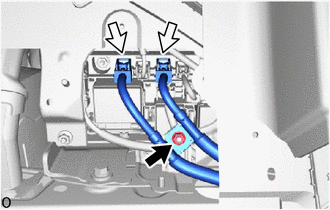
Remove the nut and disconnect the 2 HV battery junction block assembly connectors.
Note:Insulate each disconnected high-voltage connector with insulating tape. Wrap the connector from the wire harness side to the end of the connector.
-
-
Inspect the electrical insulation of the HV battery.
-
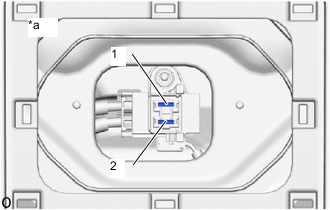
*a Service Plug Grip Removed
(Service Plug Grip Connecting Terminals)
Using a megohmmeter set to 500 V, measure the resistance according to the value(s) in the table below.
Note:Be sure to set the megohmmeter to 500 V when performing this test. Using a setting higher than 500 V can result in damage to the component being inspected.
Standard Resistance Tester Connection Condition Specified Condition 1 - Body ground Power switch off 10 MΩ or higher 2 - Body ground Power switch off 10 MΩ or higher -
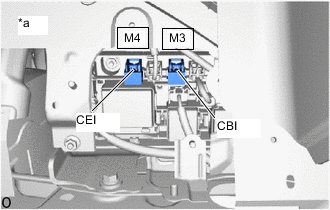
*a Component without harness connected
(HV Battery Junction Block Assembly)
Using a megohmmeter set to 500 V, measure the resistance according to the value(s) in the table below.
Note:Be sure to set the megohmmeter to 500 V when performing this test. Using a setting higher than 500 V can result in damage to the component being inspected.
Standard Resistance Tester Connection Condition Specified Condition M3-1 (CBI) - Body ground Power switch off 10 MΩ or higher M4-1 (CEI) - Body ground Power switch off 10 MΩ or higher
-
-
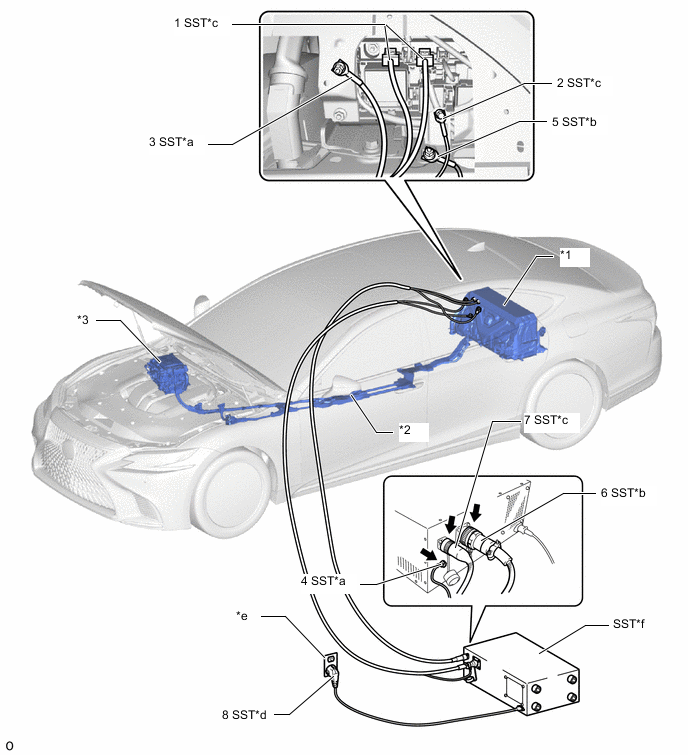
*1 HV Battery *2 HV Floor Under Wire *3 Inverter with Converter Assembly - - *a EV Bonding Cable (Green Cable) *b Low Voltage Cable *c High Voltage Cable *d Power Input Plug *e Grounded AC 100 to 240 V Receptacle *f THS Charger Connect the THS charger in the order shown in the illustration.
Note:
-
Make sure to connect the EV bonding cable first to prevent electrical shock.
-
Connect all of the THS charger cables in the order shown in the illustration to prevent electrical shock.
-
-
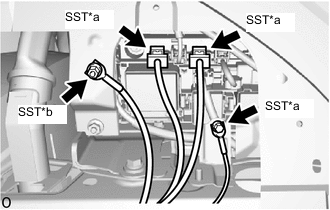
*a High Voltage Cable *b EV Bonding Cable (Green Cable) Connect the 2 SST (high voltage cable) connectors to the HV battery junction block assembly.
09882-10090 -
Connect SST (high voltage cable) terminal to the position shown in the illustration with the nut.
8.0 N*m 82 kgf*cm 71 in.*lbf -
Connect SST (EV bonding cable (green cable)) to the position shown in the illustration with the nut.
09882-10070 7.5 N*m 76 kgf*cm 66 in.*lbf -
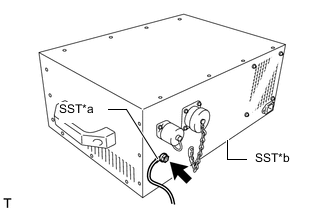
*a EV Bonding Cable (Green Cable) *b THS Charger Connect SST (EV bonding cable (green cable)) to SST (THS charger).
09880-10021 09881-10041 -
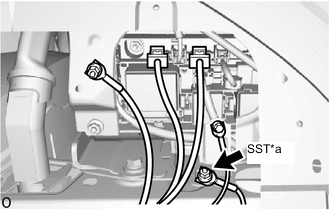
*a Low Voltage Cable Connect SST (low voltage cable) to the position shown in the illustration with the nut.
7.5 N*m 76 kgf*cm 66 in.*lbf -
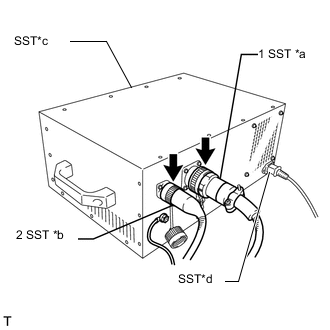
*a Low Voltage Cable *b High Voltage Cable *c THS Charger *d Power Input Plug Connect SST (low voltage cable) and SST (high voltage cable) to SST (THS charger) in the order shown in the illustration.
-
Install the service plug grip.
-
Connect the cable to the negative (-) auxiliary battery terminal.
-
Connect SST (power input plug) of SST (THS charger) to a grounded AC 100 to 240 V receptacle.
09881-10081 09881-10050 09881-10090 Note:Always use an AC 100 to 240 V receptacle with a properly functioning ground. The ground is designed to reduce the chance of electric shock if a malfunction occurs. Do not use the charger if any of the pins on its plug have been damaged or removed.
-
- Click here
HV BATTERY CHARGING
-
Connect the Techstream to the DLC3.
-
Turn the power switch on (IG).
-
Enter the following menus: Powertrain / Hybrid Control / Active Test / Hybrid Battery Charge
- Powertrain > Hybrid Control > Active Test
Tester Display Hybrid Battery Charge -
-
-
-
Tip:
-
While performing the "Battery Charge" Active Test, check the Data List items "System Main Relay Status - SMRB" and "System Main Relay Status - SMRG".
-
If the values of the Data List items are not as specified in the table below, turn the Techstream and the power switch off and then perform the HV battery charging procedure again.
"System Main Relay Status - SMRB" and "System Main Relay Status - SMRG" in Data List during "Battery Charge" Active Test Step Active Test
"Battery Charge"
THS charger START
Switch
Data List
"System Main Relay Status - SMRB"
Data List
"System Main Relay Status - SMRG"
1 OFF OFF OFF OFF 2 OFF → ON OFF OFF → ON OFF → ON 3 ON OFF → ON ON ON - Powertrain > Hybrid Control > Active Test
-
Make sure that the EMERGENCY STOP switch is in the reset condition (the switch is turned clockwise and released).
-
Make sure that the BREAKER is in the ON position.
-
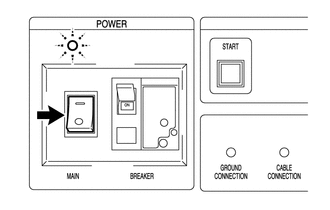
Turn the THS charger MAIN switch on.
Tip:The MAIN indicator will illuminate (green).
-
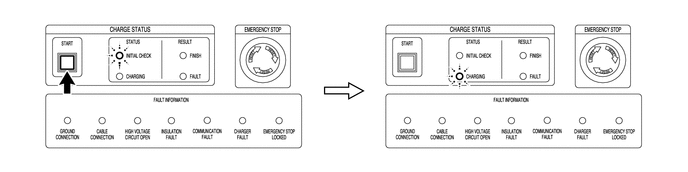
Press the START switch.
Tip:
-
When the START switch is turned on, the INITIAL CHECK indicator illuminates and an initial check starts. When the initial check completes successfully, the INITIAL CHECK indicator turns off, the CHARGING indicator illuminates and charging will start at the same time.
-
While the INITIAL CHECK indicator is illuminated, the insulation, 400 V output, emergency stop switch, connector connections and ground connection are inspected.
-
-
Repeat the charge cycle 3 times. When the last cycle has finished, turn the THS charger MAIN switch off.
Tip:
-
Charging time using the THS charger is 10 minutes per charge cycle. The charging time when using a THS charger is a short charging time (when the battery temperature is 25°C (77°F), 10 minutes may be sufficient, if the battery temperature is 0°C (32°F), then three 10 minute charge cycles may be required) for putting the engine in a condition where it can be started (the system can enter the READY-on state). (The THS charger will automatically stop 10 minutes after charging starts.)
-
There is very little chance of overcharging the HV battery during the second or third charging cycle. The SOC will not likely increase beyond the upper limit because it was low enough to prevent the engine from starting. Even if the SOC was to increase enough to exceed the limit, the hybrid vehicle control ECU will stop the Active Test to prevent overcharging.
-
Cranking the engine once causes the SOC to drop approximately 1%.
-
Charging the HV battery once (10 minutes) using the THS charger restores the SOC approximately 2%.
-
-
Turn the power switch off.
-
Remove the THS charger and connect the HV floor under wire (for HV Battery).
Note:Make sure to disconnect the EV bonding cable last.
-
Disconnect SST (power inlet plug) of SST (THS charger) from the grounded AC 100 to 240 V receptacle.
-
Disconnect the cable from the negative (-) auxiliary battery terminal.
-
Remove the service plug grip.
-
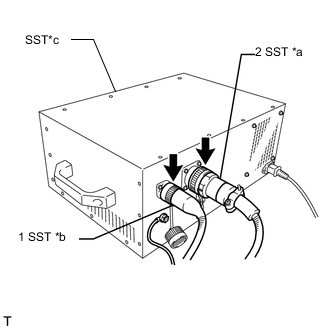
*a Low Voltage Cable *b High Voltage Cable *c THS Charger Disconnect SST (high voltage cable) and SST (low voltage cable) from SST (THS charger) in the order shown in the illustration.
-
*a Low Voltage Cable Remove the nut and disconnect SST (low voltage cable).
-
*a EV Bonding Cable (Green Cable) *b THS Charger Disconnect SST (EV bonding cable (green cable)) from SST (THS charger).
-
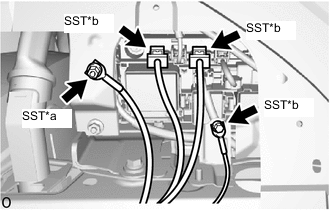
*a EV Bonding Cable (Green Cable) *b High Voltage Cable Remove the nut and disconnect SST (EV bonding cable (green cable)).
-
Remove the nut and disconnect SST (high voltage cable) terminal.
-
Disconnect the 2 SST (high voltage cable) connectors from the HV battery junction block assembly.
-
Connect the HV floor under wire.
-
Install the No. 10 HV battery shield panel.
-
Install the service plug grip.
-
-
Turn the power switch on (READY) and check if the engine starts.
Tip:If the engine does not start, perform the HV battery charging operation again.
-
Install the center No. 1 floor to brace extension.
-
Install the No. 1 seat reclining adjuster assembly RH.(for Power Seat)
-
Install the center room partition garnish assembly.(for Power Seat)
-
Install the No. 2 EV battery intake duct.
-
Install the room partition board assembly LH.(for Power Seat)
-
Install the room partition board assembly RH.(for Power Seat)
-
Install the rear seat side garnish RH.
-
Install the rear door scuff plate RH.
-
Install the rear center seat armrest assembly.(for Power Seat)
-
Install the rear seatback assembly LH.(for Power Seat)
-
Install the rear seatback assembly RH.(for Power Seat)
-
Install the rear seat cushion lock hook.(for Power Seat)
-
Install the rear center seat cushion assembly.(for Power Seat)
-
Install the rear seat cushion assembly LH.(for Power Seat)
-
Install the rear seat cushion assembly RH.(for Power Seat)
-
Install the rear seat back holder.(for Fixed Seat Type)
-
Install the rear seatback assembly.(for Fixed Seat Type)
-
Install the No. 1 seat armrest cap.(for Fixed Seat Type)
-
Install the rear seat cushion lock hook.(for Fixed Seat Type)
-
Install the rear seat cushion assembly.(for Fixed Seat Type)
-
- Click here
CHECK HV BATTERY AFTER HV BATTERY CHARGE
-
Check for DTCs.
-
Perform the self-charging operation.
-
Start the engine and leave it idling with the shift position in P until the engine stops.
Tip:When the engine stops idling, this indicates that self-charging is complete. Perform any initialization procedures required after the cable is disconnected and reconnected to the negative (-) auxiliary battery terminal.
-
-