CAUTION / NOTICE / HINT
The necessary procedures (adjustment, calibration, initialization, or registration) that must be performed after parts are removed and installed, or replaced during battery ECU assembly removal/installation are shown below.
| Replacement Part or Procedure | Necessary Procedure | Effect/Inoperative when not Performed | Link |
|---|---|---|---|
| Battery ECU assembly | Perform current sensor offset learning | DTCs are stored | |
| Disconnect cable from negative auxiliary battery terminal | Memorize steering angle neutral point | LKA/LDA system (for Mono camera type) | for Stereo Camera type:Click here for Mono Camera type:Click here |
| Lane control system (for Stereo camera type) | |||
| Parking support brake system* | |||
| Pre-collision system (for Mono camera type) | |||
| Pre-collision system (for Stereo camera type) | |||
| Adaptive high beam system | |||
|
|||
| Variable gear ratio steering system | |||
| Parking assist monitor system | |||
| Panoramic view monitor system | |||
| Initialize rear door sunshade system | Rear door sunshade system | ||
| Initialize power trunk lid system | Power trunk lid system | ||
| HV battery |
|
Warning light illumination | |
| DRS ECU (rear steering control ECU) | Perform neutral position memorization and motor rotation angle sensor calibration |
|
|
|
Initialize position control ECU | Rear power seat control system |
-
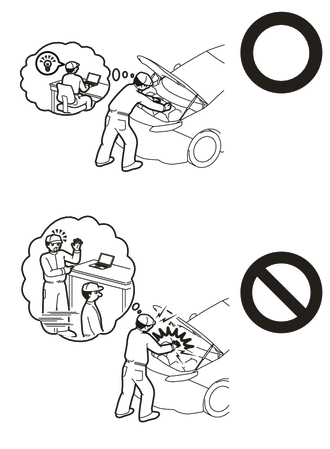
Orange wire harnesses and connectors indicate high-voltage circuits. To prevent electric shock, always follow the procedure described in the repair manual.
-
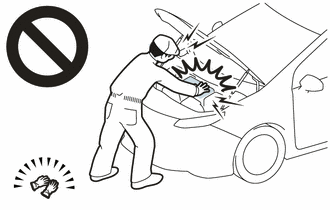
To prevent electric shock, wear insulated gloves when working on wire harnesses and components of the high voltage system.
-
The type of battery ECU assembly to be used varies depending on the vehicle model.
-
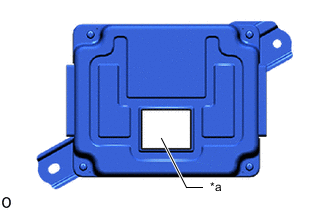
*a Black Label The type of battery ECU assembly can be confirmed by the color of the label.
-
If the wrong type of battery ECU assembly is installed, the power switch cannot be turned on (READY).
-
After installing the battery ECU assembly, perform the following to check that the power switch can be turned on (READY).
-
-
Turn the power switch on (READY).
-
Turn the power switch off and wait for 30 seconds or more.
-
Turn the power switch on (READY) again.
-
PROCEDURE
- Click here
WHEN REPLACING BATTERY ECU ASSEMBLY
HV battery learning values are stored in the battery ECU assembly and ECM and are used to detect malfunctions and illuminate the hybrid battery indicator light in the combination meter assembly. When either of these ECUs is replaced, the new ECU receives the HV battery learning values from the other ECU and stores them.
Note:
-
Do not replace the battery ECU assembly and ECM at the same time as the HV battery learning values will be lost. However, if it is necessary to replace both ECUs at the same time, replace them by following the procedure below.
-
Do not replace the battery ECU assembly or ECM with a used one from another vehicle.
-
Procedure when replacing both battery ECU assembly and ECM:
-
Disconnect the cable from the negative (-) auxiliary battery terminal.
-
Replace either ECU.
-
Connect the cable to the negative (-) auxiliary battery terminal.
-
Turn the power switch on (READY) and wait for 5 minutes or more.
-
Turn the power switch off and disconnect the cable from the negative (-) auxiliary battery terminal.
-
Replace the other ECU.
-
Connect the cable to the negative (-) auxiliary battery terminal.
-
Check that the power switch can be turned on (READY).
Tip:If the battery ECU assembly and ECM are replaced at the same time without following the above procedure, replace either of the ECUs with its original one and then replace it again by following the above procedure. If the correct procedure is not followed, perform the procedure again from the beginning.
-
-
- Click here
PRECAUTION
- Click here
REMOVE HV BATTERY ASSEMBLY
- Click here
REMOVE UPPER HV BATTERY COVER PANEL
- Click here
REMOVE NO. 2 HYBRID BATTERY SHIELD SUB-ASSEMBLY
- Click here
REMOVE NO. 1 HYBRID BATTERY SHIELD SUB-ASSEMBLY
- Click here
REMOVE UPPER NO. 1 HYBRID BATTERY COVER SUB-ASSEMBLY
- Click here
REMOVE BATTERY VOLTAGE SENSOR (for Upper Side)
- Click here
REMOVE BATTERY ECU ASSEMBLY
CAUTION:Be sure to wear insulated gloves and protective goggles.
-
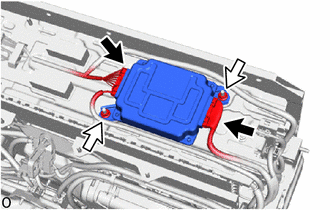
Disconnect the 2 connectors.
Note:Insulate each disconnected high-voltage connector with insulating tape. Wrap the connector from the wire harness side to the end of the connector
-
Remove the 2 nuts and battery ECU assembly.
Note:
-
Do not drop the battery ECU assembly, strike it with tools or subject it to impact.
-
If the battery ECU assembly is subjected to an impact, replace it with a new one.
-
-