LIN COMMUNICATION SYSTEM, Diagnostic DTC:B1206
| DTC Code | DTC Name |
|---|---|
| B1206 | P/W Master Switch Communication Stop |
DESCRIPTION
This DTC is stored when LIN communication between the multiplex network master switch assembly and main body ECU (multiplex network body ECU) stops for 10 seconds or more.
| DTC No. | Detection Item | DTC Detection Condition | Trouble Area |
|---|---|---|---|
| B1206 | P/W Master Switch Communication Stop | No communication between multiplex network master switch assembly and main body ECU (multiplex network body ECU) for 10 seconds or more. |
|
WIRING DIAGRAM
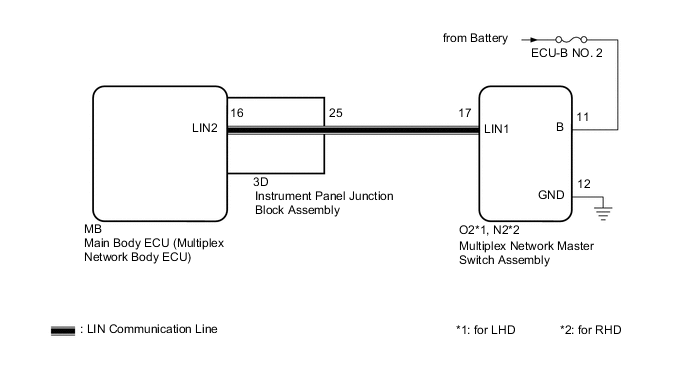
CAUTION / NOTICE / HINT
Note
-
Inspect the fuses for circuits related to this system before performing the following procedure.
-
Before replacing the main body ECU (multiplex network body ECU), refer to Service Bulletin.*
-
*: w/ Smart Entry and Start System
-
The vehicle battery supplies power to the main body ECU (multiplex network body ECU) via the door control battery. Therefore, before performing this troubleshooting procedure, make sure to perform an on-vehicle inspection to confirm that the main body ECU (multiplex network body ECU) power source circuit is normal.*
-
*: w/ Door Control Battery
PROCEDURE
-
INSPECT INSTRUMENT PANEL JUNCTION BLOCK ASSEMBLY
-
Remove the instrument panel junction block assembly.
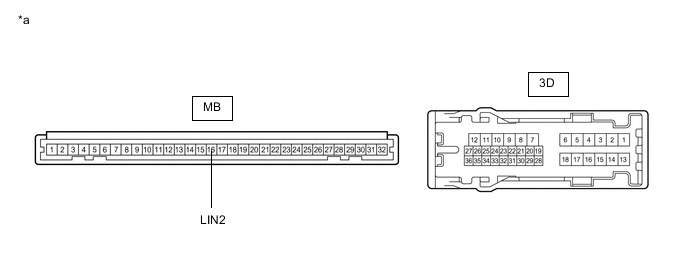
*a Component without harness connected
(Instrument Panel Junction Block Assembly)
- - -
Remove the main body ECU (multiplex network body ECU) from the instrument panel junction block assembly.
-
Measure the resistance according to the value(s) in the table below.
Tech Tips
This inspection is to check the LIN communication line in the instrument panel junction block assembly that connects the wire harness to the built-in main body ECU (multiplex network body ECU).
Standard Resistance Tester Connection Condition Specified Condition 3D-25 - MB-16 (LIN2) Always Below 1 Ω Result Proceed to OK NG
NG 
REPLACE INSTRUMENT PANEL JUNCTION BLOCK ASSEMBLY Click here
OK 
-
-
CHECK HARNESS AND CONNECTOR (INSTRUMENT PANEL JUNCTION BLOCK ASSEMBLY - MULTIPLEX NETWORK MASTER SWITCH ASSEMBLY)
-
Disconnect the O2*1 or N2*2 multiplex network master switch assembly connector.
-
*1: for LHD
-
*2: for RHD
-
-
Measure the resistance according to the value(s) in the table below.
Note
Make sure that each ECU is in sleep mode before performing the inspection. To enter sleep mode, turn the ignition switch from ON to off and wait for 180 seconds or more without operating any switches.
Standard Resistance for LHD Tester Connection Condition Specified Condition 3D-25 - O2-17 (LIN1) Ignition switch off Below 1 Ω 3D-25 or O2-17 (LIN1) - Body ground Ignition switch off 10 kΩ or higher for RHD Tester Connection Condition Specified Condition 3D-25 - N2-17 (LIN1) Ignition switch off Below 1 Ω 3D-25 or N2-17 (LIN1) - Body ground Ignition switch off 10 kΩ or higher Result Proceed to OK NG
NG
REPAIR OR REPLACE HARNESS OR CONNECTOR
OK
-
-
CHECK HARNESS AND CONNECTOR (MULTIPLEX NETWORK MASTER SWITCH ASSEMBLY - BATTERY, BODY GROUND)
-
Measure the voltage according to the value(s) in the table below.
Standard Voltage for LHD Tester Connection Condition Specified Condition O2-11 (B) - O2-12 (GND) Always 11 to 14 V for RHD Tester Connection Condition Specified Condition N2-11 (B) - N2-12 (GND) Always 11 to 14 V -
Measure the resistance according to the value(s) in the table below.
Standard Resistance for LHD Tester Connection Condition Specified Condition O2-12 (GND) - Body ground Always Below 1 Ω for RHD Tester Connection Condition Specified Condition N2-12 (GND) - Body ground Always Below 1 Ω Result Proceed to OK NG
NG
REPAIR OR REPLACE HARNESS OR CONNECTOR
OK
-
-
REPLACE MULTIPLEX NETWORK MASTER SWITCH ASSEMBLY
-
Replace the multiplex network master switch assembly.
Result Proceed to NEXT
NEXT
-
-
CHECK FOR DTC
-
Clear the DTCs.
Body Electrical > Main Body > Clear DTCs -
Recheck for DTCs.
Body Electrical > Main Body > Trouble CodesOK DTC B1206 is not output. Result Proceed to OK NG
OK
END (MULTIPLEX NETWORK MASTER SWITCH ASSEMBLY WAS DEFECTIVE)
NG
REPLACE MAIN BODY ECU (MULTIPLEX NETWORK BODY ECU) Click here
-