REAR SEAT ENTERTAINMENT ECU(w/o Rear No. 2 Seat) REMOVAL
CAUTION / NOTICE / HINT
The necessary procedures (adjustment, calibration, initialization, or registration) that must be performed after parts are removed and installed, or replaced during multi-display controller sub-assembly removal/installation are shown below.
| Replaced Part or Performed Procedure | Necessary Procedure | Effect/Inoperative Function when Necessary Procedure not Performed | Link |
|---|---|---|---|
| Disconnect cable from negative battery terminal | Memorize steering angle neutral point | LKA/LDA System | |
| Pre-crash safety system | |||
| Lighting system (EXT)
|
|||
| Adaptive high beam system | |||
| Drive the vehicle until stop and start control is permitted (approximately 15 to 60 minutes) | Stop and start system | ||
| Memorize steering angle neutral point | Parking assist monitor system (w/ Parallel parking assist function) | ||
| Parking assist monitor system (w/o Parallel parking assist function) | |||
| Panoramic view monitor system | |||
| Initialize back door lock | Power door lock control system | ||
| Reset back door close position | Power back door system |
CAUTION:
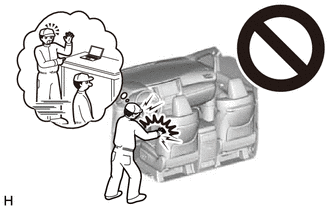
Some of these service operations affect the SRS airbag system. Read the precautionary notices concerning the SRS airbag system before servicing.
PROCEDURE
-
REMOVE TONNEAU COVER ASSEMBLY
-
REMOVE DECK BOARD ASSEMBLY
-
REMOVE REAR NO. 3 FLOOR BOARD
-
REMOVE SPARE WHEEL COVER (for Compact Spare Tire)
-
REMOVE REAR DECK FLOOR BOX (w/ Spare Tire)
-
REMOVE REAR FLOOR CARPET (w/o Spare Tire)
-
REMOVE REAR NO. 4 FLOOR BOARD (except Full Size Spare Tire)
-
REMOVE REAR NO. 4 FLOOR BOARD (for Full Size Spare Tire)
-
REMOVE DECK FLOOR BOX RH (w/o Spare Tire)
-
REMOVE DECK SIDE TRIM BOX RH (except Full Size Spare Tire)
-
REMOVE DECK SIDE TRIM BOX RH (for Full Size Spare Tire)
-
REMOVE REAR FLOOR FINISH PLATE
-
REMOVE REAR DOOR SCUFF PLATE RH
-
REMOVE REAR SEAT ASSEMBLY RH
-
REMOVE UPPER QUARTER TRIM PAD RH
-
REMOVE REAR SEAT SIDE GARNISH RH
-
REMOVE REAR FLOOR FINISH SIDE PLATE RH
-
REMOVE NO. 1 LUGGAGE COMPARTMENT TRIM HOOK
-
REMOVE ROPE HOOK ASSEMBLY
-
REMOVE NO. 1 LUGGAGE COMPARTMENT LIGHT ASSEMBLY
-
REMOVE RECLINING REMOTE CONTROL BEZEL RH (w/o Rear Power Seat System)
-
REMOVE FOLD SEAT SWITCH ASSEMBLY (w/ Rear Power Seat System)
-
REMOVE DECK TRIM SIDE PANEL ASSEMBLY RH
-
REMOVE MULTI-DISPLAY CONTROLLER SUB-ASSEMBLY WITH BRACKET
-
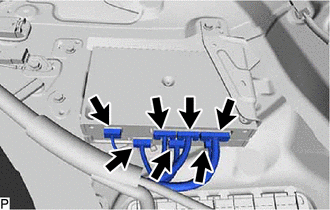
Disconnect each connector.
-
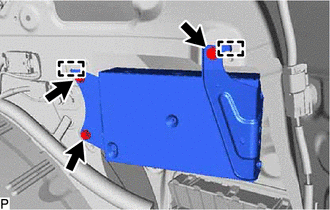
Remove the 3 bolts.
-
Disengage the 2 guides to remove the multi-display controller sub-assembly with bracket.
-
-
REMOVE NO. 2 MULTI-DISPLAY CONTROLLER BRACKET
-
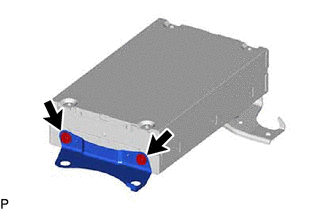
Remove the 2 screws and No. 2 multi-display controller bracket.
-
-
REMOVE NO. 3 MULTI-DISPLAY CONTROLLER BRACKET
-
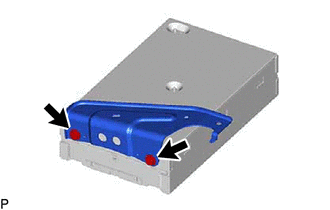
Remove the 2 screws and No. 3 multi-display controller bracket.
-
-
REMOVE MULTI-DISPLAY CONTROLLER SUB-ASSEMBLY