COOLING FAN MOTOR REMOVAL
CAUTION / NOTICE / HINT
The necessary procedures (adjustment, calibration, initialization or registration) that must be performed after parts are removed and installed, or replaced during cooling fan motor LH or cooling fan motor RH removal/installation are shown below.
| Replaced Part or Performed Procedure | Necessary Procedure | Effect/Inoperative Function when Necessary Procedure not Performed | Link |
|---|---|---|---|
| Battery terminal is disconnected/reconnected | Memorize steering angle neutral point | LKA /LDA system | |
| Intelligent clearance sonar system*1 | |||
| Pre-crash safety system | |||
| Lighting system (EXT)
|
|||
| Adaptive high beam system | |||
| Drive the vehicle until stop and start control is permitted (approximately 15 to 60 minutes) | Stop and start system | ||
| Memorize steering angle neutral point | Parking assist monitor system (w/ Parallel parking assist function) | ||
| Parking assist monitor system (w/o Parallel parking assist function) | |||
| Panoramic view monitor system | |||
| Initialize back door lock | Power door lock control system | ||
| Reset back door close position | Power back door system | ||
|
Front television camera view adjustment | Panoramic view monitor system | Click here for Initialization Click here for Calibration |
| Front bumper assembly (w/ Intelligent clearance sonar system) |
|
|
*1: When performing learning using the GTS.
PROCEDURE
-
REMOVE RADIATOR ASSEMBLY
-
REMOVE FAN LH
-
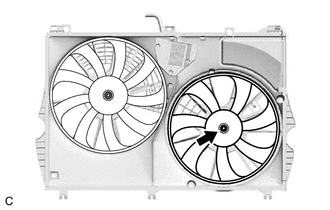
Remove the nut and fan LH.
-
-
REMOVE FAN RH
-
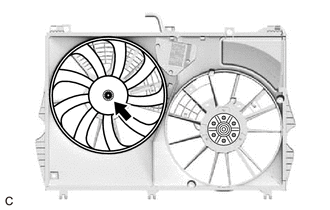
Remove the nut and fan RH.
-
-
REMOVE COOLING FAN MOTOR LH
-
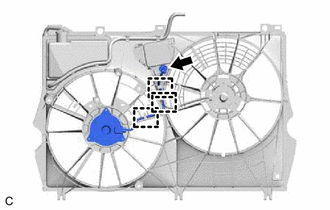
Disconnect the cooling fan motor LH connector.
-
Disengage the 3 clamps.
-
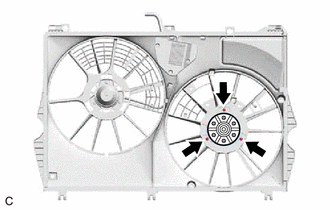
Remove the 3 screws and cooling fan motor LH.
-
-
REMOVE COOLING FAN MOTOR RH
-
Cooling Fan Motor 100 W Type:
-
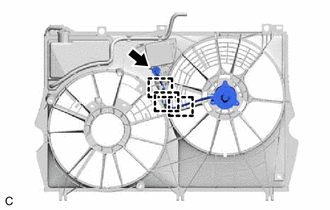
Disconnect the cooling fan motor RH connector.
-
Disengage the 3 clamps.
-
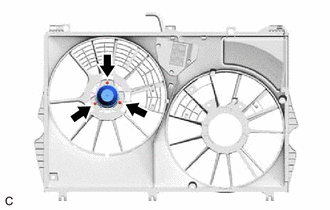
Remove the 3 screws and cooling fan motor RH.
-
-
Cooling Fan Motor 200 W Type:
-
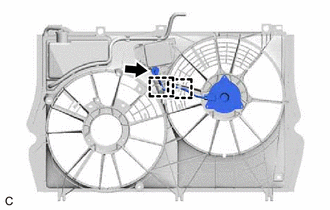
Disconnect the cooling fan motor RH connector.
-
Disengage the 2 clamps.
-
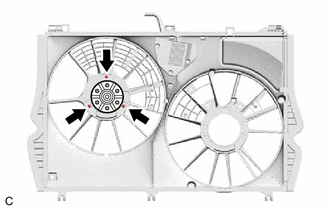
Remove the 3 screws and cooling fan motor RH.
-
-