REAR LOWER ARM INSTALLATION
CAUTION / NOTICE / HINT
Tech Tips
-
Use the same procedure for the RH side and LH side.
-
The following procedure is for the LH side.
PROCEDURE
-
TEMPORARILY INSTALL REAR NO. 1 SUSPENSION ARM ASSEMBLY
-
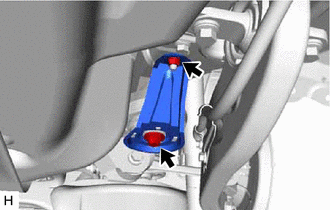
Remove the bolt, nut and rear lower suspension member stopper.
-
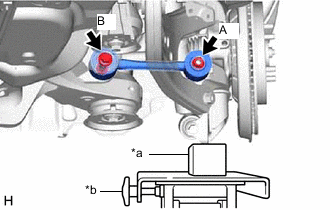
*a Wooden Block *b Transmission Jack Using a transmission jack and a wooden block, support the rear axle carrier sub-assembly.
-
Temporarily install the rear No. 1 suspension arm assembly to the rear axle carrier sub-assembly with the spacer and nut (A).
-
Temporarily install the rear No. 1 suspension arm assembly to the rear suspension member sub-assembly with the bolt (B) and nut.
Note
-
Because the nut has its own stopper, do not turn the nut. Tighten the bolt with the nut secured.
-
Insert the bolt with the threaded end facing the rear of the vehicle.
-
-
Install the rear lower suspension member stopper with the bolt and nut.
- Torque:
- Bolt
- 158 N*m { 1611 kgf*cm, 117 ft.*lbf }
- Nut
- 32 N*m { 326 kgf*cm, 24 ft.*lbf }
-
-
TEMPORARILY INSTALL REAR NO. 2 SUSPENSION ARM ASSEMBLY
-
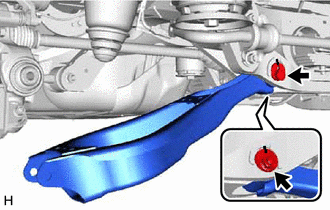
Temporarily install the rear No. 2 suspension arm assembly to the rear suspension member sub-assembly with the rear No. 2 suspension camber adjust cam, rear suspension toe adjust cam sub-assembly and the nut.
Note
-
Insert the rear suspension toe adjust cam sub-assembly from the rear of the vehicle.
-
When tightening the nut, keep the rear suspension toe adjust cam sub-assembly from rotating.
-
-
-
INSTALL REAR LOWER COIL SPRING INSULATOR
-
INSTALL REAR COIL SPRING
-
INSTALL REAR STABILIZER LINK ASSEMBLY
-
STABILIZE SUSPENSION
-
INSTALL REAR NO. 1 SUSPENSION ARM ASSEMBLY
-
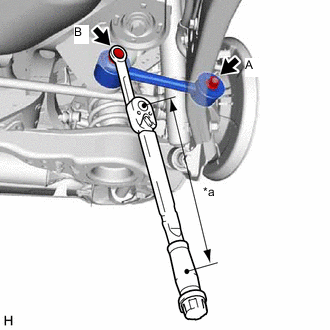
*a Torque Wrench Fulcrum Length Using a ball joint lock nut wrench fully tighten the rear No. 1 suspension arm assembly with the bolt (B).
- Torque:
- Specified tightening torque
- 150 N*m { 1530 kgf*cm, 111 ft.*lbf }
Note
Because the nut has its own stopper, do not turn the nut. Tighten the bolt with the nut secured.
Tech Tips
-
Calculate the torque wrench reading when changing the fulcrum length of the torque wrench.
-
When using a ball joint lock nut wrench (fulcrum length of 150 mm (5.91 in.)) + torque wrench (fulcrum length of 400 mm (1.31 ft.)):
109 N*m (1111 kgf*cm, 80 ft.*lbf)
-
Fully tighten the rear No. 1 suspension arm assembly with the nut (A).
- Torque:
- 145 N*m { 1479 kgf*cm, 107 ft.*lbf }
-
-
INSTALL REAR SUSPENSION ARM COVER
-
Install the rear suspension arm cover to the rear No. 2 suspension arm assembly with the 2 bolts.
- Torque:
- 12 N*m { 122 kgf*cm, 9 ft.*lbf }
-
-
INSTALL TAIL EXHAUST PIPE ASSEMBLY (for RH Side)
for 8AR-FTS: Click here
for 2GR-FKS: Click here
-
INSTALL REAR WHEEL
-
INSTALL REAR NO. 2 SUSPENSION ARM ASSEMBLY
-
Lower the vehicle to the ground.
-
Bounce the vehicle up and down at the corners to stabilize the rear suspension.
-
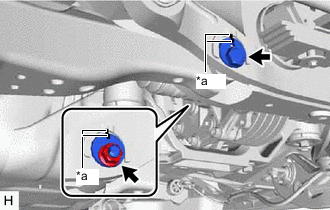
*a Matchmark Align the matchmarks on the rear No. 2 suspension camber adjust cam, rear suspension toe adjust cam sub-assembly and rear suspension member sub-assembly.
-
Fully tighten the nut.
- Torque:
- 100 N*m { 1020 kgf*cm, 74 ft.*lbf }
Note
-
Hold the rear suspension toe adjust cam sub-assembly while rotating the nut.
-
Make sure that the vehicle is unloaded when fully tightening the nut.
-
-
INSPECT AND ADJUST REAR WHEEL ALIGNMENT
-
PERFORM INITIALIZATION
Parking assist monitor system (w/ Parallel Parking Assist Function) for Initialization: Click here
for Calibration: Click here
Parking assist monitor system (w/o Parallel Parking Assist Function) for Initialization: Click here
for Calibration: Click here
Panoramic view monitor system for Initialization: Click here
for Calibration: Click here
-
Adaptive high beam system
-
Automatic headlight beam level control system
-