REAR COIL SPRING INSTALLATION
CAUTION / NOTICE / HINT
Tech Tips
-
Use the same procedure for the RH side and LH side.
-
The following procedure is for the LH side.
PROCEDURE
-
INSTALL REAR UPPER COIL SPRING INSULATOR
-
Install the rear upper coil spring insulator to the vehicle.
-
-
INSTALL REAR LOWER COIL SPRING INSULATOR
-
Install the rear lower coil spring insulator to the rear No. 2 suspension arm assembly.
-
-
INSTALL REAR COIL SPRING
-
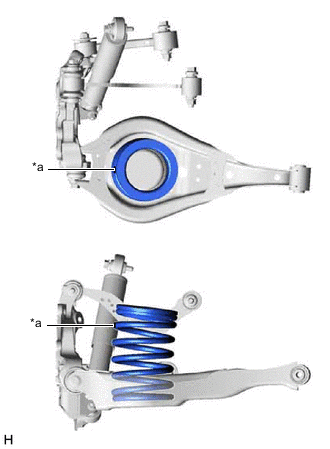
*a Identification Mark Set the rear coil spring to the rear No. 2 suspension arm assembly.
Note
Set the rear coil spring so that the identification mark is positioned as shown in the illustration.
-
Using a jack and wooden block, slowly jack up the rear No. 2 suspension arm assembly and then install the rear No. 2 suspension arm assembly to the rear axle carrier sub-assembly with the bolt and nut.
- Torque:
- 100 N*m { 1020 kgf*cm, 74 ft.*lbf }
CAUTION:
Do not jack up the rear No. 2 suspension arm assembly too high as the vehicle may fall.
Note
-
Because the nut has its own stopper, do not turn the nut. Tighten the bolt with the nut secured.
-
When jacking up the rear No. 2 suspension arm assembly, be sure to jack it up slowly.
-
Make sure to perform this operation with the vehicle kept as low as possible.
-
Insert the bolt with the threaded end facing the front of the vehicle.
-
-
INSTALL REAR STABILIZER LINK ASSEMBLY
-
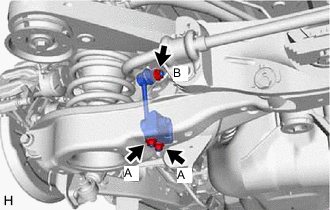
Install the rear stabilizer link assembly to the rear stabilizer bar with the nut (B).
- Torque:
- 90 N*m { 918 kgf*cm, 66 ft.*lbf }
Tech Tips
If the ball joint turns together with the nut, use a 6 mm hexagon socket wrench to hold the stud bolt.
-
Install the rear stabilizer link assembly to the rear No. 2 suspension arm assembly with the 2 nuts (A).
- Torque:
- 82 N*m { 836 kgf*cm, 60 ft.*lbf }
-
-
INSTALL REAR SUSPENSION ARM COVER
-
INSTALL TAIL EXHAUST PIPE ASSEMBLY (for RH Side)
for 8AR-FTS: Click here
for 2GR-FKS: Click here
-
INSTALL REAR WHEEL
-
INSTALL REAR NO. 2 SUSPENSION ARM ASSEMBLY
-
INSPECT AND ADJUST REAR WHEEL ALIGNMENT
-
PERFORM INITIALIZATION
Parking assist monitor system (w/ Parallel Parking Assist Function) for Initialization: Click here
for Calibration: Click here
Parking assist monitor system (w/o Parallel Parking Assist Function) for Initialization: Click here
for Calibration: Click here
Panoramic view monitor system for Initialization: Click here
for Calibration: Click here
-
Adaptive high beam system
-
Automatic headlight beam level control system
-