TELEMATICS SYSTEM(w/ Telematics Transceiver), Diagnostic DTC:B15DE
| DTC Code | DTC Name |
|---|---|
| B15DE | Telematics Transceiver Location Data Blackout |
DESCRIPTION
The telematics transceiver checks the reception condition of the location data every minute after the engine switch is turned on (ACC). If the location data is not received from the multi-media module receiver assembly for 5 minutes, this DTC will be stored.
| DTC No. | DTC Detection Condition | Trouble Area |
|---|---|---|
| B15DE | Location information from USB communication is interrupted |
|
WIRING DIAGRAM
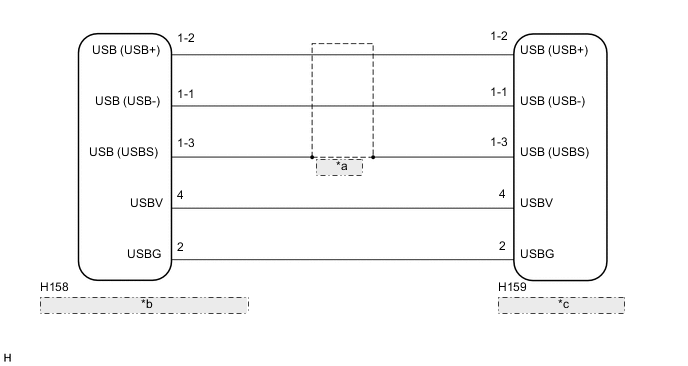
| *a | Shielded |
| *b | Multi-media Module Receiver Assembly |
| *c | Telematics Transceiver |
CAUTION / NOTICE / HINT
Note
Depending on the parts that are replaced during vehicle inspection or maintenance, performing initialization, registration or calibration may be needed. Refer to Precaution for G-BOOK Click here.
PROCEDURE
-
CHECK DTC
-
Clear the DTCs Click here.
-
Recheck for DTCs and check that no DTCs are output.
Result Result Proceed to B15DE is output A B15DB and B15DE are output B No DTCs are output C Tech Tips
If B15DB is output, perform troubleshooting for B15DB first.
B 
GO TO B15DB Click here
C
USE SIMULATION METHOD TO CHECK Click here
A 
-
-
CHECK HARNESS AND CONNECTOR (MULTI-MEDIA MODULE RECEIVER ASSEMBLY - TELEMATICS TRANSCEIVER)
-
Check the installation condition.
-
Check the USB communication cable (digital communication cable) between the multi-media module receiver assembly and the telematics transceiver for any installation or connection problems.
-
-
Disconnect the H158 multi-media module receiver assembly connector.
-
Disconnect the H159 telematics transceiver connector.
-
Measure the resistance according to the value(s) in the table below.
Standard Resistance Tester Connection Condition Specified Condition H158-4 (USBV) - H159-4 (USBV) Always Below 1 Ω H158-2 (USBG) - H159-2 (USBG) Always Below 1 Ω H159-4 (USBV) - Body ground Always 10 kΩ or higher H159-2 (USBG) - Body ground Always 10 kΩ or higher Standard Resistance (USB Cable) Tester Connection Condition Specified Condition H158-1-2 (USB+) - H159-1-2 (USB+) Always Below 1 Ω H158-1-1 (USB-) - H159-1-1 (USB-) Always Below 1 Ω H158-1-3 (USBS) - H159-1-3 (USBS) Always Below 1 Ω H159-1-2 (USB+) - Body ground Always 10 kΩ or higher H159-1-1 (USB-) - Body ground Always 10 kΩ or higher H159-1-3 (USBS) - Body ground Always 10 kΩ or higher
NG
REPAIR OR REPLACE HARNESS OR CONNECTOR
OK
-
-
REPLACE TELEMATICS TRANSCEIVER
-
Replace the telematics transceiver with a new or known good one Click here.
NEXT
-
-
CHECK DTC OUTPUT
-
Check the DTCs Click here.
-
Recheck for DTC and check that no DTCs are output.
OK No DTCs are output.
OK
END (TELEMATICS TRANSCEIVER WAS DEFECTIVE)
NG
REPLACE MULTI-MEDIA MODULE RECEIVER ASSEMBLY Click here
-