CAMSHAFT REMOVAL

PROCEDURE
-
PRECAUTION
Note
After turning the engine switch off, waiting time may be required before disconnecting the cable from the negative (-) battery terminal. Therefore, make sure to read the disconnecting the cable from the negative (-) battery terminal notices before proceeding with work Click here.
-
DISCONNECT CABLE FROM NEGATIVE BATTERY TERMINAL
Note
When disconnecting the cable, some systems need to be initialized after the cable is reconnected Click here.
-
REMOVE FRONT WHEEL RH
-
REMOVE FRONT WHEEL OPENING EXTENSION PAD RH
-
REMOVE ENGINE UNDER COVER RH
-
REMOVE FRONT FENDER APRON SEAL RH
-
REMOVE COOL AIR INTAKE DUCT SEAL
-
REMOVE NO. 1 ENGINE COVER SUB-ASSEMBLY
-
REMOVE INLET AIR CLEANER ASSEMBLY
-
REMOVE AIR CLEANER CAP WITH AIR CLEANER HOSE
-
REMOVE AIR CLEANER FILTER ELEMENT SUB-ASSEMBLY
-
REMOVE AIR CLEANER CASE SUB-ASSEMBLY
-
DISCONNECT ENGINE WIRE
-
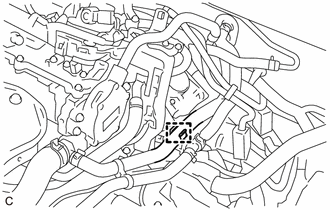
Disengage the clamp to separate the heater inlet water hose.
-
Disconnect the 18 connectors and 8 clamps.
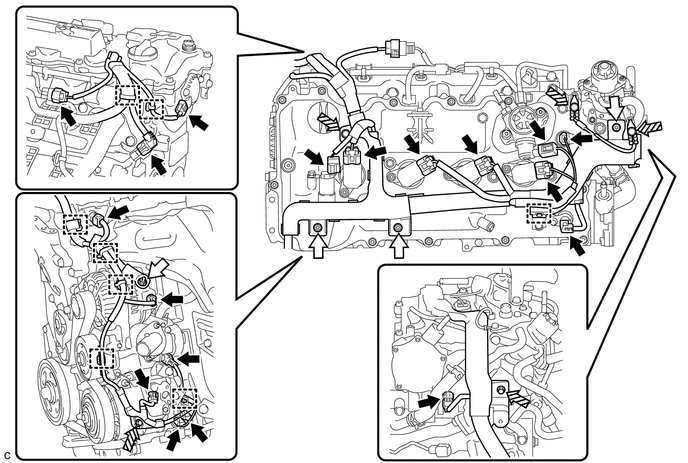
Text in Illustration 
Connector 
Nut 
Bolt - - -
Remove the 4 nuts and 5 bolts and disconnect the engine wire from the engine assembly.
-
-
REMOVE FUEL PUMP WITH SEAL SUB-ASSEMBLY (for High Pressure)
-
REMOVE VACUUM PUMP ASSEMBLY
-
REMOVE EARTH WIRE
-
REMOVE NO. 2 ENGINE MOUNTING STAY RH
-
REMOVE ENGINE MOVING CONTROL ROD BRACKET
-
REMOVE IGNITION COIL ASSEMBLY
-
DISCONNECT NO. 2 VENTILATION HOSE
-
REMOVE CYLINDER HEAD COVER SUB-ASSEMBLY
-
SET NO. 1 CYLINDER TO TDC/COMPRESSION
-
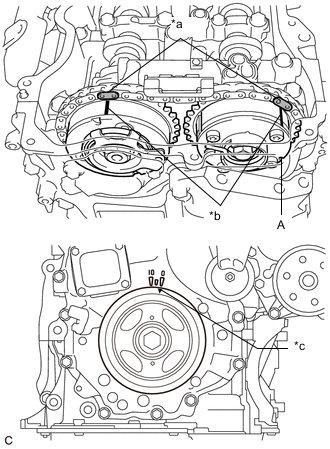
Text in Illustration *a Paint Mark *b Timing Mark *c Timing Notch (Groove) Turn the crankshaft pulley until its timing notch (groove) and the timing mark "0" of the timing chain cover assembly are aligned.
-
Check that both timing marks on the camshaft timing gear assembly and camshaft timing exhaust gear assembly are facing upward as shown in the illustration. If not, turn the crankshaft 1 revolution (360°) to align the timing marks as shown in the illustration.
Tech Tips
"A" is not a timing mark.
-
Place paint marks on the chain sub-assembly in alignment with the timing marks on the camshaft timing gear assembly and camshaft timing exhaust gear assembly.
-
-
REMOVE TIMING CHAIN COVER PLATE
-
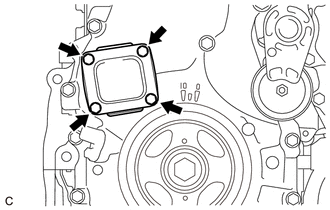
Remove the 4 bolts, timing chain cover plate and gasket.
-
-
REMOVE NO. 1 CHAIN TENSIONER ASSEMBLY
-
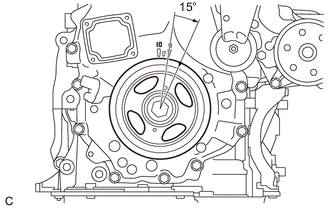
Turn the crankshaft pulley approximately 15° clockwise.
-
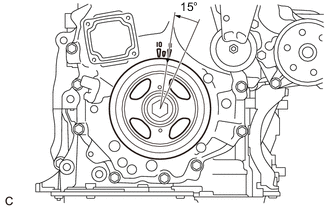
Turn the crankshaft pulley approximately 15° counterclockwise.
-
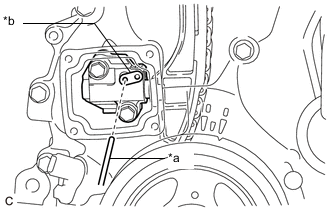
Text in Illustration *a Pin *b Stopper Plate Align the holes of the stopper plate and No. 1 chain tensioner assembly, and insert a pin into the stopper plate hole to lock the No. 1 chain tensioner assembly.
-
Turn the crankshaft pulley approximately 15° clockwise.
-
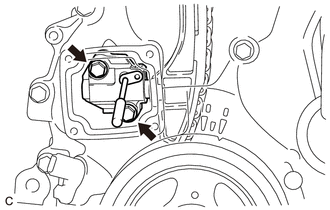
Remove the 2 bolts, No. 1 chain tensioner assembly and gasket.
Note
Make sure not to drop the gasket inside the timing chain cover assembly.
-
Turn the crankshaft pulley approximately 15° counterclockwise.
-
-
REMOVE TIMING CHAIN GUIDE
-
REMOVE CAMSHAFT TIMING OIL CONTROL SOLENOID ASSEMBLY
-
REMOVE CAMSHAFT TIMING GEAR BOLT
-
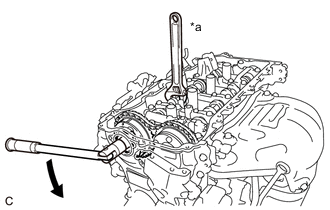
Text in Illustration *a Hold Turn Hold the hexagonal portion of the camshaft with a wrench and remove the camshaft timing gear bolt from the camshaft.
Note
Be careful not to damage the cylinder head sub- assembly or spark plug tube with the wrench.
-
-
REMOVE CAMSHAFT BEARING CAP
-
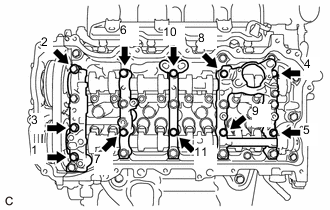
Remove the 11 bolts in several steps in the order shown in the illustration.
-
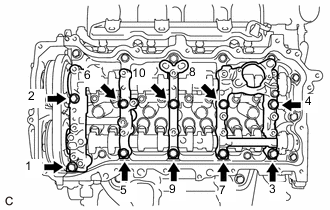
Remove the 10 bolts in several steps in the order shown in the illustration.
-
Remove the No. 1 camshaft bearing cap, No. 2 camshaft bearing cap, No. 3 camshaft bearing cap and No. 4 camshaft bearing cap.
Tech Tips
Arrange the removed parts in the correct order.
-
-
REMOVE CAMSHAFT
-
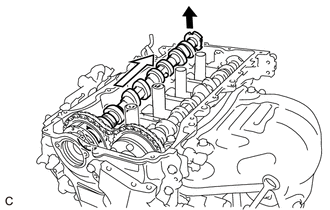
Raise the camshaft as shown in the illustration to remove it from the camshaft timing gear assembly.
Note
Be careful not to damage the camshaft or camshaft timing gear assembly.
-
-
REMOVE CAMSHAFT TIMING GEAR ASSEMBLY
-
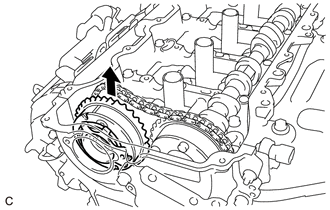
Remove the camshaft timing gear assembly.
Note
-
Do not disassemble the camshaft timing gear assembly.
-
Be careful not to damage the camshaft timing gear assembly.
-
-
-
REMOVE NO. 2 CAMSHAFT
-
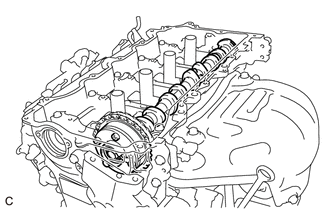
Hold up the chain sub-assembly and remove the No. 2 camshaft from the camshaft housing sub-assembly.
-
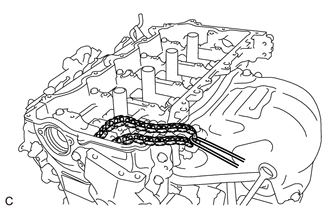
Suspend the chain sub-assembly with a string or equivalent as shown in the illustration.
Note
Be careful not to drop the chain sub-assembly inside the timing chain cover assembly.
-
-
REMOVE CAMSHAFT TIMING EXHAUST GEAR ASSEMBLY
-
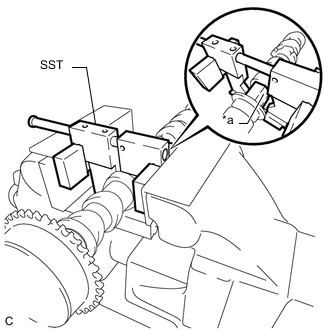
Text in Illustration *a Hexagonal Portion Using SST, grip the hexagonal portion, and then secure the SST and No. 2 camshaft in a vise as shown in the illustration.
- SST
- 09212-31010
Note
-
Do not damage the No. 2 camshaft.
-
Never grip areas other than the hexagonal portion, as this may cause damage.
-
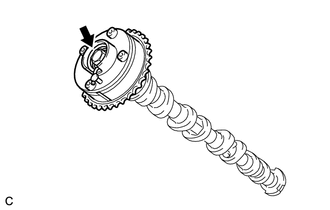
Remove the bolt and camshaft timing exhaust gear assembly.
Note
Do not disassemble the camshaft timing exhaust gear assembly.
-
-
REMOVE OIL CONTROL VALVE FILTER
-
REMOVE NO. 1 CAMSHAFT BEARING
-
REMOVE NO. 2 CAMSHAFT BEARING