DYNAMIC RADAR CRUISE CONTROL SYSTEM OPERATION CHECK
INPUT SIGNAL CHECK
-
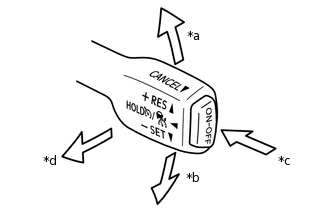
*a
+RES
*b
-SET
*c
ON/OFF
*d
CANCEL
Connect the GTS to the DLC3.
Check the cruise control main switch using the Data List function of the GTS (ON/OFF, -/SET, +/RES and CANCEL).
-
INSPECT MODE SWITCH
-
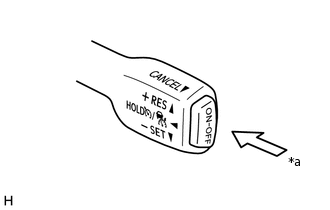
*a
ON/OFF
Turn the power switch on (IG).
Push and hold the switch of the cruise control main switch (ON/OFF) for 1.5 seconds or more with the dynamic radar cruise control system off to change to the constant speed control mode.
-
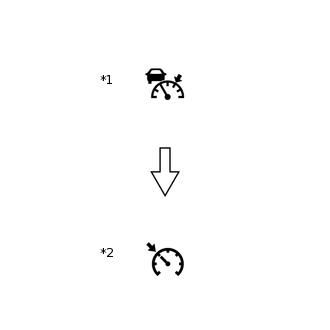
*1
Cruise Control Indicator
(Vehicle-to-vehicle Distance Control Mode)
*2
Cruise Control Indicator
(Constant Speed Control Mode)
Check that the cruise control indicator (vehicle-to-vehicle distance control mode) goes off and the cruise control indicator (constant speed control mode) illuminates.
Tip:If a malfunction is detected, turn the power switch off and repeat the procedure above.
-
INSPECT STEERING PAD SWITCH ASSEMBLY
Turn the power switch on (IG).
Turn the dynamic radar cruise control system on using the cruise control main switch (ON/OFF).
-
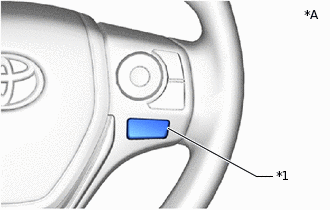
*1
Vehicle-to-vehicle Distance Control Switch
Press the vehicle-to-vehicle distance control switch of the steering pad switch assembly.
Check that the indication of the vehicle-to-vehicle distance, which is shown on the multi-information display (combination meter assembly), changes from long to middle to short in that order.
Tip:Long is automatically selected each time the power switch is turned on (IG).