THEFT DETERRENT SYSTEM Improper Operation
DESCRIPTION
When the theft deterrent system operates by itself, it could be due to a misdetection by the theft warning radar sensor (intrusion sensor), or by something such as a short circuit in the courtesy light switch of any of the doors or the hood causing a signal to be sent in error.
Tech Tips
In the following situations, the intrusion sensor (theft warning ultrasonic sensor) may operate and cause the theft deterrent system to operate even when the sensor is normal.
-
The driver locks the doors and walks away from the vehicle while other people, pets, etc. are in the vehicle.
-
There are things which move easily inside the vehicle, such as things hanging inside the vehicle or clothing hanging from the coat hooks.
-
A window is open.
-
The vehicle is parked in a place with a lot of vibration or noise such as a parking garage.
-
The vehicle is being washed using a high-pressure spray gun or an automatic car wash.
-
The vehicle is continuously being struck or is vibrating due to hail or lightning.
-
The vehicle is continuously being subjected to impacts or is vibrating when snow or ice is being removed from the vehicle.
-
A frost prevention sheet which has an aluminum film is moved by wind, etc.
Tech Tips
Preconditions for Arming Preparation:
-
The ignition switch is off and all the doors and the hood are closed and all doors are locked by wireless operation or entry operation*1.
-
*1: w/ Entry and Start System
WIRING DIAGRAM
CAUTION / NOTICE / HINT
Note
-
Before replacing the main body ECU (multiplex network body ECU), refer to Service Bulletin.
-
The theft deterrent system uses the CAN communication system. Inspect the communication function by following How to Proceed with Troubleshooting. Troubleshoot the theft deterrent system after confirming that the communication systems are functioning properly.
-
When using the GTS with the ignition switch off, connect the GTS to the DLC3 and turn a courtesy light switch on and off at intervals of 1.5 seconds or less until communication between the GTS and the vehicle begins. Then select Model Code "KEY REGIST" under manual mode and enter the following menus: Body Electrical / Entry&Start(CAN). While using the GTS, periodically turn a courtesy light switch on and off at intervals of 1.5 seconds or less to maintain communication between the GTS and the vehicle.
-
If the vehicle or vehicle controls are operated (for example, during initial inspection when the vehicle is brought in for repair) before operation history has been read out and saved, the operation history information could be lost.
-
The function "Read operation history" uses the current system time setting inside the GTS and the time counter inside the controlling ECU to calculate the timings shown in the operation history. For this reason, before reading out the operation history, first make sure that the GTS system clock is accurately set to the current time.
PROCEDURE
-
CUSTOMER PROBLEM ANALYSIS AND SYMPTOM CONFIRMATION
Tech Tips
-
In troubleshooting, confirm that the problem symptoms have been accurately identified. Preconceptions should be discarded in order to make an accurate judgment. To clearly understand what the problem symptoms are, it is extremely important to ask the customer about the problem and the conditions at the time the malfunction occurred.
-
Gather as much information as possible for reference. Past problems that seem unrelated may also help in some cases.
-
The following 5 items are important points in the problem analysis:
What? Vehicle model, system name When? Date, time, occurrence frequency, whether the problem occurred recently or has been occurring for a long time Where? Whether the problem occurs at a specific location Under what conditions? Whether the doors were locked or unlocked, whether the engine switch was on, whether the engine was running How did it happen? Problem symptoms* -
*: Be sure to ask the customer in detail about the following points concerning the vehicle operating conditions, environment and problem, and then check for DTCs.
Result Proceed to NEXT

-
-
CHECK FOR DTC*
-
Check for DTCs.
Body Electrical > Main Body > Trouble CodesNote
After problem symptoms have occurred, do not disconnect the battery until after the DTC checks have been performed.
Result Result Proceed to DTCs are not output A DTCs are output B
B 
GO TO THEFT DETERRENT SYSTEM Click here
A
-
-
CHECK THEFT DETERRENT SYSTEM OPERATION HISTORY
-
Use the GTS to check the theft deterrent system operation history around the time that the malfunction reported by the customer occurred, based on the contents of the customer interview and the last recorded theft deterrent system operation history around the time that the problem is reported to have occurred.
-
On the GTS screen, enter the following menus: Body / Main Body / Utility / Operation History Analysis. According to the display on the GTS, read the operation history.
-
Check that there is theft deterrent system operation history as reported by the customer.
Tech Tips
Based on the displayed operation history, perform vehicle-side inspection, and perform repairs if a problem is found. If the vehicle has no malfunction, interview the customer about possible causes such as "the driver" and "environmental / other than the driver".
Result Result Proceed to There is operational history around the time that the customer reported the malfunction to have occurred, but the malfunction could not be identified even by following the instructions to inspect the relevant areas A There is operational history around the time that the customer reported the malfunction to have occurred, and by following the instructions to inspect the relevant areas, the malfunction was identified B There is no operational history around the time that the customer reported the malfunction to have occurred. C -
B 
INTERVIEW THE CUSTOMER Click here
C
END
A
-
-
CHECK SECURITY INDICATOR LIGHT OPERATION
-
When the theft deterrent system is in arming preparation state, check that the security indicator light is illuminated.
-
When the theft deterrent system is in armed state, check that the security indicator light blinks.
Tech Tips
State of Theft Deterrent System Contents Security Indicator Light Condition Disarmed state (1), (2) Theft deterrent system is unset.
-
Off (Immobiliser system unset)
-
Blinking (Immobiliser system set)
Arming preparation state Standby period after theft deterrent system set conditions are met but before theft deterrent system is actually set (approximately 30 seconds).
(Theft detection not performed)
On Armed state Theft deterrent system is unset.
(Theft detection is possible)
Blinking (Immobiliser system set) Alarm sounding state Theft attempt is detected, and alarm is sounded using turn signal light, security horn assembly*1, theft warning siren assembly*2, and vehicle horn.
(Alarm sounds for 27.5 seconds)
On
-
*1: w/o Intrusion Sensor
-
*2: w/ Intrusion Sensor
Result Result Proceed to OK (w/ Intrusion Sensor) A OK (w/o Intrusion Sensor) B NG C -
B
GO TO STEP 7 Click here
C
GO TO OTHER PROBLEM Click here
A
-
-
READ VALUE USING GTS (Intrusion Sens OFF SW)
-
Connect the GTS to the DLC3.
-
Turn the ignition switch to ON.
-
Turn the GTS on.
-
Enter the following menus: Body Electrical / Main Body / Data List.
-
Read the Data List according to the display on the GTS.
Body Electrical > Main Body > Data ListTester Display Measurement Item Range Normal Condition Diagnostic Note Intrusion Sens OFF SW Intrusion sensor cancel switch ON or OFF ON: Intrusion sensor cancel switch on
OFF: Intrusion sensor cancel switch off
-
Body Electrical > Main Body > Data ListTester Display Intrusion Sens OFF SW OK Normal conditions listed above are displayed. Result Proceed to OK NG
NG
CHECK HARNESS AND CONNECTOR (MAIN BODY ECU (MULTIPLEX NETWORK BODY ECU) - INTRUSION SENSOR CANCEL SWITCH (MAP LIGHT ASSEMBLY) - BODY GROUND) Click here
OK
-
-
READ VALUE USING GTS (INTRUSION SENSOR, INTRUSION SENSOR SOUND DETECT)
-
Connect the GTS to the DLC3.
-
Turn the ignition switch to ON.
-
Turn the GTS on.
-
Enter the following menus: Body Electrical / Main Body / Data List.
-
Read the Data List according to the display on the GTS.
Tech Tips
When performing the above inspection, have the electrical key transmitter sub-assembly in the vehicle exterior detection area to perform certification (this prevents the alarm from sounding).
Note
Make sure that all windows are closed.
-
Make a metal-on-metal striking sound (such as by shaking keys) near the intrusion sensor (theft warning ultrasonic sensor) and check the Data List.
Body Electrical > Main Body > Data ListTester Display Measurement Item Range Normal Condition Diagnostic Note Intrusion Sensor Sound Detect Sound detection status of the intrusion sensor (theft warning ultrasonic sensor)*1 ON or OFF ON: Sound detected
OFF: Sound not detected
Only displays "ON" on the Data List once. When checking again, disconnect and reconnect the GTS.
Body Electrical > Main Body > Data ListTester Display Intrusion Sensor Sound Detect Note
*1: Perform the intrusion sensor (theft warning ultrasonic sensor) operation inspection with the GTS disconnected.
-
From inside the vehicle, put your hand in front of the intrusion sensor (theft warning ultrasonic sensor) and move it back and forth a distance of 0.7 to 1 m (2.30 to 3.28 ft.) and check the Data List.
Body Electrical > Main Body > Data ListTester Display Measurement Item Range Normal Condition Diagnostic Note Intrusion Sensor Detection status of the intrusion sensor (theft warning ultrasonic sensor) ON or OFF ON: Intrusion detected
OFF: Intrusion not detected
-
Body Electrical > Main Body > Data ListTester Display Intrusion Sensor OK The GTS display changes correctly in response to the detection condition of the intrusion sensor (theft warning ultrasonic sensor). Result Proceed to OK NG
NG
CHECK INTRUSION SENSOR (THEFT WARNING ULTRASONIC SENSOR) Click here
OK
-
-
READ VALUE USING GTS
-
Connect the GTS to the DLC3.
-
Turn the ignition switch to ON.
-
Turn the GTS on.
-
Enter the following menus: Body Electrical / Main Body / Data List.
-
Read the Data List according to the display on the GTS.
Body Electrical > Main Body > Data ListTester Display Measurement Item Range Normal Condition Diagnostic Note ACC SW Ignition switch ACC signal ON or OFF ON: Ignition switch ACC
OFF: Ignition switch off
- IG SW Ignition switch ON signal ON or OFF ON: Ignition switch ON
OFF: Ignition switch off or ACC
-
Body Electrical > Main Body > Data ListTester Display ACC SW IG SW OK Normal conditions listed above are displayed. Result Proceed to OK NG
NG
GO TO LIGHTING SYSTEM Click here
OK
-
-
READ VALUE USING GTS
-
Connect the GTS to the DLC3.
-
Turn the ignition switch to ON.
-
Turn the GTS on.
-
Enter the following menus: Body Electrical / Main Body / Data List.
-
Read the Data List according to the display on the GTS.
Body Electrical > Main Body > Data ListTester Display Measurement Item Range Normal Condition Diagnostic Note FR Door Lock Pos Front door RH unlock detection switch signal LOCK or UNLOCK LOCK: Front door RH locked
UNLOCK: Front door RH unlocked
- FL Door Lock Pos Front door LH unlock detection switch signal LOCK or UNLOCK LOCK: Front door LH locked
UNLOCK: Front door LH unlocked
- RR-Door Lock Pos SW Rear door RH and LH unlock detection switch signal ON or OFF ON: Rear door RH or LH unlocked
OFF: Rear door RH and LH locked
- RL-Door Lock Pos SW Rear door RH and LH unlock detection switch signal ON or OFF ON: Rear door RH or LH unlocked
OFF: Rear door RH and LH locked
-
Body Electrical > Main Body > Data ListTester Display FR Door Lock Pos FL Door Lock Pos RR-Door Lock Pos SW RL-Door Lock Pos SW Result Proceed to OK NG
NG
GO TO LIGHTING SYSTEM Click here
OK
-
-
READ VALUE USING GTS
-
Connect the GTS to the DLC3.
-
Turn the ignition switch to ON.
-
Turn the GTS on.
-
Enter the following menus: Body Electrical / Main Body / Data List.
-
Read the Data List according to the display on the GTS.
Body Electrical > Main Body > Data ListTester Display Measurement Item Range Normal Condition Diagnostic Note RR Door Courtesy SW Rear door courtesy light switch assembly RH signal ON or OFF ON: Rear door RH open
OFF: Rear door RH closed
- RL Door Courtesy SW Rear door courtesy light switch assembly LH signal ON or OFF ON: Rear door LH open
OFF: Rear door LH closed
- FR Door Courtesy SW Front door courtesy light switch assembly RH signal ON or OFF ON: Front door RH open
OFF: Front door RH closed
- FL Door Courtesy SW Front door courtesy light switch assembly LH signal ON or OFF ON: Front door LH open
OFF: Front door LH closed
-
Body Electrical > Main Body > Data ListTester Display RR Door Courtesy SW RL Door Courtesy SW FR Door Courtesy SW FL Door Courtesy SW OK Normal conditions listed above are displayed. Result Proceed to OK NG
NG
GO TO LIGHTING SYSTEM Click here
OK
-
-
READ VALUE USING GTS
-
Connect the GTS to the DLC3.
-
Turn the ignition switch to ON.
-
Turn the GTS on.
-
Enter the following menus: Body Electrical / Main Body / Data List.
-
Read the Data List according to the display on the GTS.
Body Electrical > Main Body > Data ListTester Display Measurement Item Range Normal Condition Diagnostic Note Back Door Courtesy SW Back door courtesy light switch ON or OFF ON: Back door open
OFF: Back door closed
-
Body Electrical > Main Body > Data ListTester Display Back Door Courtesy SW OK Normal conditions listed above are displayed. Result Proceed to OK NG
NG
GO TO LIGHTING SYSTEM Click here
OK
-
-
READ VALUE USING GTS (HOOD COURTESY SW)
-
Connect the GTS to the DLC3.
-
Turn the ignition switch to ON.
-
Turn the GTS on.
-
Enter the following menus: Body Electrical / Main Body / Data List.
-
Read the Data List according to the display on the GTS.
Body Electrical > Main Body > Data ListTester Display Measurement Item Range Normal Condition Diagnostic Note Hood Courtesy SW Hood courtesy switch ON or OFF ON: Hood open
OFF: Hood closed
-
Body Electrical > Main Body > Data ListTester Display Hood Courtesy SW OK The GTS display changes correctly in response to the hood courtesy switch (hood lock assembly) status. Result Proceed to OK NG
NG
INSPECT HOOD COURTESY SWITCH (HOOD LOCK ASSEMBLY) Click here
OK
-
-
INTERVIEW THE CUSTOMER
-
If the phenomenon could not be confirmed or reproduced, after explaining this to the customer, also explain the history of input signals from the electrical key transmitter sub-assembly (electronic key) for the relevant date/time in the operation history.
Standard Cause was identified Result Proceed to OK NG
OK
END
NG
CHECK INTERMITTENT PROBLEMS Click here
-
-
INSPECT HOOD COURTESY SWITCH (HOOD LOCK ASSEMBLY)
-
Remove the hood courtesy switch (hood lock assembly).
-
Inspect the hood courtesy switch (hood lock assembly).
Result Proceed to OK NG
NG
REPLACE HOOD COURTESY SWITCH (HOOD LOCK ASSEMBLY) Click here
OK
-
-
CHECK HARNESS AND CONNECTOR (MAIN BODY ECU (MULTIPLEX NETWORK BODY ECU) - HOOD COURTESY SWITCH (HOOD LOCK ASSEMBLY) - BODY GROUND)
-
Disconnect the F15 main body ECU (multiplex network body ECU) connector.
-
Disconnect the A8 hood courtesy switch (hood lock assembly) connector.
-
Measure the resistance according to the value(s) in the table below.
Standard Resistance Tester Connection Condition Specified Condition F15-11 (HCTY) - A8-1 (+) Always Below 1 Ω F15-11 (HCTY) or A8-1 (+) - Body ground Always 10 kΩ or higher A8-2 (E) - Body ground Always Below 1 Ω Result Result Proceed to OK (for LHD) A OK (for RHD) B NG C
A
REPLACE MAIN BODY ECU (MULTIPLEX NETWORK BODY ECU) Click here
B
REPLACE MAIN BODY ECU (MULTIPLEX NETWORK BODY ECU) Click here
C
REPAIR OR REPLACE HARNESS OR CONNECTOR
-
-
CHECK INTRUSION SENSOR (THEFT WARNING ULTRASONIC SENSOR)
-
Using an oscilloscope, check the waveform.
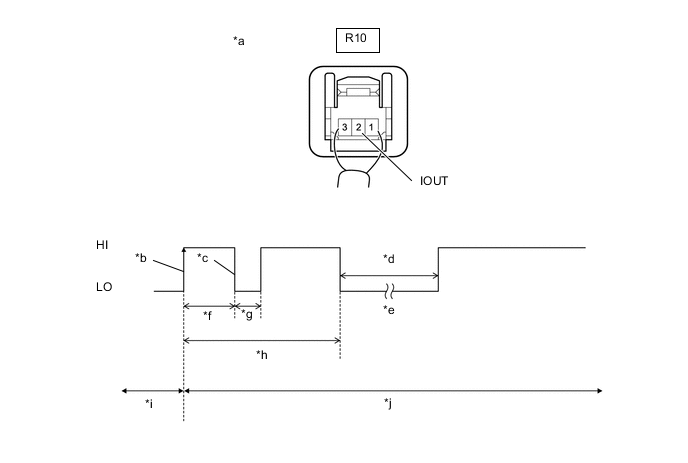
*a Component with harness connected
(Intrusion Sensor (Theft Warning Ultrasonic Sensor))
*b IOUT Initial Signal *c IOUT Initial Response *d Approximately 1.0 Second *e Initial Diagnosis *f Approximately 1.0 to 1.6 Seconds *g Approximately 0.05 Seconds *h Approximately 5.5 Seconds *i Disarmed State *j Arming Preparation State Measurement Condition Item Content Tester Connection R10-2 (IOUT) - Body ground Tool Setting 2 V/DIV., 100 ms./DIV. Condition Theft deterrent system is set (system changes from disarmed state to arming preparation state) Tech Tips
-
If the intrusion sensor (theft warning ultrasonic sensor) is normal, an initial response is output in response to the HI input from the main body ECU (multiplex network body ECU).
-
If the waveform output remains LO, there may be a problem with the main body ECU (multiplex network body ECU), as there is no input from the main body ECU (multiplex network body ECU).
OK The waveform is output properly (HI is 6.5 V or higher and LO is below 1 V). Result Result Proceed to OK A NG (for LHD) B NG (for RHD) C -
B
REPLACE MAIN BODY ECU (MULTIPLEX NETWORK BODY ECU) Click here
C
REPLACE MAIN BODY ECU (MULTIPLEX NETWORK BODY ECU) Click here
A
-
-
CHECK HARNESS AND CONNECTOR (MAIN BODY ECU (MULTIPLEX NETWORK BODY ECU) - INTRUSION SENSOR (THEFT WARNING ULTRASONIC SENSOR))
-
Disconnect the F16 main body ECU (multiplex network body ECU) connector.
-
Disconnect the R10 intrusion sensor (theft warning ultrasonic sensor) connector.
-
Measure the resistance according to the value(s) in the table below.
Standard Resistance Tester Connection Condition Specified Condition F16-12 (ISIF) - R10-2 (IOUT) Always Below 1 Ω F16-12 (ISIF) or R10-2 (IOUT) - Body ground Always 10 kΩ or higher Result Proceed to OK NG
OK
REPLACE INTRUSION SENSOR (THEFT WARNING ULTRASONIC SENSOR) Click here
NG
REPAIR OR REPLACE HARNESS OR CONNECTOR
-
-
CHECK HARNESS AND CONNECTOR (MAIN BODY ECU (MULTIPLEX NETWORK BODY ECU) - INTRUSION SENSOR CANCEL SWITCH (MAP LIGHT ASSEMBLY) - BODY GROUND)
-
Disconnect the F16 main body ECU (multiplex network body ECU) connector.
-
Disconnect the R2 intrusion sensor cancel switch (map light assembly) connector.
-
Measure the resistance according to the value(s) in the table below.
Standard Resistance Tester Connection Condition Specified Condition F16-13 (SSW1) - R2-11 (SOFF) Always Below 1 Ω F16-13 (SSW1) or R2-11 (SOFF) - Body ground Always 10 kΩ or higher R2-3 (GND) - Body ground Always Below 1 Ω Result Proceed to OK NG
NG
REPAIR OR REPLACE HARNESS OR CONNECTOR
OK
-
-
INSPECT INTRUSION SENSOR CANCEL SWITCH (MAP LIGHT ASSEMBLY)
-
Remove the intrusion sensor cancel switch (map light assembly).
-
Inspect the intrusion sensor cancel switch (map light assembly).
Result Result Proceed to OK (for LHD) A OK (for RHD) B NG C
A
REPLACE MAIN BODY ECU (MULTIPLEX NETWORK BODY ECU) Click here
B
REPLACE MAIN BODY ECU (MULTIPLEX NETWORK BODY ECU) Click here
C
REPLACE INTRUSION SENSOR CANCEL SWITCH (MAP LIGHT ASSEMBLY) Click here
-
-
INTERVIEW THE CUSTOMER
-
If the phenomenon could not be confirmed or reproduced, after explaining this to the customer, also explain the history of input signals from the electrical key transmitter sub-assembly (electronic key) for the relevant date/time in the operation history.
Standard Cause was identified Result Proceed to OK NG
OK
END
NG
CHECK INTERMITTENT PROBLEMS Click here
-