NAME PLATE INSTALLATION
PROCEDURE
-
INSTALL SYMBOL EMBLEM
Tech Tips
When installing the symbol emblem, heat the luggage compartment door panel and symbol emblem using a heat light.
Standard Item Temperature Luggage Compartment Door Panel 40 to 60°C (104 to 140°F) Symbol Emblem 20 to 30°C (68 to 86°F)
-
Clean the luggage compartment door panel surface.
-
Using a heat light, heat the luggage compartment door panel surface.
-
Remove the double-sided tape from the luggage compartment door panel.
-
Wipe off any tape adhesive residue with cleaner.
-
-
Using a heat light, heat the luggage compartment door panel and a new symbol emblem.
-
Remove the peeling paper from the face of the symbol emblem.
Tech Tips
After removing the peeling paper, keep the exposed adhesive free from foreign matter.
-
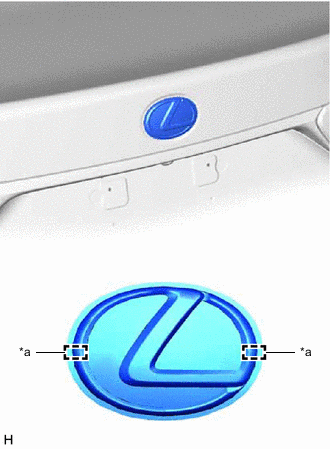
*a Boss Position Align the boss positions and install the symbol emblem.
Tech Tips
Press the symbol emblem firmly to install it.
-
-
INSTALL NO. 1 LUGGAGE COMPARTMENT DOOR NAME PLATE
Tech Tips
When installing the No. 1 luggage compartment door name plate, heat the luggage compartment door panel and No. 1 luggage compartment door name plate using a heat light.
Standard Item Temperature Luggage Compartment Door Panel 40 to 60°C (104 to 140°F) No. 1 Luggage Compartment Door Name Plate 20 to 30°C (68 to 86°F) CAUTION:
-
Do not touch the heat light and heated parts.
-
Touching the heat light may result in burns.
-
Touching heated parts for a long time may result in burns.
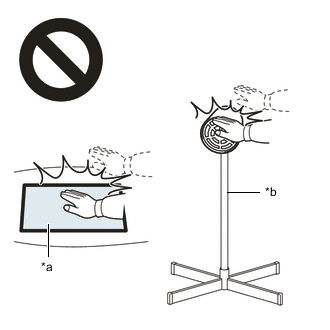
*a Heated Part *b Heat Light
-
Clean the luggage compartment door panel surface.
-
Using a heat light, heat the luggage compartment door panel surface.
-
Remove the double-sided tape from the luggage compartment door panel.
-
Wipe off any tape adhesive residue with cleaner.
-
-
Using a heat light, heat the luggage compartment door panel and a new No. 1 luggage compartment door name plate.
-
Remove the peeling paper from the face of the No. 1 luggage compartment door name plate.
Tech Tips
After removing the peeling paper, keep the exposed adhesive free from foreign matter.
-
Install the No. 1 luggage compartment door name plate as shown in the illustration.
Tech Tips
Press the No. 1 luggage compartment door name plate firmly to install it.
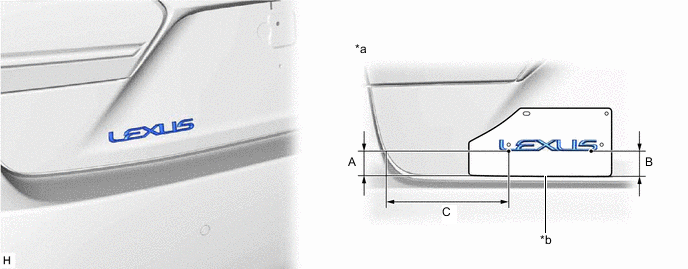
*a Reference Values *b R End Standard Area Specified Condition Area Specified Condition A 36.5 mm (1.44 in.) B 37.3 mm (1.47 in.) C 177.9 mm (7.00 in.) - -
-
-
INSTALL NO. 3 LUGGAGE COMPARTMENT DOOR PLATE
Tech Tips
When installing the No. 3 luggage compartment door plate, heat the luggage compartment door panel and No. 3 luggage compartment door plate using a heat light.
Standard Item Temperature Luggage Compartment Door Panel 40 to 60°C (104 to 140°F) No. 3 Luggage Compartment Door Plate 20 to 30°C (68 to 86°F) CAUTION:
-
Do not touch the heat light and heated parts.
-
Touching the heat light may result in burns.
-
Touching heated parts for a long time may result in burns.
*a Heated Part *b Heat Light
-
Clean the luggage compartment door panel surface.
-
Using a heat light, heat the luggage compartment door panel surface.
-
Remove the double-sided tape from the luggage compartment door panel.
-
Wipe off any tape adhesive residue with cleaner.
-
-
Using a heat light, heat the luggage compartment door panel and a new No. 3 luggage compartment door plate.
-
Remove the peeling paper from the face of the No. 3 luggage compartment door plate.
Tech Tips
After removing the peeling paper, keep the exposed adhesive free from foreign matter.
-
Install the No. 3 luggage compartment door plate as shown in the illustration.
Tech Tips
Press the No. 3 luggage compartment door plate firmly to install it.
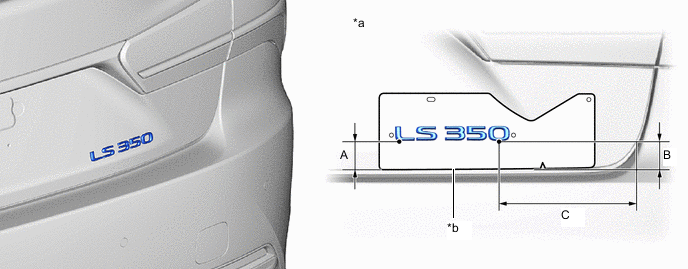
*a Reference Values *b R End Standard Area Specified Condition Area Specified Condition A 37.3 mm (1.47 in.) B 36.1 mm (1.42 in.) C 178.6 mm (7.03 in.) - -
-
-
INSTALL FRONT FENDER NO. 2 NAME PLATE (for Sport Package)
Tech Tips
When installing the front fender No. 2 name plate, heat the front fender panel and front fender No. 2 name plate using a heat light.
Standard Item Temperature Front Fender Panel 40 to 60°C (104 to 140°F) Front Fender No. 2 Name Plate 20 to 30°C (68 to 86°F)
-
Clean the front fender panel surface.
-
Using a heat light, heat the front fender panel surface.
-
Remove the double-sided tape from the front fender panel.
-
Wipe off any tape adhesive residue with cleaner.
-
-
Using a heat light, heat the front fender panel and a new front fender No. 2 name plate.
-
Remove the peeling paper from the face of the front fender No. 2 name plate.
Tech Tips
After removing the peeling paper, keep the exposed adhesive free from foreign matter.
-
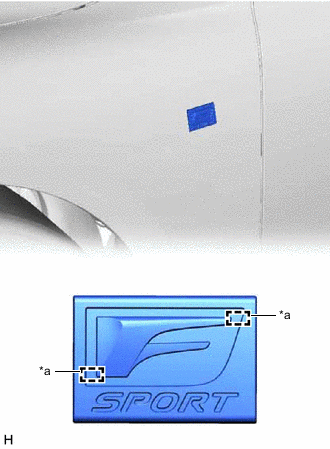
*a Boss Position Align the boss positions and install the front fender No. 2 name plate.
Tech Tips
Press the front fender No. 2 name plate firmly to install it.
-
-
INSTALL FRONT FENDER NO. 1 NAME PLATE (for Sport Package)
Tech Tips
When installing the front fender No. 1 name plate, heat the front fender panel and front fender No. 1 name plate using a heat light.
Standard Item Temperature Front Fender Panel 40 to 60°C (104 to 140°F) Front Fender No. 1 Name Plate 20 to 30°C (68 to 86°F)
-
Clean the front fender panel surface.
-
Using a heat light, heat the front fender panel surface.
-
Remove the double-sided tape from the front fender panel.
-
Wipe off any tape adhesive residue with cleaner.
-
-
Using a heat light, heat the front fender panel and a new front fender No. 1 name plate.
-
Remove the peeling paper from the face of the front fender No. 1 name plate.
Tech Tips
After removing the peeling paper, keep the exposed adhesive free from foreign matter.
-
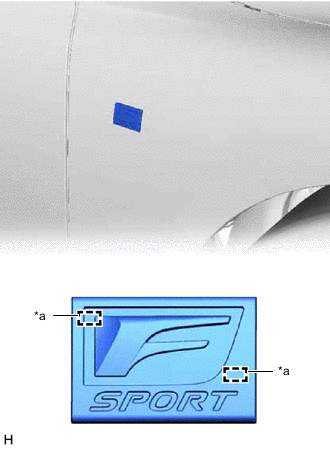
*a Boss Position Align the boss positions and install the front fender No. 1 name plate.
Tech Tips
Press the front fender No. 1 name plate firmly to install it.
-