NAVIGATION RECEIVER REMOVAL
PROCEDURE
-
PRECAUTION
Note
-
After turning the power switch off, waiting time may be required before disconnecting the cable from the negative (-) auxiliary battery terminal. Therefore, make sure to read the disconnecting the cable from the negative (-) auxiliary battery terminal notices before proceeding with work Click here.
-
A hard disk drive (HDD) is built into the navigation receiver assembly to store map and other data and is used for the navigation system. Therefore, make sure to read all of the precautions thoroughly before handling the navigation receiver assembly.
-
When removing the hard disk drive, eliminate static electricity by touching the vehicle body to prevent components from being damaged.
-
-
REMOVE DECK BOARD ASSEMBLY
-
REMOVE NO. 1 DECK BOARD
-
REMOVE NO. 2 DECK BOARD
-
REMOVE REAR DECK FLOOR BOX
-
REMOVE DECK FLOOR BOX RH
-
DISCONNECT CABLE FROM NEGATIVE AUXILIARY BATTERY TERMINAL
Note
When disconnecting the cable, some systems need to be initialized after the cable is reconnected Click here.
-
REMOVE INTEGRATION CONTROL AND PANEL
-
REMOVE INSTRUMENT PANEL BOX ASSEMBLY
-
REMOVE CENTER INSTRUMENT PANEL REGISTER ASSEMBLY
-
REMOVE NAVIGATION RECEIVER ASSEMBLY WITH BRACKET
-
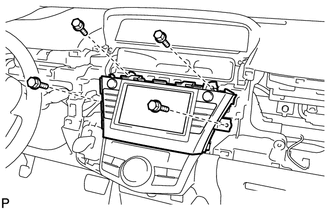
Remove the 4 bolts.
-
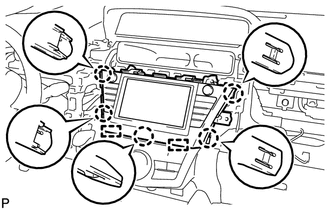
Disengage the 5 claws and 2 guides.
-
Disconnect each connector and remove the navigation receiver assembly with bracket.
-
-
REMOVE NO. 1 RADIO RECEIVER BRACKET
-
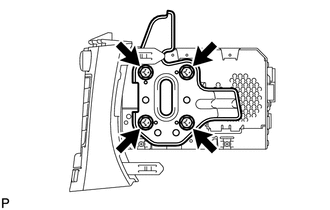
Remove the 4 screws and No. 1 radio receiver bracket.
-
-
REMOVE NO. 2 RADIO RECEIVER BRACKET
Tech Tips
Use the same procedure as for the No. 1 radio receiver bracket.
-
REMOVE HARD DISK DRIVE
-
REMOVE NAVIGATION ECU SUB-ASSEMBLY