CAN COMMUNICATION SYSTEM(w/ Central Gateway ECU) TERMINALS OF ECU
Note
-
After turning the power switch off, waiting time may be required before disconnecting the cable from the negative (-) auxiliary battery terminal. Therefore, make sure to read the disconnecting the cable from the negative (-) auxiliary battery terminal notices before proceeding with work Click here.
-
Turn the power switch off before measuring the resistances between CAN main bus lines and between CAN branch lines.
-
Turn the power switch off before inspecting CAN bus lines for a ground short.
-
Before measuring the resistance of the CAN bus, turn the power switch off and leave the vehicle for 1 minute or more without operating the key or any switches, or opening or closing the doors. After that, disconnect the cable from the negative (-) auxiliary battery terminal and leave the vehicle for 1 minute or more before measuring the resistance.
-
This section describes the standard values for all CAN related components.
Tech Tips
-
Operating the power switch, any other switches or a door triggers related ECU and sensor communication on the CAN. This communication will cause the resistance value to change.
-
Even after DTCs are cleared, if a DTC is stored again after driving the vehicle for a while, the malfunction may be occurring due to vibration of the vehicle. In such a case, wiggling the ECUs or wire harness while performing the inspection below may help determine the cause of the malfunction.
-
NO. 1 CAN JUNCTION CONNECTOR (for LHD)
-
Check the No. 1 CAN junction connector (engine room main wire side).
-
Connection diagram
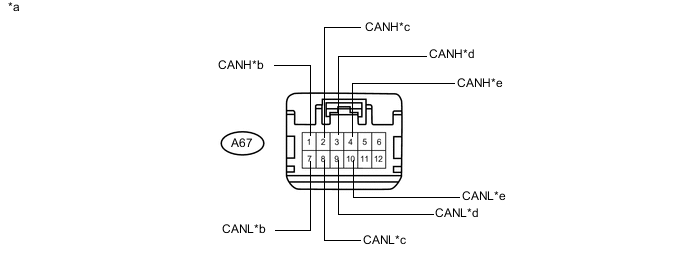
Text in Illustration *a Front view of wire harness connector
(to No. 1 CAN Junction Connector)
*b to ECM
(for Bus 2)
*c to Brake Booster with Master Cylinder Assembly (Skid Control ECU)
(for Bus 2)
*d to Brake Booster with Master Cylinder Assembly (Skid Control ECU)
(for Sub Bus 15)
*e to ECM
(for Sub Bus 15)
- - -
Check the connection diagram of the components which are connected to the No. 1 CAN junction connector.
Terminal No. (Symbol) Wiring Color Connected to A67-1 (CANH) P ECM
(for Bus 2)
A67-7 (CANL) V A67-2 (CANH) LG Brake booster with master cylinder assembly (skid control ECU)
(for Bus 2)
A67-8 (CANL) L A67-3 (CANH) P Brake booster with master cylinder assembly (skid control ECU)
(for Sub bus 15)
A67-9 (CANL) V A67-4 (CANH) B ECM
(for Sub bus 15)
A67-10 (CANL) W
-
-
Check the No. 1 CAN junction connector (instrument panel wire side).
-
Connection diagram
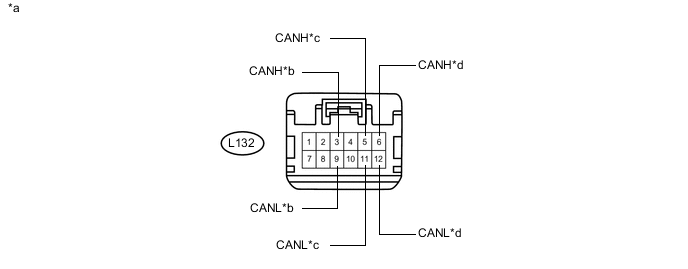
Text in Illustration *a Front view of wire harness connector
(to No. 1 CAN Junction Connector)
*b to No. 5 CAN Junction Connector
(for Sub Bus 15)
*c Main body ECU (Multiplex Network Body ECU)
(for Bus 2)
*d to No. 2 CAN Junction Connector
(for Bus 2)
-
Check the connection diagram of the components which are connected to the No. 1 CAN junction connector.
Terminal No. (Symbol) Wiring Color Connected to L132-3 (CANH) R No. 5 CAN junction connector
(for Sub bus 15)
L132-9 (CANL) Y L132-5 (CANH) SB Main body ECU (multiplex network body ECU)
(for Bus 2)
L132-11 (CANL) W L132-6 (CANH) B No. 2 CAN junction connector
(for Bus 2)
L132-12 (CANL) W
-
-
-
NO. 1 CAN JUNCTION CONNECTOR (for RHD)
-
Check the No. 1 CAN junction connector (engine room main wire side).
-
Connection diagram
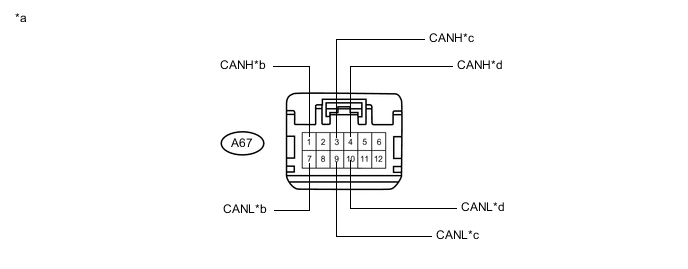
Text in Illustration *a Front view of wire harness connector
(to No. 1 CAN Junction Connector)
*b to Brake Booster with Master Cylinder Assembly (Skid Control ECU)
(for Bus 2)
*c to Brake Booster with Master Cylinder Assembly (Skid Control ECU)
(for Sub Bus 15)
*d to ECM
(for Sub Bus 15)
-
Check the connection diagram of the components which are connected to the No. 1 CAN junction connector.
Terminal No. (Symbol) Wiring Color Connected to A67-1 (CANH) LG Brake booster with master cylinder assembly (skid control ECU)
(for Bus 2)
A67-7 (CANL) L A67-3 (CANH) P Brake booster with master cylinder assembly (skid control ECU)
(for Sub bus 15)
A67-9 (CANL) V A67-4 (CANH) B ECM
(for Sub bus 15)
A67-10 (CANL) W
-
-
Check the No. 1 CAN junction connector (instrument panel wire side).
-
Connection diagram
Text in Illustration *a Front view of wire harness connector
(to No. 1 CAN Junction Connector)
*b to No. 5 CAN Junction Connector
(for Sub Bus 15)
*c to No. 2 CAN Junction Connector
(for Bus 2)
*d Combination Meter Sub-assembly
(for Bus 2)
-
Check the connection diagram of the components which are connected to the No. 1 CAN junction connector.
Terminal No. (Symbol) Wiring Color Connected to L132-3 (CANH) R No. 5 CAN junction connector
(for Sub bus 15)
L132-9 (CANL) Y L132-5 (CANH) GR No. 2 CAN junction connector
(for Bus 2)
L132-11 (CANL) W L132-6 (CANH) SB Combination meter sub-assembly
(for Bus 2)
L132-12 (CANL) G
-
-
-
NO. 2 CAN JUNCTION CONNECTOR (for LHD)
-
Check the No. 2 CAN junction connector (instrument panel connector holder left side).
-
Connection diagram
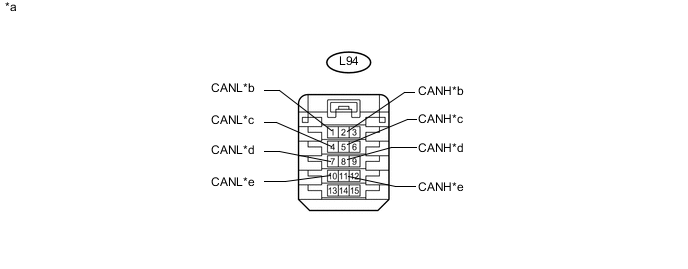
Text in Illustration *a Front view of wire harness connector
(to No. 2 CAN Junction Connector)
*b to No. 3 CAN Junction Connector
(for Bus 2)
*c to No. 1 CAN Junction Connector
(for Bus 2)
*d to Certification ECU (Smart Key ECU Assembly)
(for Bus 2)
*e to Spiral Cable with Sensor Sub-assembly (Steering Angle Sensor)
(for Bus 2)
- - -
Check the connection diagram of the components which are connected to the No. 2 CAN junction connector.
Terminal No. (Symbol) Wiring Color Connected to L94-2 (CANH) GR No. 3 CAN junction connector
(for Bus 2)
L94-1 (CANL) W L94-5 (CANH) B No. 1 CAN junction connector
(for Bus 2)
L94-4 (CANL) W L94-8 (CANH) B Certification ECU (smart key ECU assembly)
(for Bus 2)
L94-7 (CANL) W L94-11 (CANH) B Spiral cable with sensor sub-assembly (steering angle sensor)
(for Bus 2)
L94-10 (CANL) W
-
-
Check the No. 2 CAN junction connector (instrument panel connector holder right side).
-
Connection diagram
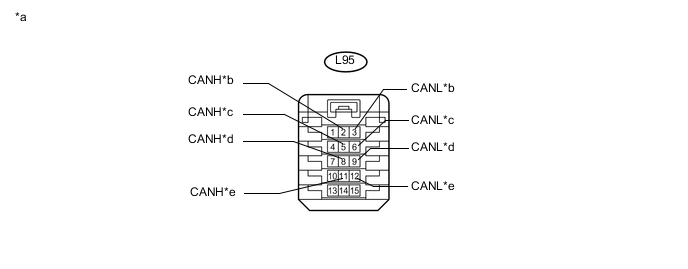
Text in Illustration *a Front view of wire harness connector
(to No. 2 CAN Junction Connector)
*b to Power Steering ECU Assembly
(for Bus 2)
*c to Air Conditioning Amplifier Assembly
(for Bus 2)
*d to Airbag ECU Assembly
(for Bus 2)
*e to Central Gateway ECU (Network Gateway ECU)
(for Bus 2)
- - -
Check the connection diagram of the components which are connected to the No. 2 CAN junction connector.
Terminal No. (Symbol) Wiring Color Connected to L95-2 (CANH) R Power steering ECU assembly
(for Bus 2)
L95-3 (CANL) W L95-5 (CANH) B Air conditioning amplifier assembly
(for Bus 2)
L95-6 (CANL) W L95-8 (CANH) B Airbag ECU assembly
(for Bus 2)
L95-9 (CANL) W L95-11 (CANH) L Central gateway ECU (network gateway ECU)
(for Bus 2)
L95-12 (CANL) W
-
-
-
NO. 2 CAN JUNCTION CONNECTOR (for RHD)
-
Check the No. 2 CAN junction connector (instrument panel connector holder left side).
-
Connection diagram
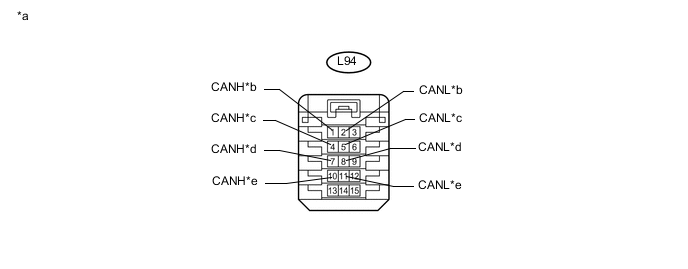
Text in Illustration *a Front view of wire harness connector
(to No. 2 CAN Junction Connector)
*b to No. 1 CAN Junction Connector
(for Bus 2)
*c to No. 3 CAN Junction Connector
(for Bus 2)
*d to Certification ECU (Smart Key ECU Assembly)
(for Bus 2)
*e to Spiral Cable with Sensor Sub-assembly (Steering Angle Sensor)
(for Bus 2)
- - -
Check the connection diagram of the components which are connected to the No. 2 CAN junction connector.
Terminal No. (Symbol) Wiring Color Connected to L94-1 (CANH) GR No. 1 CAN junction connector
(for Bus 2)
L94-2 (CANL) W L94-4 (CANH) B No. 3 CAN junction connector
(for Bus 2)
L94-5 (CANL) W L94-7 (CANH) B Certification ECU (smart key ECU assembly)
(for Bus 2)
L94-8 (CANL) W L94-10 (CANH) B Spiral cable with sensor sub-assembly (steering angle sensor)
(for Bus 2)
L94-11 (CANL) W
-
-
Check the No. 2 CAN junction connector (instrument panel connector holder right side).
-
Connection diagram
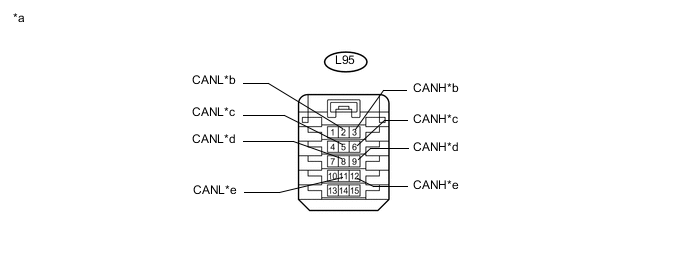
Text in Illustration *a Front view of wire harness connector
(to No. 2 CAN Junction Connector)
*b to Power Steering ECU Assembly
(for Bus 2)
*c to Air Conditioning Amplifier Assembly
(for Bus 2)
*d to Airbag ECU Assembly
(for Bus 2)
*e to Central Gateway ECU (Network Gateway ECU)
(for Bus 2)
- - -
Check the connection diagram of the components which are connected to the No. 2 CAN junction connector.
Terminal No. (Symbol) Wiring Color Connected to L95-3 (CANH) R Power steering ECU assembly
(for Bus 2)
L95-2 (CANL) W L95-6 (CANH) B Air conditioning amplifier assembly
(for Bus 2)
L95-5 (CANL) W L95-9 (CANH) B Airbag ECU assembly
(for Bus 2)
L95-8 (CANL) W L95-12 (CANH) L Central gateway ECU (network gateway ECU)
(for Bus 2)
L95-11 (CANL) W
-
-
-
NO. 3 CAN JUNCTION CONNECTOR (for LHD)
-
Check the No. 3 CAN junction connector (engine room main wire side).
-
Connection diagram
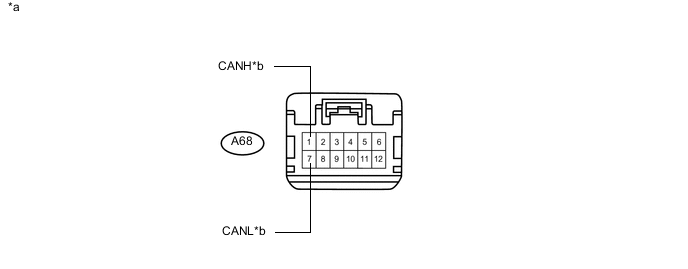
Text in Illustration *a Front view of wire harness connector
(to No. 3 CAN Junction Connector)
*b to Transmission Control ECU Assembly
(for Bus 2)
-
Check the connection diagram of the components which are connected to the No. 3 CAN junction connector.
Terminal No. (Symbol) Wiring Color Connected to A68-1 (CANH) Y Transmission control ECU assembly
(for Bus 2)
A68-7 (CANL) BR
-
-
Check the No. 3 CAN junction connector (instrument panel wire side).
-
Connection diagram
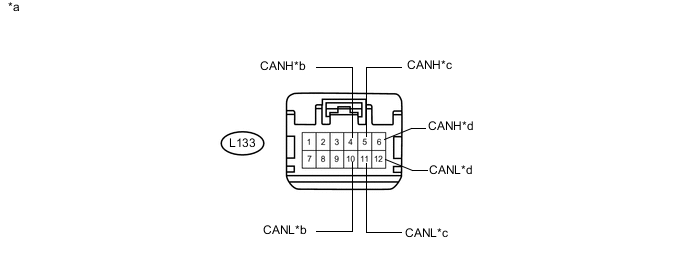
Text in Illustration *a Front view of wire harness connector
(to No. 3 CAN Junction Connector)
*b to Hybrid Vehicle Control ECU
(for Bus 2)
*c to No. 2 CAN Junction Connector
(for Bus 2)
*d to Combination Meter Sub-assembly
(for Bus 2)
-
Check the connection diagram of the components which are connected to the No. 3 CAN junction connector.
Terminal No. (Symbol) Wiring Color Connected to L133-4 (CANH) V Hybrid vehicle control ECU
(for Bus 2)
L133-10 (CANL) P L133-5 (CANH) GR No. 2 CAN junction connector
(for Bus 2)
L133-11 (CANL) W L133-6 (CANH) SB Combination meter sub-assembly
(for Bus 2)
L133-12 (CANL) G
-
-
-
NO. 3 CAN JUNCTION CONNECTOR (for RHD)
-
Check the No. 3 CAN junction connector (engine room main wire side).
-
Connection diagram
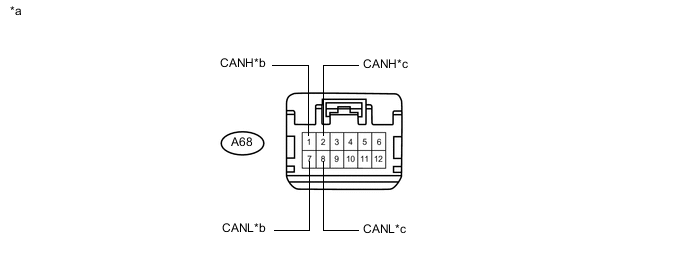
Text in Illustration *a Front view of wire harness connector
(to No. 3 CAN Junction Connector)
*b ECM
(for Bus 2)
*c to Transmission Control ECU Assembly
(for Bus 2)
- - -
Check the connection diagram of the components which are connected to the No. 3 CAN junction connector.
Terminal No. (Symbol) Wiring Color Connected to A68-1 (CANH) P ECM
(for Bus 2)
A68-7 (CANL) V A68-2 (CANH) Y Transmission control ECU assembly
(for Bus 2)
A68-8 (CANL) BR
-
-
Check the No. 3 CAN junction connector (instrument panel wire side).
-
Connection diagram
Text in Illustration *a Front view of wire harness connector
(to No. 3 CAN Junction Connector)
*b to Hybrid Vehicle Control ECU
(for Bus 2)
*c to Main body ECU (Multiplex Network Body ECU)
(for Bus 2)
*d to No. 2 CAN Junction Connector
(for Bus 2)
-
Check the connection diagram of the components which are connected to the No. 3 CAN junction connector.
Terminal No. (Symbol) Wiring Color Connected to L133-4 (CANH) V Hybrid vehicle control ECU
(for Bus 2)
L133-10 (CANL) P L133-5 (CANH) SB Main body ECU (multiplex network body ECU)
(for Bus 2)
L133-11 (CANL) W L133-6 (CANH) B No. 2 CAN junction connector
(for Bus 2)
L133-12 (CANL) W
-
-
-
NO. 4 CAN JUNCTION CONNECTOR
-
Check the No. 4 CAN junction connector.
Tech Tips
Connectors that connect to the CAN junction connector can be distinguished by the color of their CAN bus lines. When the connectors have been disconnected from the CAN junction connector, reconnecting the connectors to non-original positions on the CAN junction connector does not affect system performance. However, it is preferred to reconnect the connectors to their original positions to avoid negative effects on the wiring such as tension on the wire harnesses, and to make future maintenance easier.
-
Connection diagram
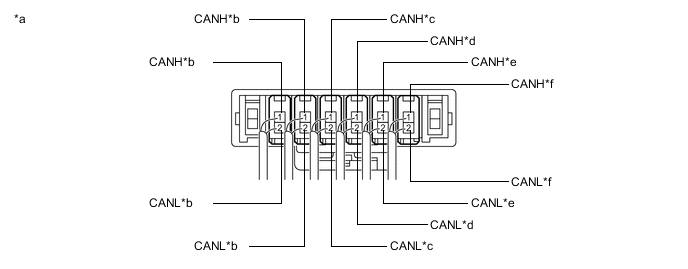
Text in Illustration *a Component with harness connected
(No. 4 CAN Junction Connector)
*b to Central Gateway ECU (Network Gateway ECU)
(for Bus 5)
*c to Lane Departure Warning Camera
(w/ Lane Departure Alert System)
(for Bus 5)
*d to Hybrid Vehicle Control ECU
(for Bus 5)
*e to Parking assist ECU
(w/ Intelligent Parking Assist System)
(for Bus 5)
*f to Driving Support ECU Assembly
(w/ Pre-crash Safety System)
(for Bus 5)
-
-
Check the connection diagram of the components which are connected to the No. 4 CAN junction connector.
Terminal No. (Symbol) Wiring Color Connected to L199-1 (CANH) B Central gateway ECU (network gateway ECU)
(for Bus 5)
L199-2 (CANL) P L198-1 (CANH) B Central gateway ECU (network gateway ECU)
(for Bus 5)
L198-2 (CANL) V L185-1 (CANH) B Lane departure warning camera*1
(for Bus 5)
L185-2 (CANL) W L184-1 (CANH) B Hybrid vehicle control ECU
(for Bus 5)
L184-2 (CANL) G L183-1 (CANH) B Parking assist ECU*2
(for Bus 5)
L183-2 (CANL) L L182-1 (CANH) B Driving support ECU assembly*3
(for Bus 5)
L182-2 (CANL) R *1: w/ Lane Departure Alert System
*2: w/ Intelligent Parking Assist System
*3: w/ Pre-crash Safety System
-
-
NO. 5 CAN JUNCTION CONNECTOR
-
Check the No. 5 CAN junction connector (instrument panel connector holder left side).
-
Connection diagram
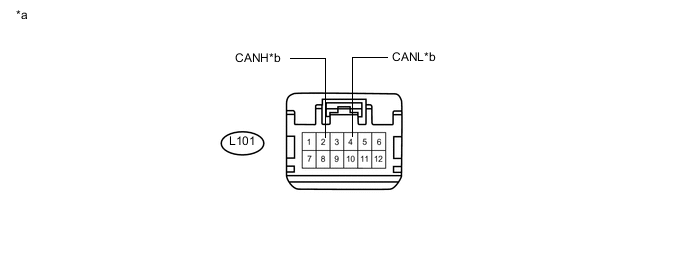
Text in Illustration *a Front view of wire harness connector
(to No. 5 CAN Junction Connector)
*b to No. 1 CAN Junction Connector
(for Sub Bus 15)
-
Check the connection diagram of the components which are connected to the No. 5 CAN junction connector.
Terminal No. (Symbol) Wiring Color Connected to L101-2 (CANH) R No. 1 CAN junction connector
(for Sub bus 15)
L101-4 (CANL) Y
-
-
Check the No. 5 CAN junction connector (instrument panel connector holder right side).
-
Connection diagram
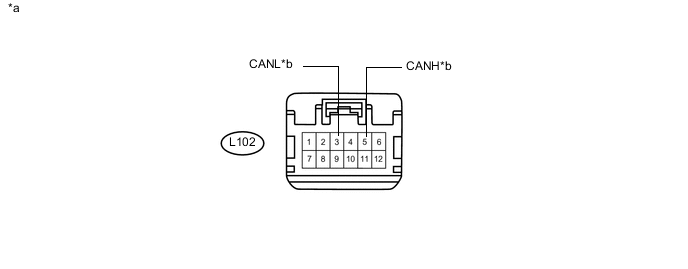
Text in Illustration *a Front view of wire harness connector
(to No. 5 CAN Junction Connector)
*b to Hybrid Vehicle Control ECU
(for Sub Bus 15)
-
Check the connection diagram of the components which are connected to the No. 5 CAN junction connector.
Terminal No. (Symbol) Wiring Color Connected to L102-5 (CANH) B Hybrid vehicle control ECU
(for Sub bus 15)
L102-3 (CANL) W
-
-
-
NO. 6 CAN JUNCTION CONNECTOR
-
Check the No. 6 CAN junction connector.
-
Connection diagram
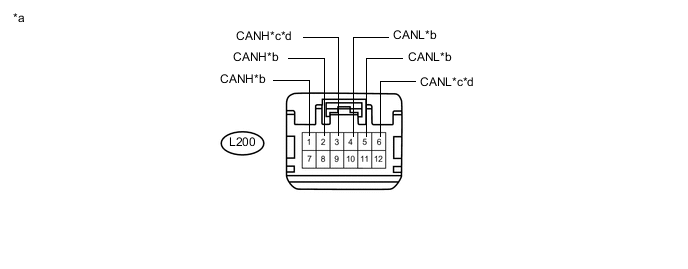
Text in Illustration *a Front view of wire harness connector
(to No. 6 CAN Junction Connector)
*b to Central Gateway ECU (Network Gateway ECU)
(for Bus 3)
*c to Radio and Display Receiver Assembly
(for Radio and Display Type)
(for Bus 3)
*d to Navigation Receiver Assembly
(for Navigation Receiver Type)
(for Bus 3)
-
Check the connection diagram of the components which are connected to the No. 6 CAN junction connector.
Terminal No. (Symbol) Wiring Color Connected to L200-1 (CANH) R Central gateway ECU (network gateway ECU)
(for Bus 3)
L200-4 (CANL) W L200-2 (CANH) GR Central gateway ECU (network gateway ECU)
(for Bus 3)
L200-5 (CANL) W L200-3 (CANH) B Radio and display receiver assembly*1
(for Bus 3)
L200-6 (CANL) W L200-3 (CANH) B Navigation receiver assembly*2
(for Bus 3)
L200-6 (CANL) W *1: for Radio and Display Type
*2: for Navigation Receiver Type
-
-
-
DLC3
-
Measure the resistance according to the value(s) in the table below.
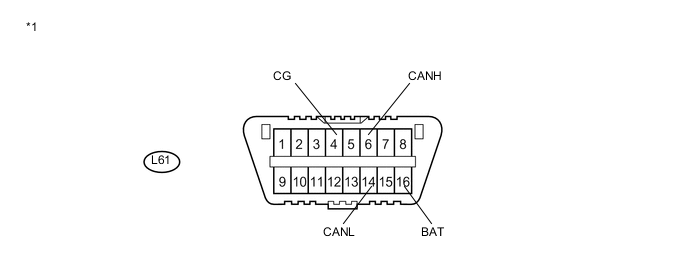
Text in Illustration *1 DLC3 - -
-
-
CENTRAL GATEWAY ECU (NETWORK GATEWAY ECU)
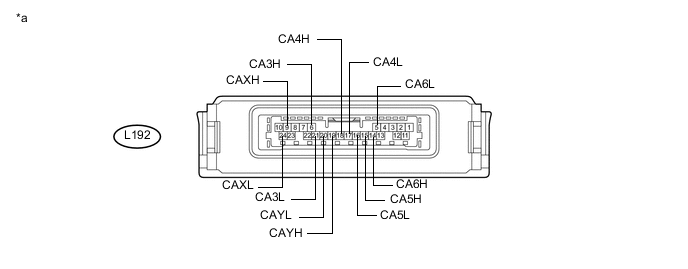
Text in Illustration *a Component without harness connected
(Central Gateway ECU (Network Gateway ECU))
- -
-
Disconnect the cable from the negative (-) auxiliary battery terminal.
-
Disconnect the L192 central gateway ECU (network gateway ECU) connector.
-
Measure the resistance according to the value(s) in the table below.
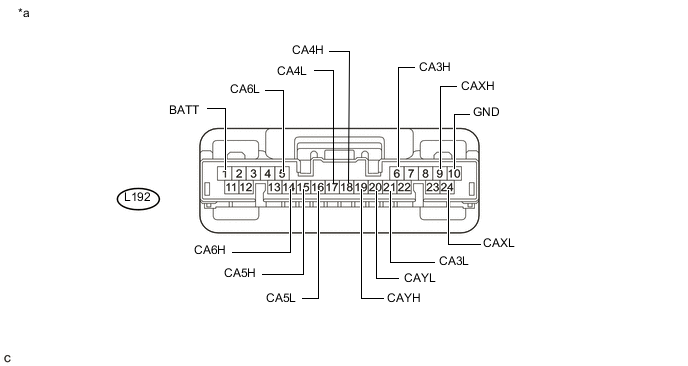
Text in Illustration *a Front view of wire harness connector
(to Central Gateway ECU (Network Gateway ECU))
- -
-
-
HYBRID VEHICLE CONTROL ECU
Refer to Terminals of ECU Click here.
-
Disconnect the cable from the negative (-) auxiliary battery terminal.
-
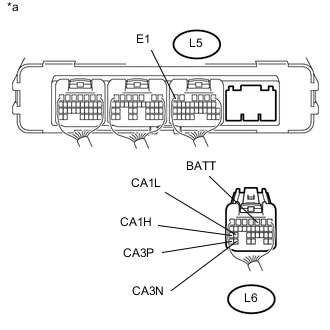
Text in Illustration *a Rear view of wire harness connector
(to Hybrid Vehicle Control ECU)
Disconnect the L6 hybrid vehicle control ECU connector.
-
Measure the resistance according to the value(s) in the table below.
-
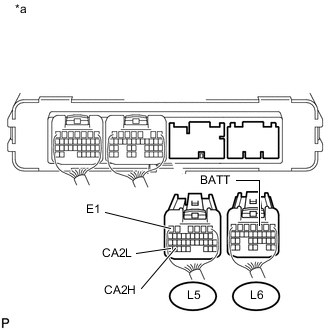
Text in Illustration *a Rear view of wire harness connector
(to Hybrid Vehicle Control ECU)
Disconnect the L5 hybrid vehicle control ECU connector.
-
Measure the resistance according to the value(s) in the table below.
-
-
ECM
Refer to Terminals of ECU Click here.
-
Disconnect the cable from the negative (-) auxiliary battery terminal.
-
Disconnect the A57 and D28 ECM connectors.
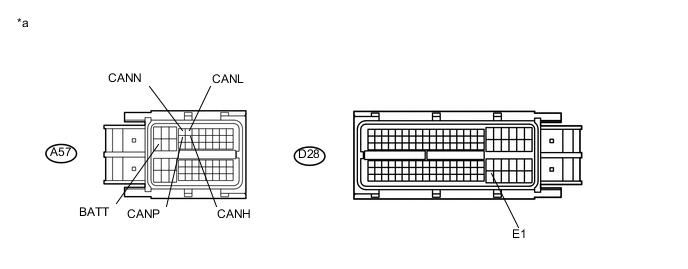
Text in Illustration *a Front view of wire harness connector
(to ECM)
- - -
Measure the resistance according to the value(s) in the table below.
-
-
TRANSMISSION CONTROL ECU ASSEMBLY
Refer to Terminals of ECU Click here.
-
Disconnect the cable from the negative (-) auxiliary battery terminal.
-
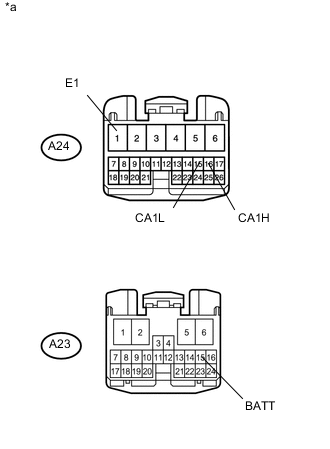
Text in Illustration *a Front view of wire harness connector
(to Transmission Control ECU Assembly)
Disconnect the A23 and A24 transmission control ECU assembly connectors.
-
Measure the resistance according to the value(s) in the table below.
-
-
BRAKE BOOSTER WITH MASTER CYLINDER ASSEMBLY (SKID CONTROL ECU)
Refer to Terminals of ECU Click here.
-
Disconnect the cable from the negative (-) auxiliary battery terminal.
-
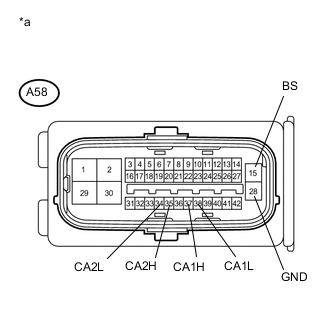
Text in Illustration *a Front view of wire harness connector
(to Brake Booster with Master Cylinder Assembly (Skid Control ECU))
Disconnect the A58 brake booster with master cylinder assembly (skid control ECU) connector.
-
Measure the resistance according to the value(s) in the table below.
-
-
AIRBAG ECU ASSEMBLY
Refer to Terminals of ECU Click here.
-
Disconnect the cable from the negative (-) auxiliary battery terminal.
-
Disconnect the L16 airbag ECU assembly connector.
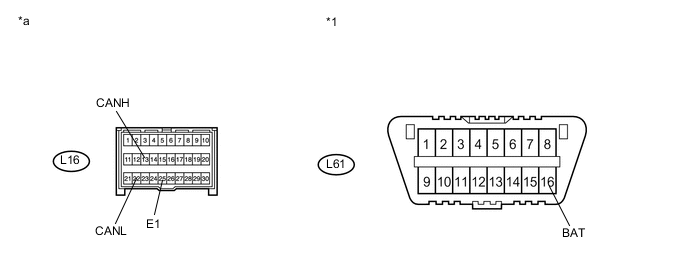
Text in Illustration *1 DLC3 - - *a Front view of wire harness connector
(to Airbag ECU Assembly)
- - -
Measure the resistance according to the value(s) in the table below.
-
-
MAIN BODY ECU (MULTIPLEX NETWORK BODY ECU)
Refer to Terminals of ECU Click here.
-
Disconnect the cable from the negative (-) auxiliary battery terminal.
-
Disconnect the L201 main body ECU (multiplex network body ECU) connector.
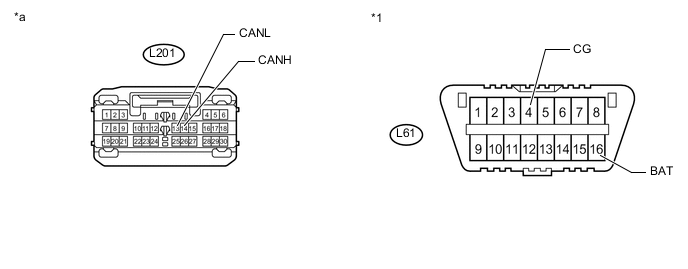
Text in Illustration *1 DLC3 - - *a Front view of wire harness connector
(to Main Body ECU (Multiplex Network Body ECU))
- - -
Measure the resistance according to the value(s) in the table below.
-
-
SPIRAL CABLE WITH SENSOR SUB-ASSEMBLY (STEERING ANGLE SENSOR)
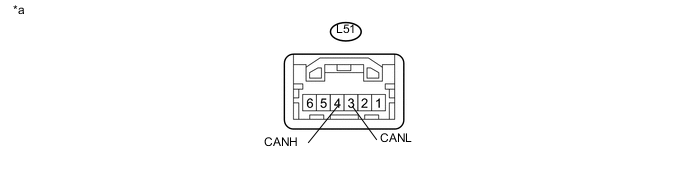
Text in Illustration *a Component without harness connected
(Spiral Cable with Sensor Sub-assembly (Steering Angle Sensor))
- -
-
Disconnect the cable from the negative (-) auxiliary battery terminal.
-
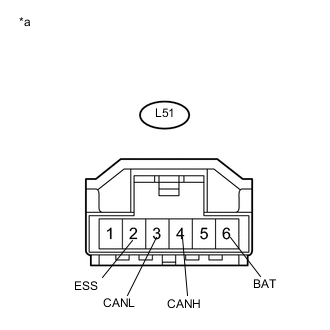
Text in Illustration *a Front view of wire harness connector
(to Spiral Cable with Sensor Sub-assembly (Steering Angle Sensor))
Disconnect the L51 spiral cable with sensor sub-assembly (steering angle sensor) connector.
-
Measure the resistance according to the value(s) in the table below.
-
-
POWER STEERING ECU ASSEMBLY
Refer to Terminals of ECU Click here.
-
Disconnect the cable from the negative (-) auxiliary battery terminal.
-
Disconnect the A27 and L54 power steering ECU assembly connectors.
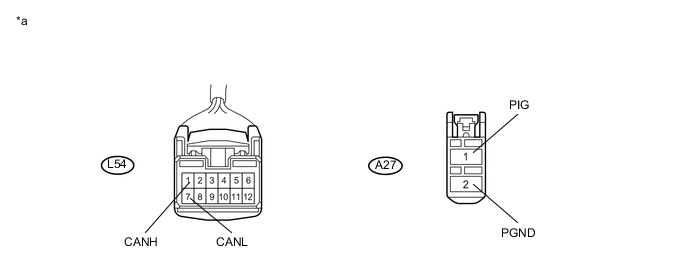
Text in Illustration *a Front view of wire harness connector
(to Power Steering ECU Assembly)
- - -
Measure the resistance according to the value(s) in the table below.
-
-
CERTIFICATION ECU (SMART KEY ECU ASSEMBLY)
Refer to Terminals of ECU Click here.
-
Disconnect the cable from the negative (-) auxiliary battery terminal.
-
Disconnect the L195 and L197 certification ECU (smart key ECU assembly) connectors.
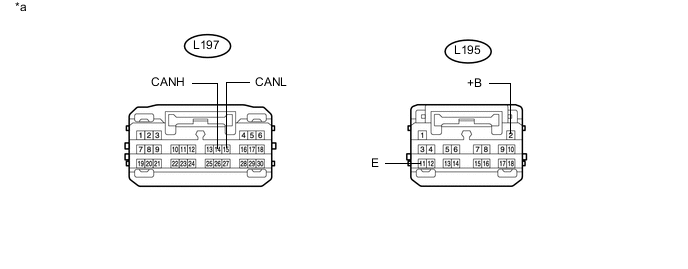
Text in Illustration *a Front view of wire harness connector
(to Certification ECU (Smart Key ECU Assembly))
- - -
Measure the resistance according to the value(s) in the table below.
-
-
RADIO AND DISPLAY RECEIVER ASSEMBLY (for Radio and Display Type)
Refer to Terminals of ECU Click here.
-
Disconnect the cable from the negative (-) auxiliary battery terminal.
-
Disconnect the L35 and L167 radio and display receiver assembly connectors.
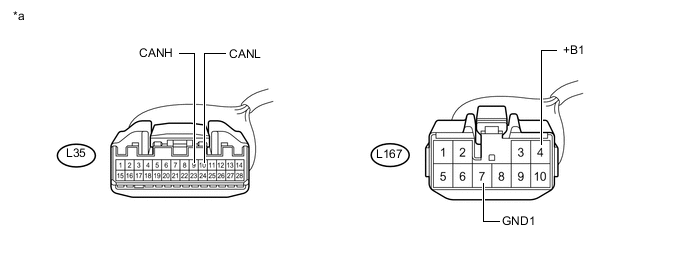
Text in Illustration *a Front view of wire harness connector
(to Radio and Display Receiver Assembly)
- - -
Measure the resistance according to the value(s) in the table below.
-
-
NAVIGATION RECEIVER ASSEMBLY (for Navigation Receiver Type)
Refer to Terminals of ECU Click here.
-
Disconnect the cable from the negative (-) auxiliary battery terminal.
-
Disconnect the L38 and L171 navigation receiver assembly connectors.
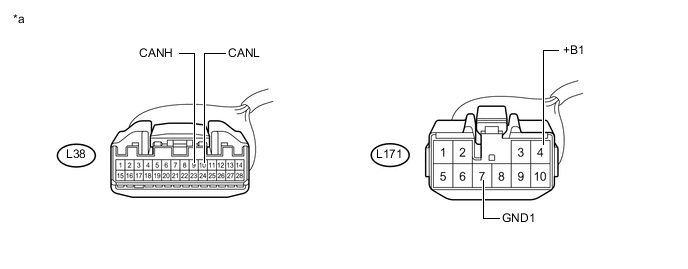
Text in Illustration *a Front view of wire harness connector
(to Navigation Receiver Assembly)
- - -
Measure the resistance according to the value(s) in the table below.
-
-
COMBINATION METER SUB-ASSEMBLY
Refer to Terminals of ECU Click here.
-
Disconnect the cable from the negative (-) auxiliary battery terminal.
-
Disconnect the L27 combination meter sub-assembly connector.
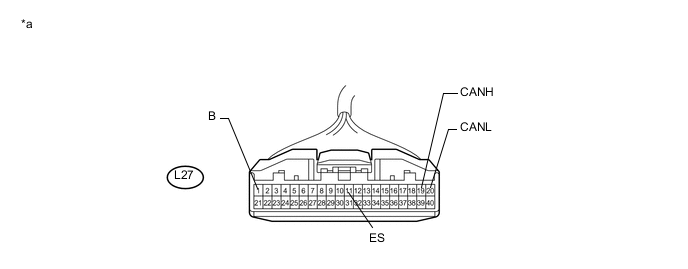
Text in Illustration *a Front view of wire harness connector
(to Combination Meter Sub-assembly)
- - -
Measure the resistance according to the value(s) in the table below.
-
-
AIR CONDITIONING AMPLIFIER ASSEMBLY
Refer to Terminals of ECU Click here.
-
Disconnect the cable from the negative (-) auxiliary battery terminal.
-
Disconnect the L17 air conditioning amplifier assembly connector.
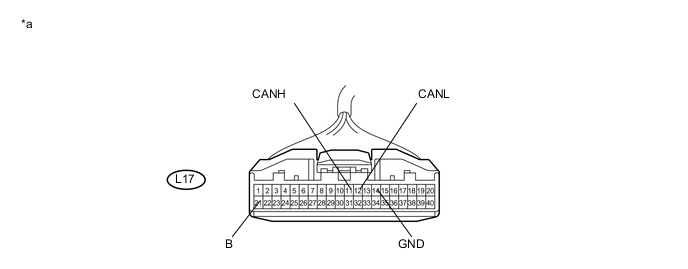
Text in Illustration *a Front view of wire harness connector
(to Air Conditioning Amplifier Assembly)
- - -
Measure the resistance according to the value(s) in the table below.
-
-
DRIVING SUPPORT ECU ASSEMBLY (w/ Pre-crash Safety System)
Refer to Terminals of ECU Click here.
-
Disconnect the cable from the negative (-) auxiliary battery terminal.
-
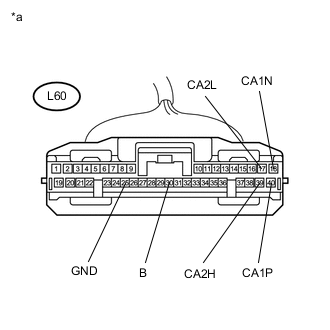
Text in Illustration *a Front view of wire harness connector
(to Driving Support ECU Assembly)
Disconnect the L60 driving support ECU assembly connector.
-
Measure the resistance according to the value(s) in the table below.
-
-
PARKING ASSIST ECU (w/ Intelligent Parking Assist System)
Refer to Terminals of ECU Click here.
-
Disconnect the cable from the negative (-) auxiliary battery terminal.
-
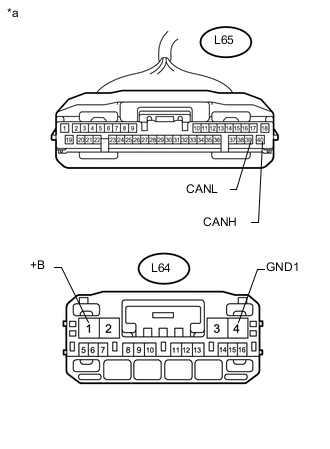
Text in Illustration *a Front view of wire harness connector
(to Parking Assist ECU)
Disconnect the L64 and L65 parking assist ECU connectors.
-
Measure the resistance according to the value(s) in the table below.
-
-
MILLIMETER WAVE RADAR SENSOR ASSEMBLY (w/ Pre-crash Safety System)
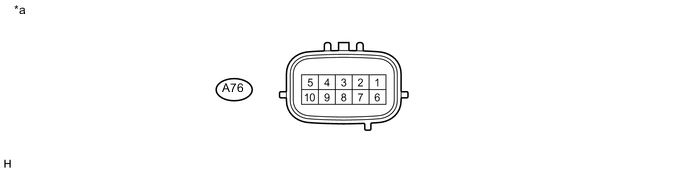
Text in Illustration *a Component without harness connected
(Millimeter Wave Radar Sensor Assembly)
- -
-
Disconnect the cable from the negative (-) auxiliary battery terminal.
-
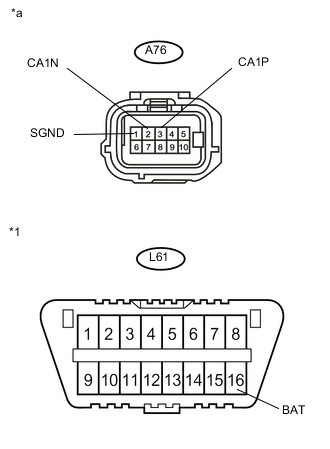
Text in Illustration *1 DLC3 *a Front view of wire harness connector
(to Millimeter Wave Radar Sensor Assembly)
Disconnect the A76 millimeter wave radar sensor assembly connector.
-
Measure the resistance according to the value(s) in the table below.
-
-
LANE DEPARTURE WARNING CAMERA (w/ Lane Departure Alert System)
Refer to Terminals of ECU Click here.
-
Disconnect the cable from the negative (-) auxiliary battery terminal.
-
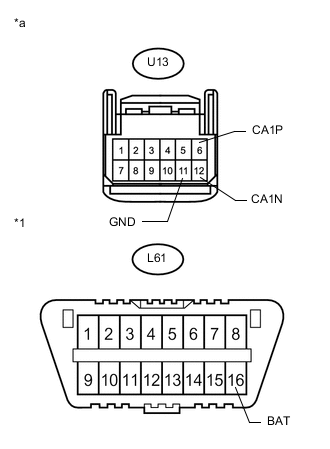
Text in Illustration *1 DLC3 *a Front view of wire harness connector
(to Lane Departure Warning Camera)
Disconnect the U13 lane departure warning camera connector.
-
Measure the resistance according to the value(s) in the table below.
-