ТРОС МЕХАНИЗМА ПЕРЕКЛЮЧЕНИЯ ПЕРЕДАЧ РЕГУЛИРОВКА
PROCEDURE
-
SECURE VEHICLE
-
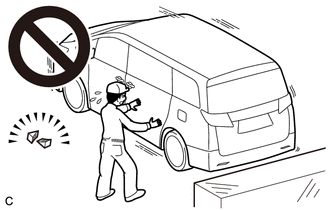
Fully apply the parking brake and chock a wheel.
CAUTION:
-
Make sure to apply the parking brake and chock a wheel before performing this procedure.
-
If the vehicle is not secure and the shift lever is moved to N, the vehicle may suddenly move, possibly resulting in an accident or serious injury.
-
-
-
REMOVE CONSOLE BOX ASSEMBLY (for Integrated Type)
-
REMOVE CENTER NO. 1 INSTRUMENT CLUSTER FINISH PANEL (for Separate Console Box Type)
-
REMOVE CENTER NO. 2 INSTRUMENT CLUSTER FINISH PANEL (for Separate Console Box Type)
-
REMOVE INSTRUMENT PANEL BOX ASSEMBLY (for Separate Console Box Type)
-
REMOVE INSTRUMENT CLUSTER FINISH PANEL ASSEMBLY (for Separate Console Box Type)
-
ADJUST SHIFT LEVER POSITION
-
Move the shift lever to N.
-
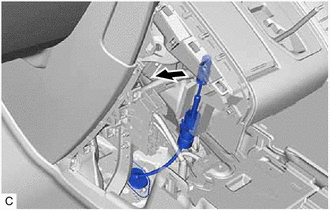
Disconnect the transmission control cable assembly from the shift lever assembly.
-
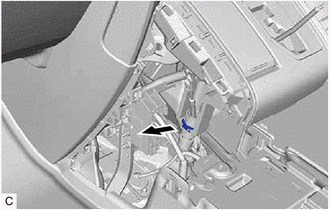
Using a screwdriver, pull out the stopper of the transmission control cable assembly.
Note
Do not remove the stopper. If it is removed, reinstall it to its original position.
-
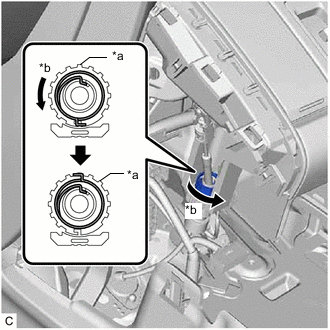
*a Nut *b Turn approximately 180° Turn the nut counterclockwise approximately 180° and, while holding the nut in that position, disconnect the transmission control cable assembly from the shift lever assembly.
Note
Do not turn the nut excessively as the internal spring may come off and transmission control cable assembly will not be reusable.
-
Push the 2 claws together at the top of the lock piece. While holding the 2 claws together, push the 2 lugs on the bottom of the lock piece toward each other and upward to push up the lock piece.
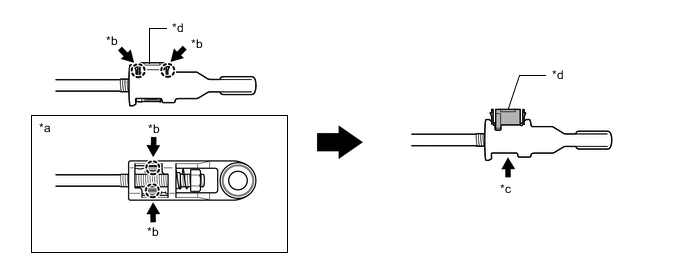
*a Bottom View *b Push *c Push up *d Lock Piece -
Turn the nut of the transmission control cable assembly approximately 180° counterclockwise. While holding the nut in place, push in the stopper until it clicks twice.
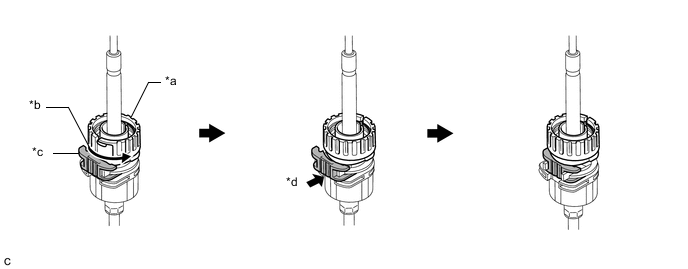
*a Nut *b Turn approximately 180° *c Stopper *d Push in Tech Tips
If the stopper cannot be pushed in, slightly turn the nut clockwise and then push in the stopper again.
-
Connect the transmission control cable assembly to the shift lever assembly. Check that the spring is positioned at (A) and push in the stopper.
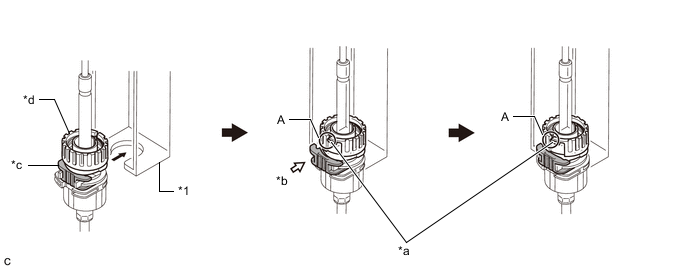
*1 Shift Lever Assembly - - *a Spring *b Push in *c Stopper *d Nut Note
-
If the stopper cannot be pushed in, slightly turn the nut clockwise and then push in the stopper again.
-
Make sure that the transmission control cable assembly is securely locked.
-
-
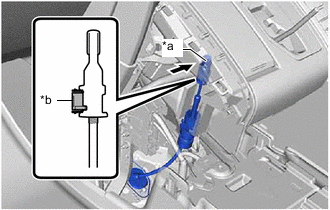
*a Pin *b Lock Piece Connect the transmission control cable assembly to the shift lever assembly.
Note
-
The shift lever should be in N.
-
Connect the transmission control cable assembly all the way to the base of the pin.
-
Check that the lock piece is pulled up.
-
Connect the transmission control cable assembly so that the lock piece faces the passenger side.
-
-
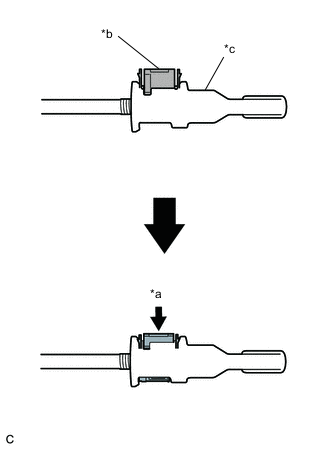
*a Push in *b Lock Piece *c Adjuster Case Push the lock piece into the adjuster case.
Note
-
Check that the park/neutral position switch assembly and shift lever are in neutral.
-
Securely push in the lock piece until the slider lock is engaged.
-
-
After adjusting the shift lever position, check the operation and function of the shift lever. If there is a problem, adjust the position again.
-
-
INSTALL CONSOLE BOX ASSEMBLY (for Integrated Type)
-
INSTALL INSTRUMENT CLUSTER FINISH PANEL ASSEMBLY (for Separate Console Box Type)
-
INSTALL INSTRUMENT PANEL BOX ASSEMBLY (for Separate Console Box Type)
-
INSTALL CENTER NO. 2 INSTRUMENT CLUSTER FINISH PANEL (for Separate Console Box Type)
-
INSTALL CENTER NO. 1 INSTRUMENT CLUSTER FINISH PANEL (for Separate Console Box Type)