STARTER DISASSEMBLY
PROCEDURE
-
REMOVE STARTER COMMUTATOR END FRAME ASSEMBLY
-
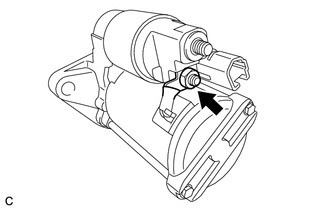
Remove the nut, and disconnect the field coil lead wire from terminal C.
-
Secure the starter assembly in a vise between aluminum plates.
Note
Do not overtighten the vise.
-
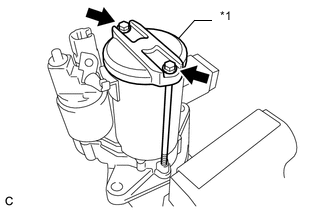
*1 Starter Commutator End Frame Assembly Remove the 2 through bolts and starter commutator end frame assembly from the starter yoke assembly.
-
-
REMOVE STARTER BRUSH HOLDER ASSEMBLY
-
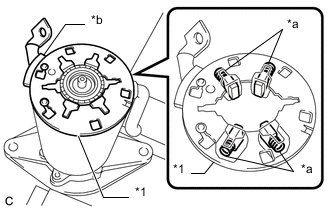
*1 Starter Brush Holder Assembly *a Spring *b Rubber Remove the starter brush holder assembly from the starter armature assembly.
Note
-
Do not pull on the rubber.
-
Use caution to prevent the spring from dropping.
-
-
Remove the starter assembly from the vise.
-
-
REMOVE RING GEAR
-
Remove the starter yoke assembly from the starter drive housing assembly.
-
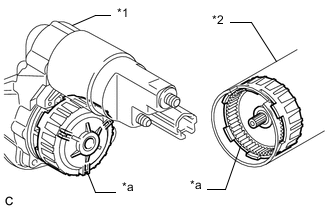
*1 Starter Drive Housing Assembly *2 Starter Yoke Assembly *a Ring Gear Remove the ring gear from the starter drive housing assembly or starter yoke assembly.
-
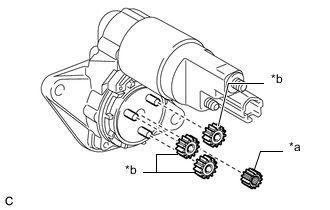
*a Sun Gear *b Planetary Gear Remove the sun gear and 3 planetary gears from the planet carrier shaft sub-assembly.
-
-
REMOVE STARTER ARMATURE ASSEMBLY
-
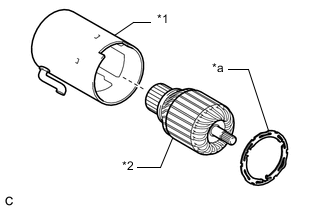
*1 Starter Yoke Assembly *2 Starter Armature Assembly *a Starter Armature Ring Remove the starter armature ring from the starter yoke assembly.
-
Remove the starter armature assembly from the starter yoke assembly.
-
-
REMOVE MAGNET STARTER SWITCH ASSEMBLY
-
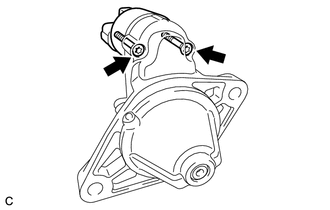
Using a T25 "TORX" socket wrench, remove the 2 screws that hold the magnet starter switch assembly to the starter drive housing assembly.
-
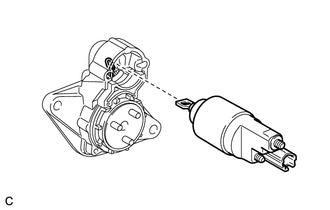
While lifting the rear of the magnet starter switch assembly, remove the hook from the pinion drive lever, then remove the magnet starter switch assembly.
-
-
REMOVE PINION GEAR
-
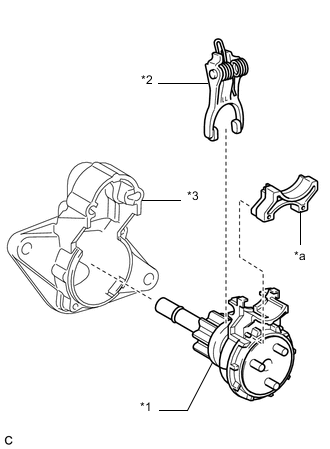
*1 Planet Carrier Shaft Sub-assembly with Pinion Gear *2 Pinion Drive Lever *3 Starter Drive Housing Assembly *a Starter Drive Housing Cover Remove the planet carrier shaft sub-assembly with pinion gear, pinion drive lever and starter drive housing cover from the starter drive housing assembly.
-
Secure the planet carrier shaft sub-assembly in a vise between aluminum plates.
Note
Do not overtighten the vise.
-
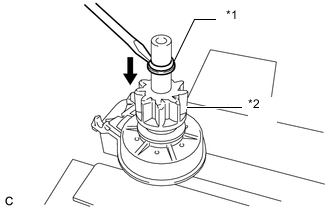
*1 Pinion Stop Collar *2 Pinion Gear Using a screwdriver, move the pinion stop collar down to the pinion gear.
-
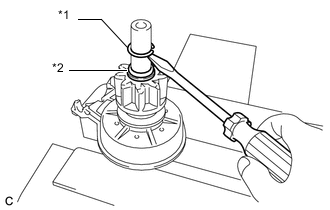
*1 Snap Ring *2 Pinion Stop Collar Using a screwdriver, remove the snap ring.
-
Remove the pinion stop collar.
-
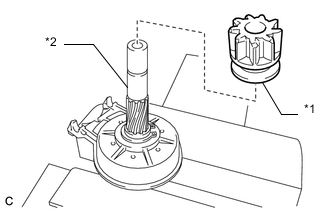
*1 Pinion Gear *2 Planet Carrier Shaft Sub-assembly Remove the pinion gear from the planet carrier shaft sub-assembly.
-
-
REMOVE PLANET CARRIER SHAFT SUB-ASSEMBLY
-
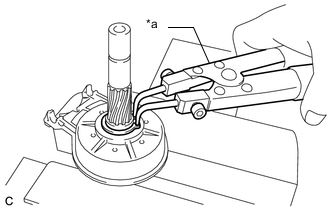
*a Snap Ring Pliers Using snap ring pliers, remove the snap ring from the planet carrier shaft sub-assembly.
-
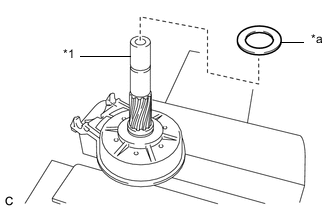
*1 Planet Carrier Shaft Sub-assembly *a Washer Remove the washer from the planet carrier shaft sub-assembly.
-
Remove the planet carrier shaft sub-assembly from the vise.
-
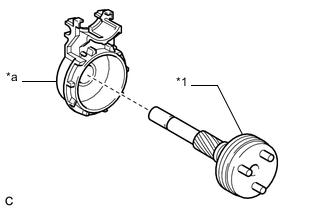
*1 Planet Carrier Shaft Sub-assembly *a Clutch Gear Cover Remove the planet carrier shaft sub-assembly from the clutch gear cover.
-