NAVIGATION SYSTEM(for SD) CD Sound Skips
| DTC Code | DTC Name |
|---|---|
| CD Sound Skips |
PROCEDURE
CHECK DISC
-
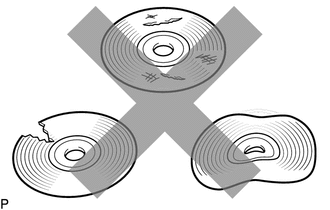
Check that the disc is not deformed or cracked.
OK
No deformation or cracks on the disc.
Result
Proceed to
OK
NG
NG CHANGE DISC
-
CHECK DISC
-
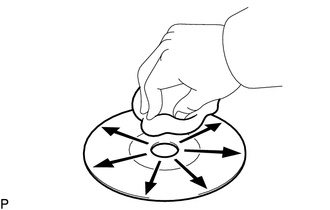
Disc cleaning
If dirt is on the disc surface, wipe it clean with a soft cloth from the inside to the outside in a radial direction.
OK
Malfunction disappears.
Note:Do not use a conventional record cleaner or antistatic preservative.
Result
Proceed to
OK
NG
OK END (DISC IS DIRTY)
-
DISC WITH ANOTHER AND RECHECK
Replace the disc with a known good one and check that the malfunction disappears.
OK
Malfunction disappears.
Result
Proceed to
OK
NG
OK END (DISC IS DEFECTIVE)
CHECK NAVIGATION RECEIVER ASSEMBLY
Check that the navigation receiver assembly is properly installed.
OK
The navigation receiver assembly is properly installed.
Result
Proceed to
OK
NG