AIR CONDITIONING SYSTEM (for Automatic Air Conditioning System), Diagnostic DTC:12
| DTC Code | DTC Name |
|---|---|
| 12 | Ambient Temperature Sensor Circuit |
DESCRIPTION
The thermistor assembly connected to the accessory meter detects fluctuations in the ambient temperature. This information is used for controlling the interior temperature. The accessory meter assembly detects the resistance of the thermistor assembly and sends this information to the air conditioning amplifier assembly.
| DTC Code | DTC Detection Condition | Trouble Area |
|---|---|---|
| 12 | An open or short in ambient temperature sensor circuit |
|
WIRING DIAGRAM
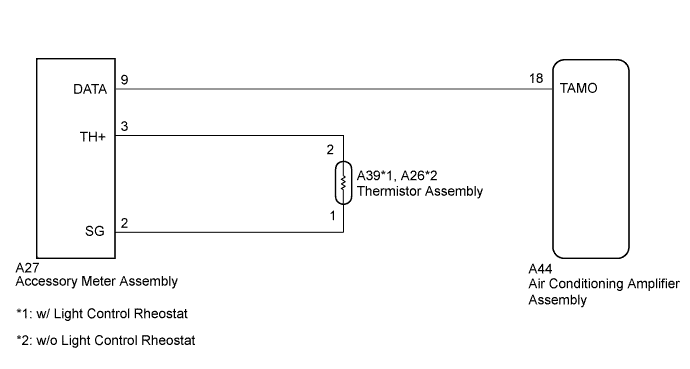
INSPECTION PROCEDURE
Note
Check that the accessory meter assembly illuminates normally before performing the following inspection procedure.
PROCEDURE
-
CHECK ACCESSORY METER ASSEMBLY
-
Check the difference between the ambient temperature value displayed on the accessory meter assembly and the actual ambient temperature.
OK The ambient temperature displayed on the accessory meter assembly and the actual ambient temperature are almost the same. Tech Tips
The temperature displayed on the accessory meter assembly and the actual temperature detected by the thermistor assembly may differ when the ambient temperature changes significantly (for example, when the vehicle is entering/exiting tunnels, or the vehicle speed or wind direction changes).
NG 
INSPECT THERMISTOR ASSEMBLY Click here
OK 
-
-
CHECK HARNESS AND CONNECTOR (ACCESSORY METER - AIR CONDITIONING AMPLIFIER)
-
Disconnect the A27 accessory meter assembly connector.
-
Disconnect the A44 air conditioning amplifier assembly connector.
-
Measure the resistance according to the value(s) in the table below.
Standard Resistance Tester Connection Condition Specified Condition A27-9 (DATA) - A44-18 (TAMO) Always Below 1 Ω A27-9 (DATA) - Body ground Always 10 kΩ or higher Result Result Proceed to OK (When troubleshooting according to problem symptoms table.) A OK (When troubleshooting according to DTC.) B NG C
B 
REPLACE AIR CONDITIONING AMPLIFIER ASSEMBLY Click here
C
REPAIR OR REPLACE HARNESS OR CONNECTOR
A 
PROCEED TO NEXT SUSPECTED AREA SHOWN IN PROBLEM SYMPTOMS TABLE Click here
-
-
INSPECT THERMISTOR ASSEMBLY
-
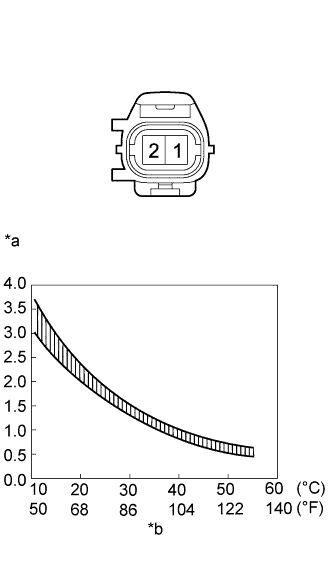
Text in Illustration *a Resistance (kΩ) *b Temperature Remove the thermistor assembly Click here.
-
Measure the resistance according to the value(s) in the table below.
Standard Resistance Tester Connection Condition Specified Condition 1 - 2 10°C (50°F) 3.00 to 3.73 kΩ 15°C (59°F) 2.45 to 2.88 kΩ 20°C (68°F) 1.95 to 2.30 kΩ 25°C (77°F) 1.60 to 1.80 kΩ 30°C (86°F) 1.28 to 1.47 kΩ 35°C (95°F) 1.00 to 1.22 kΩ 40°C (104°F) 0.80 to 1.00 kΩ 45°C (113°F) 0.65 to 0.85 kΩ 50°C (122°F) 0.50 to 0.70 kΩ 55°C (131°F) 0.44 to 0.60 kΩ 60°C (140°F) 0.36 to 0.50 kΩ Note
-
Even slightly touching the thermistor assembly may change the resistance value. Be sure to hold the connector of the thermistor assembly.
-
When measuring the resistance, the thermistor assembly temperature must be the same as the ambient temperature.
Tech Tips
As the temperature increases, the resistance decreases (Refer to the graph).
-
NG
REPLACE THERMISTOR ASSEMBLY Click here
OK
-
-
CHECK HARNESS AND CONNECTOR (THERMISTOR - ACCESSORY METER)
-
Disconnect the A39*1 or A26*2 thermistor assembly connector.
-
*1: w/ Light Control Rheostat
-
*2: w/o Light Control Rheostat
-
-
Disconnect the A27 accessory meter assembly connector.
-
Measure the resistance according to the value(s) in the table below.
Standard Resistance w/ Light Control Rheostat Tester Connection Condition Specified Condition A27-3 (TH+) - A39-2 Always Below 1 Ω A27-2 (SG) - A39-1 A27-3 (TH+) - Body ground Always 10 kΩ or higher A27-2 (SG) - Body ground w/o Light Control Rheostat Tester Connection Condition Specified Condition A27-3 (TH+) - A26-2 Always Below 1 Ω A27-2 (SG) - A26-1 A27-3 (TH+) - Body ground Always 10 kΩ or higher A27-2 (SG) - Body ground
NG
REPLACE THERMISTOR ASSEMBLY Click here
OK
REPLACE ACCESSORY METER ASSEMBLY Click here
-