PARKING ASSIST MONITOR SYSTEM(for Camera built-in ECU) CUSTOMIZE PARAMETERS
CUSTOMIZE PARKING ASSIST MONITOR SYSTEM
Tip:The following items can be customized.
Note:When the customer requests a change in a function, first make sure that the function can be customized.
Record the current settings before customizing.
-
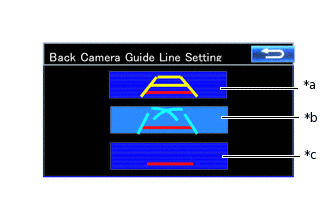
*a
Estimated Guide Line Mode
*b
Parking Guide Line Mode
*c
Guide Line Deletion Mode
Customizing with Multi-display
Turn the power switch on (IG).
Enter the following menus: Setup / Vehicle / Back Camera Guide Line Setting.
Select the setting by referring to the table below.
Parking Assist Monitor Display Mode
Estimated Guide Line Mode
Parking Guide Line Mode
Guide Line Deletion Mode