AUDIO AND VISUAL SYSTEM(w/ Multi-display) Does not Play even after Bluetooth Audio Mode is Selected
| DTC Code | DTC Name |
|---|---|
| Does not Play even after Bluetooth Audio Mode is Selected |
CAUTION / NOTICE / HINT
Even if the portable player can play audio content, it may not be able to play via the in-vehicle device. This does not necessarily indicate a malfunction of the in-vehicle device.
PROCEDURE
CHECK OPERATION
Check if the portable player operates normally.
OK
The portable player operates normally.
Result
Result
OK
NG
NG MALFUNCTION IN PORTABLE PLAYER
CHECK AUDIO SETTINGS
-
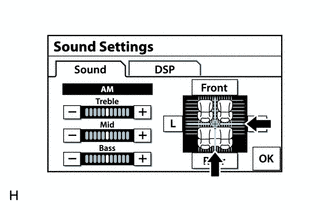
Enter the "Sound Settings" screen by pressing the "Sound" switch on the audio display.
Set volume, fader and balance to the initial values and check that sound is normal.
OK
Audio system returns to normal.
Tip:Sound quality adjustment measures vary according to the type of the amplifier.
Result
Result
OK
NG
NG TURN VOLUME UP AND SET MUTE OFF
-
CHECK USING ANOTHER "BLUETOOTH" AUDIO COMPATIBLE VEHICLE OF SAME MODEL
Check if the "Bluetooth" audio player plays normally on another "Bluetooth" audio compatible vehicle of the same model.
OK
"Bluetooth" audio plays normally.
Result
Result
OK
NG
NG MALFUNCTION IN PORTABLE PLAYER