POWER BACK DOOR SYSTEM Close & Lock Function does not Operate
DESCRIPTION
The door control switch signal is sent to the multiplex network door ECU. If the power back door system does not operate when the door control switch is operated, the door control switch circuit may be malfunctioning.
WIRING DIAGRAM
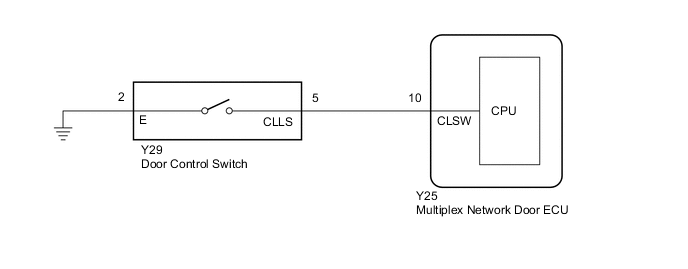
CAUTION / NOTICE / HINT
Note
If the replacement, removal and installation of the multiplex network door ECU or disconnection of the connectors of the multiplex network door ECU has been performed, initialize the power back door system.
PROCEDURE
-
READ VALUE USING GTS
-
Read the Data List according to the display on the GTS.
Body Electrical > Back Door > Data ListTester Display Measurement Item Range Normal Condition Diagnostic Note Close and Lock SW Door control switch signal ON or OFF ON: Door control switch pushed
OFF: Door control switch not pushed
-
Body Electrical > Back Door > Data ListTester Display Close and Lock SW OK The door control switch functions as specified in the normal condition column. OK Proceed to OK NG
OK 
REPLACE MULTIPLEX NETWORK DOOR ECU Click here
NG 
-
-
INSPECT DOOR CONTROL SWITCH
-
Remove the door control switch.
-
Inspect the door control switch.
OK Proceed to OK NG
NG
REPLACE DOOR CONTROL SWITCH Click here
OK
-
-
CHECK HARNESS AND CONNECTOR (DOOR CONTROL SWITCH - MULTIPLEX NETWORK DOOR ECU AND BODY GROUND)
-
Disconnect the Y29 door control switch connector.
-
Disconnect the Y25 multiplex network door ECU connector.
-
Measure the resistance according to the value(s) in the table below.
Standard Resistance Tester Connection Condition Specified Condition Y29-5 (CLLS) - Y25-10 (CLSW) Always Below 1 Ω Y29-2 (E) - Body ground Always Below 1 Ω Y29-5 (CLLS) or Y25-10 (CLSW) - Body ground Always 10 kΩ or higher OK Proceed to OK NG
OK
REPLACE MULTIPLEX NETWORK DOOR ECU Click here
NG
REPAIR OR REPLACE HARNESS OR CONNECTOR
-