NAVIGATION SYSTEM(for HDD) Voice Guidance does not Function
| DTC Code | DTC Name |
|---|---|
| Voice Guidance does not Function |
PROCEDURE
CHECK NAVIGATION SETTING
-
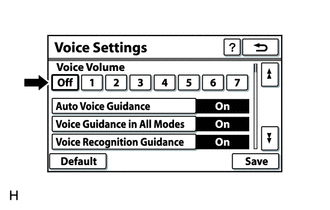
Enter the "Voice Settings" screen.
Check that "Off" is not selected.
OK
"Off" is not selected.
Result
Result
OK
NG
NG TURN UP VOICE VOLUME
-
CHECK NAVIGATION SETTING
-
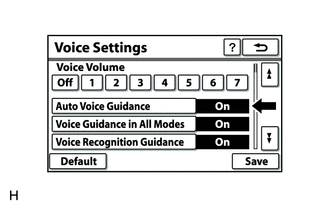
Enter the "Voice Settings" screen.
Check that "Auto Voice Guidance" is not "Off".
OK
"Auto Voice Guidance" is not "Off".
Result
Result
OK
NG
NG TURN "Auto Voice Guidance" ON
-
CHECK NAVIGATION SETTING
-
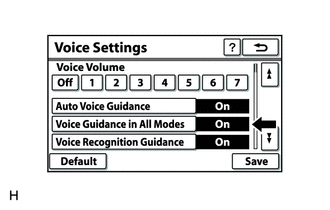
Enter the "Voice Settings" screen.
Check that "Voice Guidance in All Modes" is not "Off".
OK
"Voice Guidance in All Modes" is not "Off".
Result
Result
OK
NG
NG TURN "Voice Guidance in All Modes" ON
-
CHECK AUDIO FUNCTION
Check that audio can be heard from the driver side speaker.
OK
Audio can be heard.
Result
Result
OK
NG